
Your Browsing History


Michael S.
Joined on 03/07/03
0
0
product reviews
- 4
Very happy
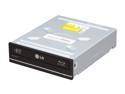
LG WH10LS30 10X Blu-ray Burner - LightScribe Support - Bulk - OEM
Pros: Bought this drive when the Sony BR-5100s readers I purchased turned out to be terrible. I have nothing but good things to say about this LG WH10LS30 drive. It read the 3 Blu-rays my Sony's would not (Viva Las Vegas, Sleeping Beauty and Mr. And Mrs. Smith) and did so without any issues or noise. I got a promo on this, which also came with Cyberlink PowerDVD 9 and 3-D glasses (the Red/Blue kind). Haven't figured out how to use the glasses yet, but PowerDVD 9 plays my Blu-rays just fine (although I could do without all the banner ads and prompts to upgrade). This drive is reading Blu-ray discs at about 12 MB/s on the inside to about 25 MB/s on the outside. I haven't had any problems yet with any of my Blu-rays on this drive. It also came with both an internal SATA cable as well as a 4-pin computer power to internal SATA power adapter. I was glad, as I needed both and didn't know it until I opened my case. :P
Cons: None with the drive. Promotional-bundled Cyberlink PowerDVD 9 is relentless with its ads and prompts to upgrade, although it does seem to play Blu-rays just fine. Promotional-bundled 3-D anaglyph glasses (Red/Blue) came with no information on how to use them - guess I'll figure that out on a rainy day.
Overall Review: My system is a 4-year old Pentium-D dual core 820 (2.8 GHz) with 4 GB RAM. I wiped out Vista and am running XP Pro.
1/6/2011See more detail
Decent router, 1 flaw: No NAT loopback
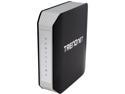
TRENDnet TEW-812DRU V1 AC1750 Dual Band Wireless Router
Pros: Decent setup, good web interface, range is OK, faster than my previous router (A TRENDnet TEW-452BRP).
Cons: Router didn't like being changed from 192.168.10.1 to 192.168.1.1...I restarted both router and wired computer after receiving errors from the browser interface when accessing and it was OK after that. The worst is that the router doesn't support what's called "NAT loopback", which my previous TRENDnet *did* support, and I expected this one would also. TRENDnet tech support informed me of this after I created a ticket with them. This lack of NAT loopback means I can't access any of my port-forwarded servers like email or http from within my own network without resorting to calling them out by their local IP. And if I take a mobile machine out and about to an external network I obviously won't be able to use the local IP there, so it will result in "flipping" how I access my email depending on where I am. In my opinion this should be an option in the web interface setting that can be turned on or off, as desired. Now I've gained gained speed and some range compared with my old router, but lost a significant advantage as well.
Overall Review: Otherwise I'm decently happy with the router. A great improvement over my last TRENDnet except for the lack of NAT forwarding which, unfortunately, is a major loss for the new TEW-812DRU. I still gave it 3 stars because other than this, it's really been working well.
5/6/2013See more detail
Junk!
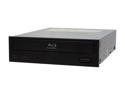
Sony Optiarc Black 2X BD-ROM 8X DVD-ROM 24X CD-ROM SATA Internal 2X BD-ROM Model BR-5100S
Pros: Bought at a reduced price (think they are discontinued and this was maybe some leftover stock). Drives are manufactured by Sony, the creators of the Blu-ray format (that's a Pro, right? Or should be....maybe?) Drives seems to read DVDs OK.
Cons: Drives do not read Blu-ray discs well. I bought 3 of these at a reduced price for some of my systems, thinking it would be a great way to get started on them with Blu-ray. WRONG! Of the first 10 Blu-rays I tried to play in these drives 3 would not play (I tested them among 2 of the 3 drives I purchased - I haven't installed the 3rd and I don't think I'm going to now, it'll make a pretty paperweight). Sleeping Beauty and Mr. And Mrs. Smith would not play without freezing up or erroring out. Viva Las Vegas wouldn't even be recognized by the drives. All discs were in excellent condition. I checked and there is no updated firmware for these drives to fix any of this.
Overall Review: Tested discs on 2 of these Sony drives before giving up and purchasing a more expensive LG burner, WH10LS30, which worked wonders! Both Sony drives had the latest firmware. The playback software (WinDVD 2010) was not at fault. Stay away from these, even if on sale. I'm keeping mine, but only because it's not worth the hassle to take them out of the machines they're in and send them back. At least they seem to read DVDs OK. :P
1/6/2011See more detail
Works on Thinkpad A21P Ultrabay 2000 (with modifications)
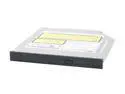
TOSHIBA Slim Internal DVD Burner 8X DVD+R 4X DVD+RW 2.4X DVD+R DL 8X DVD-R 4X DVD-RW 8X DVD-ROM 24X CD-R 10X CD-RW 24X CD-ROM Black IDE Model SD-R6472
Comments: With modification, this works great on my Thinkpad A21P in the Ultrabay 2000 slot (where the original DVD-ROM goes). With a tiny phillips screwdriver (and about 10 minutes time) I needed to remove the IBM "caddy" from the original DVD-ROM drive and transfer the side rails and back interface-connector to the Toshiba. I left the Toshiba front bezel on and the drive is working great! Note that the square front-bezel covers the IBM ejection hardware, so now to eject the entire drive from the machine I need to open the drive door and then operate the IBM ejection "lever". No big deal as I think this drive will be staying put anyway. I think you may be able to get the "caddy" hardware from IBM separately, but I couldn't figure out how so I just "borrowed" it from the original drive, which I'll no longer need. I use Nero software and have done 4 burns at 4X my first day with the drive and experienced NO PROBLEM! Thanks!
9/16/2005See more detail