
Your Browsing History


Jason B.
Joined on 12/05/06
0
0
product reviews
- 9
EVGA 9800GTX
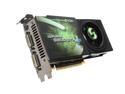
EVGA GeForce 9800 GTX+ 512MB DDR3 PCI Express 2.0 x16 SLI Support Graphics Card 512-P3-N871-AR
Pros: Got this today (September 11, 2008). I was attracted to the low price. EVGA is a pretty good company. The 9800GTX has a black pcb with black DVI inputs in the back. Installed real easy. Same length as the 8800GTX, just a little bit thicker, though. I think it is the same weight too. I inspected the card for fingerprints, wear and tear, loose integrated circuits etc. to make sure I didn't get a used/refurbished one. Everything looks good. Nice solid construction, nothing looked or felt cheap. No driver issues. Doesn't seem to run hot, although I have 9 loud fans.
Cons: None. The top long/large EVGA logo sticker is coming undone in the middle, it doesn't bother me though, I'm just saying. I think it would have been cooler to have blue on the card instead of green. That's ok, though.
Overall Review: I am replacing an EVGA 8800GTX that I had for a year. I am not expecting great leaps in performance with the 9800GTX. I just wanted something with low cost and pretty good performance. I don't want to get too far behind in grapics cards. I also didn't want to spend the money on a GTX 280. I prefer to spend a lot less for last generation graphics card rather than spend a lot of money to be "current." My next card will most likely be the GTX280 within the next 6-12 months or whenever the price gets low enough that I feel comfortable paying for it. I believe the difference between a 9800GTX and a 9800GTX+,besides the speeds, is that the 9800GTX+ uses 55nm technology and the 9800GTX uses 65nm technology. Intel Core 2 Duo 2.66/EVGA 680i/8GB G.Skill DDR2 800/ /EVGA 9800GTX/Thermaltake 700W/Thermaltake Armor/ Western Digital Raptor 74GB 10,000/Windows Vista Ultimate x64/
9/11/2008See more detail
Kingston HyperX DDR2 800 4GB (2x2)

HyperX 4GB (2 x 2GB) DDR2 800 (PC2 6400) Desktop Memory Model KHX6400D2K2/4GR
Pros: I got two sets of these today (September 8, 2008) for 8GB. I thought the price wasn't too bad and I have used Kingston memory in the past without too many problems. The modules have a nice textured heat sink. Nice looking memory cosmetically.
Cons: According to CPU-Z, POST, and SPD/EPP, the lantencies were too high and the bandwidth was too narrow. So, I made some adjustments in the BIOS such as linkings, latencies, voltages, etc. I made sure that everything was up to date such as BIOS, Windows Vista updates, drivers, etc. In the end, the settings were still not right. I will be returning the memory tomorrow (September 11, 2008).
Overall Review: I bought these modules to replace 4GB of Kingston HyperX DDR2 800 (4x1). I guess Kingston is a pretty good module manufacturer but I think I will try someone else's memory. It always seems that no matter what component I buy, not matter what brand it is, I always have to return something. For once I would like to have something that works the first time. I already ordered 8GB of G.Skill DDR2 800 (4x2). The 15% restocking fee is too high for me. On top of that I have to spend money for return shipping and handling via UPS. If it wasn't for the fact that I have to drive 20 minutes north of where I live to get to the nearest UPS store, return shipping wouldn't be that bad. Of course, you can have UPS come and pick up the package for you. Oh well. I should be feel better when my new EVGA 9800GTX comes in tomorrow. Intel Core 2 Duo 2.66/EVGA 680i/EVGA 8800GTX/ Thermaltake 700W/Thermaltake Armor/74GB Western Digital Raptor 10,000/Dell 20" 1680x1050/Vista 64
9/10/2008See more detail
Asus VW246H 24" Display.
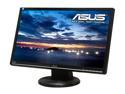
ASUS VW246H Glossy Black 24" HDMI Widescreen LCD Monitor 300 cd/m2 ASCR 20000:1 (1000:1) Built-in Speakers
Pros: -Clear picture. -Price not too bad. -Reliable. -No dead pixels or bright pixels.
Cons: -None. Maybe price? Things could always be a little cheaper.
Overall Review: -I have two of these in a dual monitor configuration. I got the first one a couple of years ago, and the second one about a week ago. I'll be getting a third in a month or two, I'm just waiting for graphics cards to go down in price a little. When put side by side, the older monitor isn't as bright as the new one. It's still pretty bright, though. That's ok with me, after all, the older monitor is about two years older, so it's going to lose some of it's brightness.
1/3/2013See more detail
Logitech G9x Gaming Mouse.
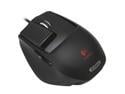
Logitech G9x Black Two modes scroll USB Wired Laser Gaming Mouse
Pros: -Customizable LED colors. -2 different hand grips. -Weight management system. -High DPI (5700 DPI). -Smooth scrolling. -Just the right amount of buttoms for me. -Highly customizable via software.
Cons: -None. Maybe the price? Maybe it's not wireless?
Overall Review: -You will have to get use to the higher DPI. It only took me about an hour or two to get use to not having to move my hand much. -The weight system is pretty cool. You will be able to tell when you add the weights, but it won't be anything extreme.
1/2/2013See more detail
Logitech G19 Keyboard.
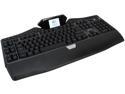
Logitech 920-000969 G19 Keyboard with Color Display
Pros: -Light Up Keys(Customizable color palate via software). -Cool LCD screen. -Nice responsive keys. -Detachable palm rest. -Powerful macro key configuration software. -You can watch YouTube videos on the LCD screen. -You can watch your pictures on the LCD screen.
Cons: -Price? (Not a real big deal for me though, I'm just saying). -Not wireless? (Not a real big deal for me though, I'm just saying). -That's about it.
Overall Review: -When I first got this, the LCD screen kept freezing and the applications would not show up. So, I deleted the driver software that came on the installation disc and downloaded the most recent updates from Logitech.com. I recommend not installing the drivers on the disc and just go directly to Logitech.com to download the latest drivers. -The "Tab" key and the "Caps Lock" key doesn't light up completely, only about half the key is lit up. It's going to cost me around $20 to RMA it via UPS. It's just not worth it to me. I'll just live with it. What if the new keyboard has issues? -You can't see the lit keys very well during the day time. But it's real awesome looking at night. -Make sure you have the most current drivers for USB 3.0 for your motherboard. I think when I updated everything, the LCD issue is fixed, but I am still keeping an eye on the LCD to see if the problem is solved.
1/2/2013See more detail
ASUS VW246H 24" 1920x1080p Monitor
ASUS VW246H Glossy Black 24" HDMI Widescreen LCD Monitor 300 cd/m2 ASCR 20000:1 (1000:1) Built-in Speakers
Pros: Easy to install. Solid bezel. Very large in size. No dead pixels or bright pixels. Has HDMI, VGA, and DVI connectors in the back. You can get high def 1920x1080p resolution using the supplied DVI cable, you don't need an HDMI cable. Pretty bright.
Cons: The speakers that are built in aren't that great. It doesn't bother me, I'm just saying.
Overall Review: I'm replacing a Dell 20" 1680x1050 monitor.
2/28/2011See more detail