




 here!
here!
I’m your shopping assistant for PC builds, upgrades, and everything tech.
Got questions? Ask away!
Start a conversation
here!
I’m your shopping assistant for PC builds, upgrades, and everything tech.
Got questions? Ask away!
Start a conversation

Joined on 02/10/06
6 cores behind the "compute" in computer
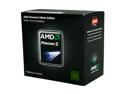
Pros: 6 physical cores stocked at 3.2 GHz with an unlocked multiplier that enables maximum control for overclocking, all at an incredibly reasonable price. This processor truly benefits software able to utilize multiple cores. It all boils down to price vs performance and what you want to use your system for. Just a personal note: If I had a PhD in computer science, I'd maybe consider my "Tech Knowledge" level a 5. I can't recall the equations to the Discrete Fourier Transform by memory (to cite one of countless examples), I'm just someone with no more than a high school education. I built a desktop PC for my 3D content creation work; I'm self-taught in whatever I do, and the internet is an incredible resource of information. I use my machine to do everything in the digital production pipeline from initial concept sketches in Photoshop to 3D work in Maya, Mudbox, and Mari, to post-production using Nuke, Vegas, Encore, ffmpeg CLI and x264 CLI. Now onto the review.
Cons: NOT CONS, build notes: I installed this into an Asus M4A88TD-V EVO/USB3 board using Arctic Silver 5 thermal paste, along with a single 4GB G.Skill DDR3 1333 MHz DIMM, to start. It's all in a Cooler Master HAF 922 RC-922M case with two extra 120mm case fans as intakes on the side. Powered by a Corsair TX 750W power supply. OS is Windows Server 2008 R2 Standard (Windows NT 6.1). It achieved a 5.67 software rendering score with CineBench 11.5 at stock CPU frequency with Turbo Core disabled through the BIOS. Various monitoring programs reported 48 C on stock heat sink (at stock 3.2 GHz, Turbo Core off) after Mental Ray for Maya rendering at 100% CPU utilization for 30 hours; not a con. Also note the stock heat sink has copper heat pipes; not a con. The product is reliable, but it's not the fastest; you pay a significant premium for "the best" that'll be outdated in a year or two anyway. The CPU's architecture is aged, but everything eventually ages. To simplify, there aren't any cons.
Overall Review: If you do 3D animation and rendering, this CPU won't let you down. Big CGI projects render 24/7 at 100% for weeks, even months; this processor will experience this sort of activity from me. 3D rendering is done entirely in memory, so DDR3 1333 MHz RAM is more than enough, and SSDs aren't needed since the raster data for each frame is written to files after the computations are complete. In Maya, the IPR preview is also multithreaded, so tweaking materials and lighting is impressively fast. Nuke is multithreaded on almost everything, which makes compositing 2K resolution full floating point precision (32-bits per channel) imagery rendered from Maya highly enjoyable on this processor, using a typical 7200 RPM hard drive. HD video editing and encoding with Vegas is yet another nice experience; I'm able to forget about transcoding to low quality takes to edit and apply effects in real-time, for example. To close this off, in my opinion this processor is another winner from AMD!
Exceptional computing ability for the price.
Pros: I installed this processor into an ASUS M4A88TD-V/EVO USB3 board with a Cooler Master Hyper 212 Plus heatsink, coupled with 16GB of G.Skill DDR3 1333 DIMMs, all inside a Cooler Master 922M case. OS is Win Server 2008 R2. Scored 5.68 with Cinebench R11.5. Even at my ambient room temperature of 90F, the CPU when rendering one of my current 3D animations using 11 GB RAM for 18 days of uptime and at 100% CPU usage (nonstop, all day and night), SpeedFan never reported higher than 53C on Temp1, well below the critical 62C. I report my "Tech Knowledge" as low since I'm not a computer scientist, but anyone can easily overclock the processor; I haven't because I need guaranteed stability. At the time of this writing I've just ordered an A/C unit, but let me assure you this CPU won't have cooling issues so long as you have a decent case. I transcode my uncompressed project renders with x264 CLI and ffmpeg CLI (for audio and media multiplexing), and the CPU expectantly impresses there too.
Cons: The cons section may be relevant for some products but not this one. I've pushed AMD processors to their limits over the past years, sometimes well beyond their critical temperatures, and not one failed even though it should have. I was just lucky, but now all my equipment is treated properly; it goes to show that AMD does not make an unreliable product despite their low prices. Core for core Intel has a slight performance edge, but when it comes to how many cores you can get per CPU die, nothing beats AMD, and Intel's hyper-threading doesn't provide enough of a boost to warrant the higher prices, in my opinion. Virtual or cloud anything is out of the question for me, it all has to be local, as the amount of data generated and worked with is measured on the Terabyte level, so if you want to base a small personal server farm off these CPUs, I recommend the cheaper 2.8 GHz 1055T, then OC it a bit to save money for memory per render node. Again, no cons here, it works well and runs coo
Overall Review: If you're running 10 programs just to get this CPU to 100%, it may not be the best purchase choice. However, any sort of work that simulates reality, typically scientific or 3D digital content creation, will always be able to make use of unlimited computing resources. In my own personal 3D projects, I use Maya, ZBrush, Mari, VRay, and Nuke software. In Mari all tasks are multithreaded, sames goes for Nuke. In Maya, fluid dynamics simulation as well as certain other tasks use all cores, and I'm able to adjust materials and lights while, in the background, all 6 cores are maxed at 100% usage; this is due to VRay performing progressive path tracing, which produces a relatively unbiased result of real-world photo-realistic lighting. Local networked computers may be used to assist, making better the entire process of interactively adjusting and rendering 3D scenes. I consider the AMD 1090T a highly capable CPU for anyone on a budget, even if you won't maximize its potential. 5/5 produ
High quality memory at a low price!
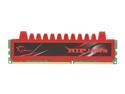
Pros: I installed 4 of these into an ASUS M4A88TD-V EVO/USB3 board along with an AMD Phenom II X6 1090T Black Edition processor, all powered by a Corsair 750 watt PSU. OS is Windows Server 2008 R2 Standard (Windows NT 6.1). The memory is at stock/auto settings, nothing had to be adjusted in the BIOS. The GPU being used is a modest ASUS GeForce GTS 450. I'm a self-taught CG animation generalist and I use my system for all the various stages of the digital production pipeline. From concept art and matte painting with Photoshop through 3D work involving modeling, animation and rendering in Maya, through detailed texturing in Mari and sculpting in Mudbox, to 2K compositing of full floating point precision (32 bits per channel) imagery rendered from Maya using Nuke, to post production using Vegas, and final encoding and stream multiplexing of sequences using ffmpeg CLI and x264 CLI, to delivery with Encore. Of all the tasks I do, the 3D work tends to stress this memory the most.
Cons: NOT CONS: This memory is incredible, especially at this price, and the system is rock solid. As I work on dense scenes in Maya (especially with lots of foliage), the 16 GB limit is reached on the scenes consisting of hundreds of millions of polygons, but I don't have any issues with the memory itself; it just works. Rendering Maya scenes through the command line eases some load on the system as no UI has to be addressed, allowing 100% of the CPU cores to be maxed 24/7 for as many hours/days/weeks needed to render a project. DDR3 1333 memory is more than fast enough for 3D rendering, since it's mostly done in memory anyway, and such work generates a lot of data, especially for particles, fluids, and other dynamic simulation caches, so I prefer typical 7200 RPM hard drives over SSDs. Also when using Mental Ray for Maya, I'm able to create memory mapped files (.map), meaning partial instead of entire texture maps are loaded into memory to be accessed when invoked by shading algorithms.
Overall Review: What really impresses me is the amount of data I'm able to wrangle using a desktop system with 16 GB of memory. Over 100 million polygons in Mudbox are able to be easily sculpted, then normal and displacement maps exported for rendering later. Mari is also a fun experience with this much memory; Mari easily loads and works with models consisting of hundreds of 4096x4096 (or much larger) texture maps along with dynamic shading as the geometry is being painted, and Mari is smart and swaps data to disc archives even when the memory limit is way beyond maxed out. To me it's exciting that I'm able to work with large data sets that don't have to be partitioned and broken up (as often) to work on, so if you're in need of low-price quality memory, I highly recommend this. If you happen to get unlucky and receive a bad module, G.Skill has you covered with their lifetime warranty. I just don't see any cons with this memory; whether for play or for work, it performs.


