
Your Browsing History


Mr. B.
Joined on 08/09/04
0
0
product reviews
- 17
Excellent product!
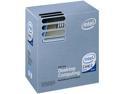
Intel Core 2 Duo E8500 - Core 2 Duo Wolfdale Dual-Core 3.16 GHz LGA 775 65W Processor - BX80570E8500
Pros: I LOVE this processor! I've built several machines with it since it first came out and the responsiveness feels like a new PC should... Ever since the step from the old Prescott's to the CoreSolo/Duo I was disappointed in the sluggish feel of those newer processors for day to day tasks. This chip totally "feels" like a new computer upgrade should feel again for every day tasks, and it shines extremely well for hardcore apps too...
Cons: Absolutely none!
Overall Review: Great low price, runs extremely cool, "feels" fast, and if you're into O/C'ing it does that very well too!
10/3/2009See more detail
Different Chip Layouts???
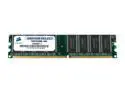
CORSAIR 512MB 184-Pin DDR SDRAM Unbuffered DDR 400 (PC 3200) System Specific Memory Model CMSS512MB-400
Pros: Works like it should, is PC3200, decent Latency, and priced well.
Cons: Double-Check your sticks! Ordered 4 sticks of this "(Most Name-Brand Computers) Compatible" Corsair PC3200, received 2 of one layout and 2 of another in the same shipment, all with identical part numbers! Didn't notice at first until the machine immediately came up with a reasonable but odd RAM count total and POSTed as Single-Channel with 2 sticks in the proper slots. Pulled them out, saw the difference, matched them up, put the identical pairs in each machine and they work fine in Dual-Channel now, although the one with fewer chips posts as like 983K or so instead of 1024K like the other layout in two identical machines with matching BIOS settings and VGA Ports.
Overall Review: Newegg was kind enough to send me 2 of each layout, probably assuming I wanted the 4 of them for just 2 machines as I did, but if they hadn't done that I'd be considerably upset with the folks at Corsair for this serious inconsistency. Sure it would've worked, but why live with Single-Channel when it totally should be Dual and was specifically purchased to be, simply because of an inconsistent and undocumented device revision from a hardware manufacturer? At least Newegg made it work out well enough though! THANKS NewEgg!
8/1/2006See more detail
"BLK" means BULK/OEM, no retail stuff like driver discs included!
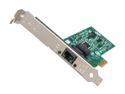
Intel EXPI9301CTBLK Network Adapter 10/100/1000Mbps PCI-Express 1 x RJ45
Pros: it's a gigabit network card
Cons: none so far
Overall Review: Two things about other reviewers' negative comments. No, this card will NOT increase your internet speed but it's not this card's fault, it's a clueless user's fault fior thinking it would. Most Internet service speeds are well below or only recently getting up anywhere near just 100MB so any Gigabit card can't make a much slower internet service go fast like Gigabit speeds... LAN vs WAN speed. Think about it... How fast is your service's top speed that you're paying for? Do you even know? When real mega internet speed service is available, many routers and modems can't even fully handle it, again not the card's fault. Also note that the BLK in the model name has this card priced about $6 less than the same exact card here on newegg that's a few dollars more and is the full retail version which doesn't have BLK in its' name. Did you notice that one at all, and opted to save a few bucks? Know what you're ordering before you complain... Just like Bulk/OEM hard drives and such, the device is identical to the retail version but the price is lower and any cables, adapters, driver discs, retail packaging, etc, etc, etc ARE NOT INCLUDED since this is the BULK a.k.a. OEM version of this card. If you want/need the driver disc (and a retail box) included with this card then order the slightly more expensive, non-bulk version of this card instead which is just a few items further down in the list... This model (BLK) is for I.T. people who are buying more than one of these and don't want or need to pay extra for another disc they won't be needing.
5/17/2013See more detail
Works okay...

StarTech.com Heatsink Thermal Pads, Pack of 5 (HSFPHASECM)
Pros: Easy enough to install. Fits where I needed it to go. Solved my laptop's thermal issues that appeared after a cpu upgrade that was originally done with the thin coat of arctic silver paste.
Cons: Not so easy to get the clear backing to come off smoothly and keep the pad intact.
Overall Review: Apparently there was a larger gap than acceptable between the cpu and the heatsink of my laptop once the original thermal pad was removed and arctic silver 5 paste was used instead during a cpu upgrade. This pad seems to have filled that gap back into spec and made the new cpu stop going into thermal slowdown under moderate work loads so the laptop runs faster instead of slower now, as it should.
11/20/2009See more detail
Great unit, especially for the price!
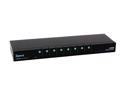
Zonet KVM3008 8 Port KVM Switch w/OSD
Pros: OSD works well, buttons and indicators make it simple to see what's going on at all times, it's compatible with some of the older Belkin cables as-is.
Cons: My ancient Dell 15" LCD won't sleep/standby with this KVM, not sure why. On my old Belkin OVP2 I could either select an unused port or let the selected PC power down the monitor but this KVM doesn't do either of those things with this old flat-screen monitor.
Overall Review: When lightning killed my old Belkin 8-Port KVM and the newer versions of it got horrible reviews, I saw this unit with the same connectors as my Belkin cables use, saw the unbelievably low price, and gave it a shot. So far other than the monitor sleep issue that allows other tech's to leave my monitor on without my knowledge, I'm totally happy with this product.
10/3/2009See more detail
Mostly does the job I wanted...
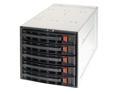
SUPERMICRO CSE-M35T-1B 3 x 5.25" to 5 x 3.5" Hot-swap SATA HDD Trays
Pros: Fits in the 4U rack-mount chassis I chose. Easy to install and operate. Has its' own fan for increased cooling of drives.
Cons: Not all Status and Warning Lights per bay might be usable as desired depending on your choice of RAID controller. They work differently depending on whether this is the SCSI, SAS, or SATA version of this enclosure. Carefully read the instructions for the enclosure and your drive controller to make sure they'll both give you what you want for status/warning/failure/alarm lights.
Overall Review: So far I'm satisfied with the quality and performance of this device. This is my first attempt at using a hot-swap enclosure and SATA/SAS RAID controller. The hot-swap feature works well and the hot-spare option of my controller card also plays nice with this enclosure. This enclosure works well for what I wanted out of it other than the warning lights on indivual bays not being able to show me when an individual drive starts having I/O problems when combined with the controller I chose.
10/3/2009See more detail