

Your Browsing History


Randall W.
Joined on 10/13/02
0
0
product reviews
- 9
Great durable package, decent speed
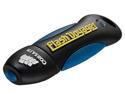
CORSAIR Voyager 16GB USB 2.0 Flash Drive CMFUSB2.0-16GB
Pros: 14.7 GB formatted capacity FAT32 14 files from 700-1800MB - Total size 14.7 GB Transfer from disk to flash drive - Elapsed time - 30 minutes - Transfer rate - 8.4 MB/s Transfer from flash drive to disk - Elapsed time - 9 minutes - Transfer rate - 27.8 MB/s
Cons: Not particularly fast. Indicator light only visible from one side.
Overall Review: Fun to bounce on desk when I'm bored.
12/6/2009See more detail
High speed, high capacity, but flawed
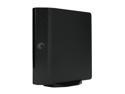
Seagate FreeAgent XTreme 1.5TB USB 2.0 / Firewire400 / eSATA 3.5" External Hard Drive ST315005FPA2E3-RK Black
Pros: Bought this drive as a backup for my 1.75TB (RAID5) system drive. Reported size in Vista 1.36TB formatted NTFS. I bought this drive specifically for the eSATA connection since even incremental backups can be painful over USB with this much data. Benchmarking shows sequential read and write speeds around 110 MB/s over SATA and random reads and writes around 60 MB/s. USB speed is similar to other external drives since it's limited by USB rather than the drive. The slowly pulsing front light looks better than the activity indicators on most other external drives.
Cons: The included stand and feet are almost worthless. The feet barely hang on to the edge of the drive and will detach if you brush them with your finger or slide the drive on your desk. The stand connects so weakly that the drive could fall over at any time. I don't trust it one bit and thus have not used it. You'd think a company making drives for this long would not screw this up so bad.
Overall Review: I haven't had any trouble with it not responding after a certain time. However, I don't leave it connected all the time. Connect, run scheduled backup, disconnect, repeat next week. I don't use the included software so I can't say anything about it. Vista doesn't recognize it as an external drive when connected via eSATA so you can't "safely remove" it. I just pull the cords when I know the backup is done. This may be an issue with Windows or the eSATA card.
10/25/2008See more detail
Good NAS board until it dies with voltage issues
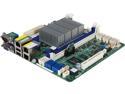
AsRock Rack C2550D4I Mini ITX Server Motherboard FCBGA1283 SOC Supports DDR3 1600 / 1333 ECC / non-ECC Unbuffered UDIMM
Pros: Like most people I bought this for use in a FreeNAS box at home. Lots of SATA ports, ok CPU performance, dual Intel NICs, low power usage, and remote management are a winning combination. It ran FreeNAS with an eight disk pool plus two small old SSDs as a mirror boot pool. Few reasonably priced motherboards have 10+ onboard SATA ports.
Cons: I bought this in August 2015 and put it behind a $500 APC Smart UPS 1500. It ran without issue until mid-November 2016. One day I come home and found my NAS was off. I leave it running 24/7 except for reboots to install updates so this is unexpected. It also won't start. It finally boots up after power cycling it 4 or 5 times. A one time occurrence? I click restart from the FreeNAS web GUI. Same issue trying to restart again. Logged into the IPMI interface and find the voltages are all over the place. My NAS is serious business so a flakey motherboard just won't work. When I finally get it to start again after another 5 or 6 power cycles I save the FreeNAS config and detach the main ZFS pool. Motherboard is removed from the case since it can't be trusted. I'll probably toss it. :( It is eventually replaced with a SuperMicro X11SSH-CTF and an Intel i3-6100.
Overall Review: - In 15 years of PC building this is the first motherboard I've had fail. My desktop motherboard is an ASRock X99 and it's fine. Maybe just an issue with ASRock Rack or this specific model? - The single thread performance of this CPU is not so good. In over a year of usage and monitoring I found that most of the times I hit a limit it was because a single thread was maxed. CPU benchmark single thread score for 2550 is 596. Score for the i3-6100 that replaced it is 2102. The improvement is obvious. - In early January 2017 I run across a reddit thread in /r/FreeNAS talking about voltage issues for this board. I guess my experience is not unusual.
1/7/2017See more detail
Good speed for FreeNAS
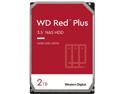
WD Red Plus 2TB NAS Hard Disk Drive - 5400 RPM Class SATA 6Gb/s, CMR, 64MB Cache, 3.5 Inch - WD20EFRX
Pros: Have been running 6 of these in RaidZ2 with FreeNAS for just over a year, total actual running time around 7500 hours. Automated SMART tests and ZFS scrubs have never detected any errors. Drives are fast enough for backups and file sharing. iSCSI across gigabit ethernet usually peaks at 500-600 Mbps.
Cons: Nothing in particular
Overall Review: Not the fastest drives but you don't need always need the fastest. These are fine for bulk storage.
6/4/2014See more detail
Huge monitor with known anti-glare issues
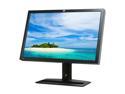
HP ZR30w Black 30" 7ms S-IPS Panel Height &Swivel Adjustable Widescreen LCD Monitor w/USB Ports 370 cd/m2 DC 3,000:1
Pros: Clearly superior to my three year old Samsung 26" 1920x1200 TN-TFT. Huge amount of desktop space for working with Lightroom, Photoshop, Eclipse, Google Earth, maps, etc. Hooked it up via included dual link DVI cable and loaded color profile from included CD. Looking at a few free monitor calibration images show it is close right out of the box. Zero bad pixels. Fast shipping: Ordered Thanksgiving morning with free 3-day shipping and received it on Monday.
Cons: Sparkly anti-glare is a well documented issue. It is quite obvious on this monitor but does not bother me. If sparklies bother you, look elsewhere.
Overall Review: No OSD but any adjustments can easily be made through the video drivers. Newegg photo shows an HDMI cable is included but mine came with a DisplayPort cable instead. Makes sense since monitor has only DVI and DisplayPort inputs. Very bright even at lowest level.
11/29/2011See more detail
x2 for a rock solid 16GB
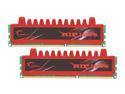
G.SKILL Ripjaws Series 8GB (2 x 4GB) DDR3 1333 (PC3 10666) Desktop Memory Model F3-10666CL9D-8GBRL
Pros: Bought two of these for a total of 16GB, maxing out my Gigabyte P55 based board with an i7-860. Installed all four sticks and ran Memtest86+ with no errors. Windows 7 x64 picked up all the RAM automatically. Overall computer performance has improved noticeably, particularly for heavy photoshop work and when running multiple virtual machines in VMWare Workstation 7.
Cons: The name "Ripjaws" is kind of dumb.
Overall Review: I was torn between buying this or a new SSD. I think this was the better choice. I do not reboot often so once my daily-use programs are cached in memory the hard drive speed does not matter.
10/14/2010See more detail