
Your Browsing History


David W.
Joined on 03/21/03
0
0


product reviews
- 53
Corsair's middle brother is a beast!
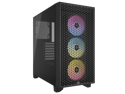
CORSAIR 3000D RGB AIRFLOW Mid-Tower PC Case - Black - 3x AR120 RGB Fans - Four-Slot GPU Support - Fits up to 8x 120mm fans - High-airflow Design
Pros: - Excellent cable / routing options - RGB fans are bright - Cosair's older brother highly praised ventilation passed down to this little brother - Reasonably priced for what you get!
Cons: - For those RGB to have maximum effect, you need the iCUE software - The back/PSU area is a tight fit, plan accordingly
Overall Review: There are a few main things people are looking for when they are looking for a case. Does the case house the components safely. How well is it able to ventilate/cool my components. Is it easy to work with. Does it look nice. Does the IO's (input/output, such as microphone/USB ports) make sense. Anything after that are icing on the cake (innovations, features, etc). Coming from the 4000D, this rightfully works just as well as the bigger brother. Everything is reliable/stable. The cables / openings / routings all make sense. The upper and front of the chassis gives you many options for your build choices and of course comes with the 120mm fans x3 with aRGB as advertised. If anyone still uses the 2.5" drive bays, just like the older brother it's on the front / bottom facing away from the motherboard, is a bit tricky to work with but just be aware that's the location. It can be snug with cable management in that area, as well as the cables running from the PSU. All things to consider when working with that area. Speaking of the PSU, I noticed there was just a slight rubber standoff for the PSU. I'm aware it's to help the PSU not slip/slide, but that little extra room also helps the PSU have some breathing room, which was nice. However it also does make the area snug to work with, a little tight fitting. It's with the appropriate dimensions but for my Seasonic was a little snug, but brought in the Corsair and it felt very clean/nice fit. Still fits, but just something to be aware of. Otherwise another gem from Corsair. Highly recommended!
10/9/2023See more detail
Easy to set up and use, but dim
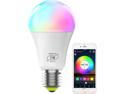
MagicLight Smart Light Bulb (60w Equivalent), A19 7W Multicolor 2700k-6500k Dimmable WiFi LED Bulb, Compatible with Alexa Google Home Siri IFTTT
Pros: Easy to set up Connection was strong but short distance Colorful
Cons: Dim Limited software Limited support
Overall Review: Will keep it short. I have a problem with some of the brands out there, using hubs or incompatibility issue. The nice thing about this bulb is you don't need a bulb, literally just plug and go. Easy to set up, the software is self-explanatory, but limited in options. The color range was colorful, but limited colors, and very dim. It did not feel like it met the reported lumens. Despite the shortcomings, I still recommend it. I would use it where you don't need things to be too bright, and can use a little simple color flare to the room. I used this in my kids room and they love it.
7/10/2025See more detail
Runs very hot, but very fast
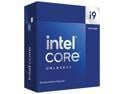
Intel Core i9-14900KF - Core i9 14th Gen 24-Core (8P+16E) LGA 1700 125W None Integrated Graphics Processor - Boxed - BX8071514900KF
Pros: AI Overclock is here! Works better than before, such as that from ASUS AI overclock, which tends to overvolt. Its a lot tighter , making suggestions to offsets cab lines etc. you can do this with the xtu app. Once completed take a screen shot and set it in your bios, done. Very nice. Other pros is its fast , still depends on what you plan to do. If you want to just game, I would consider the 7950x3D or other variants from AMD. But I tend to multitask while gaming , so I really enjoy this chip. It is a lot hotter than my previous 12900k. My previous 12900k was overclocked ran hot, but still not as hot as the 14900kf.
Cons: Very hot, power to performance gain not the best
Overall Review: Still highly recommended despite the power and heat. It is still a very fast chip. Dont need to upgrade your existing z690 or z790 motherboard, just make sure your mobo bios has the right version to support this chip/microcode and youre good to go.
10/21/2023See more detail
Multi-purpose all around powerful CPU
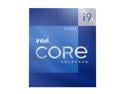
Intel Core i9-12900K - Core i9 12th Gen Alder Lake 16-Core (8P+8E) 3.2 GHz LGA 1700 125W Intel UHD Graphics 770 Desktop Processor - BX8071512900K
Pros: Debut of the specific cores (P and E) by Intel and what a show! Debut of DDR5 and PCIe5! Reliable as it's now 2 years old and I'm still using it as my main rig Easily overclockable
Cons: Clean power recommended Hefty cooling set up recommended Some know-how before jumping into this series of CPU's to manage P and E cores
Overall Review: If you're shopping for this CPU, then you should already know what you're getting yourself into. You should know the motherboard and the chipset you're getting and what it offers. You should watch some youtube or read a guide about E cores and P cores to help this beast reach it's full potential. It's not as complicated as it first seems so don't be intimidated. I've had this CPU for 2 years. I've never had a problem. I've overclocked to 5.2ghz on an AIO, low-medium fan speed only, I've gamed, I've video edited, I've streamed, love it. I usually upgrade pretty frequently and hand down my PC's to my wife or children, but I don't think I will be handing this one down, it's holding it's own very well even after 2 years.
8/30/2023See more detail
Reliable
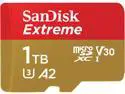
SanDisk 1TB Extreme microSDXC UHS-I/U3 A2 Memory Card with Adapter, Speed Up to 160MB/s (SDSQXA1-1T00-GN6MA)
Pros: Reliable Very fast, among the best in it's class at the time of sale (there are faster now 9/2023) Functional in extreme condition
Cons: Very fast but under certain conditions only
Overall Review: Not much to say as we all know the functionality of an SD card. The only thing I would mention is I was able to use this on my drone in a desert, high heat over 105 degrees that day, and reliable fast transfer all day and never had a problem. Would definitely recommend
8/30/2023See more detail
Reliable
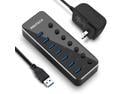
RSHTECH USB 3.0 Hub Powered 7 Port USB Data Hub Extender Aluminum USB Splitter with Individual On/Off Switches and Universal 5V AC Adapter, 3.3ft USB 3.0 Cable (RSH-518)
Pros: Reliable Compact Cost Effective Light Buttons to power on/off device
Cons: Short cable Light
Overall Review: I think if you read about the product, the spec's, you'll find that this product delivers what it touts. I liked this so much, I bought several of these to go with my laptop/work computer/wife computer. Although the product is light, which is great, plugging in several devices can tug on the device and cause it to flop, so I suppose it's a pro and a con. Other things to note is if you're transferring several things at once via usb, it will take up lanes and slow transfers down, that should be intuitive but needs to be said so people don't inadvertently give it a negative rating due to such. Highly Recommend!
8/30/2023See more detail