

Your Browsing History


Felix B.
Joined on 02/03/10
0
0
product reviews
- 5
Great product that most people just don't understand.. (Listen up WD!!)
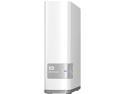
WD 2TB My Cloud Personal Network Attached Storage - NAS - WDBCTL0020HWT-NESN
Pros: Drive works exactly as advertised, it works perfectly fine between all devices within network, transfer speed is not terrible considering its a single drive running through an Ethernet controller, it's not as 'HORRID' as many lead to believe. It goes on standby as it should and wakes up as it should, have not had any problems with these drives so far and i have purchased and installed many of them. Updating firmware has not given me any issues at all on any of the drives i have set up either, it accesses the Mapped Drive immediately just as if it was a Portable Drive plugged in through USB directly.. If you are looking for a simple solution that WORKS then this is the drive for you, "Be Aware" though that Setup of this Drive is very tricky..
Cons: Software needs improvement, (GUYS AT WD PLEASE LISTEN UP) Setup is more complicated than it should thus any common non tech savvy person is going to automatically hate it not because its a bad product but because they just cant get it to work right and get frustrated. Transfer speeds within local network could be better too, it doesn't sustain normal speeds for long then it drops a lot, even after optimization. And please, PLEASE make it so you can use files outside the local network without having to download what you need and re uploading again to replace, though functional, its a very VERY big hassle and people that like to access their files remotely will automatically hate it.. (FYI) please make a step by step video tutorial on all you need to do to set up these Drives, the lack of useful instructions are hurting this good product a lot!
Overall Review: People need to understand one thing about single drive NAS drives, this is just a SINGLE DRIVE running through a network controller which adds latency and slows down transfer speeds, if you are a tech savvy person and want blazing fast transfer speeds then go for a raid setup with multiple drives, this drive is meant for the regular consumer that wants to have his or her data stored outside of their computers and accessible to any other device within your local network and some occasional remote accessing of files, for these uses this drive performs admirably, i know, i have installed many and own one myself. (FYI) to those out there that have a hard time installing, as soon as you install it on your network, you WILL NOT see the drive pop up in your computer like a standard portable hard drive does, you have to FIRST AND FOREMOST go to the website written on your welcome little piece of cardboard that comes in the packaging and set up your drive by following the instructions. Only then will you be able to access it and set it up to work the way you want it to work, after you do this then you NEED TO (map a network drive) to whatever folder you created on the setup page initially, only then will you be able to access your files in your Drive folder normally, you can also install the WD Access program from the WD website and access your files from there no prob, but to many peoples taste you might prefer to just Map the Drive manually and just access it from "MY PC" like you would a normal portable hard drive. Oh and if you think the USB 3 port on the back is to fisically connect it to the PC then you got another thing coming, that USB port is ONLY to connect a flash drive or portable hard drive for the Cloud Drive to use as a "Backup" if you want to set it up that way, you can also access whatever drive you connect there through your network as well. All in all, this drive is decent, please do your homework before buying and save yourself a headache, it normally takes me 5 to 10 minutes to set up and be ready to roll, but that's me because i already know the system well, if you do your homework it could be you too. All in all this brings me back to the biggest issue here which is the elaborate setup this drive needs, to all you guys at WD please make the installation process less of a homework and more of a plug and play for those that aren't tech savvy which is the vast majority of the people that want to buy this little Cloud Drive. I am giving it 5 stars because frankly it WORKS WELL, assuming you set it up correctly that is. Anyone else will just hate on it and i don't think its fair for this Drive to receive such bad reviews over Software issues..
1/24/2018See more detail
Startech HDMI cable with Ethernet
StarTech.com HD2MM15MA CL2 HDMI Cable - 50 ft / 15m - Active - High Speed - 4K HDMI Cable - HDMI 2.0 Cable - In Wall HDMI Cable with Ethernet
Pros: Solid construction, thick gauge cable, transmission quality is noticeably superior to standard HDMI. Anything over 50ft normally requires to be converted to SDI or Ethernet and back which requires converters on both ends, this solution for 50ft length in wall is ideal. "This is an active cable which means its directional" "READ LABELS"
Cons: None
Overall Review: Would absolutely recommend for use on any display at 50ft distance.
3/25/2021See more detail
Great Product!
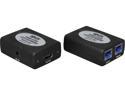
Tripp Lite HDMI over Dual Cat5/6 Extender Kit, In-Line Transmitter/Receiver, Video and Audio, 1920x1200 1080/24p, Up to 150-ft. (B125-150)
Pros: Works exactly as advertised, bought several of these for multiple restaurant HD displays, have been installed and running flawlessly for a year now. None of the displays has ever even flickered at 1080 resolution, as long as you're within 100ft you should be fine, tested one at 120ft and it flickers every now and then, just as advertised stay under the limit and it should work flawlessly, I'm also using Cat6 wiring for the runs. Works well on monitors too, currently extending a touchscreen monitor with one of these..
Cons: There seems to be no difference in performance with or without the power adapter, not really a Con, I still use the adapters anyways.
Overall Review: Would totally recommend this to anyone needing to extend 1080p signal up to 100ft away..
4/19/2016See more detail
Works better than expected!
Tripp Lite USB 2.0 Hi-Speed Active Extension Repeater Cable (M/F), USB Type-A, 20M (65-ft.) (U026-20M)
Pros: Using this with a Touchscreen display and it works flawlessly so far away with no noticeable lag.
Cons: None.
Overall Review: Totally recommend this product.
5/9/2014See more detail
Super compatible
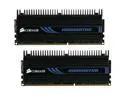
CORSAIR DOMINATOR 4GB (2 x 2GB) DDR3 1600 (PC3 12800) Desktop Memory Model CMP4GX3M2A1600C8
Pros: Excellent Ram, super fast, never gave me a problem not even once at any speed and voltage on many different motherboards.
Cons: none really.
Overall Review: To the guy with the P7P55D-E Pro mobo, get your motherboard checked man, its totally not the ram, i have the same P7P55D-E Pro motherboard with this ram and it runs beautifully all 4gbs in dual channel at 8-8-8-24 at 1.65v. Try going on the Bios and setting the mode to XMP, it should work perfectly thereafter :)
12/2/2011See more detail