
Your Browsing History


Kevin W.
Joined on 12/06/05
0
0
product reviews
- 9
Solid
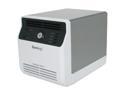
Synology DS411J Diskless System DiskStation 4-bay NAS Server for Small Office and Home Use
Pros: There are many more positives than negatives for this little unit. Small footprint. Low power usage. Hard drives were easy to insert. Easily identified by all my computers on our home network, and I have mapped drives on the NAS without a hitch. The backup runs regularly and faithfully. The sync function works very well (almost too well since it copies everything!). I have used this as an iTunes server for the house, and it also serves all the music for my Sonos devices. For those of you with Sonos devices, this NAS works very well. If you don't have a Sonos, consider getting one if you are a music freak. It just seems to work very well. It has never crashed on me in the past year.
Cons: The setup was long. I installed four 1TB drives in RAID5 configuration. It really wasn't that big of a deal since it basically set things up overnight. The web interface is a little bit confusing, but after some trial and error, I was able to figure it out. I have posted questions to the Synology forum a few times for guidance, and questions were answered promptly with resolution. There is only 128 MB of RAM, so operation is kind of slow. I imagine if you had constant access of this device, that would be a problem. However, for me, this is a music server and a back-up station. The slow speed is rarely an issue.
Overall Review: This is definitely a good deal for the average home user. I knocked off 1 egg for the RAM, speed, and length of time to set up the system. I've had a couple of issues with the sync feature that have required rebooting the server, but I can deal with that as a home user. Again, as a business user, I would not tolerate that kind of problem. I would buy again.
6/19/2011See more detail
Decent product, but a bit of eye candy
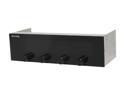
"KAZE MASTER" 5.25" Bay Fan Controller
Pros: Capable of controlling up to four fans and monitoring 4 temperatures. Additional temperature probes for the clumbsy or burnt-out probes. Easy to install. Slick display, and it makes the case look a lot cooler than before.
Cons: This unit does seem a little flimsy, and I think it is over-priced for what it actually does.
Overall Review: Helpful hint: plug in all the wires and probes before you insert the unit into your PC. Also, don't be a dud and plug the wire labeled "FAN4" into the "FAN2" slot and expect to be controlling the right fan...D'oh! Also, I may be doing something wrong, but if your fan doesn't have variable resistance, the fan controller can't vary the fan speed. It controls my CPU fan nicely, but the case fans are either ON or OFF, no variable speed. Lastly, don't forget to disable the CPU fan warning in BIOS if you have this product control your CPU fan...your MB will think the fan is no present/not functioning if it's not plugged into the MB. Over all, I think it's OK as a product. It's more eye candy with software-controlled speeds. I don't think I'd buy it again.
10/6/2008See more detail
It's a nice all-in-one for office productivity
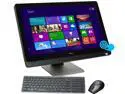
DELL All-in-One PC XPS XPSo27-5000BK Intel Core i5-3330S 6GB DDR3 1TB HDD 27" Touchscreen Windows 8
Pros: This all-in-one PC has a very nice 27 inch display that looks beautiful. The touch screen display is a very nice addition to the desktop, and having this capability really expands the functionality of Windows 8. The keyboard is small and compact, and along with the mouse, the two offer a nice wireless solution without any unnecessary dongles or cords. The setup is more or less turnkey. You take the computer out of the box, plug it in and turn it on. It will take you through the rest of the Windows 8 setup. After this was completely setup, I was taken directly to the desktop, and this confused me since I assumed I would be taken to the new Windows 8 start menu. No matter; I figured it out quickly. The computer comes with a Blu-Ray disc player (side loading on the monitor) and plenty of ports (6 USB, headphone/microphone, SD card, 2 SATA and ethernet -- jeesh, what else do you need for an A-I-O computer?). So, it has plenty of space for my external USB drives and other goodies that need to be plugged in. The computer also has wifi capacility, which is nice and makes it somewhat portable. Replacing my dual monitor Windows XP machine has greatly reduced the clutter on my desktop. The built-in speakers are good, but I plan to hook up my external speakers. The computer comes with some basic instructions, but I really haven't read them yet. I'm sure I'll regret that later. There is a camera at the top of the screen, and it is nice in that it has a sliding window to cover the lens for when you need that extra privacy from Big Brother. It has plenty of RAM for office productivity and the processor (i5) and speed are acceptable for such a compact system. Another thing I like about this system is that the internal hard drive is 7200 RPM; other AIO computers I looked at had 5400 RPM drives, and this is significantly slower. Unlike some of the other AIO computers that offer only 1080p resolution, this offers a finer 2560x1440 resolution. Lastly, the construction feels solid. I have not been a fan of Dell computers in recent times. Back in the late 90s and early 2000s, their computers were heavy and could practically be dropped from two stories and still function. In the last 10 years, the plastic has been cheaply made and things fell apart. Our employer contracts with Dell, so we have them. I actually bought this PC out of my own account, and it feels solid and appears well-constructed. Time will tell.
Cons: This system runs Windows 8. I really am not a fan of this when compared to Windows 7, which I run on my home PC. I think the new start menu system is great for tablets, but for the desktop computer, it's really not an efficient use of operating power and actually slows down the user. I try to stay on the desktop as much as possible and have created most frequent program shortcuts for the desktop. This was not ideal in my opinion. Although the keyboard is solid, it is kind of small for my hands. I am going to have to really get used to it, but it's almost like using a notebook keyboard for a desktop computer. I would have appreciated a keyboard a little bit larger. The mouse is very cheaply made. Fits nice on the hand, but it's cheap as junk. I will probably replace it with another RF or bluetooth mouse. I just hate taking up a USB port with a dongle. The i5 processor isn't as fast as I thought it would be. Perhaps Windows 8 is much more complex than Windows 7, but I feel like my quad core 9550 at home with Windows 7 runs at a similar speed. No matter, compared to my office computer that ran XP, it's much faster. The screen does collect fingerprints and this is apparent if the angle reflects light -- but, what touch screen doesn't show finger prints?
Overall Review: Warranty is 1 year. I bought the extended 1 year warranty. As usual, Newegg shipped this computer in about 3 business days when I selected the 4-7 business day option. This is my preliminary review. I will see what amendments I can make when I have had more time to crash the computer or tax it.
7/31/2013See more detail
Works very well; headache to install
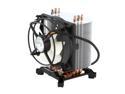
ARCTIC Freezer 7 Pro - Compact Multi-Compatible Tower CPU Cooler | 92 mm PWM Fan | for AMD AM4 and Intel 115x CPU | Recommended up to 115 W TDP
Pros: I have a Q9550 installed. With my AC Freezer 7 Pro installed with Artic Silver, my idle temps were 17C!! Under moderate-to-high load, temps hovered around 30C. Awesome.
Cons: This was a hassel to install. I installed this on my MB outside of the case, but I would have pinched a loaf if I had installed it in my case. Maybe I'm technically challenged, but the pins kept on popping out every time I'd get another pin to pop in. I felt like I was bending the MB too much, which made me paranoid since I had to RMA my first MB. Also, the fan is kind of ugly. It lacks style.
Overall Review: Other than the headache of installation and the lack of good looks, I can't complain about the performance at all. I mean, 17-20C with normal Vista operation, including Photoshop, Sony Vegas, iTunes, MS Office. I think some other HS/fans would have looked nicer and added either the same blue or contrasting red lighting to the system. Others probably work just as well. But, for $30 and the performance, I'd buy this one again.
10/6/2008See more detail
Excellent form and function
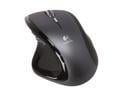
Logitech MX Revolution Black 7 Buttons 2 x Wheels RF Wireless Laser Mouse
Pros: Excellent form: I have medium-to-large hands, and this mouse fits comfortably in my hands. The buttons and dials are all within reasonable reach of my fingertips and don't cause any undue stress on my fingers. It's very sleek. Excellent function: this mouse glides very easily. I have witnessed no skipping or problems at all, regardless of whether its on my varnished desk or mouse pad. Lots of buttons and dials for built in and programmed functions. I'll never use them all, but I could if I wanted. Most of the button functions can be utilized without installing any software. Lastly, the USB receiver is tucked behind my PC across my small office -- no problems with transmission.
Cons: Price. Did I really spend $100 on this thing?
Overall Review: The highlight and search function is cool. I haven't used it too much, simply because I am used to opening a browser and cutting and pasting. I'll get over this. I've tried this with XP and Vista; both work fine. I would buy this product again.
10/6/2008See more detail
Solid and What I prefer
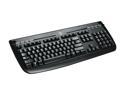
Logitech Internet 350 Black 104 Normal Keys 8 Function Keys USB Wired Standard Keyboard
Pros: This is a basic keyboard with a few extras that take advantage of the functionality of Windows Vista. It's not much more than that. It is thin and appears fragile, but after handling it, it's actually not fragile at all. The keys are soft click, which I love. No stuck keys at this point. Also, it's only 10 bucks.
Cons: To say this keyboard lacks certian features that other keyboards now have is not a "con." I believe "cons" should refer to what a product has and how it performs. At this point, I can think of no "cons."
Overall Review: If you are short on USB ports or don't like using USB hubs because of the clutter, realize that this is a USB keyboard. PS/2 is probably on its way out if it already isn't. Truth be told, I actually selected this because of the "delete" key. I HATE the new keyboards with the large "delete" key that is separate from the HOME/END/PAGE UP/PAGE DOWN keys. Overall: solid, and I would buy this keyboard again. No software required.
10/6/2008See more detail