
Your Browsing History


Roy B.
Joined on 09/02/01
0
0


product reviews
- 49
Great Case so Far (7 hours)
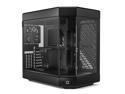
HYTE Y60 Modern Aesthetic Dual Chamber Panoramic Tempered Glass Mid-Tower ATX Computer Gaming Case with PCIe 4.0 Riser Cable Included, Black
Pros: I took my Gen 12 build out of another case and put into this case. I had a 2 fan water cooler in other case as well.. I was getting 40 to 90 degree C when I played my game. GW2. 1) HYTE Y60 Case 2) Asus TUF Z690 with WiFi 3) 12700k CPU 4) Asus TUF 3070 TI Video 5) Rosewill PB360-RGB RGB CPU Liquid Cooler (Diff. 3 Fans 2000 rpm pulling in thru radiator 6) 2 Sets of Samsung SSDs in RAID 0 7) Rosewill SMG Series, SMG1050, 1050W Fully Modular 8) 2 Fans pulling in bottom of case. thru Video and 3 Fans pushing out After working playing with this after setting it up today, My temps have dropped way down. Prior 40ª-90ª C, I had to run my CPU at 4000MHz vs 5000MHz Now, my temps. are 24ª-57ª C the highest core temp. reading - where before 90º C high side I am very pleased with these results at the moment.. Running at 5000MHz Probably could do more now, but I'm good with 5000MHz on the CPU Hopes this helps someone.
Cons: Cost might be a little high, but for the nice looks, the video card sitting on bottom vs. hanging off MB.. I thought I'd have to try this pretty case out.. At moment I'm not disappointed.
Overall Review: I would recommend it.. I watched a video the other night before getting this, showing that this case was hotter than their other test cases. I think their results were a little skewed. I then watched another video of a test between a 2 fan vs. a 3 fan liquid cooler and they showed that almost no lower in temp... I was a little concerned by those results until I started my computer today.. As shown above, my temps. have dropped very nicely and I'm a happy builder..
7/26/2022See more detail
It's FREE

Intel Holiday Bundle 2024 - (Free UBISOFT+ Classics 6 Month Subscription & Free Assassin’s Creed Shadows) - Limit 1 MASTER KEY PER VALID PURCHASE
Pros: I'm just jotting down for those below that can't figure this out - NewEgg.com sends you 1) Email - it has "Product Key" 2) When logged onto the site listed 3) Add Product Key to the Master Key slot 4) Click button 5) There you go - grab your free game and rock.. It will be released on Feb 14 2025
Overall Review: I haven't played yet, Released on Feb 14 2025.. Just letting players below hopefully will see this to get their game..
1/13/2025See more detail
DIYPC Vanguard-F1-BK Black Cases
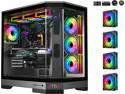
DIYPC Vanguard-F1-BK -Black Dual USB3.0 and Type C Tempered Glass ATX Full Tower Gaming Computer Case w/ 4 x ARGB PWM Fans (3 x MB Side, 1 x Rear) Pre-Installed.
Pros: Same case different name, my 2nd one.. It looks nice, lots of room, I have the AMD Ryzen 7 9850X3D GIGABYTE X870 AORUS ELITE WIFI7 32G G.Skill 7200 Memory Lightly OC to 5.5GHz with temps 43 to 64 by using a great CPU grease Cooler Master CryoFuze W/m.k= 14m I set voltage - 20 with CPU Volt 1.18
Cons: Unfortunately the MB shares 2) M.2 slots with X16 graphic, so I can only use 2 M.2 SSD. If you buy a AMD type of MB check for this .. I see most of these AMD use the same lanes which will cause your fast graphics card X16 to be reduced to X8
Overall Review: If you already have a good running computer and as high as prices are right now, I'd wait.. I got lucky and ran across an old Memory price saving over $400, then my other components with discounts in a combo is why I went ahead on this build..
4/18/2026See more detail
GIGABYTE X870 AORUS ELITE WIFI7

GIGABYTE X870 AORUS ELITE WIFI7 AM5 LGA 1718, ATX, DDR5, 4x M.2, PCIe 5.0, USB4, Wi-Fi 7, 2.5GbE LAN, EZ-Latch, 5-Year Warranty
Pros: I used this GIGABYTE X870 AORUS ELITE WIFI7 MB with AMD Ryzen 7 9850X3D CPU.. It suppose to be the fastest CPU on the market.. I have the Intel Ultra 265, not sure if I can any difference in the work or game speed.. I have it boosted to 56Ghz with temps 43-64 range using a high quality CPU grease Cooler Master CryoFuze W/m.k= 14m..
Cons: What grips me is on the M.2 SSD slots I can only use 2 M.2 SSD losing all the other slots or my 5080 Graphics is cut down to 8 vs 16.. I could buy an expansion card, but then it would take up another slot.. LOL..
Overall Review: When buying a MB for the AMD brand, be sure to check how many M.2 Slots that you can really use without losing over Graphic card slots..
4/17/2026See more detail
AMD Ryzen 7 9850X3D
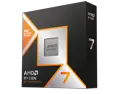
AMD Ryzen 7 9850X3D - Ryzen 7 9000 Series 8-Core 5.6GHz - Socket AM5 120W - AMD Radeon Graphics Desktop Processor - 100-100001973WOF
Pros: I've been using this CPU for less than a month and so far it seems to be working very well. I have it with the GIGABYTE X870 AORUS ELITE WIFI7 motherboard.. I used the high quality CPU grease Cooler Master CryoFuze W/m.k= 14m for the best heat transfer with temps running 43º to highest so far 64º .. I never stress test a CPU.. I just use the programs and games only, to not burn things up..
Cons: NA ATM with CPU but if you buy a MB, watch on these AMD builds especially; if you put all the M.2 SSDs in the slots, you video card is reduced to 8 vs 16.. Check the MB out good and know how many M.2 SSDs that you want before buying..
Overall Review: If you're looking for a new CPU, then this most likely will work well for you.. I bought the Intel Ultra 265 when it came out and wasn't to happy with it, seen a good buy for this CPU and Memory so I went ahead and grabbed it since everything is getting so pricey..
4/17/2026See more detail
SAMSUNG T9 Portable SSD 2TB
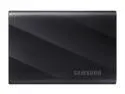
SAMSUNG T9 Portable SSD 2TB, USB 3.2 Gen 2x2 External Solid State Drive, Seq. Read Speeds Up to 2,000MB/s for Gaming, Students and Professionals, MU-PG2T0B/AM, Black
Pros: I did a full Windows 11 backup and noticed it was a little warmer than most SSDs but it was pretty fast.. If it lasts then I'll be a happy buyer.
Cons: Nothing at moment
Overall Review: Good
2/3/2026See more detail
seller reviews
- 5
Gaming Keyboard and Mouse Headset Combo,Rainbow LED
I bought this for the grand-kids, they loved the lights and I haven't heard any complaints.
On-time
Delivery
Product
Accuracy
Customer Service
Satisfactory
11/18/2024See more detail
WAVLINK USB C to SATA III Hard Drive Adapter Cable, SATA to USB C
This worked really good for an old HDD that I needed to copy some files from, where those adapters without the extra power won't work with HDDs.
On-time
Delivery
Product
Accuracy
Customer Service
Satisfactory
10/4/2024See more detail
Test results Why I bought this
I checked out the best test results for thermal paste before buying a brand. This was like .03 difference in temp and about 1/2 the price.. Guess what I bought. After changing from a 2 fan liquid cooler to a 3 fan Rosewill, and this thermal paste, my temps. went from 40-90 down to 24-66.
On-time
Delivery
Product
Accuracy
Customer Service
Satisfactory
8/1/2022See more detail