

Your Browsing History


Virgil V.
Joined on 08/11/16
0
0
product reviews
- 1
Best option for the price currently, you will need to update the BIOS
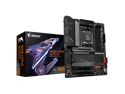
GIGABYTE B650 AORUS ELITE AX AM5 LGA 1718 AMD B650 ATX Motherboard DDR5, M.2, PCIe 5.0, USB 3.2 Gen2X2 Type-C, WiFi 6E, 2.5GbE LAN, Q-Flash Plus, EZ-Latch
Overall Review: Works amazingly, however you will likely need to update the bios before it works. I had a Ryzen 5 7600x and 32GB of DDR5, and it would not boot until I did. To update, you will need a FAT32 USB drive (some of them are fickle, older USB2 ones work better), download the latest BIOS from the manufacturer website, put it on the USB and rename to GIGABYTE.bin, insert the USB into the USB port labelled BIOS, and click the Q-FLASH PLUS button on the back of the motherboard with a small screwdriver. If it works properly it will turn on the computer and take several minutes to update. There is a blinking orange light above the button that will turn solid when done. Do not power off during this time.
12/3/2022See more detail