

Your Browsing History


KYLE M.
Joined on 07/25/07
0
0

product reviews
- 12
Was cheaper than the 990 Pro for some reason...
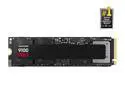
SAMSUNG SSD 9100 PRO 2TB, PCIe 5.0x4 M.2 2280, Seq. Read Speeds Up to 14,700MB/s, Best for AI Computing, Gaming, and Heavy Duty Workstations (MZ- VAP2T0B/AM)
Pros: - It's fast - Was somehow cheaper than the 2tb 990 pro at the time, so definitely check out the price difference when you go to buy if your mobo supports gen5 NVMe. Gen 3 samsung SSD going on 10 years old now, and still works like a champ, here's hoping for the same longevity and performance outta this thing.
Cons: - Price outta whack at the moment, not a substantial enough upgrade over gen 4 NVMe to warrant the cost, but if then gen4 is more expensive, then ehhhh, what can ya do
Overall Review: - Always had good luck / performance from samsung SSDs.
2/22/2026See more detail
Nice case. Terrrrible QC.
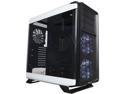
Corsair Graphite Series 760T CC-9011074-WW White Full Tower Windowed Case
Pros: So some/most of the pro's are quite obvious. 1) Aesthetically pleasing 2) Spacious without being way oversized (like working in a ford F150 vs. a honda civic) 3) Thoughtful engineering went into such easily removeable HD drive bays and SSD bays. Glad that you can free up extra airflow where the HD bays sit on the bottom. (By removing them, of course) 4) Cable management is a breeze with this case. Very clean with the gromit holes. 5) Cut-out in motherboard mounting plate for easy access to the back of the mobo behind the CPU. Allows for easy installation of Heatsink bracket. (Don't have to install CPU and heatsink before mounting the mobo) 6) The removeable/hinged door design is nice, as well as the magnetic cosmetic cover for the top. (Though mine came off for the Corsair H105, and the case still looks quite nice anyway) 7) Slot-removeable, washable dust cover for the PSU is a great feature. You'll hardly ever have to pull lint sheets out of your PSU again. (or, being a cat-owner, giant furballs) 8) 2x USB 3.0 and 2x USB 2.0 felt like just the right amount for the front of the case. (For me anyway)
Cons: Case reeked of trouble the moment I pulled it feet first from the box. 1) Noticed the missing rubber foot-pad right off the get-go. I searched for it, quite thoroughly I might add, as it was the first thing that caught my eye. (Just a little glue was all that remained) - Had to rip all the other footpads off so the case wouldnt' wobble on the hardwood floor. Tried cutting one of 'em in half to try and share, but the footpad adhesive is terrible and the pads wouldn't re-stick. Couldn't be bothered to superglue them back on, so no footpads = strike 1. 2) Acrylic / Plexi door. It's nice, it's pretty, but wow, the amount of static generated by those plastic doors is insane. Get them as far away from the case as you can when you're building your new rig, or do the smart thing and using a grounding strap. At least they're hinge remove-able so it's not too bad. But hey, the upside is that plexi sides act like a dust magnet and keep the rest of your case clean. **That and you can vigorously rub the side door panels and zap your friends at lan-parties like the mighty Zeus. (strike 1 and 1/2) 3) Case feels quite flimsy without the doors on. Felt like I was gonna bend it in the installation process. I get that they had to cut material/weight, and the doors seem to add some rigidity when they're on and closed...oh well, minor gripe. (strike 2, a half point from gryffindor) ***4) So I get done putting everything together....cables are nice, neat, tidy, water cooling is in, everything is powered and ready to go ; I push the power on button...and nothing happens. Nothing. No fans spinning, nothing. That lack of foot-pad earlier still disturbed me, so I decided the case had to be the one to blame at that point... Low, and behold, the entire cable group for the front panel case buttons... had been sheared cleanly in two. The severance happened a fair ways near the pin terminal. (wasn't quite plain as day, though not impossible to see either) There was maybe 1-2" of cable left near the connection point. (Strike 3, I'd send this thing back in a heartbeat if it wasn't such a reasonably trivial, albeit annoying fix) How QA/QC could possibly miss that glaring issue is anyone's guess...(unless 100% of the cases aren't being inspected, which very well might be the case, no pun intended...) A defect potentially stopping someone from even turning on their PC at all is just bad...quite bad indeed. Not only that! It seems to be a common/recurring problem, as a previous review mentioned a similar (yet not as severe) issue. Well, whatever...I ended up stripping the wires and reconnecting them as a temp fix, and plan on picking up another harness locally soon, but seriously, what the fail.
Overall Review: If there had been no defects, I would have easily given this case 4-5 eggs. It's nice looking, easy to build in, engineer'd for an easy build in mind... Heck, even with the defects, I so badly want to give the case at least 3 eggs, but they were just so dumb, and easy to catch if proper QA/QC were in place. Worse that the problem is recurring. 2 eggs for you mr. 760T. But at least...it's running now, and looks great paired with my MSI krait edition motherboard. And as was said above, install any optical drives before mounting a water cooling radiator to the top of the case. Also, probably a good idea to mount your fans to the radiator before you mount the radiator to the case. Some of the mobo components (dimm slot latches) will get in the way of your screwdriver.
3/11/2015See more detail
Good case, for sure.
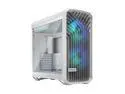
Fractal Design Torrent RGB White E-ATX Tempered Glass Window High-Airflow Mid Tower Computer Case
Pros: - Can tell a lot of thought went into this case...and I think it's praise is well deserved. - Pre-existing cable management options on the backside, and at the rear of the case to manage the typical USB rats nest. - Good airflow, and the fans are probably worth 1/2 this things pricetag. - 9800x3d + 360mm AIO idles at 38C with PBO, games at around 52-58C. With 2x 180mm mounted on the bottom, the GPU gets all the cool air it could ever want. - Roomy case, and very flexible - Always thought that mounting the PSU at the top of a case made more sense...and it makes cooling the GPU that much easier.
Cons: - A minor gripe...Just wish there was a scoche more room between the motherboard and the bottom of the case...like a 1/2". With the 180mm fans installed, there's exactly 0 clearance between the fan shroud and edge of the motherboard...So some cables unfortunately stick out. - Front mounting the AIO will be a majority of the battle for this PC case, and order of operation is important. If swapping the 180mms to the bottom, then those must get installed before mounting the 360mm AIO in the front... But, I could always run the 120mms on the bottom...Performance over beauty I guess.
Overall Review: - Wonderful case with sleek aesthetics and good airflow, which keeps the PC builder in mind. While seemingly designed for an air-cooled setup, it can absolutely be switched to AIO or water-cooled, and still perform well.
2/22/2026See more detail
Things insane...
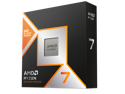
AMD Ryzen 7 9800X3D - Ryzen 7 9000 Series Zen 5 8-Core 5.2 GHz - Socket AM5 120W - AMD Radeon Graphics Desktop Processor - 100-100001084WOF
Pros: - It's fast - It goes faster when you undervolt it... - She games, for sure. Doesn't seem to run *too* hot, even before PBO curves were applied. Using an msi mag i360 with Grizzly duronaut, initial burn-in was a stable 70C. After PBO, temps hovered around 67-70C. Sits at 38C while idling, and generally hangs out around 55-57C while gaming.
Cons: - None so far.
Overall Review: - I usually get budget CPUs, but not this time...And I'm definitely not sad about it.
2/22/2026See more detail
Good card
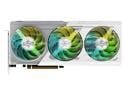
ASRock Steel Legend Radeon RX 9070 XT 16GB GDDR6 PCI Express 5.0 x16 ATX Graphics Card RX9070XT SL 16G
Pros: - @1440p : Paired with 9800x3d, runs Cyberpunk @ 120-144fps max settings (no ray/path trace), runs helldivers 2 at 144fps max settings. - Looks nice - Isn't 12v-2x6, meaning I don't have to upgrade PSU just yet...
Cons: - Doesn't like ray / path tracing so much...so if that's a priority, the extra $250 might be worth it for the 5070 ti.
Overall Review: - Good card so far, at it's current price. Would be a great card at it's MSRP.
2/22/2026See more detail
Didn't skimp this time...
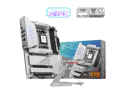
MSI MPG X870E EDGE TI WIFI White Motherboard, ATX - Supports AMD Ryzen 9000 / 8000 / 7000 Processors, AM5 - 80A SPS VRM, DDR5 Memory Boost 8400+MT/s (OC), PCIe 5.0 x16, M.2 Gen5, Wi-Fi 7, 5G LAN
Pros: - It's purdy - Nice board layout, has everything I needed and then some - Ability to flash motherboard directly is nice for peace of mind. - Wifi ended up being better than expected... - M2_1 doesn't lane share! - Straightforward BIOS UEFI, PBO, both XMP/EXPO if you can only get your hands on intel ram in this tight market. - LED utility that works as a temp monitor afterwards is very nice to have.
Cons: - None so far.
Overall Review: - You get what you pay for.
2/22/2026See more detail