
Your Browsing History


Jorde W.
Joined on 10/03/08
0
0
product reviews
- 20
It's Love!
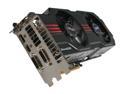
ASUS GeForce GTX 580 (Fermi) 1536MB GDDR5 PCI Express 2.0 x16 SLI Support Graphics Card ENGTX580 DCII/2DIS/1536MD5
Pros: I get very attached to my electronics, and this card has just become my absolute favorite GPU of all time. I ran with Quad-SLI GTX 295s before this, and this card runs my games at the same resolution (1920x1200) at high or very high detail with comparable and even framerates (no microstutter!), plus it is dead silent. It's not just a GTX 580 with a non-reference cooler - this card was designed from the ground up with better circuity and components. It truly is a powerhouse! I'm actually going to list the size of the card as a pro - nothing says "leet" like a triple-slot super-long graphics card! For the install I waited for Windows to do the "found new hardware" pop-up and dropped in the CD that came with the card. Windows installed the driver and the card ran flawlessly just like that. A one-minute install - I couldn't believe how easy that was! I didn't install the Asus OC programs though; if I ever need to overclock this card I'll use MSI Afterburner.
Cons: This card is heavy, and - like other cards with this kind of cooler - the PCB can flex a LOT when installed in an upright case. I had to use cable ties on the power cables to suspend that end of the card in order to correct the flexing. Hanging something from its power cables is never good but this will have to do until I can come up with something more clever. Without supporting the front end of this card I would be seriously worried about long-term deformation - seriously, this card dipped about 3/8" as soon as I put it in. Be prepared to support this card in some way. This really isn't a con, but it's an aspect of the card design that may ward off some buyers. Better to know up front; I expected it so it wasn't a big suprise.
Overall Review: Do your homework - It's three slots wide, as anyone can see from the pictures here on the Egg, and it's very long. A Corsair AX750 provides plenty of juice for a system with one of these. Beware as some PSUs are rated for 700w but when you look at the fine print they only have 500-some watts available as 12v power (which isn't enough). At this powerband you'll want a single-rail PSU, and modular is always a good option. Google is your friend. Due to the size, SLI may not be an option if you have a lot of other expansion cards (sound card, network card, etc). Bottom line - The Egg is awesome, as always, and if you're in the market for a GTX 580 and have the room to fit it, then this is the card for you. Don't be fooled my the meager factory overclock - that's just to avoid competing with the ROG Matrix 580. This card has massive headroom with its own cooler and holds the world record by a very wide margin for the fastest LN2 overclock ever on a GTX 580. I love it.
3/22/2011See more detail
Missing a CD
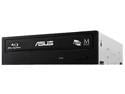
ASUS Black Blu-Ray Burner SATA BW-16D1HT
Pros: It's a great Blu-ray burner
Cons: The one I got was missing the OTHER software CD that includes the Blu-ray player and other items. The only CD I got was for the burning utility. So, I have no idea how well this even works for playback. Very disappointed.
12/1/2013See more detail
Best MATX Case Ever
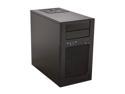
SilverStone Temjin Series TJ08B-E Black Aluminum front panel, steel body Micro ATX Mini Tower Computer Case
Pros: Aluminum and Steel- light and strong; all-black interior; removable hard-drive cage; SSD mounting space is separate from the drive cage; CPU cooler support bracket (finally!); Slot 1 GPU support pad (on hard drive cage); space behind motherboard tray for cable management; black case wiring already tucked and tidy; both side panels and the top come off with thumbscrews; massive quiet 180mm front fan; top vent for PSU intake; sleek and stylish.
Cons: The hard drive cage may interfere with the USB 3.0 motherboard plug depending on the motherboard - watch out for models with a straight-up header on the front edge of the board. This is not a complaint against the case - just something to be aware of.
Overall Review: I was able to fit a Noctua NH U12 CPU cooler with room to spare. This case was truly wonderful to work with. Using two Noctua 120mm fans with a low-speed adapter and setting the case 180mm fan to the low setting, my PC is absolutely silent. I can't say enough good things about this case. Buy one.
11/21/2012See more detail
Review Update
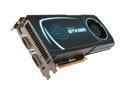
EVGA SuperClocked 015-P3-1582-AR GeForce GTX 580 (Fermi) 1536MB 384-bit GDDR5 PCI Express 2.0 x16 HDCP Ready SLI Support Video Card
Pros: Update to my prior review. Flipped mine thinking that I didn't really need all that power, but seller's remorse hit me something fierce and so now I've ordered another one. Using another less powerful card made me realize how quiet this one really is!
Cons: I love it too much... I don't need the power but I missed it...
Overall Review: There is now a 3GB version available from EVGA for a premium over the 1.5GB version. Be reassured that the higher memory card is only useful for peeps who game at ultra-high resolution across multiple monitors (remember that memory amongst graphics cards is duplicated, not added, as the same information has to be on all the cards at the same time). For us mere mortals this card is plenty powerful.
5/25/2011See more detail
Excellent version of the fastest GPU
EVGA SuperClocked 015-P3-1582-AR GeForce GTX 580 (Fermi) 1536MB 384-bit GDDR5 PCI Express 2.0 x16 HDCP Ready SLI Support Video Card
Pros: I say "fastest GPU" because the GTX 580 is the fastest single GPU that exists right now (the HD6990 and GTX 590 are both dual-GPU graphics cards). Anyhoo this is a reference-design card (meaning it's made the way Nvidia designed it) but the clocks have been upped a bit by EVGA for some extra oomph. They're not charging a very big premium for it so no biggie; the included software from EVGA lets you push the card even further if you want. This card is an excellent performer in games - I play Starcraft II at 1920x1200 and "high" graphics - with this card I can keep vsync enabled and it stays right at 60FPS with no trouble. On "ultra" it's also very capable but it dips down to 40FPS during some of the intense action. But for one GPU to do all that... I mean come on, who's complaining? Also, this card has a full-length metal heatsink on the inside that's thankfully bolted to the exhaust bracket for stability, so this card is very resistant to flexing and twisting!
Cons: The stickers are super-high gloss and attract fingerprints. The card can run hot so I think the default profile for the cooling fan is too low (i.e. lets the card run warmer and quieter instead of cooler and louder). The card may get too hot if your case does not have sufficient airflow as it throws a lot of heat off its back (the side without a cooler). However, this heat load really is typical for any card of this caliper - heck, my old GTX 295 gave out more heat than this and it wasn't nearly as powerful. There's a special backplate available from EVGA; it's made of aluminum. While it may be counterintuitive to put a plate over the side that's throwing off so much heat, the aluminum actually draws the heat off. If you have case fans blowing on the card it stays much cooler with the backplate installed. Better grab one while they're still available!
Overall Review: The first one I got came with a high-flow exhaust bracket already installed. This upgrade and can lower your operating temps by several degrees. Just an FYI - better pick up the bracket direct from EVGA just in case yours doesn't come with one as some of them don't. I think the cooling fan is one of the nicer ones - if you crank it up yes it's loud but all you hear is rushing air. The fan doesn't "whine" like some others. If I hold my hand behind the case I can't feel any airflow at speeds below 50% - for me, 58% fan speed seems to be a sweet spot but I can tolerate 65% speed or more when gaming with headphones on. I have a Coolermaster Stacker 830 with the side fans blowing right on this card and the adjacent expansion slots open (to provide some exhaust for hot air). My card doesn't go over 64C while gaming - even at the specs mentioned in "pros" above. The highest recommendation I can give: I love this card so much that I bought another one.
4/18/2011See more detail
Functional and Easy to Use
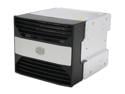
Cooler Master 4-in-3 Device Module Cage
Pros: This is a great module that allows you to install four 3.5" hard drives in the same space as three 5.25" bays, and has a fan at the front of the cage for double duty as a case intake and a cooler for your drives. You can also install laptop drives and SSDs by using 2.5" to 3.5" adapters (Silverstone makes a great one). Can't be beat for this price!
Cons: None
Overall Review: The plastic face and fan assembly can be removed for use in any case with three 5.25" bays available. You can also swap out the fan for a stronger / higher quality one in this way. I did this for use in my CM Stacker 830 and used one of the case's own fan brackets in front of the module to maintain a uniform look. The reason I bought this one instead of using the module that came with the 830 is that this one is aluminum instead of gray steel. It just looks better.
4/4/2011See more detail