


Your Browsing History


Robert K.
Joined on 04/09/02
0
0
product reviews
- 8
Awesome XBMC HTPC
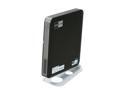
Jetway Mini-Top Atom Dual-Core 525 NVIDIA ION2 with WiFi /Remote Control Mini Barebone
Pros: small & inexpensive. running Ubuntu 10.10 and XBMC Dharma beta 4. Had PCM audio running over HDMI, but haven't tried DD or DTS yet
Cons: fan started making noise after 3 weeks, audio output only on front (not good w/ 1 yr old). remote works as a mouse, but that's about it
Overall Review: After 3 weeks of the remote not working, then working, then not working and never recognized by Lirc, I gave up and ordered a mceusb compatible remote which worked out of the box. As for audio over HDMI, it took some tweaking in Ubuntu, but Google is your friend. until I get a new receiver (since the HDMI daughter board blew on mine), I'm sending audio out through the optical port on the front. now, to find a mini PCIe SSD to put the OS on... since I don't really need the wireless.
11/17/2010See more detail
Random disconnects on USB3 bus. Not usable for a home file server.
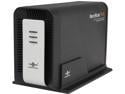
VANTEC NexStar MX NST-400MX-S3 Aluminum / Plastic 3.5" Black SATA USB 3.0 Dual 3.5"SATA to USB 3.0 With JBOD External Hard Drive Enclosure
Pros: sturdy, well constructed case
Cons: random, unexplainable disconnects. linux system logs do not show any communications that indicate that the drives are disconnecting, and the system can't find them after the disconnect (see 'Other' section for more info...
Overall Review: on linux machine, the USB adapter shuts down, causing read/write errors to and from the drive. Accessing the drive does not reactivate it. Rebooting the machine does ont reactivate it, either. Disconnecting and reconnecting the USB bus does not reactivate the drives... It appears the the bus powers down inside the enclosure and does not re-enable unless the enclosure is powered off for more than 60 seconds and then powered back on again.
1/21/2016See more detail
just say no
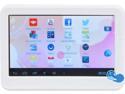
iView CyberPad 420TPC Android Tablet - 1.2GHz 512MB DDR3 4GB flash memory 4.3" Tablet WIFI Android 4.2 White (iVIEW-420TPC-WT)
Pros: small, cheap, android
Cons: slow, touch screen is non-responsive, horrible battery life, it overheats when watching videos or after 30+ minutes of continuous play, didn't come with charger or cable
Overall Review: bought 2 of these for my kids for Christmas, thinking that if they got broken, at least it wasn't a lot of money lost. I should have spent the extra money
2/27/2014See more detail
Works well with ubuntu and xbmc - followup on previous review
Jetway Mini-Top Atom Dual-Core 525 NVIDIA ION2 with WiFi /Remote Control Mini Barebone
Pros: works well with Ubuntu, XBMC, sabnzbd, and sickbeard
Cons: noisy fan, runs a little warm, not enough cpu to handle a usb digital tuner. see previous review and below for more details
Overall Review: owned 4 months. Fan started making noise after 3 weeks & died after 4. Sent to Jetway for repair. 3 weeks gone. Be aware, jetway charges $10 for warranty repairs. I complained & they waved the charge. I moved the hard drive out to the eSATA port & installed an internal SSD as a system drive to reduce heat. Boots in 45 seconds, but fan is still louder than I would like. Not too loud to watch TV, but constant hum when not in use is annoying. I would replace the fan, but it's all soldered together as a single unit. I also use this machine to run sabnzbd and sickbeard for tv "subscriptions" and it works wonderfully. an awesome combination if you're not familiar with it. Recently, I tried adding mythtv with a hauppauge WinTV-HVR-950Q usb tuner for live tv viewing. Using dvb-apps and mplayer, I can get ATSC video and audio, but not smooth or in sync. And I haven't been able to get mythtv to work at all yet. I will probably have to move the backend service to another machine.
2/19/2011See more detail
Works with XBMC on Ubuntu!!!
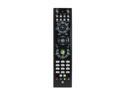
AVS Gear GP-IR01BK Windows Vista Infrared MCE Black Remote Control
Pros: basic functionality worked with XBMC on Ubuntu right out of the box. full functionality only required installation of the Lirc package
Cons: the power button will power off, but doesn't power on my HTPC (yet... I'm still experiementing)
Overall Review: I have this on my HTPC running XBMC on Ubuntu. I believe that XBMC Live loads lirc out of the box, but if you're running XBMC on top of an Ubuntu workstation install, you may have to manually install the Lirc package. But, that's all you have to do. I ran some tests and Lirc recognized the remote immediately and detected every button correctly.
11/17/2010See more detail
Great HTPC keyboard
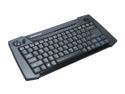
IOGEAR GKM561R Black 2.4GHz Wireless HTPC Multimedia Keyboard with Laser Trackball and Scroll Wheel
Pros: durable, compact, built-in trackball, most multi-media keys work with XBMC on Ubuntu right out of the box
Cons: as others have noted, the ball is a little loose. no number pad. the HOME, END, PgUp, & PgDn keys require Fn+ combo keystroke
Overall Review: I would have preferred a touchpad over a trackball since this keyboard will spend most of its time on the couch and/or coffee table (where the chips are), but the keyboard that I originally got that had a touchpad, didn't work as specified, so I went with the one with the best reviews to match my setup.... and I'm very happy that I did.
11/17/2010See more detail