
Your Browsing History


ratta k.
Joined on 04/10/02
0
0
product reviews
- 12
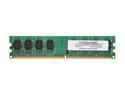
AllComponents 1GB DDR2 800 (PC2 6400) Desktop Memory Model AC2/800X64/1024
Pros: been working good for a few years now
Cons: na
1/6/2011See more detail
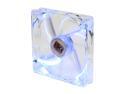
XIGMATEK FCB (Fluid Circulative Bearing) Cooling System Crystal Series CLF-F1451 140mm Blue LED Case Fan PSU Molex Adapter/extender included
Pros: Quality quiet motor and bearing, though when i bought it it wasn't called an FCB. Bought it to replace my power supply fan which had a noisy ball-bearing fan (even at low speeds). Run this at a steady and truly silent ~500 rpm (50% off of the motherboard controller) and is truly silent. At this speed it wouldnt cool the power-supply enough under load so I flipped both the power supply and the fan so it vents up in to the system (yes I know it sounds bad :P) so it's going with the way the heat wants to naturally convect and it cools adequately. So I have a quadcore 3ghz 100watt cpu with giant Scythe Ninja3 heatsink (wonder why newegg discontinued Scythe products which are quite good), 150watt gpu, and PSU all venting out the top and it stays within temp limits under full load all dead silent. Total power drain ~330 watts. nice.
Cons: Bought this hoping to get a rebate available at the time. WAsted my time filling out and sending it in on time. Dont trust Xigma for rebates!! A bit pricey for a fan. Considered taking off an 0 for that : o
8/22/2013See more detail
Not too hot
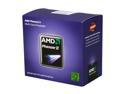
AMD Phenom II X6 1075T - Phenom II X6 Thuban 6-Core 3.0 GHz Socket AM3 125W Desktop Processor - HDT75TFBGRBOX
Pros: Lots of processing for the money
Cons: Not a lot of programs that can use 4 cores effectively let alone 6
Overall Review: I read a number of reviews here (and elsewhere) and see people all too often complaining of their chip running too hot. With all due respect, temps in the lower 50s C are not even close to too hot. These chips are rated to at least 70c some even up to 100. The engineers who design these would not rate them as such if they weren't able to run fully reliably at these temps. You are not getting hot till you are at least at 60c so its really a waste of time, money, and fan noise to fret about it. Unless you are yourself an engineer you probably don't have a reasonable basis to be second guessing the engineers who designed these and set the specs. Sorry for the little rant but hate to see people worrying unnecessarily:]
12/6/2011See more detail
Not too hot
AMD Phenom II X6 1075T - Phenom II X6 Thuban 6-Core 3.0 GHz Socket AM3 125W Desktop Processor - HDT75TFBGRBOX
Pros: Lots of processing for the money
Cons: Not a lot of programs that can use 4 cores effectively let alone 6
Overall Review: I read a number of reviews here (and elsewhere) and see people all too often complaining of their chip running too hot. With all due respect, temps in the lower 50s C are not even close to too hot. These chips are rated to at least 70c some even up to 100. The engineers who design these would not rate them as such if they weren't able to run fully reliably at these temps. You are not getting hot till you are at least at 60c so its really a waste of time, money, and fan noise to fret about it. Unless you are yourself an engineer you probably don't have a reasonable basis to be second guessing the engineers who designed these and set the specs. Sorry for the little rant but hate to see people worrying unnecessarily:]
12/6/2011See more detail
lowest performance/price
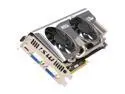
MSI GeForce GTX 580 (Fermi) 1536MB GDDR5 PCI Express 2.0 x16 SLI Support Graphics Card N580GTX Twin Frozr II/OC
Pros: Highest performance
Cons: This only has ~50% more cores than a gtx460 meaning it will only perform about that much better yet costs about 400% as much. Obviously if you're buying this you have more money than you know what to do with. You can either give it to me, or give it to charity. Seriously though, you should get one or two 460s (the 768mb are the best deal) give the difference to either me for my advice or charity. Thank you. ;)
4/21/2011See more detail
Silent but Deadly
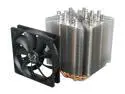
Scythe Ninja 3 SCNJ-3000 120mm Sleeve CPU Cooler - Retail
Pros: I bought this because it is the highest surface area for the dollar I could find. Surface area is *the* main factor affecting heatsink performance. The beauty of this heatsink (other than the fact that it looks beautiful) is not that it will necessarily cool lower than others, but that it will do a perfectly adequate job completely silently. It keeps my Athlon x4 3Ghz < 50C under 100% load with the fan spinning at an absolutely silent (and when I say "silent" I mean it unlike some people who really should be saying "quiet") 500 or so Rpm. I installed the fan on the bottom blowing the hotair the way it naturally wants to go out the top vent. I like the fact that it is almost like a cube and the fan can go on any side.
Cons: Don't know why people give a bad rating for instalation difficulty. It should only be a onetime deal for most and it more than makes up for it in performance and reliability. I took the recommendation of laying the MB on top of it upside down. It also helps to have steady hands and line things up carefully. Some people are more suited to these tasks than others. It will probably fit in most mid towers, albeit tightly. Personally I think fancy thermal paste is way overrated (what difference is a couple degrees anyhow?) so I went stock on that.
Overall Review: The laws of physics mean that your temp is going to have to be significantly above room temperature no matter how big your heatsink is and how fast your fans are turning. No point in fighting it, especially when the chips are rated to 70+ They wouldn't rate them as such if they couldn't withstand this temp for years of service and who plans to use their computer for more than 10 years anyhow? I find it amusing how many seem to obssess over cooling but then seem eager to upgrade after just a couple of years for just a 20% or so performance boost (I know it's fun buying new things, but think of the environment). My rule is its not worth upgrading, unless you can at least double your performance (especially when you keep the environment in mind) though I just more than quadrupled my performance in my recent upgrade from my 8y old C. Any way, you're not imho getting hot till you hit 60C and up and you're still within the limit so why put up with a bunch of noise to just get a bit cooler?
3/24/2011See more detail