
Your Browsing History


Terry B.
Joined on 12/09/05
0
0
product reviews
- 12
One Great Case
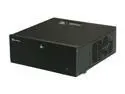
SILVERSTONE Black Aluminum / Steel Grandia Series SST-GD07B ATX Media Center / HTPC Case
Pros: Well thought out . Built to last . Holds eatx+ m/b (see cons). Has all parts and screws that you'll ever need . Accepts big video card (as long as you don't need all 4 h/d (3 1/2") slots . Will accommodate a larger CPU cooler . No hard drive vibration detected with 4 7200 rpm hard drives installed and running (solid cage and attachment arrangement) . Good cooling with extra fan slots and multiple sizing . Power switch can be locked with faceplate along with muted power on LED brightness (blue , so not annoying)
Cons: My m/b (990fxa ud7) has the 90° data connectors on back side of board. With the full size fans installed , cannot use them . Have to use smaller fans . Another 1/4"-3/8" would've made a big difference . But how many put such a large board in htpc ? Once you install CD/DVD drive(s) , the drive cage gets tricky (and heavy) to line up and install (no problem at all if this is first step , but a hard drive will fail eventually , and to remove , cage has to come out .. unless you only screw one side)
Overall Review: I put ALOT of components in this case . 4 h/d , DVD , fan controller, 5 1/4" backplane cage (holding 4 ssd) , eatx m/b , sea sonic x-series p/s , 8 1/2" long video card, raid card and 7 cooling fans (did not use those supplied , arctic fans only...very quiet) . The airflow keeps it all cool . I left the inside 5 1/4" vertical drive slot open for some of the extra cabling (in a good spot to tuck the excess) . I am glad I did not need the slot...though it seems a cavernous case at first , it fills up quickly . Planning and patience is required if you want to fully utilize the case options .
1/3/2014See more detail
Love 'em
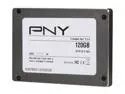
PNY Prevail 2.5" SATA III SSD9SC120GEDE-PB
Pros: They're SSDs. Fast . Easy to install . Long life ! PNY backs this series for 5 years to consumers with registration . Assembled in USA . Very solid , all metal housing.
Cons: Just like all others , only 111.xx G available space.
Overall Review: I have 4 of these in a RAID5 boot array (Adaptec RAID card) that have been running non-stop for 3 months now. No crashes , no loss of data , no nothing . Just fast SSDs working as intended . I did not change bios , try to over-provision , run a boatload of tests , or anything else . I put them into a backplane cage , installed and hooked em to the RAID card , and started using them . I have them in a HTPC I rip my movies with (tons of temp files !!) so the 10k cycle was of importance to me . Glad I didn't pay particular attention to the other reviews here . These things have very high end flash memory (enterprise) and solid , proven controllers . Just go to tweaktown.com and search the review there . Highly recomended ssd !!
3/6/2014See more detail
Great Card
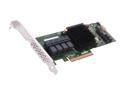
Adaptec 2274400-R 71605Single PCI-Express 3.0 x8 Low Profile Ready SATA / SAS RAID Controller Card
Pros: Small form factor. Easy to install. Set up is not as complicated as some make it out to be. Card does ALL raid calculations onboard. Windows just sees a disk . Has options for just about any array possible. Maxview Storage Manager is easily navigated . Reads all smart attributes . RAID migration is easily done. Can set power saving setting for drives , arrays , and the card itself . It will email any reports to you.
Cons: Must read instruction manuals . This is not a plug and play item . Card does run warm @ ~68C . Maxview says this is normal. I am no noob . But I still read manuals. Maxview Manager must have same password as Windows. Then , every time you login , you MUST also logout . Cannot just close the window. If you do not , system has to be restarted.(This is MY observation...not in directions). I only access locally,so I cannot comment on remote access to arrays. BIOS takes ~45 seconds to load and check array status.
Overall Review: I have this card running a 4 SATA SSD RAID5 boot array and a 4 SAS Hard drive RAID5 storage array. Have been up over 3 months now with no errors or problems. I have the SAS drives slow down , then park , recheck in 8 hours. Also have the back-up capacitor/board installed. This thing is fast ! For writing to a RAID5 , I was worried about the temp files for ripping DVDs . With NO GPU acceleration , only compute from CPU and temp bins , I rip full movies in under 8 minutes. Windows7Pro boots in 3-4 seconds AFTER this boards' BIOS loads . This is only thing I wish I could change..BUT..it is designed to run 24/7 and the cold hard fact is my machines last longer and have fewer problems (read as:Windows errors) when I leave them always on. I use this in a HTPC/Media Server I built. So glad I paid no heed to the other two reviews here. I am happy with this purchase !
3/6/2014See more detail
Silverline 1333
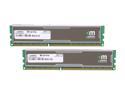
Mushkin Enhanced Silverline 8GB (2 x 4GB) DDR3 1333 (PC3 10666) Desktop Memory Model 996770
Pros: Recognised and booted Gigabyte 870A-UD3 no problems . Fast and no frills . Don't overclock so I don't need big heatspreaders/tubes/fans etc... These hardly get warm to the touch when stressed @ 1.5V and default timings .
Cons: I bought before price drop . :(
Overall Review: 3rd Mushkin purchase and counting . No failures yet !
12/5/2010See more detail
Shark
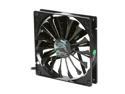
AeroCool Shark 140mm Black Edition 140mm Case cooler
Pros: Really , really good product. Sleeved cables are long enough for any placement . Included voltage reducer works if you cannot connect to MB for fan control .
Cons: None I know of.
Overall Review: Can be loud at full speed (but moves ALOT of air) so either use MB smartfan if possible or start with reducer and check temps . Fan controller is an option , but more $$ .
12/5/2010See more detail
870A-UD3
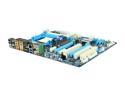
GIGABYTE GA-870A-UD3 AM3 AMD 870 USB 3.0 ATX AMD Motherboard
Pros: Posted 1st try . Works as advertised . Looks good . Recognised my 970 BE BEFORE updating to F4 Bios even though not officially supported until F4 . More sata ports than the other (non-AMD) guys for same $$ (or even more , for that matter)
Cons: Needs a MOSFET heatsink . Overclock or not , if you want a board to last , get heat away . Enzotech MST-88 C1100 is a perfect fit , but Gigabyte should have included one with a board that supports 125W cpus . Note to Newegg ... order a bunch more MST-88's . Anyone buying this board will eventually buy one of those and you're always out of stock . :(
Overall Review: Anyone else only getting ~2000MHz hyperthreading out of 970BE instead of 4000MHz advertised ????
12/5/2010See more detail
seller reviews
- 1
Excellent Service
Very fast order fulfillment . Great communication of where your order is in the process .
On-time
Delivery
Product
Accuracy
Customer Service
Satisfactory
5/2/2014See more detail