




 here!
here!
I’m your shopping assistant for PC builds, upgrades, and everything tech.
Got questions? Ask away!
Start a conversation
here!
I’m your shopping assistant for PC builds, upgrades, and everything tech.
Got questions? Ask away!
Start a conversation

Joined on 09/29/10
It controls ARGB
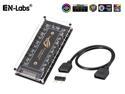
Pros: -It controls at least 12+ amps of argb devices at max brightness -Cheap -Easy to set up
Cons: -Controller plastic cover was not protected and came scratched and scuffed -Pins do not have a tight connection (just don't shake your PC and connections should hold though) -Mobo to controller ARGB cable was a little on the short side, might limit placement of unit in larger cases or require daisy chaining with splitters to get a device cable that can't reach
Overall Review: Came in an anti-static bag inside bubble wrap inside a bubble wrap envelope and was still scuffed/scratched. Plastic cover is a little cloudy and not completely clear. The velcro was pretty strong and I had to peel it carefully so it wouldn't pull the back off the controller. Not the best looking hardware but it gets the job done so far and it was cheap. One egg off for lower quality appearance and slightly loose connections.
Mouse has issues tracking on surfaces made for mice or being used like a mouse.....
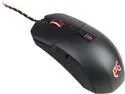
Pros: - LEDs are bright - Button clicks are more robust feeling than DeathAdder Chroma. - Works fine on a flat surface like wood.
Cons: - Has MASSIVE issues tracking on my game pad I got with an i5 760. It jumps, skips and lags all over if I place it on the game pad. - The 20g( 4x 5g) weights in the back of the mouse make it tiresome to use. I took them out and it feels much better. - The middle and back LEDs are stuck on red. - It has trouble tracking if you like to lift the mouse for repositioning. It will jump.
Overall Review: Only the mouse wheel is capable of changing colors. In use it will be the color of whatever profile you are using(red, yellow, cyan, green and violet). The AFM will do a breathing color sequence where you will find the wheel LED is actually capable of making even more shades and this leads me to wonder why they didn't do that for the whole mouse from the start as a setting while in use. If it wasn't for the horrible, spastic tracking I would have given it 4 or 5. At least I got it free with hardware I bought.
Great ASUS quality as usual
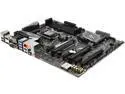
Pros: - It has all the connections I need. - Cool lights. - Black PCB goes with anything.
Cons: - LEDs are limited to the sound chip and a few lights near the power connector. Could have put some around the other 2 sides. - 2 of the SATA connections are under where a GPU like the EVGA GTX 1060 FTW will go and they are horizontal. I prefer vertical and not under stuff. Only a small negative. You won't be able to use angled cables here. But I don't like them either so I don't use them.
Overall Review: - The I/O shield that comes with this has a bit of a foam cushion between the metal face plate and the metal film on the inside so you may need to push very firmly on the mobo while trying to screw it onto the stand offs.
I know the LEDs don't make it go faster, but that's not the point...
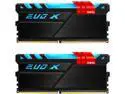
Pros: - Running them @3200 w/ XMP on ASUS Aura mobo. Played FO4 a few hours last night and no problems. - Was in a combo so it was discounted.
Cons: - Not all mobos have RGB headers. ASUS Aura does not, it only has onboard LEDs. You will be limited to the cycling(breathing) or single color RGB using the white fan power connector.
Overall Review: If you put ground effects on a car why not do something similar to your awesome custom built PC? Put those sour grapes down, boy. ;)
Intel CPU
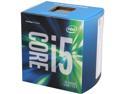
Pros: It's working.
Cons: It costs money.
Overall Review: 11/10 would buy again.
Interesting case...
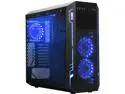
Pros: - Came with 5 RGB LED fans as described - The windows looked really dark even when taken off but are actually quite clear with the lights on. - Not too heavy even with all the parts in it.
Cons: - The fan speed switch did not make full contact and thus the fans were not working at first. I had to jiggle the switch into position to make contact and close the circuit. - Only 6 mobo stand offs are put in by the factory. They make you put the other 3 in yourself. Wouldn't be bad except the holes they drilled on mine were WAAYYYYY too small. I was able to get them in, albeit not perfectly straight, with needle nosed pliers and my hands were very sore. (Use gloves xD) I basically drilled holes in steel with tiny screws and a hand tool. - The 3.5 HDD bays in the cable management area are only far enough away from the window for the bay to be between it and the HDD meaning if you have a modular PSU like EVGA's SuperNOVA that comes with only power plugs perpendicular to the cable, you either have to bend the cable back at 90* or put the HDD in the 5.25 bay. - If you want to put the 3.5 HDD in a 5.25 bay you have to use something like an Icy Dock and put it in BEFORE laying an ATX mobo in. Mobo will sit too tall and too close and the dock will not go in. Also, there are hooks and a raised area lending themselves to the trouble. - Cable management ports are too close to the 2.5 bays meaning if you have to use them you will have to turn the SSD around with ports facing the front. Might be an issue, might not. - The 5.25 bays can only be opened by taking off the front, detaching connected wires beforehand, punching out the outside covers then also punching out the mesh cover from the inner layer that are connected by chads on either side.
Overall Review: -Most of it is what appears to be good quality to me. The window screws have a back on them to protect the window from scratching and the adhesive(?) gives it a cheap look but the rest is fine. - If you use SSDs primarily, don't use any angled cables, or don't mind dismantling half the case this one should be fine. - They could have given the cable management space a half inch or something and still had plenty on the other side. That would negate the issues with hard drives and cables. Still would be a pain to get optical drives in if you use them. Fortunately I don't. Coming from an Apevia mATX Q-Pack2 this was quite an experience.


