

Your Browsing History


Kenneth Y.
Joined on 06/22/08
0
0
product reviews
- 4
Incredible, flexible ITX enclosure
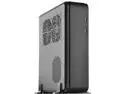
SilverStone Fortress Series SST-FTZ01B-E Black Aluminum unibody frame, steel chassis Mini-ITX Computer Case
Pros: - Room for an ATX PSU, but this would limit space for cables - Can accommodate full-size GPUs, no need to settle for an ITX-specific card - Plenty of ventilation for positive pressure cooling setups - Magnetic air filters that have a negligible effect on cooling performance
Cons: - Limited space for cable routing, but that's typical with any SFF case - Stock fans are not PWM, which I would expect considering the price
Overall Review: When I built my first PC back in 2008, I went with the NZXT Tempest. The Antec 900 seemed to be what everyone had and I didn't want to be like everyone. The Tempest proved to be more fragile than I anticipated. I broke tabs for the plastic top panel trying to remove it from the case. My second case was the Fractal Design Define R5. Beautiful case, but I grew tired of its cumbersome footprint after having to move it about half a dozen times in three or four years. This is where my desire to go ITX was born. I researched a lot of ITX and ATX cases. I eventually narrowed my choices down to the FTZ01 and FTZ01-E. I would have loved to have space for my 3TB P300 HDD, but I never had any intention of using the slim-slot DVD area. I also liked the cleaner front panel of the FTZ01-E. I considered the RVZ01 and RVZ03, but I didn't like the plastic shell of the RVZ01 and I want as little RGB in my build as possible. Installing everything in this case proved to be somewhat of a challenge and required a bit of forethought and creativity, more so than a typical tower enclosure. There's much less space for cable routing so you have to make efficient use of every cubic inch possible. Space becomes even more of a premium if you use SATA drives like I did. I would recommend using no more than three. The mount toward the front of the GPU caddy is difficult to route for while the other three are fairly straightforward. My system currently: - i9-9900KF - ASRock Z390 Phantom Gaming ITX/AC - Scythe Big Shuriken 3 w/Noctua NF-A12x25 PWM - Crucial Ballistix Sport LT 2x8GB DDR4 3200 CL16 - EVGA GTX 1070 ACX 3.0 SC - Samsung 970 Evo 500GB - Samsung 850 Pro 500GB x2 - Samsung 850 Pro 250GB - Seagate FireCuda 2TB - be quiet! Silent Wings 3 120mm High Speed x2 Unfortunately this setup can't adequately cool the i9-9900KF. This is partially due to the cooler compatibility of the case. However, if I limit turbo frequencies for the higher core usage, I can get by without being thermal throttled in stress tests. I'm not thermally throttled while gaming, but temperatures do get quite high. I will eventually switch to AMD so I don't have to worry about being thermally throttled or figure out how to put a custom loop in this thing. I have seen build logs of custom loops in similar SilverStone cases. Overall, I'm very pleased with this case. I wanted something console-sized without compromising component power and this case has that covered. Now I just need to find a bag to carry everything when I travel.
9/20/2019See more detail
Impressive Low Profile Cooler
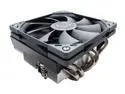
Scythe Big Shuriken 3 Low Profile 120mm CPU cooler
Pros: - Low Profile: 69mm in height with 15mm fan, 79mm with 25mm fan - Incredibly easy to install
Cons: - No option for push-pull like some other competing low-profile coolers
Overall Review: I cannot stress enough how easy this cooler was to install. You install the backplate, you apply thermal paste to the CPU, you line up the cooler, then you tighten down the screws. It's so simple and straightforward and the easiest cooler installation I've experienced. The fan comes pre-installed, but a screwdriver fits between the blades just fine so this just adds to ease of installation. The fan mounting is a little trickier because the mounting holes aren't that deep, but it's straightforward and still easy. Scythe includes mounting screws for a standard 25mm fan in case you want to replace the slim fan with one that has a little more static pressure for increased cooling performance. As easy as this thing is to install, I managed to mess it up. I thought I might have messed up applying the thermal paste, but coverage was adequate. I thought the included paste may not have been up to snuff and the slim fan wasn't strong enough to help cool my i9-9900KF, so I ordered Thermal Grizzly Kryonaut and an Noctua NF-A12x25 PWM. My temperatures improved slightly, but I still didn't install the cooler properly. I thought I had the screws tightened all the way down, but one of them wasn't because it wasn't aligned with the mounting hole properly. I cleaned off the paste and played around with mounting before reapplying paste to make sure I was doing things correctly. Found out I wasn't, reapplied Kryonaut, and made sure to install the cooler properly. After I figured everything out, my temperatures were finally within expectations. The Big Shuriken 3 can't handle the heat an i9-9900KF can produce under AVX loads, but it's more than adequate while gaming. Before installing the cooler properly, I was seeing temperatures flirt with 100° C while gaming; after installing the cooler properly, I see temperatures peak around 81° C while gaming. This might be warmer than most users would like, but it's well within spec. I knew I was going to have to make some compromises with a furnace inside a SilverStone FTZ01-E, but this cooler at allows for acceptable temperatures at stock boost clocks under typical gaming loads. I can't ask for much more than that. I recommend doing a dry run to make sure you know how to install the cooler properly. One screw rotating more than the other was a red flag for me, but I was too excited to get things up and running to explore that any further. In hindsight, it was rather foolish of me to move on with the rest of the installation. I took off one egg because I would like the option for a push-pull configuration. I planned on going with the Noctua NH-L12S, but it was sold out everywhere when I was purchasing my components. The Big Shuriken 3 performs similarly so I'm overall very pleased.
10/15/2019See more detail
Lots of capacity
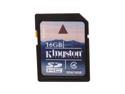
Kingston 16GB Secure Digital High-Capacity (SDHC) Flash Card Model SD4/16GB
Pros: 16GB. That's a lot of pictures. On my SD850 IS, it's a little over two hours of video.
Cons: Class 4, but whatever.
Overall Review: I bought a couple of these to take video at a concert, but my battery died way too quickly. It's my fault for not charging it. I have three Kingston SD cards and I'm pretty sure I'll stick with them until they give me a reason to do otherwise.
12/3/2008See more detail
Nice fans
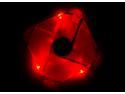
Thermaltake A1927 120mm Red LED Case Fan
Pros: The fans aren't nearly as loud as I thought they would be. I read other people complaining about their volume. I have three of these, three other 120mm fans spinning at ~1900rpm, two 92mm fans and a couple 140mm fans and I can't hear the Thunderblades above the rest.
Cons: Not really a con, but the red wasn't as bright as I hoped. It's definitely red, though, and that was my biggest concern before ordering.
Overall Review: I have two of these setup as intake fans on the from of my NZXT Tempest and the other is in the side window. I only bought this fan because the ones I wanted are discontinued. I can't complain with what I have, hence the four eggs.
11/19/2008See more detail