
Your Browsing History


Alexander L.
Joined on 07/02/03
0
0
product reviews
- 25
Low wattage with high amperage
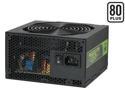
CORSAIR CMPSU-450VX 450 W ATX12V V2.2 80 PLUS Certified Active PFC Compatible with Core i7 Power Supply
Pros: Good value for a reliable power supply. This is probably the most clean and silent power supply straight out of the box I've owned. So many people mistake high wattage for what they need exactly. Look at your components, and see how many AMPs you need per rail not what the total wattage displays. 33amps on a 12v rail is just ridiculous; not to mention the 3.3v & 5v are at 20amps. I'm running pretty high end stuff with a 450watt PSU with absolutely no hickups. I'll list it below since I'm running out of space here. Also, this is an 80 PLUS PSU, which will keep your bill down for the cheapo Asians that we are. ;)
Cons: None
Overall Review: My parts: - Intel Q6600 Quad-Core CPU - Abit P35 Pro - 4gb (4 DIMMs) Corsair XMS Dominator RAM - 2x 500gb Samsung Spinpoint 7200rpm 16mb cache HDs - PNY 8800GTS 320bit 320mb - Samsung DVD/CD burner All running off 450watts with no problems whatsoever. Don't be tricked by the gimmicks of high wattage PSUs.
12/24/2007See more detail
Clean, Quiet, and Cool
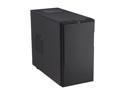
Fractal Design Define Mini Black Silent MATX Mini Tower Computer Case
Pros: 1. Clean, solid, and well-built. 2. The sound dampening material is made very well that is effective. 3. The stock fans are quiet, as well as push and pull a fair amount of cool air through. I have my motherboard set to slowest fan speeds for the chassis and CPU fan, and everything runs at 30c. It will almost never run at load, since I'm running this for my FreeNAS file server. I'm happy with the purchase, and I would recommend it again.
Cons: None
Overall Review: Rig: Intel G630t Asrock H77M ASUS DVD-RW drive 2x 3TB Western Digital Reds 8gb Gskill 1.25v Sniper (only using 4gb for lower power consumption)
12/13/2012See more detail
Decent for the Money
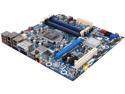
Intel BOXDH67BLB3 LGA 1155 Intel H67 HDMI USB 3.0 Micro ATX Intel Motherboard
Pros: 1. Full of features 2. Boot on the first try 3. Layout is very easy to find the connectors/pins for the front panel
Cons: 1. Unable to adjust the voltage of the memory. This was the main reason why I had to return my motherboard. I opted for low voltage RAM (GSkill Sniper 1.25v), and even though the motherboard lists that it can do 1.20 - 1.90v on their website, it didn't allow me to manually adjust it. Other than this, I would have kept the motherboard. I had to dock an egg for it because it had me frustrated that Intel's website (not NewEgg's fault) would say that you can adjust memory voltage but not actually let you do it. I spent quite some time scratching my head, making sure the BIOS was the correct version and everything. After doing some googling, I realized it's not capable of actually adjusting the voltage to the 1.25v that I was trying to do for my low power RAM.
Overall Review: Rig: Intel G630t Asrock H77M ASUS DVD-RW drive 2x 3TB Western Digital Reds 8gb Gskill 1.25v Sniper (only using 4gb for lower power consumption)
12/13/2012See more detail
Quick
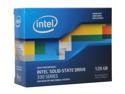
Intel 330 Series Maple Crest 2.5" 120GB SATA III MLC Internal Solid State Drive (SSD) SSDSC2CT120A3K5
Pros: Laptop hard drive died, and I decided to pop one of these in to replace it. It pretty much breathes new life into a year old laptop. Boot times have reduced from ~1 minute to ~12 sec to the desktop.
Cons: None
12/13/2012See more detail
Perfect for FreeNAS OS
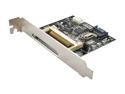
SYBA SD-ADA40001 SATA II To Compact Flash Adapter
Pros: It showed up as a storage disk when it was connected to the SATA port. Everything came up just fine. It was a good investment along with a Transcend 2gb Compact Flash card for my FreeNAS 8.3 OS.
Cons: You do have to align it with the card in before screwing it in because it doesn't sit in the slot right on my case, which I'm sure is consistent with any case with how it was built.
Overall Review: Rig: Intel G630t Asrock H77M ASUS DVD-RW drive 2x 3TB Western Digital Reds 8gb Gskill 1.25v Sniper (only using 4gb for lower power consumption)
12/13/2012See more detail
Low Power & Quiet
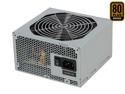
SeaSonic SS-300ET Bronze 300 W ATX12V V2.3 80 PLUS BRONZE Certified Active PFC Power Supply
Pros: 1. 80PLUS Bronze 2. Cool 3. Quiet I'm using this in my FreeNAS file server, and it runs really quiet. Even though everything is setup with air cooling, it still idles all at 30c and very quiet. The only way I know it's on is because the PC case's activity light is super bright.
Cons: 1. Cables will have trouble reaching other components if you have a PC case with a PSU mount at the bottom, like most modern cases. 2. Modern PSUs should switch all the Molex cables to SATA power cables. If you have more than 4 devices, you'll have a little bit of trouble unless you grab some Molex-to-SATA power connectors.
12/13/2012See more detail