


Your Browsing History


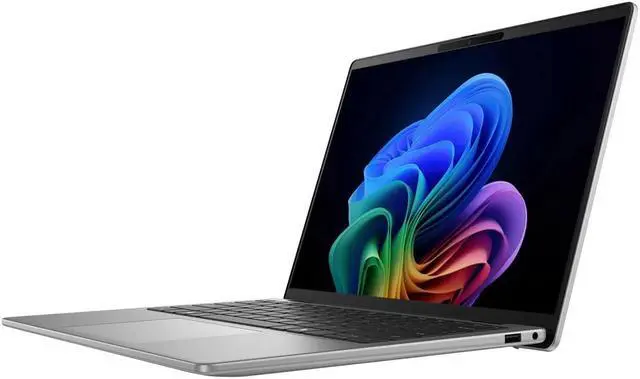
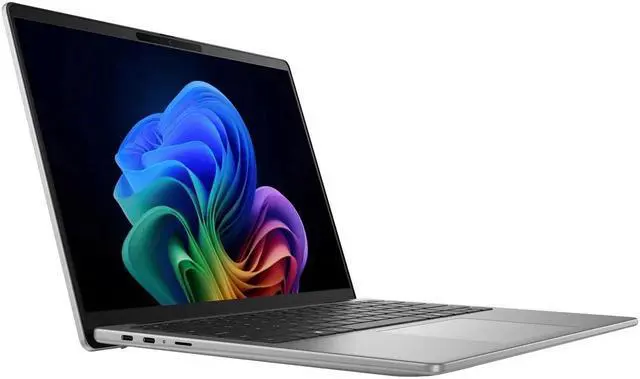
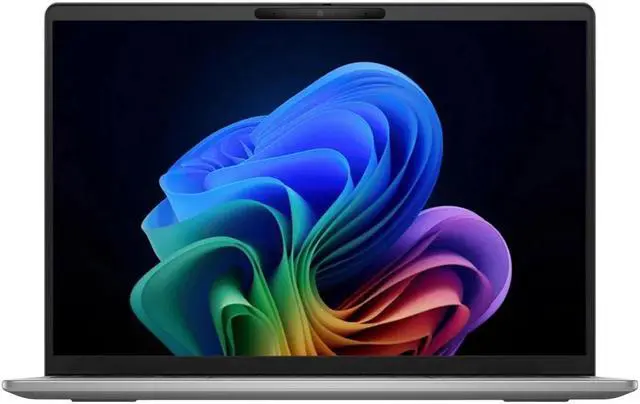
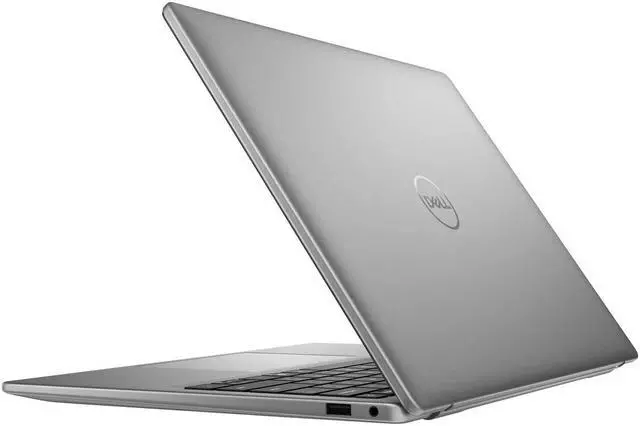
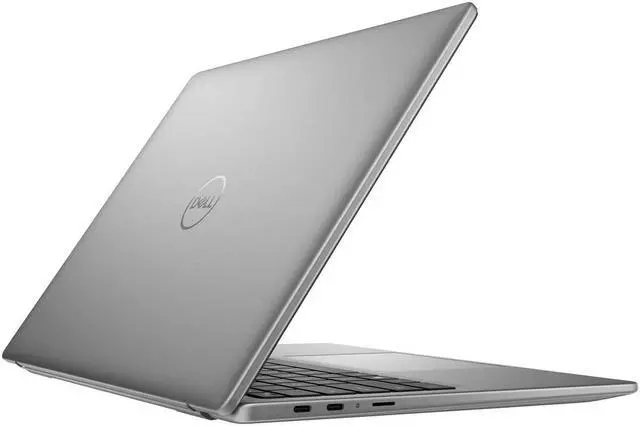


Dell Inspiron 14" Copilot+ Laptop - Qualcomm Snapdragon X Plus Processor (10 Core) - 1920 x 1200 - 16GB Memory - 1TB SSD - Windows 11 Home
- Qualcomm Snapdragon X Plus (10 core) X1P-64-100 Processor
- Wi-Fi 7 and Bluetooth 5.4
- 14" FHD+ IPS (1920 x 1200) 300nits Display
- Backlit Keyboard and FHD RGB Webcam
- Windows 11 Home
Overview
Specs
Reviews
See all Q & A 
Any questions? Our AI mode will help you find out quickly.
Try me now
Ports and Slots
1. USB 3.2 Gen 1 Type-A |
2. Universal audio jack | 3. USB Type-C® Full Function Port (40Gbps, Power Delivery, and DisplayPort) | 4. USB Type-C® Full Function Port (40Gbps, Power Delivery, and DisplayPort) |
5. Mirco SD
Processor & Memory:
Qualcomm® Snapdragon® X Plus (10 core) X1P-64-100 Processor
16GB LPDDR5x RAM
Drives:
1TB M. 2 PCIe NVMe Solid State Drive
Operating System:
Windows 11 Home
Graphics & Video:
14" FHD+ IPS (1920 x 1200) 300nits Display
Integrated Qualcomm® Adreno GPU Graphics
Communications:
Wi-Fi 7 + Bluetooth 5.4
Integrated Widescreen FHD (1080p) RGB Webcam
Keyboard:
Apollo English AI Backlit Keyboard
Ports & Slots:
2 x USB Type C (40Gbps, Power Delivery, and DisplayPort)
1 x USB 3.2 Type A
2x Display Port
1x Headset Jack
1 x Micro SD Card Reader
Power Supply:
65W Type-C Power Adapter
54 WH, 3-Cell Battery
Additional Information:
Dimensions: 12.36" x 8.81" x 0.7"
Approximate Weight: 3.39 lbs
1. USB 3.2 Gen 1 Type-A |
2. Universal audio jack | 3. USB Type-C® Full Function Port (40Gbps, Power Delivery, and DisplayPort) | 4. USB Type-C® Full Function Port (40Gbps, Power Delivery, and DisplayPort) |
5. Mirco SD
Processor & Memory:
Qualcomm® Snapdragon® X Plus (10 core) X1P-64-100 Processor
16GB LPDDR5x RAM
Drives:
1TB M. 2 PCIe NVMe Solid State Drive
Operating System:
Windows 11 Home
Graphics & Video:
14" FHD+ IPS (1920 x 1200) 300nits Display
Integrated Qualcomm® Adreno GPU Graphics
Communications:
Wi-Fi 7 + Bluetooth 5.4
Integrated Widescreen FHD (1080p) RGB Webcam
Keyboard:
Apollo English AI Backlit Keyboard
Ports & Slots:
2 x USB Type C (40Gbps, Power Delivery, and DisplayPort)
1 x USB 3.2 Type A
2x Display Port
1x Headset Jack
1 x Micro SD Card Reader
Power Supply:
65W Type-C Power Adapter
54 WH, 3-Cell Battery
Additional Information:
Dimensions: 12.36" x 8.81" x 0.7"
Approximate Weight: 3.39 lbs
Warranty & Returns
Warranty, Returns, And Additional Information
Warranty
- Limited Warranty period (parts): 1 year
- Limited Warranty period (labor): 1 year
- Read full details
Return Policies
- Return for refund within: 15 days
- Return for replacement within: 15 days
- This item is covered by Newegg.com's 15-Day Return Policy.
- Read full return policy for details.
Manufacturer Contact Info
- Manufacturer Website
- Support Phone: 1-800-WWW-DELL
- Support Website
- View other products from DELL
LOADING...
Learn about this product
The Dell Inspiron 14 Copilot+ Laptop is a 14-inch Windows 11 notebook with a Qualcomm Snapdragon X Plus 10-core processor, built for students, home users, and professionals who want a portable everyday PC with modern AI-ready features, a sharp 1920 x 1200 display, and fast Wi-Fi 7 connectivity.
Recommended For
- Students and mobile office users who spend most of the day in a browser, Office apps, video calls, and note-taking, and want a 14-inch Windows laptop that prioritizes long battery life over peak performance.
- Remote workers and commuters who need a quiet, cool-running everyday laptop for email, meetings, cloud tools, and multitasking away from an outlet.
- Buyers specifically shopping for an affordable Copilot+ PC for on-device AI features and standard Windows tasks, without stepping up to Dell's more premium XPS or Latitude lines.
- Users whose app stack is mostly ARM-native or web-based, such as Microsoft 365, Teams, Zoom, streaming, and light photo/document work, where Snapdragon laptops tend to feel smooth in daily use.
Real-World Use Scenarios
- Working away from an outlet for most of the day: users handling email, web apps, documents, video calls, and note-taking can usually get through a full school or workday with fewer charging breaks than on many comparable x86 laptops, though heavier workloads cut that down.
- General home, school, or office productivity: for browser-heavy multitasking, Microsoft 365 work, streaming, messaging, and everyday admin tasks, the laptop is typically described as responsive and quiet rather than aimed at demanding creator or gaming workloads.
- Frequent video meetings and remote classes: the built-in 1080p webcam, wireless-focused design, and Copilot+ positioning fit Zoom, Teams, and online classes well, with users likely to get a practical everyday conferencing experience rather than a premium media setup.
- Travel and commute use: people who want a lighter 14-inch Windows laptop for flights, coffee shops, and commuting are likely to find it convenient for portable work and media playback, especially because reviewers consistently highlight battery efficiency and low-noise operation.
- Light photo editing, coding, and casual creative work: it can handle lighter development and content tasks, but professional reviews generally place it below higher-tier creator laptops for sustained heavy rendering, advanced editing, or GPU-dependent workflows.
- Buying for older Windows apps or niche peripherals: it works best when the job is mostly web-based or built around mainstream Windows software, while buyers with specialized legacy apps, drivers, or hardware should expect to double-check compatibility because Snapdragon Windows laptops can still be less predictable there.
Spec Summary
| Attribute | Value |
|---|---|
| Best For | Users who want a compact 14-inch Copilot+ Windows laptop with a Snapdragon mobile processor for everyday productivity, web browsing, and on-the-go use |
| Display Spec | 14.0-inch screen — 14-inch size balances portability with usable workspace |
Reference Q&A
Q: Should I buy this Dell Inspiron 14 Copilot+ laptop or an Intel Core Ultra 14-inch laptop?
A: Choose this Dell Inspiron 14 with Snapdragon X Plus if your priority is long battery life, quiet everyday productivity, and Copilot+ features on a lighter 14-inch system. Reviews comparing Dell's Snapdragon and Intel Inspiron 14 Plus models consistently describe the Snapdragon version as the more efficient option, with added Copilot+ capabilities, newer wireless support, touch on some related configurations, and improved webcam features. Choose an Intel Core Ultra alternative if you rely on broad x86 software compatibility, more ports, or heavier legacy app workflows where staying on traditional x86 is the simpler fit.
Q: Is the Snapdragon X Plus version enough, or should I step up to Snapdragon X Elite?
A: For most buyers, the Snapdragon X Plus version is the smarter fit. Multiple reviews found that real-world productivity performance is close to Snapdragon X Elite in normal office, browser, and video-call use, while the price jump often buys only a modest day-to-day speed gain. Move up to Snapdragon X Elite if you want extra headroom for heavier sustained CPU workloads or you plan to keep the laptop longer and want the stronger configuration. For school, work, streaming, and general multitasking, X Plus is usually the more balanced value.
Q: How does this laptop compare with Microsoft's Surface Laptop on Snapdragon?
A: Pick this Dell Inspiron 14 if value and practical everyday use matter more than premium materials. Reviews show Dell's Snapdragon Inspiron can deliver competitive day-to-day performance and often comes with a favorable price-to-storage trade-off, while still offering the Copilot+ platform. Pick the Surface Laptop if you want a more premium chassis, brighter display, and stronger battery margin in review testing. In short: Dell is the better value-oriented Snapdragon choice, while Surface is the more polished premium option.
Q: Is this a better choice than the previous Intel-based Inspiron 14 generation?
A: Yes, if your usage is centered on portability, battery life, and AI-ready Windows features. Coverage of the Snapdragon Inspiron 14 generation versus the prior Intel-based Inspiron 14 Plus highlights better efficiency, cooler everyday operation, and access to Copilot+ experiences on supported Windows builds. The older Intel generation remains the safer choice for buyers who need the most familiar Windows app compatibility, more graphics flexibility, or a more traditional x86 laptop setup.
Q: Should I choose this laptop for portability and battery life, or a performance-first laptop instead?
A: Choose this Dell Inspiron 14 if you want a portable Windows laptop for web work, Office, video calls, streaming, and other everyday tasks away from an outlet. Reviews repeatedly point to strong battery life, cool thermals, and solid responsiveness in normal productivity use. Choose a performance-first laptop instead if your workload includes gaming, GPU-heavy creative apps, or specialized software that benefits from stronger graphics or guaranteed x86-native support. This model is positioned more as an efficient everyday productivity laptop than as a graphics-focused machine.
Q: Is this a good laptop for travel, meetings, and everyday office work?
A: Yes. Based on its 14-inch size, Snapdragon X Plus platform, FHD+ display, backlit keyboard, and FHD webcam, this model fits mobile productivity well. Comparable Snapdragon Copilot+ laptops are repeatedly discussed on retail sites as strong for portability, battery-focused use, web work, documents, and video meetings. The main limitation is that this class is aimed more at productivity than heavy specialty workloads.
Q: Is it good for note-taking, Zoom or Teams meetings, and school or office tasks?
A: Yes. This configuration is well suited to note-taking, browser-based work, Microsoft Office, email, video calls, and multitasking typical of school or office use. Its FHD webcam, Windows 11 Home, 14-inch 1920 x 1200 screen, and Snapdragon X Plus processor match the common retail buying pattern for users asking about classes, meetings, and basic productivity. It is a practical fit for students and general business users, but not the best pick if your workflow depends on niche legacy Windows apps or specialized engineering software.
Q: Can it handle gaming or graphics-heavy software?
A: Not especially well. This laptop should be treated as a thin-and-light productivity device first. Retail Q&A for closely comparable Dell and Snapdragon X systems repeatedly frames these machines as suitable for productivity, media, and light creative work, but not as the right choice for demanding gaming or GPU-heavy applications. If gaming or intensive 3D software matters, an Intel or AMD laptop with stronger graphics is usually the safer buy.
Q: Will it work well with a USB-C dock, external monitors, and a desk setup?
A: Probably yes for normal USB-C docking use. On comparable Dell Copilot+ models, dock compatibility is a repeated retail question, and Dell Q&A confirms support for USB-C docking stations on similar Inspiron Snapdragon systems. That makes this a reasonable choice for users who want one laptop for travel and desk use. Still, buyers who need multiple high-resolution displays or very specific dock behavior should confirm the exact port and display-output limits for this Newegg configuration before purchase.
Q: Who should buy this instead of a more premium Copilot+ laptop like Surface Laptop or Yoga Slim?
A: This Dell makes more sense for buyers who want a straightforward 14-inch Windows laptop for daily productivity and mobility, without paying extra for a more premium screen or chassis. A Surface Laptop or Yoga Slim alternative is usually the better fit if display quality, premium build, or a more upscale overall experience matters more than value. In short: choose this Dell for practical office and travel use; choose a pricier rival for a better screen and more premium feel.
Q: Is this Dell Inspiron 14 Copilot+ a good buy for everyday work and travel?
A: Yes, if your main use is web browsing, Office apps, video calls, note-taking, and general portable work. Reddit and YouTube discussion around Snapdragon X Plus laptops repeatedly treats them as strong for battery life, quiet operation, and light productivity. The main trade-off is software compatibility for specialized Windows apps, older utilities, and some niche workflows.
Q: Who is this laptop most suitable for?
A: It is most suitable for students, remote workers, and travelers who want a 14-inch Windows laptop for writing, meetings, browsing, streaming, and note-taking. Based on the listed hardware, it fits mainstream productivity better than heavy creator, gaming, or engineering use. It is a better fit when long battery life and mobility matter more than maximum app compatibility or graphics performance.
Q: What are the main trade-offs of choosing this Snapdragon X Plus model instead of a typical Intel or AMD laptop?
A: The main upside is efficiency: Snapdragon X Plus systems are commonly discussed as cooler, quieter, and better on battery for everyday tasks. The main downside is platform compatibility. Some x86 apps run well through emulation, but niche software, certain drivers, gaming, Linux use, and some peripherals can still be less predictable than on conventional Intel or AMD Windows laptops.
Q: Can this laptop replace a standard work or school laptop?
A: For many users, yes. It can replace a standard laptop if your workflow is mostly browser-based or built around common Windows productivity apps like documents, spreadsheets, meetings, email, and streaming. It is a weaker replacement if you depend on specific legacy software, uncommon accessories, local AI tools that require broader NPU support, or games and apps that expect x86 hardware behavior.
Q: Is this a good choice if I care about battery life more than gaming or power-user performance?
A: Yes. That is one of the clearest reasons to choose this type of laptop. Community discussion around Snapdragon X Plus repeatedly centers on long battery life and efficient everyday use. The trade-off is that it is not the safest choice for gaming, GPU-heavy work, or workflows where app compatibility matters more than mobility.