




 here!
here!
I’m your shopping assistant for PC builds, upgrades, and everything tech.
Got questions? Ask away!
Start a conversation
here!
I’m your shopping assistant for PC builds, upgrades, and everything tech.
Got questions? Ask away!
Start a conversationShipped by Hebei XG Technology Co., Ltd.





Any questions? Ask CelesteSM will help you find out quickly.
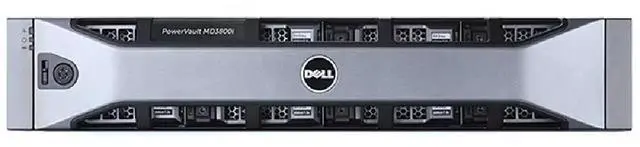
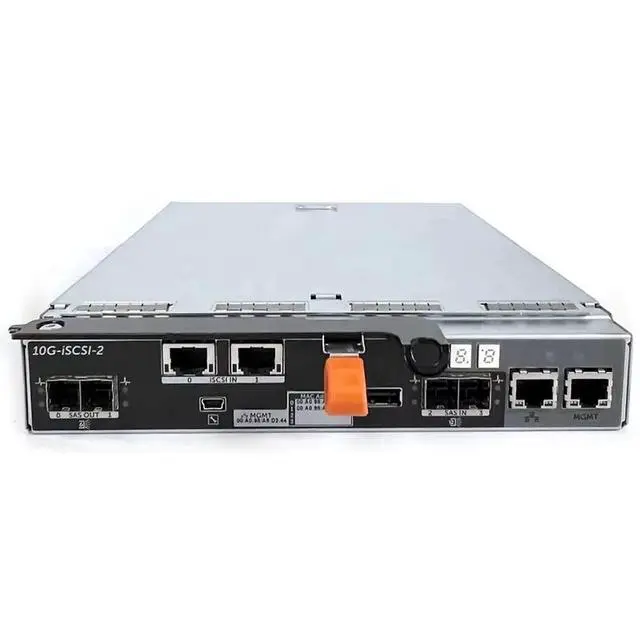
The Dell PowerEdge 3800F is a 12-bay 3.5-inch storage enclosure barebone with dual controllers and redundant 600W power supplies, built for businesses and IT teams that need customizable shared storage expansion in server or data center environments.
| Attribute | Value |
|---|---|
| Best For | Deployments that need a 12-bay 3.5-inch barebone storage enclosure with dual-controller redundancy and redundant 600W power supplies; ships without drives and is intended for adding customer-selected drives to expand storage capacity |
| Model Identifiers | Dell PowerEdge 3800F (Model 3800F) |
| CPU And Socket | No CPU included and no CPU socket (storage device) |
Q: Should I choose the Dell 3800F or the Dell MD3820F?
A: Choose the Dell 3800F when you want a 12-bay 3.5-inch Fibre Channel array that favors larger-capacity drives and simpler capacity-focused deployments. Choose the MD3820F when you want a 24-bay 2.5-inch platform that is better suited to higher spindle counts, denser performance-oriented layouts, or smaller SAS/SSD media. Both are dual-controller 16Gb Fibre Channel arrays in Dell's MD3 family, but the main trade-off is 3.5-inch capacity density per drive on the 3800F versus 24-bay 2.5-inch drive density on the MD3820F.
Q: Is the Dell 3800F a better fit than a newer Dell PowerVault ME4012?
A: Choose the Dell 3800F if you specifically need the older MD-series Fibre Channel platform, already run compatible MD tooling, or want a barebones array for an existing FC environment. Choose the ME4012 if you want a newer 12-bay 3.5-inch Dell platform with broader modern protocol options, integrated web management, newer controller architecture, and a more current product family. The practical trade-off is legacy FC array continuity with the 3800F versus a newer platform and management experience with the ME4012.
Q: Should I buy this 12-bay 3800F or move up to a higher-capacity 60-bay Dell array?
A: Choose the 3800F when you want a smaller 2U footprint, lower initial drive count, and easier step-by-step expansion for a traditional SAN deployment. Move to a 60-bay class Dell array such as the MD3860F only when rack density and much larger raw capacity matter more than simplicity. The trade-off is straightforward: the 3800F is easier to size for modest or growing deployments, while a 60-bay platform is better for larger consolidated storage pools.
Q: Is the Dell 3800F better than a simple disk shelf or JBOD for storage expansion?
A: Choose the 3800F when you need dual controllers, Fibre Channel host connectivity, built-in RAID features, and a shared storage design for SAN use. Choose a disk shelf or JBOD when you only need direct-attached capacity expansion behind another server or storage controller. The main difference is that the 3800F is a storage array with controller intelligence and FC connectivity, while a JBOD shelf is mainly an expansion enclosure and depends on an external controller for array functions.
Q: Does this barebone enclosure come with any hard drives or a CPU?
A: No. This is a diskless storage enclosure, not a complete server. Based on the provided product data, it includes 12 x 3.5-inch drive bays, dual controllers, and dual 600W power supplies, but no pre-installed hard drives and no CPU. It is best suited for buyers who already plan to supply drives and integrate the enclosure into an existing storage environment.
Q: Who is this product suitable for?
A: This product is suitable for IT teams, labs, and businesses that need rack-style storage expansion with high drive density and hardware redundancy. The 12-bay layout supports large-capacity builds, while the dual-controller and dual-power design suggests a focus on availability and service continuity rather than general desktop use. It is not ideal for casual users because it is a barebone enclosure that requires drives and a compatible storage setup.
Q: Is this a good choice if I want flexible storage capacity later?
A: Yes, if your priority is flexibility. Because the unit ships without disks, you can choose drive sizes and populate bays over time instead of paying upfront for fixed storage. The trade-off is that your total cost, supported drive options, and final usable capacity depend on the drives and storage configuration you add later.
Q: Is this an all-in-one NAS I can use by itself on a network?
A: Not by itself. The provided specifications identify it as a storage device with no CPU, which means it should be treated as an enclosure or storage subsystem rather than a full self-contained NAS server. Buyers should expect to pair it with compatible storage infrastructure instead of using it as a simple plug-and-play network appliance.
Q: Is this a full server or just a storage enclosure?
A: It is a storage enclosure, not a complete server. The listed specs show no CPU and no CPU socket, and barebone listings for similar Dell 12-bay units are typically discussed by Reddit users as drive shelves that need a separate host server, controller, and drives. Buy it if you already have a server and want external storage expansion; do not buy it if you need a standalone compute system.
Q: Who is this suitable for?
A: This is best suited to buyers who already run a server and need more raw drive bays, especially for lab, backup, archive, media, or general storage expansion. Reddit discussions around comparable Dell 12-bay shelves consistently frame them as add-on storage for an existing setup rather than as first-time all-in-one servers.
Q: What else do I need before this can be used?
A: You should expect to supply drives, a compatible external storage controller or HBA in your server, and the correct cabling. Community threads about similar Dell dual-controller shelves regularly focus on needing a host-side controller and external SAS connections before the enclosure is usable.
Q: What are the main trade-offs of buying this barebone unit?
A: The main advantage is flexible, potentially cost-effective storage expansion with 12 large-drive bays and redundant controllers and power supplies. The trade-off is that barebone means more setup work and more parts to source, including disks and host connectivity. It is a better fit for buyers who value expandability and redundancy than for buyers who want a simple plug-and-play NAS.
Q: Is this a good choice for a first-time buyer building a home server?
A: Usually only if you already understand external storage shelves and have a host system ready. For first-time buyers, the lack of included drives, compute hardware, and built-in simplicity makes it less straightforward than a complete server or a ready-to-use NAS. It makes more sense as an expansion purchase than as a beginner's single-box solution.


