

Your Browsing History
- Free 30-day Returns
$200.00

Meet Your Seller


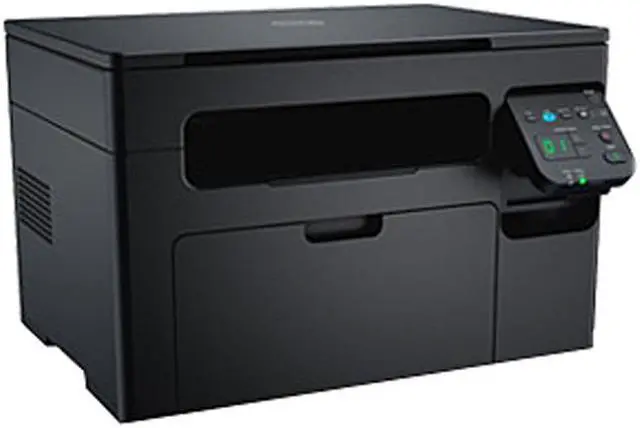

Dell B1163W MFP Up to 21 ppm USB Printer
Used - Good Product Type
- Up to 21 ppm
- 1200 x 1200 dpi Black Print Quality
- Up to 20,000 pages monthly
- 64 MB Memory, std.
+
+
Overview
Specs

Any questions? Our AI mode will help you find out quickly.
Try me now
Easily handle your everyday tasks! The Dell B1163W printer is an effective three-in-one multifunction printer that combines printing, scan, and copy functions in a compact design. Loaded with many easy-to-use features, it boots your workgroup’s productivity. RoHS compliant and ENERGY STAR qualified, it saves you on the costs of toner use and energy consumption. In addition, you can easily print documents, photos, images, and reports directly from mobile smartphones and tablets.
 An efficient and reliable printerWith a high duty cycle of up to 20,000 pages per month, the Dell B1163W printer can easily handle your everyday work demands. It speeds through your daily tasks, and prints at up to 21 pages per minute (ppm) (letter), or 20 ppm (A4). Get long-term performance from a fuser unit that’s designed to last the life of the printer. In addition, with just a single toner cartridge to replace, you'll find that maintenance is easy.
 Environmentally consciousHelp lower toner usage (and costs) with the "Eco" button, a feature that automatically reduces toner use and energy consumption. Use the onscreen Eco Simulator to estimate how different printer settings will affect paper and toner consumption, as well as your energy usage and its impact on carbon dioxide emissions. Designed with the environment in mind, this printer is Restriction of Hazardous Substances (RoHS) compliant, and ENERGY STAR qualified.
 Prints from select mobile devicesThe Dell B1163W prints documents, photos, web pages, and more directly from your Android mobile device with the Dell Mobile Print App (Download it for free at Google Play). Moreover, it allows direct printing from your iPhone, iPad, or iPod touch using AirPrint (AirPrint works with a variety of apps including Safari, Mail, Photos, iWork, and PDFs in iBooks.). You can print seminar confirmation tickets, photos, vital emails, and web pages quickly and easily. In addition, Using Google Cloud Print (works on your smartphone, tablet, Chromebook, PC, and other web-connected devices), you can make this printer available to you and anyone you choose from the applications you use every day.
 Simplified wireless setupIn as few as four clicks, your printer is connected wirelessly, and ready to go. The Dell Easy WiFi Installer simplifies the setup process, helping you get up and running quickly with wireless convenience.
 Exceptional document managementEasily manage your documents with Nuance PaperPort 14. This included software helps you transform paper documents into high-quality, searchable PDF files for easy archiving, organizing, and sharing. PaperPort 14 places all PDF files on your desktop in clearly marked, color-coded folders, so information is always at your fingertips.
 Easy copy featureUse the "ID Copy" button to copy both sides of an ID card on a single side of paper.
 An efficient and reliable printerWith a high duty cycle of up to 20,000 pages per month, the Dell B1163W printer can easily handle your everyday work demands. It speeds through your daily tasks, and prints at up to 21 pages per minute (ppm) (letter), or 20 ppm (A4). Get long-term performance from a fuser unit that’s designed to last the life of the printer. In addition, with just a single toner cartridge to replace, you'll find that maintenance is easy.
 Environmentally consciousHelp lower toner usage (and costs) with the "Eco" button, a feature that automatically reduces toner use and energy consumption. Use the onscreen Eco Simulator to estimate how different printer settings will affect paper and toner consumption, as well as your energy usage and its impact on carbon dioxide emissions. Designed with the environment in mind, this printer is Restriction of Hazardous Substances (RoHS) compliant, and ENERGY STAR qualified.
 Prints from select mobile devicesThe Dell B1163W prints documents, photos, web pages, and more directly from your Android mobile device with the Dell Mobile Print App (Download it for free at Google Play). Moreover, it allows direct printing from your iPhone, iPad, or iPod touch using AirPrint (AirPrint works with a variety of apps including Safari, Mail, Photos, iWork, and PDFs in iBooks.). You can print seminar confirmation tickets, photos, vital emails, and web pages quickly and easily. In addition, Using Google Cloud Print (works on your smartphone, tablet, Chromebook, PC, and other web-connected devices), you can make this printer available to you and anyone you choose from the applications you use every day.
 Simplified wireless setupIn as few as four clicks, your printer is connected wirelessly, and ready to go. The Dell Easy WiFi Installer simplifies the setup process, helping you get up and running quickly with wireless convenience.
 Exceptional document managementEasily manage your documents with Nuance PaperPort 14. This included software helps you transform paper documents into high-quality, searchable PDF files for easy archiving, organizing, and sharing. PaperPort 14 places all PDF files on your desktop in clearly marked, color-coded folders, so information is always at your fingertips.
 Easy copy featureUse the "ID Copy" button to copy both sides of an ID card on a single side of paper.
Warranty & Returns
Warranty, Returns, And Additional Information
Warranty
- Please contact the Seller directly for warranty information. Warranty information may also be found on the Manufacturer's website.
- CONTACT
Return Policies
- Return for refund within: 30 days
- Return for replacement within: 30 days
- This item is covered by 88printers Return Policy
Manufacturer Contact Info
- For a directory of all our manufacturers, please click below.
- Manufacturers Directory
LOADING...