




Important Notice: G91J0 Battery Compatibility & Selection Guide
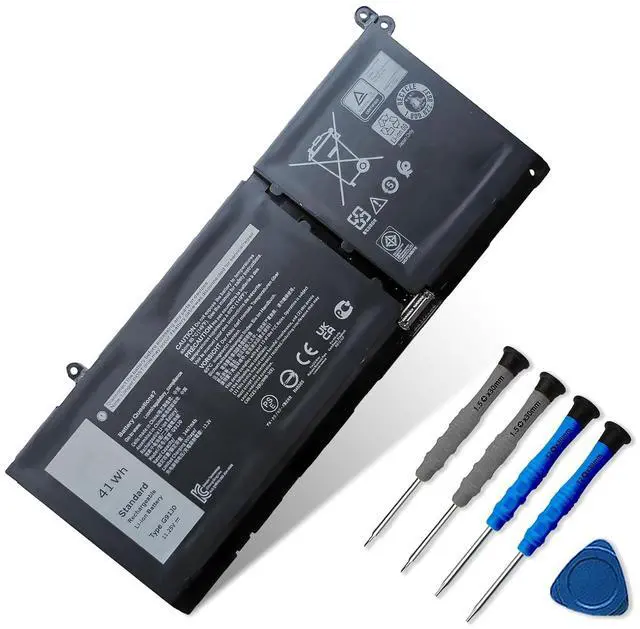
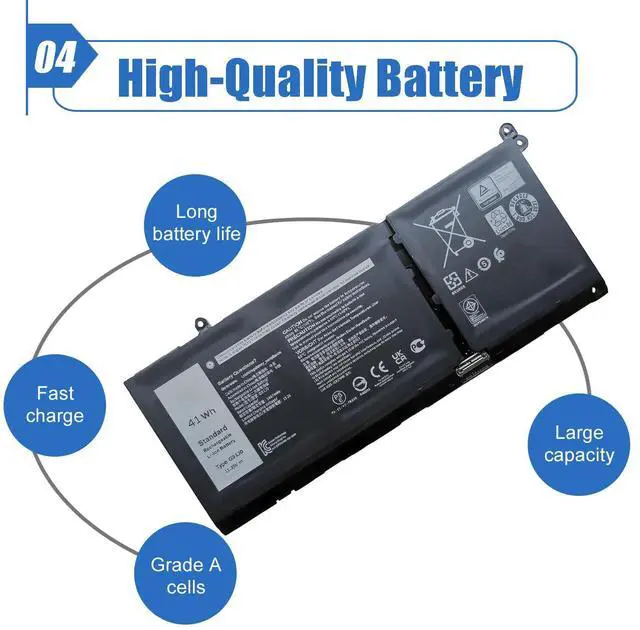
- Our battery is G91J0
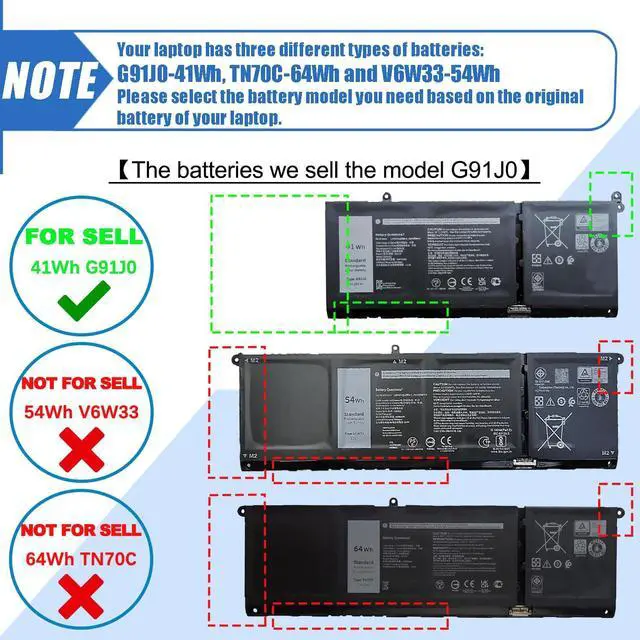
- These laptops have a total of three different types of batteries (G91J0-41Wh, TN70C-64Wh and V6W33-54Wh)
- Please choose the which one you are going to replace and according to your laptop's original battery

Note Before Purchasing
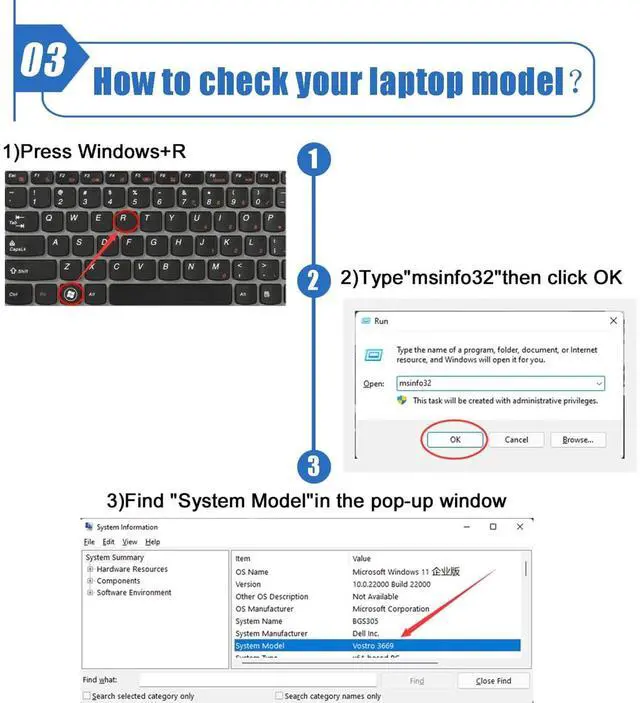
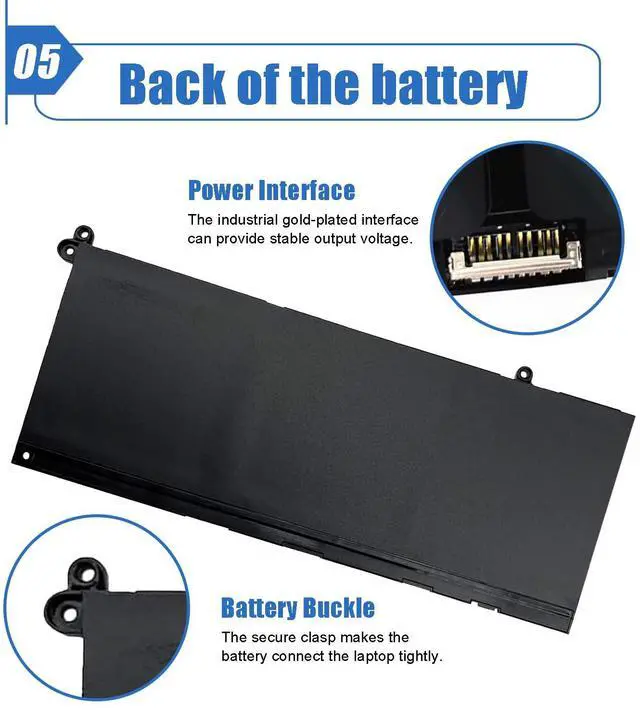
- We suggest you open your laptop case to check and confirm your original battery model and appearance, compared with our battery image, make sure that's what you need. Especially the connector location and type, the cable length (long or short etc).
Replacement for Part Number
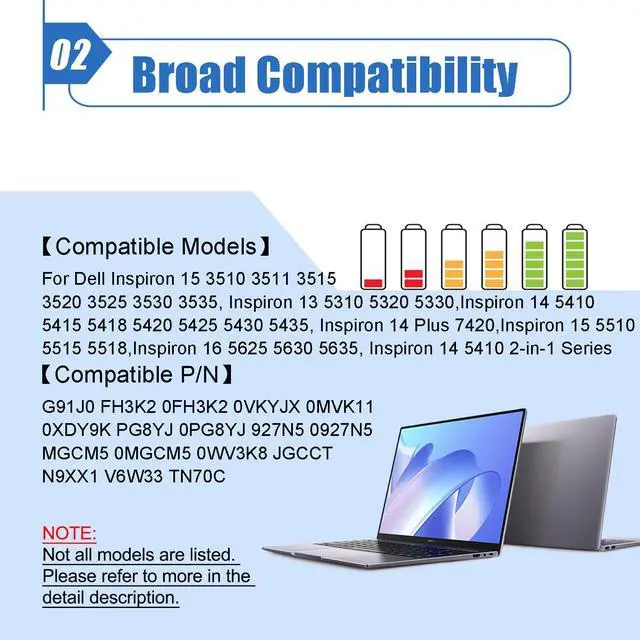
- G91J0 FH3K2 0FH3K2 0VKYJX 0MVK11
- 0XDY9K PG8YJ 0PG8YJ 927N5 0927N5
- MGCM5 0MGCM5 0WV3K8 JGCCT
- N9XX1 V6W33 TN70C

Compatible Laptop Models(Use "Ctrl+F” to find your model quickly)
- For Dell Inspiron 15 3510 3511 3515 3520 3521 3525 3530 3535 series; For Dell Inspiron 13 5310 5320 5330 series
- For Dell Inspiron 14 5410 5415 5418 5420 5425 5430 5435 series; For Dell Inspiron 15 5510 5515 5518 series
- For Dell Inspiron 15 5510 5515 5518 series; For Dell Inspiron 16 5625 5630 5635 series
- For Dell Inspiron 14 5410 2-in-1 Series; For Dell Inspiron 14 7415 2-in-1 Series
- For Dell Inspiron 14 7420 2-in-1 Series; For Dell Inspiron 14 7425 2-in-1 Series
- For Dell Inspiron 14 7430 2-in-1 Series; For Dell Inspiron 14 7435 2-in-1 Series
- For Dell Latitude 3320 3330 3420 3520 series
- For Dell Vostro 15 3510 3511 3515 3520 3525 3530 3535 series
- For Dell Vostro 13 5310 5320 series; For Dell Vostro 14 3420 3425 5410 5415 series
- For Dell Vostro 15 5510 5515 series; For Dell Vostro 5620 5625 series
- For Dell Inspiron 16 7620 2-in-1 Series
Note: The Dell Inspiron 16 7620 2-in-1 is available with two battery options (model: TN70C 4-Cell and DWVRR 6-Cell). Please open your laptop case to check and confirm your original battery model before purchasing.
- For Dell Inspiron 16 7630 2-in-1 Series
- For Dell Inspiron 16 7635 2-in-1 Series
Note: The Dell Inspiron 16 7630 2-in-1 and Dell Inspiron 16 7635 2-in-1 are available with two battery options (model: TN70C 4-Cell and 69KF2 6-Cell).Please open your laptop case to check and confirm your original battery model before purchasing.

Battery Optimal Maintenance
- New battery received, discharge the battery to 5% (not 0%) for the fist use, then charge and cycle 3-4 times to wake up the new battery.
- The important point is to perform a full discharge and charge every other month to extend the battery life.
- Do not connect adapter for a long time while using the battery. It may damage the battery.
- Avoid artificial shocks, disassembly, crush or puncture. Do not dispose of it in fire or water.

Installation Suggestion
- All of our batteries are rigorously tested to meet or exceed the OEM specifications. The performance are the same or better than laptop original battery.
- Battery Installation is easy, but we also recommend you to learn related installation video on the web in advance, or just find a repair technician for help.
- Please be careful when install battery. Any damage caused by improper operation will be your own responsibility, hope understand.
Battery cannot be identified by your laptop or it doesn't seem to work. That may be caused by different situations. Please check by yourself first as below steps.

Issue Troubleshooting Methods
- Could be caused by battery loose. Remove the battery and try to reinstall more than once.
- May be due to conductive material damaged which the laptop motherboard and battery anode and cathode contact position, you can try to confirm it with your original battery.
- Check whether the battery drive is in normal condition, if not, download the corresponding driver software to update.
- Take out the battery and press the power button for about 15 seconds to consume the internal residual power (Do not connect the power cord), and then reinstall the battery. You can try several times.
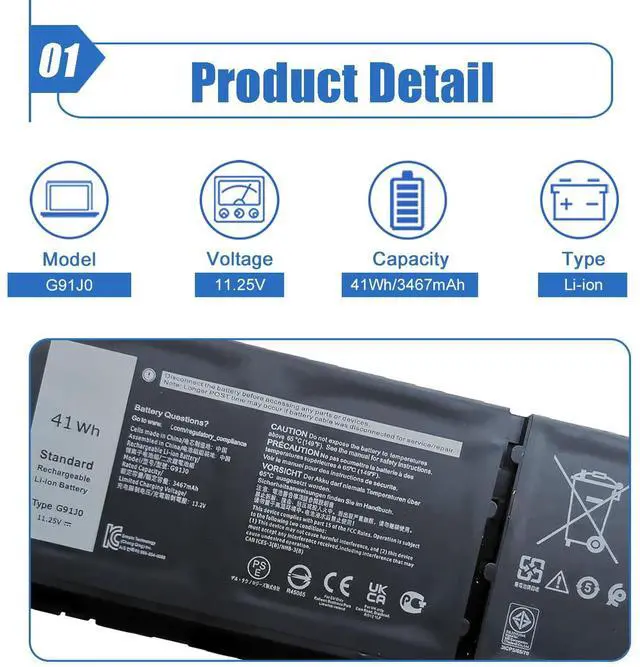
| Battery Model | G91J0 |
| Battery Type | Li-ion |
| Voltage | 11.25V |
| Capacity | 41Wh/3467mAh |
| Condition | 100% Brand New From Manufacturer |
| Packaging | 1* battery + 1* instruction manual |
Important Notice: G91J0 Battery Compatibility & Selection Guide
- Our battery is G91J0
- These laptops have a total of three different types of batteries (G91J0-41Wh, TN70C-64Wh and V6W33-54Wh)
- Please choose the which one you are going to replace and according to your laptop's original battery
Note Before Purchasing
- We suggest you open your laptop case to check and confirm your original battery model and appearance, compared with our battery image, make sure that's what you need. Especially the connector location and type, the cable length (long or short etc).
Replacement for Part Number
- G91J0 FH3K2 0FH3K2 0VKYJX 0MVK11
- 0XDY9K PG8YJ 0PG8YJ 927N5 0927N5
- MGCM5 0MGCM5 0WV3K8 JGCCT
- N9XX1 V6W33 TN70C
Compatible Laptop Models(Use "Ctrl+F” to find your model quickly)
- For Dell Inspiron 15 3510 3511 3515 3520 3521 3525 3530 3535 series; For Dell Inspiron 13 5310 5320 5330 series
- For Dell Inspiron 14 5410 5415 5418 5420 5425 5430 5435 series; For Dell Inspiron 15 5510 5515 5518 series
- For Dell Inspiron 15 5510 5515 5518 series; For Dell Inspiron 16 5625 5630 5635 series
- For Dell Inspiron 14 5410 2-in-1 Series; For Dell Inspiron 14 7415 2-in-1 Series
- For Dell Inspiron 14 7420 2-in-1 Series; For Dell Inspiron 14 7425 2-in-1 Series
- For Dell Inspiron 14 7430 2-in-1 Series; For Dell Inspiron 14 7435 2-in-1 Series
- For Dell Latitude 3320 3330 3420 3520 series
- For Dell Vostro 15 3510 3511 3515 3520 3525 3530 3535 series
- For Dell Vostro 13 5310 5320 series; For Dell Vostro 14 3420 3425 5410 5415 series
- For Dell Vostro 15 5510 5515 series; For Dell Vostro 5620 5625 series
- For Dell Inspiron 16 7620 2-in-1 Series
Note: The Dell Inspiron 16 7620 2-in-1 is available with two battery options (model: TN70C 4-Cell and DWVRR 6-Cell). Please open your laptop case to check and confirm your original battery model before purchasing.
- For Dell Inspiron 16 7630 2-in-1 Series
- For Dell Inspiron 16 7635 2-in-1 Series
Note: The Dell Inspiron 16 7630 2-in-1 and Dell Inspiron 16 7635 2-in-1 are available with two battery options (model: TN70C 4-Cell and 69KF2 6-Cell).Please open your laptop case to check and confirm your original battery model before purchasing.
Battery Optimal Maintenance
- New battery received, discharge the battery to 5% (not 0%) for the fist use, then charge and cycle 3-4 times to wake up the new battery.
- The important point is to perform a full discharge and charge every other month to extend the battery life.
- Do not connect adapter for a long time while using the battery. It may damage the battery.
- Avoid artificial shocks, disassembly, crush or puncture. Do not dispose of it in fire or water.
Installation Suggestion
- All of our batteries are rigorously tested to meet or exceed the OEM specifications. The performance are the same or better than laptop original battery.
- Battery Installation is easy, but we also recommend you to learn related installation video on the web in advance, or just find a repair technician for help.
- Please be careful when install battery. Any damage caused by improper operation will be your own responsibility, hope understand.
Battery cannot be identified by your laptop or it doesn't seem to work. That may be caused by different situations. Please check by yourself first as below steps.
Issue Troubleshooting Methods
- Could be caused by battery loose. Remove the battery and try to reinstall more than once.
- May be due to conductive material damaged which the laptop motherboard and battery anode and cathode contact position, you can try to confirm it with your original battery.
- Check whether the battery drive is in normal condition, if not, download the corresponding driver software to update.
- Take out the battery and press the power button for about 15 seconds to consume the internal residual power (Do not connect the power cord), and then reinstall the battery. You can try several times.