DIGITUS Cable Entry with Brush Strip & Cable Trap - 1U - 19 Inch - Network Enclosure - Patch Cable - Gray
  •  
  • $153.99 
  • $31.99
  • Free 30-day Returns
  • Price alert
    Shop it at NeweggBusiness.

    Meet Your Seller

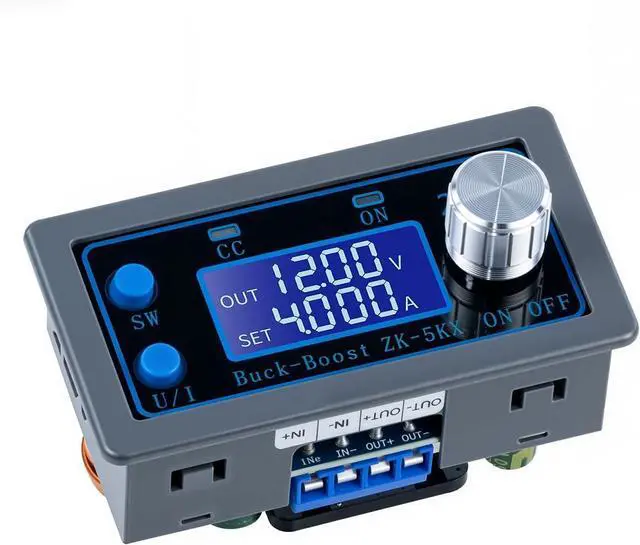
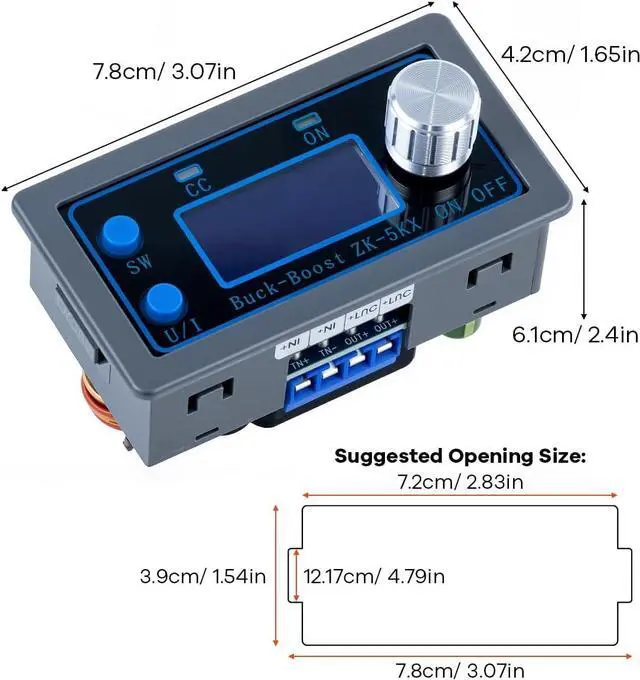
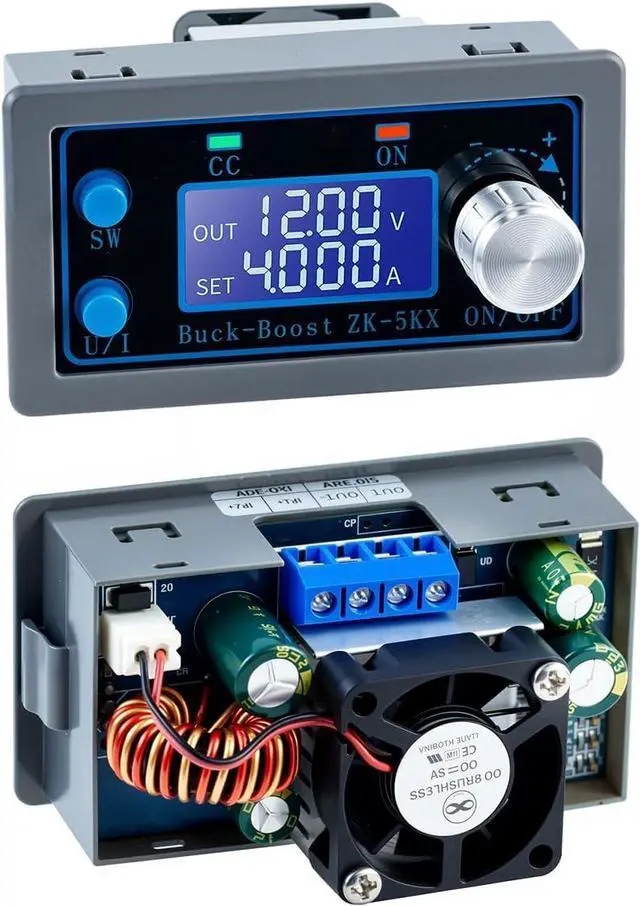
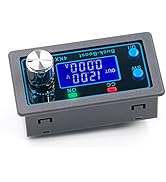
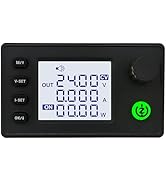
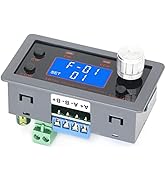
    DC DC Buck Boost Converter Variable Voltage Regulator CC CV 0.5-30V 4A 5V 6V 12V 24V Power Module Adjustable Voltage Regulated Laboratory Power Supply

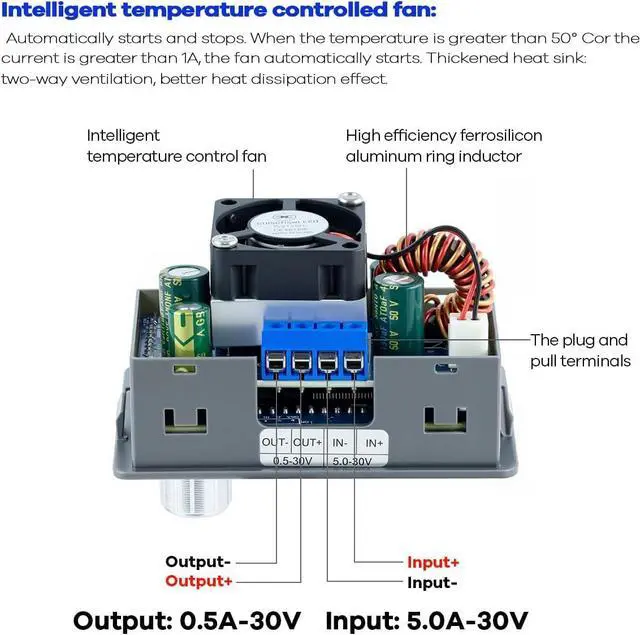
    • input voltage range is DC 5-30V; output voltage range is DC 0.5-30V, can be arbitrary adjustable; output current can be 3A for long term use, if enhance heat dissipation, it can reach 4A; max output power is 35W, if enhance dissipation, it can reach 50W
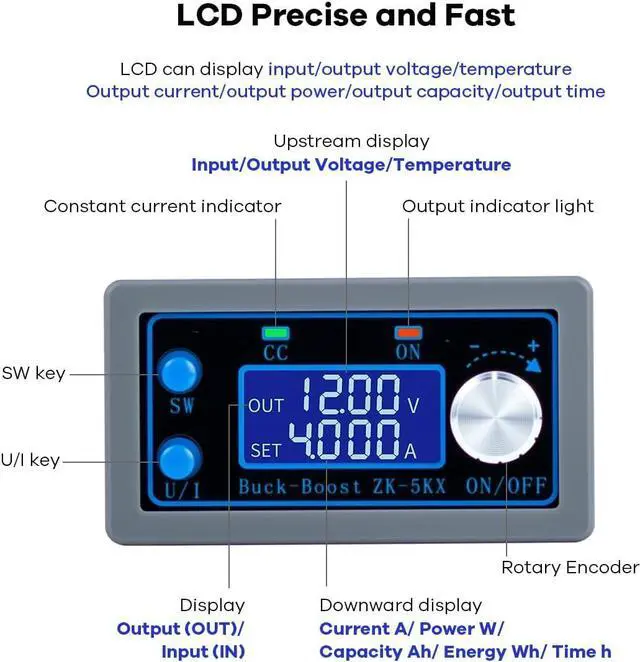
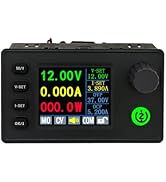
    • LCD displays input/output voltage, output current/output power/output capacity/output time.The module can be set to ON/OFF by default
    • Safe Protection: the module is with Anti-reverse connection protection of input end, so that it will not burn out when there is reverse connection.Anti-backflow protection at the output end. No need to add anti-backflow diode when charging. Multiple software protection mechanisms are available, and the protection threshold is adjustable. When the working parameters of the module exceed the protection threshold, the output will be automatically turned off
    • Application: the volt conversion board can be used as an ordinary buck/Boost module with over-current protection; used as a high-power LED constant current driver module; DIY a solar power controller, Battery Charging
    • Output ripple is small and filter is available.Thick heat sink .Buck-boost Integrated
    +
    +
    Overview
    Specs
    Reviews
    avatar

    Any questions? Our AI beta will help you find out quickly.
    1
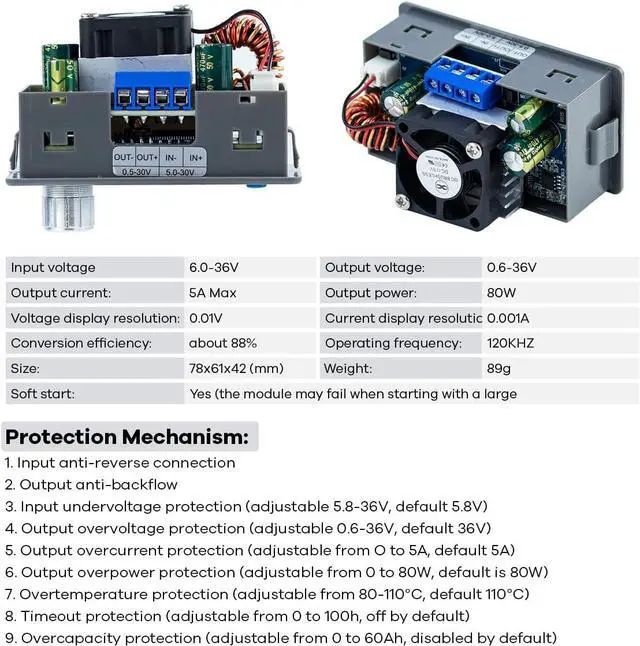
    Input Voltage 5.0-30V Output Voltage: 0.5-30V
    Operating Frequency 180KHZ
    Output Current It can work stably in 3A for a long time, and can reach 4A under enhanced heat dissipation
    Output Power natural heat dissipation 35W, enhanced heat dissipation 50W
    Voltage Display Resolution 0.01V Current Display Resolution:0.01A
    Size Length * width * height 79mm(3.11inch)*43mm(1.69inch)*26mm(1.02inch)
    Conversion Efficiency about 88%
    Soft Start Yes (large power with load module startup may fail)
    Protection Mechanism Input anti-reverse connection; Output anti-backpouring
    Input Under Voltage Protection 4.8-30V Adjustable, default 4.8V
    Output Overvoltage Protection 0.5-31V adjustable, 31V by default
    Output Over Current Protection Adjustable from 0 to 4.1A, default 4.1A
    Output Overpower Protection 0-50W adjustable, default 50W
    Over Temperature Protection 80-110? adjustable, default 110?
    Time-out Protection 0-100h adjustable, off by default
    Overcapacity Protection 0-60Ah adjustable, off by default
    6
    6

    Instructions for use

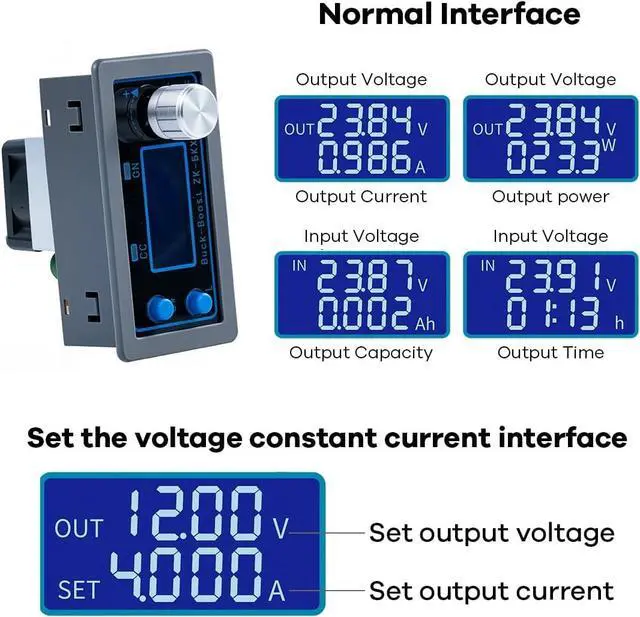
    • Switching Display Parameters -- Under the normal interface, press SW to switch the down link display of the display screen, and the display content switches between current A, power W, capacity Ah, time h. Press and hold the SW button to switch the upstream display of the display. The display content switches between input voltage IN and output voltage OUT.
    • Setting Output Voltage -- Press U/1 under the normal interface to enter the interface for setting voltage and constant current. You can see that a certain digit of the output voltage value is blinking, turn the rotary encoder left and right, and adjust it to large or small. Tap the rotary encoder to select which bit of the output voltage to set. After the setting is complete, press the U/1 button twice to return to the normal interface. Or the system automatically returns to the normal screen after stopping operations for 10 s.
    • Set the constant current value (that is, the maximum current value allowed by the module) -- press the U/1 button under the normal interface to enter the interface for setting the voltage constant current. Then press the U/1 button to switch to set constant current value, you can see that a certain part of the constant current value is blinking, rotate the rotary encoder left and right, and adjust the major or small. Tap the rotary encoder to select which bit to set the constant current value. After the setting is complete, press the U/1 button to exit the setting voltage constant current interface and return to the normal interface. Or the system automatically returns to the normal screen after stopping operations for 10 s.
    • Setting the Default Power ON/OFF State of the Module -- Press and hold down the U/1 button to enter the parameter setting screen. OPEN OFF or OPEN ON is displayed. OPEN Off indicates that the output is disabled by default during power-on, and OPEN ON indicates that the output is enabled by default during power-on. Long press the rotary encoder to switch between two states. After the Settings are complete, press and hold the U/1 button to return to the normal interface.
    • Setting the Status and Threshold of Protection Parameters -- On the normal screen, hold down the U/1 key to enter the parameter setting screen. Press the SW button until the protection parameter you want to set appears. LUP- Undervoltage protection threshold; OUP - Overvoltage protection threshold; OCP - - Overcurrent protection threshold; OPP - - Overpower protection threshold; OAP - - Overcapacity protection threshold; OHP timeout protection threshold. OTP -- Overtemperature protection threshold. Tap the rotary encoder to select which bit of the protection parameter you want to set. Press and hold the rotary encoder to set the protection parameter on or off (only timeout protection and overcapacity protection can be set on/off, other protection parameters are enabled by default). . Rotate the encoder left and right to make the parameters smaller and larger. After the Settings are complete, press and hold the U/1 button to return to the normal interface.
    • Calibrating Voltage and current -- Hold down the U/1 button to enter the parameter setting screen. Press the SW button until the parameter screen with CAL appears. The one with CAL+IN+V symbol is the calibration input voltage interface; The one with CAL+OUT+V symbol is the calibration output voltage interface; The CAL+OUT+A symbol is the calibration output current interface. The parameter size can be adjusted by rotating the encoder left and right. When the adjustment is complete, press and hold the rotary encoder to confirm the adjustment is complete. At this time, the parameter value is no longer blinking. Press and hold the U/1 key to return to the normal screen.

    1

    Product parameters

    1
    Input Voltage 5.0-30V Output Voltage: 0.5-30V
    Operating Frequency 180KHZ
    Output Current It can work stably in 3A for a long time, and can reach 4A under enhanced heat dissipation
    Output Power natural heat dissipation 35W, enhanced heat dissipation 50W
    Voltage Display Resolution 0.01V Current Display Resolution:0.01A
    Size Length * width * height 79mm(3.11inch)*43mm(1.69inch)*26mm(1.02inch)
    Conversion Efficiency about 88%
    Soft Start Yes (large power with load module startup may fail)
    Protection Mechanism Input anti-reverse connection; Output anti-backpouring
    Input Under Voltage Protection 4.8-30V Adjustable, default 4.8V
    Output Overvoltage Protection 0.5-31V adjustable, 31V by default
    Output Over Current Protection Adjustable from 0 to 4.1A, default 4.1A
    Output Overpower Protection 0-50W adjustable, default 50W
    Over Temperature Protection 80-110? adjustable, default 110?
    Time-out Protection 0-100h adjustable, off by default
    Overcapacity Protection 0-60Ah adjustable, off by default
    6
    6

    Instructions for use

    • Switching Display Parameters -- Under the normal interface, press SW to switch the down link display of the display screen, and the display content switches between current A, power W, capacity Ah, time h. Press and hold the SW button to switch the upstream display of the display. The display content switches between input voltage IN and output voltage OUT.
    • Setting Output Voltage -- Press U/1 under the normal interface to enter the interface for setting voltage and constant current. You can see that a certain digit of the output voltage value is blinking, turn the rotary encoder left and right, and adjust it to large or small. Tap the rotary encoder to select which bit of the output voltage to set. After the setting is complete, press the U/1 button twice to return to the normal interface. Or the system automatically returns to the normal screen after stopping operations for 10 s.
    • Set the constant current value (that is, the maximum current value allowed by the module) -- press the U/1 button under the normal interface to enter the interface for setting the voltage constant current. Then press the U/1 button to switch to set constant current value, you can see that a certain part of the constant current value is blinking, rotate the rotary encoder left and right, and adjust the major or small. Tap the rotary encoder to select which bit to set the constant current value. After the setting is complete, press the U/1 button to exit the setting voltage constant current interface and return to the normal interface. Or the system automatically returns to the normal screen after stopping operations for 10 s.
    • Setting the Default Power ON/OFF State of the Module -- Press and hold down the U/1 button to enter the parameter setting screen. OPEN OFF or OPEN ON is displayed. OPEN Off indicates that the output is disabled by default during power-on, and OPEN ON indicates that the output is enabled by default during power-on. Long press the rotary encoder to switch between two states. After the Settings are complete, press and hold the U/1 button to return to the normal interface.
    • Setting the Status and Threshold of Protection Parameters -- On the normal screen, hold down the U/1 key to enter the parameter setting screen. Press the SW button until the protection parameter you want to set appears. LUP- Undervoltage protection threshold; OUP - Overvoltage protection threshold; OCP - - Overcurrent protection threshold; OPP - - Overpower protection threshold; OAP - - Overcapacity protection threshold; OHP timeout protection threshold. OTP -- Overtemperature protection threshold. Tap the rotary encoder to select which bit of the protection parameter you want to set. Press and hold the rotary encoder to set the protection parameter on or off (only timeout protection and overcapacity protection can be set on/off, other protection parameters are enabled by default). . Rotate the encoder left and right to make the parameters smaller and larger. After the Settings are complete, press and hold the U/1 button to return to the normal interface.
    • Calibrating Voltage and current -- Hold down the U/1 button to enter the parameter setting screen. Press the SW button until the parameter screen with CAL appears. The one with CAL+IN+V symbol is the calibration input voltage interface; The one with CAL+OUT+V symbol is the calibration output voltage interface; The CAL+OUT+A symbol is the calibration output current interface. The parameter size can be adjusted by rotating the encoder left and right. When the adjustment is complete, press and hold the rotary encoder to confirm the adjustment is complete. At this time, the parameter value is no longer blinking. Press and hold the U/1 key to return to the normal screen.

    1

    Product parameters

    DC DC Buck Boost Converter Variable Voltage Regulator CC CV 0.5 -30V 4A 5V 6V 12V 24V Power Module Adjustable Voltage Regulated Laboratory Power Supply

    Warranty & Returns

    Warranty, Returns, And Additional Information

    Warranty

    • Please contact the Seller directly for warranty information. Warranty information may also be found on the Manufacturer's website.
    • CONTACT

    Return Policies

    Manufacturer Contact Info

    LOADING...