




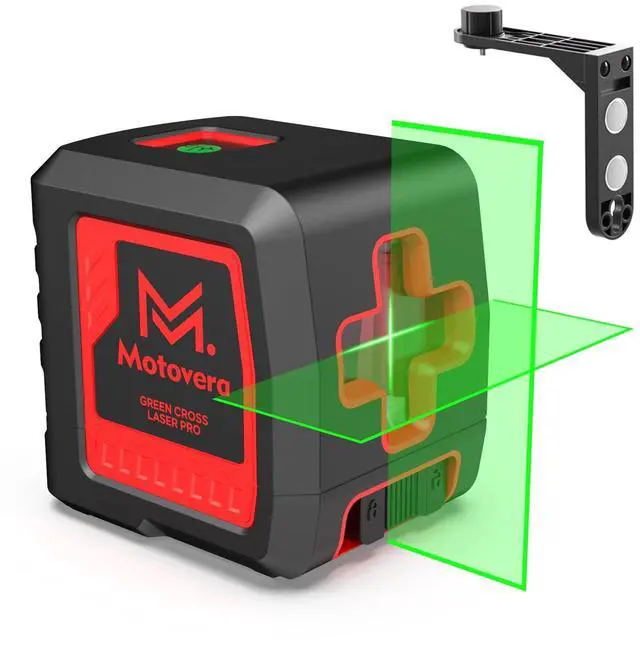



Laser Level Series
 Laser Level with Tripod |  Laser Level with Magnet |  Laser Level 3x360° |  Motovera Laser Level | |
|---|---|---|---|---|
Customer Reviews | — | — | — | — |
Price | — | — | — | — |
Laser Level | ? | ? | ? | ? |
Features | Laser Level with Tripod | Laser Level with Magnet | Laser Level 3x360° | Motovera Laser Level |
Ease Of Use | ? | ? | ? | ? |
Quality-Overall | ? | ? | ? | ? |
Brightness/Shine/Glow | ? | ? | ? | ? |
How to use or setup the green target plate?
1.Fix the laser target on a flat, stable surface and make sure it is level with the laser level.
2.The laser target help to detect the position and offset of the laser level to help determine if is level or vertical.
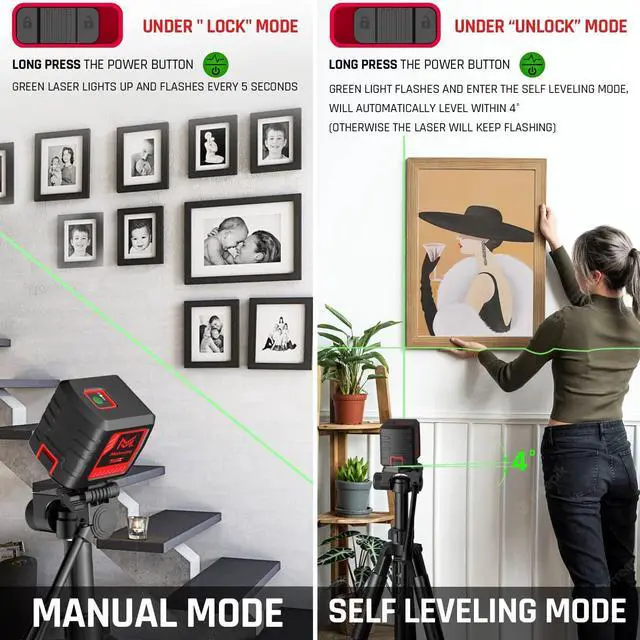
How to solve that after the first use, the second time turn on the laser level keep blinking?
1.We recommend removing the batteries after each use.
2.When it keeps blinking and won't calbrate,try changing the batteries or turning it of for at least ten minutes and then turning it on again to calibrate.

?Motovera
It is an independent brand specializing in the manufacture of laser tools, with 10 years of professional R&D experience.

You have chosen one of our laser level
which is the most handy and professional laser tool,
you can think of to carry out work
for all trades from drop ceiling installation, lighting fixtures,
photo frames aligning and wall tilling down to floor tiling etc.
What makes our products unique?
It is an independent brand specializing in the manufacture of laser tools, with 10 years of professional R&D experience.
Our team is committed to creating innovative and useful tool products.
How did we get our start?
Motovera is a professional seller specializing in casting line instruments.
You have chosen one of our laser level which is the most handy and professional laser tool
you can think of to carry out work for all trades from drop ceiling installation, lighting fixtures,
photo frames aligning and wall tilling down to floor tiling etc.
Motovera Laser Level

?Motovera
It is an independent brand specializing in the manufacture of laser tools, with 10 years of professional R&D experience.
You have chosen one of our laser level
which is the most handy and professional laser tool,
you can think of to carry out work
for all trades from drop ceiling installation, lighting fixtures,
photo frames aligning and wall tilling down to floor tiling etc.
What makes our products unique?
It is an independent brand specializing in the manufacture of laser tools, with 10 years of professional R&D experience.
Our team is committed to creating innovative and useful tool products.
How did we get our start?
Motovera is a professional seller specializing in casting line instruments.
You have chosen one of our laser level which is the most handy and professional laser tool
you can think of to carry out work for all trades from drop ceiling installation, lighting fixtures,
photo frames aligning and wall tilling down to floor tiling etc.
Motovera Laser Level


Laser Level Series
Laser Level with Tripod | Laser Level with Magnet | Laser Level 3x360° | Motovera Laser Level |
|---|---|---|---|
| Customer Reviews | |||
| — | — | — | — |
| Price | |||
| — | — | — | — |
| Laser Level | |||
| ? | ? | ? | ? |
| Features | |||
| Laser Level with Tripod | Laser Level with Magnet | Laser Level 3x360° | Motovera Laser Level |
| Ease Of Use | |||
| ? | ? | ? | ? |
| Quality-Overall | |||
| ? | ? | ? | ? |
| Brightness/Shine/Glow | |||
| ? | ? | ? | ? |
How to use or setup the green target plate?
1.Fix the laser target on a flat, stable surface and make sure it is level with the laser level.
2.The laser target help to detect the position and offset of the laser level to help determine if is level or vertical.
How to solve that after the first use, the second time turn on the laser level keep blinking?
1.We recommend removing the batteries after each use.
2.When it keeps blinking and won't calbrate,try changing the batteries or turning it of for at least ten minutes and then turning it on again to calibrate.