




 here!
I’m your shopping assistant for PC builds, upgrades, and everything tech.
Got questions? Ask away!
Start a conversation
here!
I’m your shopping assistant for PC builds, upgrades, and everything tech.
Got questions? Ask away!
Start a conversation
Make informed decisions with expert advice. Learn More



Any questions? Ask CelesteSM will help you find out quickly.
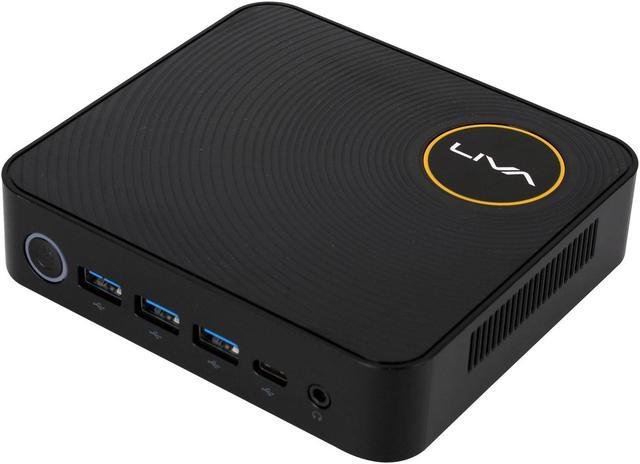
The ECS Elitegroup LIVA Z Plus is a compact mini PC with a 7th-generation dual-core Intel Core i5-7200U, 4GB of DDR4 RAM, a 512GB PCIe SSD, and Windows 10 Pro, suited to everyday web browsing, office tasks, and other light desktop use.
| Attribute | Value |
|---|---|
| Best For | Compact desktop computing for everyday tasks, with a dual-core Intel Core i5, 4GB memory, and 512GB SSD |
| Processor And Cache | 7th Gen Intel Core i5, dual-core, 2.70GHz, with 3MB Smart Cache |
| Graphics | Integrated Intel HD Graphics 620 |
| Memory | 4GB DDR4 |
| Storage And Expansion | 512GB SSD; no HDD, optical drive, or card reader |
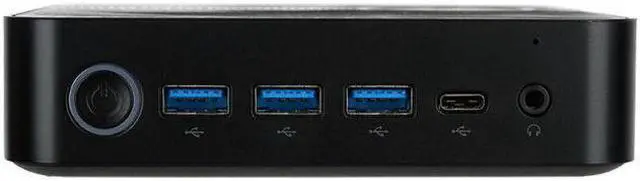
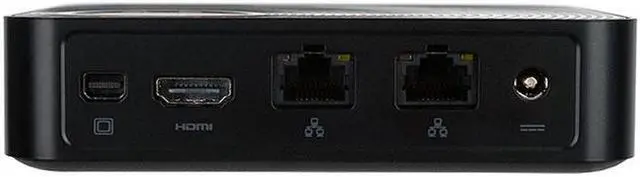
| Networking And Audio | 802.11ac Wi-Fi, Bluetooth 4.0, RJ-45 Ethernet, and combo audio port |
| Operating System And Power | Windows 10 Pro with a 65W power supply |
| Physical Design | Black Mini PC; screen and keyboard not included |
| Model Identifiers | ECS Elitegroup LIVA Z Plus |
Q: ECS LIVA Z Plus i5-7200U or the original ECS LIVA Z—which should I choose?
A: Choose the LIVA Z Plus i5-7200U for its 7th-generation Core i5 processor, Intel HD Graphics 620, DDR4 memory support, and M.2 SATA/PCIe storage support. The original LIVA Z uses an Intel Celeron N-series processor and DDR3L memory, making it a different configuration within ECS’s mini-PC range.
Q: ECS LIVA Z Plus i5-7200U or i3-7100U—which configuration should I pick?
A: Choose this i5-7200U configuration if you want the Core i5’s Turbo Boost, which reaches up to 3.10 GHz. The LIVA Z Plus i3-7100U has a 2.40 GHz base frequency and shares the same 2-core, 4-thread layout and Intel HD Graphics 620, so the choice mainly comes down to the processor’s frequency and Core tier.
Q: ECS LIVA Z Plus i5-7200U or i5-7300U—which one has the higher processor clock?
A: The LIVA Z Plus i5-7300U has the higher clock range, with a base frequency of 2.60 GHz and Turbo Boost up to 3.50 GHz. This i5-7200U configuration reaches up to 3.10 GHz. Choose the i5-7300U variant if its higher processor frequencies are your priority; both are LIVA Z Plus configurations with Intel HD Graphics 620.
Q: Is this mini PC suitable for everyday office work and online meetings?
A: It is configured for basic desktop use such as documents, email, web browsing, and video meetings. Its 7th-generation dual-core i5 and 4GB of RAM are modest, so heavy multitasking or demanding creative work may feel limited. A monitor and keyboard are not included.
Q: Can I connect two monitors to this mini PC?
A: The listed HDMI and Mini DisplayPort outputs provide two separate display connections, so it can connect to two monitors using compatible cables. The product information does not specify supported resolutions or refresh rates.
Q: Is 4GB of RAM enough, and can I upgrade it?
A: The installed 4GB of DDR4 RAM is limited for running many apps or browser tabs at once. The listing does not confirm whether the RAM can be upgraded, so check with the seller about compatibility and upgrade options before buying.
Q: Does it include a monitor and keyboard, and is it practical to travel with?
A: No monitor or keyboard is listed as included, and the product information does not specify whether a mouse is included. It can be moved between workspaces, but it needs a separate display, input devices, and power, so it is less self-contained than a laptop.
Q: Is the LIVA Z Plus suitable for everyday office work and media playback?
A: It can suit basic desktop tasks and media playback. A YouTube review of the LIVA Z Plus covered web browsing, Office apps, video playback, and Plex. This listing has 4GB of RAM, so heavy multitasking may be limiting.
Q: Is this LIVA Z Plus a good choice for gaming?
A: It is better suited to light gaming than demanding games. The listed system uses Intel HD 620 integrated graphics, and a YouTube review of the LIVA Z Plus tested games including Rocket League; the reviewer also noted the benefit of using dual-channel memory. This listing has 4GB of RAM.
Q: Should I upgrade the 4GB of RAM?
A: Consider upgrading if you plan to multitask or use the integrated graphics for games. A YouTube review of the LIVA Z Plus recommends a second memory stick for better graphics performance. Check the exact unit’s memory configuration and upgrade compatibility before buying.
Q: Is the LIVA Z Plus fanless and silent?
A: No. A YouTube review says the reviewed LIVA Z Plus has a fan, though it was not very loud during testing. Fan noise can vary with workload and the specific configuration.


