




 here!
I’m your shopping assistant for PC builds, upgrades, and everything tech.
Got questions? Ask away!
Start a conversation
here!
I’m your shopping assistant for PC builds, upgrades, and everything tech.
Got questions? Ask away!
Start a conversation
Make informed decisions with expert advice. Learn More



Any questions? Ask CelesteSM will help you find out quickly.
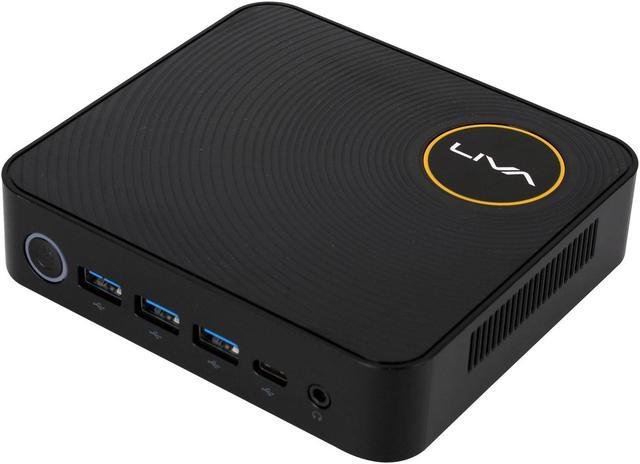
The ECS Elitegroup LIVA Z Plus is a compact mini PC with a 7th Gen Intel Core i5-7200U, 8GB RAM, a 128GB PCIe NVMe SSD, and Windows 10 Pro, suited to everyday home or office computing.
| Attribute | Value |
|---|---|
| Best For | Compact everyday desktop computing, with a dual-core Intel Core i5 processor and integrated graphics |
| Processor And Core Count | 7th Gen Intel Core i5, dual-core at 2.70GHz with 3MB Smart Cache |
| Graphics | Integrated Intel HD Graphics 620 |
| Memory | 8GB DDR4 |
| Storage And Expansion | No HDD, optical drive, or card reader |
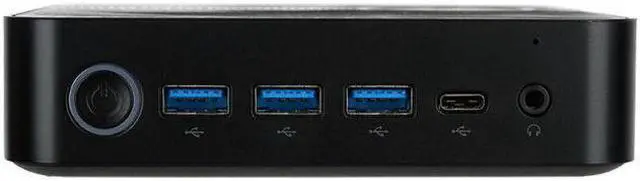
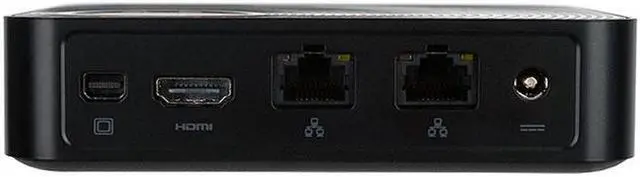
| Networking And Audio | 802.11ac Wi-Fi, Bluetooth 4.0, RJ-45 Ethernet, and a rear combo audio port |
| Display And Peripherals | No screen, monitor, or keyboard included |
| Form Factor And Power | Mini PC form factor with a 65W power supply; black |
| Operating System | Windows 10 Pro |
| Model Identifiers | ECS Elitegroup LIVA Z Plus |
Q: ECS LIVA Z Plus or LIVA ZE Plus: which should I choose?
A: Choose the LIVA Z Plus for a smaller 117 × 128 × 33 mm system with the Core i5-7200U configuration, 8GB RAM, and 128GB SSD in this listing. The LIVA ZE Plus shares the same processor options and adds a 2.5-inch drive bay and four RS232 ports, making it a fit for setups that use those connections or storage options.
Q: ECS LIVA Z Plus or the standard LIVA Z: which is better for everyday desktop use?
A: Choose this LIVA Z Plus listing if you want a Core i5-7200U, 8GB RAM, and a 128GB SSD in a ready-to-use configuration. The standard LIVA Z uses lower-power Intel Celeron-class processors, so it is the more basic configuration; a PC Perspective review also found the Plus model’s Core i5 gave it more CPU capability than the entry-level LIVA Z.
Q: ECS LIVA Z Plus or LIVA Z2: which offers the stronger configuration?
A: Choose the LIVA Z Plus listing for its Core i5-7200U, 8GB RAM, and 128GB SSD. The LIVA Z2 is based on Pentium or Celeron processors and supports up to 8GB RAM, with eMMC storage and support for a 2.5-inch drive. The Z2 emphasizes a different mix of storage and display connections, including two HDMI outputs.
Q: Should I get the LIVA Z Plus with Core i5-7200U or the Core i3-7100U version?
A: Choose the i5-7200U version in this listing if you value its higher peak clock speed: it can turbo up to 3.1 GHz, while the i3-7100U runs at 2.4 GHz. Both use Intel HD Graphics 620, and the i3 version is an option for buyers prioritizing that configuration over the i5’s higher clock ceiling.
Q: Is this mini PC suitable for everyday office work and video meetings?
A: It should suit basic office tasks such as email, web browsing, and document editing. For video meetings, you’ll need to connect a display and add a webcam and audio gear if needed; the listing specifies a headphone/microphone combo jack but no built-in screen. Its 8GB of RAM and dual-core processor may limit demanding multitasking.
Q: Can I connect two monitors?
A: The listed HDMI and mini DisplayPort outputs provide two types of display connection. The product listing does not explicitly confirm whether both can be used simultaneously, so check with the seller and confirm that your monitors have compatible inputs or cables.
Q: Does it come with a monitor, keyboard, or mouse?
A: No monitor or keyboard is listed as included, and the specifications say the monitor and keyboard are not included. The listing does not clearly state whether a mouse is included, so confirm the package contents with the seller. Plan to provide a monitor and input devices.
Q: Is it a good choice for gaming or demanding creative work?
A: It is better suited to everyday computing than demanding games or graphics-heavy creative work. The listing specifies a dual-core Intel Core i5-7200U and integrated Intel HD 620 graphics, with no dedicated graphics card.
Q: Is the ECS LIVA Z Plus suitable for everyday office and web use?
A: It is a reasonable fit for basic office work, web browsing, and media playback: this listing has a 7th-gen Core i5-7200U, 8GB RAM, and a 128GB SSD. A Lon.TV review of a different LIVA Z Plus configuration covers web browsing and Microsoft Office use; its tested unit had an i5-7300U, so results may not match this exact model.
Q: Is the LIVA Z Plus good for streaming or light gaming?
A: It can suit media playback and light gaming, but its Intel HD 620 integrated graphics are not intended for demanding games. The review discusses video playback, Plex, and light gaming on an i5-7300U version; this listing uses the slightly different i5-7200U configuration.
Q: Is the LIVA Z Plus fanless and silent?
A: No. The reviewed LIVA Z Plus has a fan. Lon.TV describes it as generally quiet, though audible, especially under load; expect some fan noise rather than silent operation.
Q: Does the LIVA Z Plus benefit from a second RAM stick?
A: It may: the review recommends dual-channel memory for better integrated-graphics performance. This listing specifies 8GB of RAM but does not state whether it is installed as one stick or two, so check the memory configuration before relying on that benefit.


