




 here!
I’m your shopping assistant for PC builds, upgrades, and everything tech.
Got questions? Ask away!
Start a conversation
here!
I’m your shopping assistant for PC builds, upgrades, and everything tech.
Got questions? Ask away!
Start a conversation
Make informed decisions with expert advice. Learn More



Any questions? Ask CelesteSM will help you find out quickly.
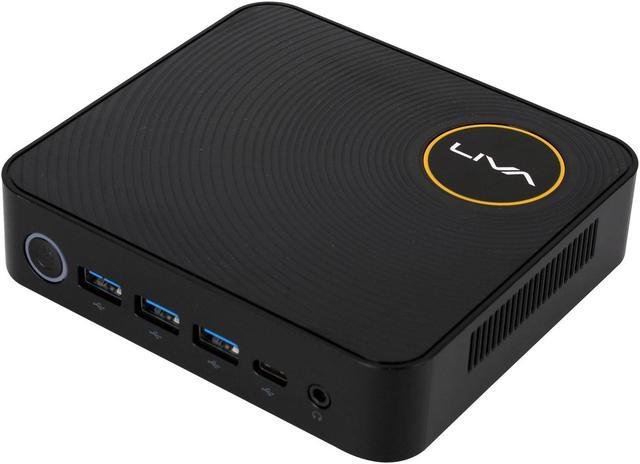
The ECS Elitegroup LIVA Z Plus is a compact mini PC with a 7th Gen Intel Core i5-7200U, 4GB DDR4 RAM, a 128GB PCIe SSD, and Windows 10 Pro, suited to light everyday tasks such as web browsing and basic office work in a space-saving setup.
| Attribute | Value |
|---|---|
| Best For | Compact desktop setups with a separate monitor and keyboard, plus Wi‑Fi, Bluetooth, or Ethernet connectivity |
| Processor And Core Count | 7th-generation Intel Core i5, dual-core, listed at 2.70GHz with 3MB Smart Cache |
| Graphics | Integrated Intel HD Graphics 620 |
| Memory | 4GB DDR4 |
| Storage And Expansion | No HDD or optical drive listed |
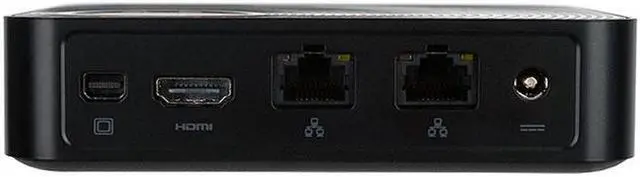
| Wired And Wireless Networking | 802.11ac Wi‑Fi, Bluetooth 4.0, and RJ‑45 Ethernet |
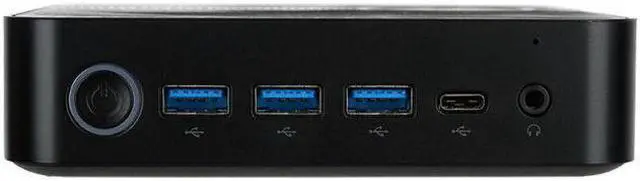
| Audio And Peripherals | Combo audio port; keyboard not included |
| Operating System | Windows 10 Pro |
| Power | 65W power supply |
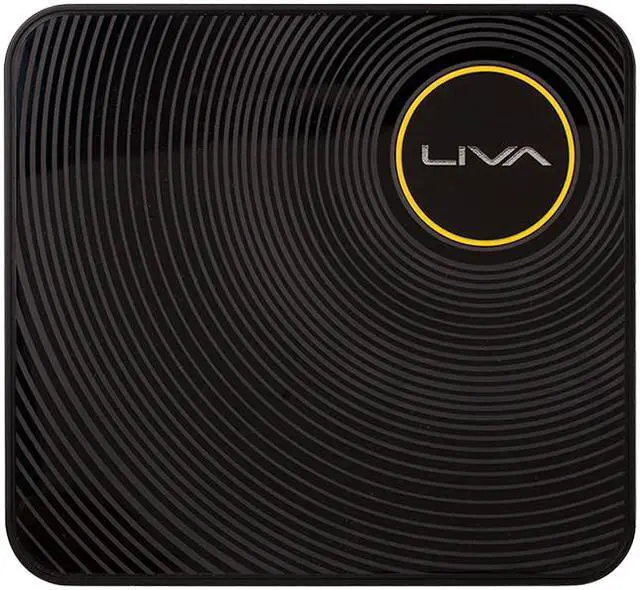
| Physical Design | Black mini PC |
| Model Identifiers | ECS Elitegroup LIVA Z Plus |
Q: ECS LIVA Z Plus vs. LIVA Z: which is better for desktop multitasking?
A: Choose the LIVA Z Plus when you want a Core i5-7200U-based mini PC for everyday desktop work and multitasking. Its platform also supports DDR4 memory and an M.2 SSD. The LIVA Z uses a Celeron-based platform and is positioned as a fanless mini PC, making it a fit when quiet operation is the priority.
Q: Should I choose the LIVA Z Plus or the LIVA Z2 for a small desktop?
A: Choose the LIVA Z Plus for a Core i5-7200U processor, an M.2 SSD, and HDMI plus mini DisplayPort video outputs. Choose the LIVA Z2 when fanless operation and two HDMI outputs are priorities; ECS lists Pentium and Celeron processor options for that model.
Q: LIVA Z Plus vs. LIVA Z3 Plus: which should I choose?
A: Choose the LIVA Z3 Plus if you want a newer 10th-generation Core processor platform, with ECS listing options up to the six-core Core i7-10710U, plus Wi‑Fi 6 and Bluetooth 5.0. Choose the LIVA Z Plus when the listed Core i5-7200U configuration and its HDMI plus mini DisplayPort outputs match your setup.
Q: Is this mini PC suitable for everyday office work and video meetings?
A: It is configured for basic desktop tasks such as web browsing, documents, and email, with Wi‑Fi, Bluetooth, Ethernet, and a headphone/microphone combo jack. Its 4GB of RAM and dual-core processor are modest, so heavy multitasking may feel constrained; the monitor, keyboard, and mouse are not listed as included.
Q: Can I connect two monitors to it?
A: The listed HDMI and mini DisplayPort provide two display connections. The product information does not specify maximum resolution or confirm every dual-display configuration, so check those requirements against your monitors before buying.
Q: Does it come with a monitor, keyboard, or mouse?
A: No monitor or keyboard is included according to the provided specifications; a mouse is not listed as included. Plan to supply your own display and input devices.
Q: Who is this mini PC best suited for?
A: It is best suited to someone who wants a compact Windows desktop for basic home or office computing and already has a monitor and peripherals. The 4GB RAM, 128GB SSD, and integrated graphics make it a less suitable choice for demanding multitasking, graphics-heavy work, or gaming.
Q: Is the LIVA Z Plus suitable for office work and media playback?
A: It is a compact option for basic office tasks and media playback: the listing specifies a dual-core i5-7200U, Windows 10 Pro, HDMI, and mini DisplayPort. A YouTube review of the LIVA Z Plus family covers office apps and video playback, but tests a different i5 configuration, so it does not verify this exact unit’s performance.
Q: Is 4GB of RAM enough, or should I plan to upgrade it?
A: Plan for a possible RAM upgrade if you expect to multitask or use graphics-intensive applications. This listing has 4GB; a LIVA Z Plus review recommends a second RAM stick for better graphics performance. The reviewed configuration may differ, so confirm the memory slots and upgrade options for this specific unit.
Q: Can this mini PC handle gaming?
A: Treat it as a basic or older-game system, not a modern gaming PC. It uses integrated Intel HD 620 graphics and only 4GB of listed RAM. A LIVA Z Plus review discusses Rocket League and emulation, but its tested configuration differs from this listing, so those results should not be taken as a guarantee for this unit.
Q: Is the LIVA Z Plus silent?
A: No. A YouTube review describes the LIVA Z Plus as actively cooled rather than fanless; its fan was reported as fairly quiet in the reviewed setup. Expect some fan noise, especially under load, and note that the review used a different configuration.


