




 here!
here!
I’m your shopping assistant for PC builds, upgrades, and everything tech.
Got questions? Ask away!
Start a conversation
here!
I’m your shopping assistant for PC builds, upgrades, and everything tech.
Got questions? Ask away!
Start a conversation
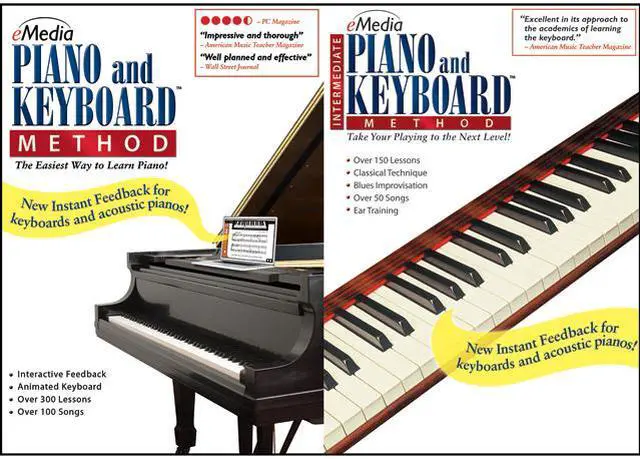

| Brand | eMedia |
|---|---|
| Model | EK02131DLM |
| Name | Piano Keyboard Method Deluxe (Mac) - Download |
|---|---|
| Operating Systems Supported | Mac OS |
| System Requirements | Mac OS X 10.4 or later |
| Packaging | Download |
| Feature | Instant Feedback on Your Playing! In eMedia Piano and Keyboard Method and for selected exercises in eMedia Intermediate Piano and Keyboard Method, Instant Feedback shows you when you play the correct notes as you progress through a melody. Note and Finger Tracker! The Note Tracker and Finger Tracker tools show you the note you play as music notation and on an animated keyboard. Over 450 Step-by-Step Lessons Animated Keyboard Displays color-coded fingerings as the music plays. Over 120 Large-Format Videos Interactive Evaluation Feedback Reviews and Ear Training Interactive review and ear training screens help reinforce new concepts and develop your ear. Song Highlighting and Looping Highlight an entire page, or just a portion of a song, and loop it for playback at whatever speed you are comfortable playing. Piano Fingering and Guitar Chords The piano fingerings help teach you the correct fingering for each note. Live Recorded Audio Live recorded audio is included for all songs and exercises. Variable-speed MIDI Slows down the audio to any tempo, while the Animated Keyboard shows song fingerings as the music plays. Progress Tracking In eMedia Piano and Keyboard Method, personalized reports show your rate of progress, including scores for specific songs (when using a MIDI keyboard). Orchestral Accompaniment Selected pieces in eMedia Intermediate Piano and Keyboard Method include orchestral accompaniment and even a jazz band with which to play along. Keyboard Tips With the click of a button in eMedia Piano and Keyboard Method, you can get suggestions as to which "voice" to use on your MIDI keyboard to get the best sound for the song! Digital Metronome Allows you to set your own tempo and work on your speed, rhythm, and timing. Digital Recorder Record and play yourself back |
|---|
| First Listed on Newegg | August 27, 2013 |
|---|
eMedia Piano Keyboard Method Deluxe for Mac is downloadable piano-learning software with over 450 step-by-step lessons, interactive feedback, and practice tools; it suits learners who want structured, self-paced instruction on a Mac.
| Attribute | Value |
|---|---|
| Best For | Mac users learning piano or keyboard through structured lessons, interactive practice, and MIDI-supported feedback |
| Platform And Delivery | For Mac OS X 10.4 or later; delivered as a download |
| Lessons And Learning Tools | More than 450 step-by-step lessons, over 120 large-format videos, piano fingering guidance, and guitar chords |
| Interactive Feedback And Progress | Instant feedback indicates correct notes; note and finger trackers show played notes in notation and on an animated keyboard. Interactive evaluations, review and ear-training screens, and progress reports support practice; reports include song scores when using a MIDI keyboard |
| Practice And Playback | Highlight and loop all or part of a song, adjust MIDI playback tempo, and follow color-coded fingerings on the animated keyboard. Includes live-recorded audio for songs and exercises, a digital metronome, and a recorder for playback of your own practice |
| Accompaniment And Keyboard Guidance | Selected pieces include orchestral or jazz-band accompaniment; keyboard tips suggest which voice to use on a MIDI keyboard for a song |
| Model Identifiers | eMedia model EK02131DLM |


