




 here!
here!
I’m your shopping assistant for PC builds, upgrades, and everything tech.
Got questions? Ask away!
Start a conversation
here!
I’m your shopping assistant for PC builds, upgrades, and everything tech.
Got questions? Ask away!
Start a conversation





Any questions? Ask CelesteSM will help you find out quickly.


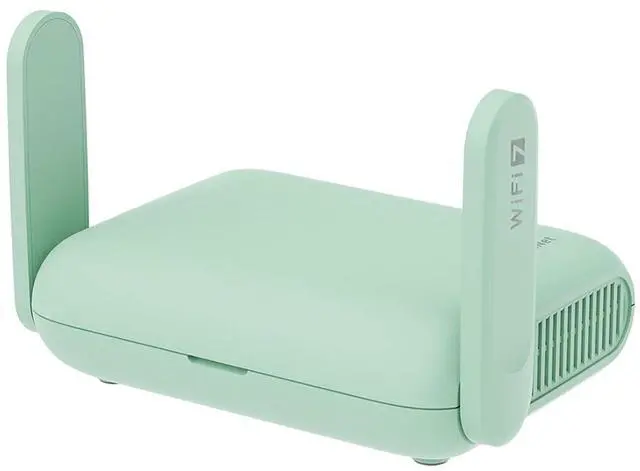
As a fully upgraded version of our Beryl AX, Beryl 7 is a compact dual-band Wi-Fi 7 travel router that delivers the fastest VPN speeds (up to 1,100 Mbps via WireGuard®) in GL.iNet's travel router lineup. With PD compatibility, it can be powered using a standard phone charger cable, which not only reduces the weight and clutter in your luggage, but also makes it much easier to keep your travel router powered up. Capable of supporting 120+ devices concurrently-all in a sleek, portable design built for life on the go.

Building on the success of the Beryl AX, the new Beryl 7 represents a major leap forward, engineered with key upgrades and differences for a more connected world.
Why should tech stay boring? The new Beryl 7 brings a refreshing Mint Green finish—soft, modern, and designed to stand out beautifully wherever you go. It’s not just a router; it’s a style statement.

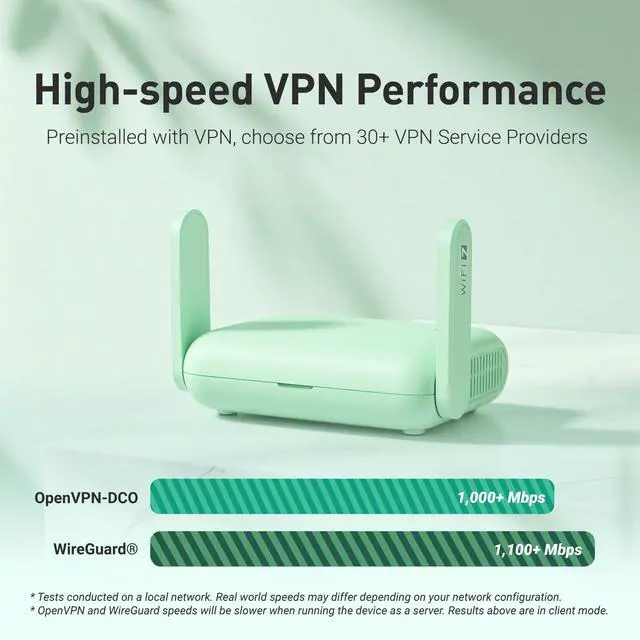
While the original Beryl already supported 30+ VPN providers, the Beryl 7 shatters speed limits. It now delivers blazing-fast OpenVPN-DCO and WireGuard performance up to 1,100 Mbps—a dramatic increase that transforms your secure experience. Enjoy effortless 8K streaming and seamless remote work with zero lag, even under full encryption.
* Tests conducted on a local network. Real world speeds may differ depending on your network configuration.
* OpenVPN-DCO and WireGuard speeds will be slower when running the device as a server. Results above are in client mode.

Beryl 7 features a quad-core 2.0 GHz CPU that delivers triple the processing power of the previous model, Beryl AX(GL-MT3000), exceeding typical travel router performance expectations. This exceptional capability enables blazing-fast VPN speeds—allowing WireGuard and OpenVPN to operate at full throughput without bottlenecks—while also supporting QoS management, multi-layer security features, and smooth connectivity for over 120 devices.

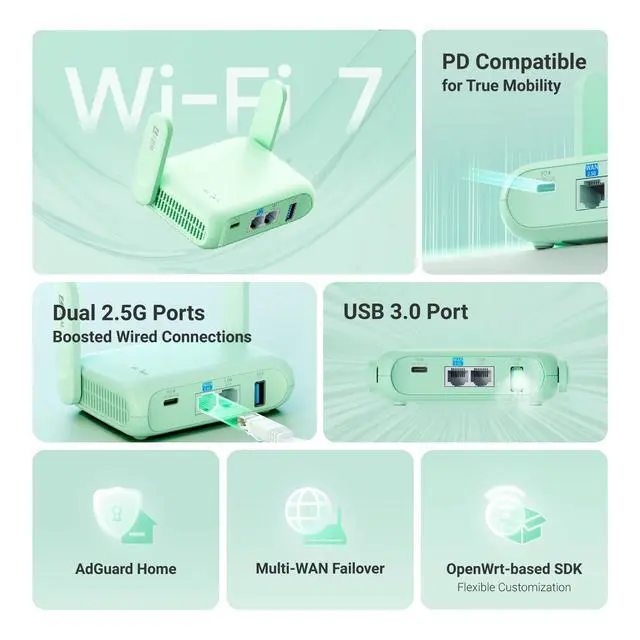
Carry the next generation of wireless technology in your pocket. Beryl 7 makes a giant leap from Wi-Fi 6 to advanced Wi-Fi 7 technology, delivering a dual-band BE3600 connection with support for key features like Multi-Link Operation (MLO) and 4K QAM. Enjoy high-speed, low-latency internet with wireless speeds of up to 3.6 Gbps, wherever you go.

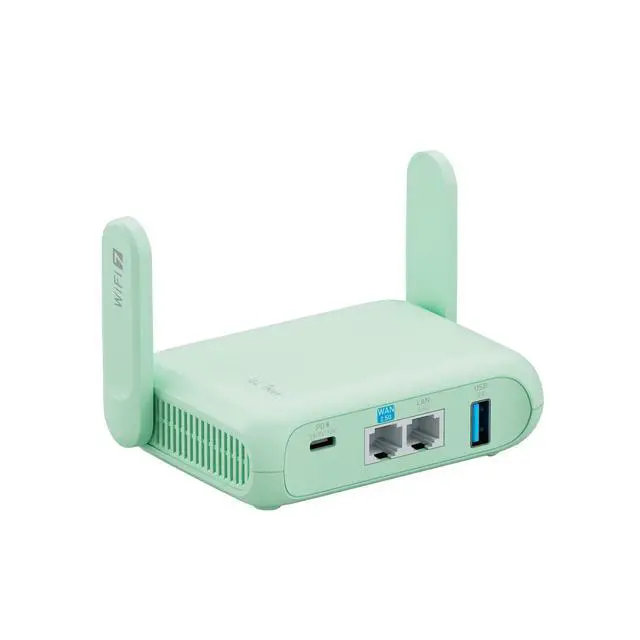
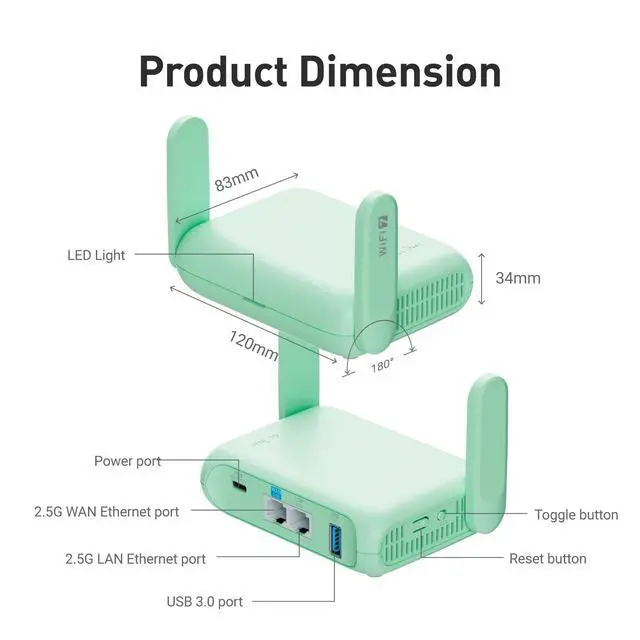
Beryl 7 comes with two full-featured 2.5G Ethernet ports, including one configurable WAN/LAN port. This allows you to fully utilize multi-gigabit internet plans while delivering super-fast wired connections to your NAS, gaming laptop, or media projector. By establishing a high-speed, low-latency wired link, Beryl 7 ensures minimal lag for gaming and smooth, uninterrupted 8K streaming—guaranteeing that every bit of performance reaches your most demanding devices.

The USB port on Beryl 7 is specially designed to provide higher power output, ensuring that virtually all Mobile Hotspots operate stably and efficiently. Whether you’re using it for high-speed cellular tethering or as a backup WAN connection, this enhanced USB port keeps your equipment running reliably, delivering seamless internet connectivity wherever you go.

Beryl 7 supports universal Power Delivery (PD) compatibility, allowing you to power it with the same high-wattage charger used for your mobile phone, laptop, tablet, or even a high-capacity power bank (supporting 5V/3A, 9V/3A, 12V/2.5A). This ensures your mobile network stays robust and ready anytime, anywhere.

The Beryl AX gave you 256 MB to work with. The new Beryl 7 doubles that to a massive 512 MB Flash. This expanded space unlocks true customization freedom—whether you need to install large game routing rule sets (e.g., for Steam, PSN, or Xbox), run lightweight IoT management tools to turn your travel router into a portable smart hub, or even deploy Python/Node.js scripts for automation tasks. With the Beryl 7, you can build a truly personalized routing setup without ever worrying about storage limitations.

With a massive 120+ device capacity (up from Beryl AX's 70+), Beryl 7 doesn’t just connect you; it empowers your entire digital ecosystem with rock-solid stability, wherever you are. On the road, every connection counts and Beryl 7 ensures you never have to compromise. You can work, stream, and share—all at once, without a hint of lag. That’s the peace of mind Beryl 7 delivers.

This router supports OpenWrt 21.02 (Kernel 5.4.281), providing an open-source platform for network customization and development. With 512 MB of memory, the router offers flexible support for various OpenWrt packages and custom scripts, enabling users to implement network optimizations, security enhancements, and personalized configurations to meet specific usage requirements.


Why pay a separate internet fee for every device? The Beryl 7 is your key to significant savings on the go. Simply connect it to the paid network once, and then share secure Wi-Fi with your phone, laptop, tablet, and more-all under a single access cost. Maximize your connectivity while you minimize your expenses and effortlessly bypass the captive portals with a one-time setup-no repeated logins required.
* Note: Travel routers may be prohibited by some cruise lines. Please check the specific regulations of your cruise line before use.

With Beryl 7, any hotel room can become your private theater. Connect to the hotel Wi-Fi, activate the built-in ultra-fast VPN client to access your home server, and plug in your streaming device or smart TV. Instantly, enjoy your personal media library and stream 8K content at high speed with complete privacy—as if you never left home.

Beryl 7 makes media and document sharing effortless during group travel. Connect an external USB drive to instantly create a private network storage space, supporting 120+ connected devices simultaneously. Family members or team members can securely access and share photos, videos, and work files—without relying on unstable public networks or limited cloud services. Everyone stays connected through a centralized, secure hub, making collaboration and memory-sharing seamless wherever you go.

With Beryl 7 acting as a VPN client, you can securely connect back to your home network anytime, anywhere. Paired with the Brume 3 (GL-MT5000) at home, it enables seamless remote access to your NAS devices, letting you manage files, stream media, or even perform real-time photo backups directly to your home storage. This setup ensures your personal data remains private and protected over encrypted connections, while giving you LAN-like access as if you were physically at home.

For digital nomads, a reliable internet connection is essential. Beryl 7 can turn any location—a café, co-working space, or beachside apartment—into a secure, productive remote office. It ensures crystal-clear VoIP calls and stable video conferences, while a dedicated guest network keeps your main connection secure for client collaborations.

For business travelers, accessing company resources restricted to specific office IP addresses can be challenging. Beryl 7 solves this seamlessly. Pre-configured with OpenVPN and WireGuard, it can act as a VPN client to securely connect back to your office network, giving you access to internal systems, file servers, or managed printers—as if you were physically in the office—all over a fully encrypted connection.

Never settle for weak signals. Beyond multiple connection methods—including Ethernet, Wi-Fi repeating, and cellular tethering—Beryl 7 is truly smart. Its advanced Multi-WAN feature provides automatic failover, constantly monitoring networks and switching to the best available connection to prevent drops. This ensures a robust, private network with the consistent high performance needed for gaming, 8K streaming and other data-intensive tasks.

Beryl 7 can turn your Mobile Hotspots or smartphone data plan into a high-performance Wi-Fi 7 network. Simply connect via USB and activate tethering mode, and it will receive the cellular signal and rebroadcast it as a superior Wi-Fi network throughout your space. With support for over 120 simultaneous connections, every device enjoys stable, high-speed internet—eliminating weak signals and connectivity limitations once and for all.

Beryl 7 lets you and your roommates bypass geographical restrictions simultaneously using a single VPN account. Supporting 30+ VPN service providers, this compact router provides seamless access to region-locked streaming services and video game platforms across all your devices. It also lets you apply VPN protection to the entire network or select specific devices, eliminating the need for individual per-device VPN subscriptions while ensuring everyone can enjoy their preferred content without compromise.

For homelab enthusiasts and media collectors who travel, the Beryl 7 ensures your entire home network is always within reach. By establishing high-speed encrypted tunnels via WireGuard or OpenVPN, it provides seamless, secure access to your home servers, development environments, and personal media libraries from anywhere. This eliminates the risks of public internet exposure while delivering LAN-like responsiveness, letting you manage critical services or stream your movie collection as if you were locally connected.

Beryl 7 enables seamless wireless control for Ethernet-only devices through a simple setup: connect the device to the router's LAN port and use your smartphone or tablet for wireless management. This compact solution is ideal for digital audio systems, mini-PCs, PLCs, and other equipment lacking native wireless capability. With flexible uplink options including Wi-Fi relay, Ethernet/USB tethering, plus built-in VPN support for secure data transmission, Beryl 7 provides a complete connectivity solution in a minimal footprint.


Product Initial Setup Guide
Visit the User Guide page https://docs.gl-inet.com/router/en/4/user_guide/gl-mt3600be/ and choose the product model and specification required for setup from the options on the left-hand side of the page.
How to Set Up OpenVPN Client on GL.iNet Router
Navigate to the OpenVPN Client Configuration section https://docs.gl-inet.com/router/en/4/interface_guide/openvpn_client/, where you can follow the provided guide to effortlessly unlock NordVPN and OpenVPN settings, ensuring seamless VPN functionality.
How to Set Up WireGuard Client on GL.iNet Router
Visit the WireGuard VPN Client page https://docs.gl-inet.com/router/en/4/interface_guide/wireguard_client/ and refer to the guide to effortlessly configure settings for AzireVPN, Mullvad, and other WireGuard client features.
How to Connect to the Internet via an existing Wi-Fi by Repeater
Repeater https://docs.gl-inet.com/router/en/4/interface_guide/internet_repeater/ Mode Basic Setup Guide
How to Build Your Own WireGuard Home Server
Proceed to the Tutorials section https://docs.gl-inet.com/router/en/4/tutorials/build_your_own_wireguard_home_server_with_two_glinet_routers/ and refer to the guide to effortlessly complete the setup of your WireGuard Home Server.
How to do if Can't access web Admin Panel
Visit the FAQ page https://docs.gl-inet.com/router/en/4/faq/cannot_access_web_admin_panel/ and search for the "Can't access the web Admin Panel" section to find the specific reasons and solutions for this issue.
Experience seamless connectivity with the GL.iNet GL-MT3600BE (Beryl 7) the ultimate portable Wi-Fi 7 travel router. This compact, pocket-sized powerhouse delivers blazing-fast dual-band wireless performance (2.4GHz + 5GHz) wherever you go. Whether you're in a hotel, RV, cruise ship, or camping, Beryl 7 transforms unreliable public Wi-Fi into your own secure, high-speed mobile hotspot. Perfect as a travel Wi-Fi route or RV internet solution, it keeps you connected without contracts or compromises. With built-in VPN router support, enjoy encrypted browsing and secure access to home networks from anywhere ideal for remote work or streaming on the road. Thanks to dual 2.5Gb Ethernet ports and advanced features, Beryl 7 stands out as one of the best portable Wi-Fi routers for international travel, business trips, or outdoor adventures. Its sleek, lightweight design slips easily into your bag, making it the go-to pocket router and Wi-Fi access point with Ethernet for multiple devices. Stay online effortlessly with the GL.iNet GL-MT3600BE your reliable companion for fast, secure internet on the go. .
| Brand | GL.iNet |
| Model Name | GL-MT3600BE |
| Special Feature | Access Point Mode, Guest Mode, Internet Security, QoS |
| Frequency Band Class | Dual-Band |
| Wireless Communication Standard | 802.11.be, 802.11a, 802.11ax, 802.11b, 802.11g |
| Compatible Devices | Gaming Console, Personal Computer, Smartphone, Tablet |
| Recommended Uses For Product | Business, Gaming, Home, Travel |
| Included Components | Ethernet Cable, GL-MT3600BE (Beryl7) router, Power Adapter (with US, UK, EU, AU Plug), User Manual |
| Connectivity Technology | Ethernet, Wi-Fi |
| Color | Mint Green |
| Other Special Features of the Product | Access Point Mode, Guest Mode, Internet Security, QoS |
| Wireless Compability | 802.11.be, 802.11a, 802.11ax, 802.11b, 802.11g |
| Antenna Location | Business, Gaming, Home, Travel |
| Antenna Type | Retractable |
| Operating System | OpenWrt |
| Security Protocol | DHS over TLS, DNS over HTTPS, WPA3 |
| Number of Ports | 2 |
| Control Method | App |
| Data Transfer Rate | 3600 Megabits Per Second |
| LAN Port Bandwidth | 10/100/1000/2500 Mbps |
| Voltage | 5 Volts (DC), 9 Volts (DC) |
| Maximum Upstream Data Transfer Rate | 2500 Megabits Per Second |
| RAM Memory Installed | 512 MB |
| Wi-Fi Generation | Wi-Fi 7 |
| Is Modem Compatible | No |
| Connectivity Protocol | Wi-Fi, Ethernet |
| Coverage | Up to 120 devices, global |
| Frequency | 2.4 GHz |
| Built-In Media | Ethernet Cable, GL-MT3600BE (Beryl7) router, Power Adapter (with US, UK, EU, AU Plug), User Manual |
| Model Number | GL-MT3600BE |
| Manufacturer | GL.iNet |
| Mfr Part Number | GL-MT3600BE |
Q: Should I buy the GL.iNet Beryl 7 or the Beryl AX for travel?
A: Choose the Beryl 7 if you want a newer platform with Wi‑Fi 7, dual 2.5GbE ports, and much higher advertised VPN throughput for WireGuard or OpenVPN-DCO. Official GL.iNet materials position it as the faster option, with up to 1100 Mbps VPN versus the older Beryl AX datasheet figures of 300 Mbps WireGuard and 150 Mbps OpenVPN. Choose the Beryl AX if your priority is a smaller, more established Wi‑Fi 6 travel router and your internet or VPN needs are well below those higher limits. In practical buying terms, Beryl AX fits value-focused travel use, while Beryl 7 makes more sense for faster hotel, home, or tethered connections and heavier VPN use.
Q: Is the GL.iNet Beryl 7 a good travel router for hotels, Airbnb, and public Wi‑Fi?
A: Yes, it is a strong fit for travel use if you want a compact router with repeater mode, dual 2.5G ports, USB 3.0, and built-in VPN support. The main trade-off is that some Reddit discussion reports repeater-mode stability issues in certain Wi‑Fi 5/6 environments, which matters because hotels and rentals often use those networks. It is best for travelers who value security, routing features, and OpenWrt flexibility more than plug-and-forget simplicity.
Q: Who is the Beryl 7 best suited for?
A: The Beryl 7 is best suited for travelers, remote workers, and privacy-focused users who want to secure multiple devices behind one router and may use WireGuard or OpenVPN. It also suits buyers who specifically want OpenWrt-based customization in a portable form. It is less suitable for people who only need a basic hotspot or want the simplest possible setup.
Q: Is the Beryl 7 worth buying over other travel routers?
A: It is worth buying if your priority is a higher-end travel router with Wi‑Fi 7, dual 2.5G Ethernet, fast advertised WireGuard performance, and OpenWrt-based flexibility. The trade-off is price and complexity: buyers comparing it with alternatives often weigh it against cheaper or simpler models. It makes more sense for advanced users than for someone who only needs occasional basic travel Wi‑Fi sharing.
Q: Can the Beryl 7 replace a home router, or is it mainly for travel?
A: It can work as a main router for light to moderate home use, especially if you want VPN features and OpenWrt customization, but it is primarily designed as a travel router. Its portable form factor and two Ethernet ports are practical, but buyers looking for broader home-network features, more ports, or a simpler long-term home setup may be better served by a dedicated home router.
Q: What are the main trade-offs or risks before buying the Beryl 7?
A: The main trade-offs are software maturity, setup complexity, and version or region concerns. Community discussion shows that early adopters have run into repeater-mode bugs and some buyers pay attention to global versus China-region variants. In return, you get strong hardware for a travel router and more control than most mainstream alternatives.


