LOWEST PRICE

In Intel Motherboards

01
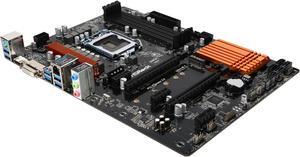
ASRock Z890 Lightning WiFi LGA 1851 Intel Z890 ATX Motherboard
ASRock Z890 Lightning WiFi LGA 1851 ATX Motherboard
  • Memory Standard: DDR5 4400 / DDR5 4800 / DDR5 5000 / DDR5 5200 / DDR5 5400 / DDR5 5600 / DDR5 5800 / DDR5 6000 / DDR5 6200 / DDR5 6400 / DDR5 6600 / DDR5 6800 / DDR5 7000 / DDR5 7200 / DDR5 7600 / DDR5 7900 / DDR5 7950 / DDR5 8000 / DDR5 8200 / DDR5 8266 / DDR5 8400 / DDR5 8600 / DDR5 8800 / DDR5 9000 / DDR5 9066 / DDR5 9200 / DDR5 9466
  • Number of Memory Slots: 4x288pin (DDR5)
  • Audio Chipset: Realtek ALC1220
  • Brand: ASRock
  • Model #: Z890 Lightning WiFi
  • Item #: N82E16813162173
  • Return Policy: International Order Return Policy
AUD$338.80
AUD$350.90
AUD$89.00 Shipping

thunderbolt 4 pc8000 memory controller m.2 5x4 Updated bios with nice Factory settings S200 overclock 5 rgb headers no fan hub needed standard cpu mount with even distribution pressure, No Hot Spots

02
ASUS Pro WS W890E-SAGE SE Intel W890 (LGA 4710-2) EEB workstation motherboard, PCIe 5.0 x16, M.2, MCIO, SlimSAS, 2x 10Gb LAN, Server-grade Remote Management, 16+(2+2)+1+2 stages, USB4, USB Type-C
  • Number of Memory Slots: 8x288pin (DDR5)
  • Brand: ASUS
  • CPU Socket Type: LGA 4710
  • Chipset: Intel W890
  • Model #: Pro WS W890E-SAGE SE
  • Item #: 9SIA0ZXKV17119
  • Return Policy: View Return Policy
AUD$1,899.70
AUD$1,967.90
AUD$191.38 Shipping
03
GIGABYTE Z790 AORUS ELITE AX LGA 1700 Intel Z790 ATX Motherboard with DDR5, Quad M.2, PCIe 5.0, USB 3.2 Gen2X2 Type-C, Intel WiFi 6E, 2.5GbE LAN, Q-Flash Plus, PCIe EZ-Latch
  • Memory Standard: Support for DDR5 7600(O.C.) /7400(O.C.) /7200(O.C.) /7000(O.C.) /6800(O.C.) /6600(O.C.) / 6400(O.C.) / 6200(O.C.) / 6000(O.C.) / 5800(O.C.) / 5600(O.C.) / 5400(O.C.) / 5200(O.C.) / 4800 / 4000 memory modules Dual channel memory architecture Support for ECC Un-buffered DIMM 1Rx8/2Rx8 memory modules (operate in non-ECC mode) Support for non-ECC Un-buffered DIMM 1Rx8/2Rx8/1Rx16 memory modules Support for Extreme Memory Profile (XMP) memory modules
  • Number of Memory Slots: 4x288pin (DDR5)
  • Audio Chipset: Realtek Audio CODEC High Definition Audio
  • Brand: GIGABYTE
  • Model #: Z790 AORUS ELITE AX
  • Item #: N82E16813145417
  • Return Policy: International Order Return Policy
Save 5%
AUD$338.80
AUD$358.94
AUD$89.00 Shipping

It came with the F3 bios, which is what I was hoping for, so no need to flash this bios. Everything worked out of the box with no issues, for example, the WiFi, the LAN, the audio (which is a very modest audio setup but it works well; more to that later). Bluetooth works very well, and NOTE, the antenna they include is not just for WiFi, but for Bluetooth as well. Gigabyte says little about the antenna, but it does affect Bluetooth performance for distant devices. All external connections work fine, as do internal connections. There are 3 screws built into the plate that covers the M2 drives, this is a nice feature (the built-in screws), makes it easy to remove and replace. The little connectors that hold the end of M2 drives in place is a really nice feature. Nice touch. This mobo says it is compatible with 6000Mt 16G x 2 sticks of Corsair Vengeance, Indeed, with XMP set, I am running two such sticks at 6000 (40-40-40-77-117) with Cmd Rate of 1T. That's a little fast for the i5-13600k chip, but is holding steady under stress testing at stock settings. So I''m pleased. With faster memory settings under stress, ,however, the system crashes but that is without any tweaking of the memory settings. I will be exploring more. The bios is pretty straightforward, though I wish Gigabyte had more documentation. There are so many settings, it is a bit overwhelming. There are some good "how-to" guides on YT, such as the following: https://www.youtube.com/watch?v=mPxosArjVVw&t=548s Overall, working with this motherboard has been pretty painless; it's well built and of high quality.