• ₩16,258
  • VAT-Inclusive Price
  • ₩9,999 Shipping
Ships from Taiwan.
Most customers receive within 4-7 days.
Add to Wish List(Found on 1 wish list)
Shop it at NeweggBusiness.

Noctua NA-SYC2, 3 Pin Y-Cables for PC Fans (Black)

  • Y-type splitter cables for running two fans on one fan header
  • RPM signal of one fan is transmitted to the motherboard for speed monitoring
  • 3-pin connectors for 3-pin fans
  • Black connectors and black cable sleeving for clean optics
  • Set includes 2 cables; Trusted Noctua quality backed up with 6-year manufacturer’s warranty
+
+
Overview
Specs
Reviews
image for this item

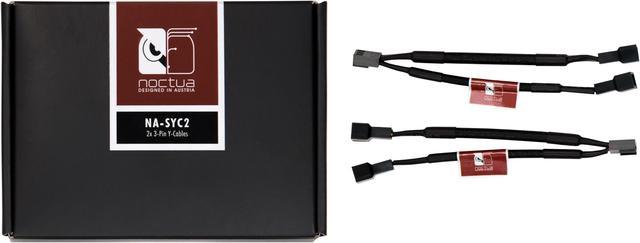
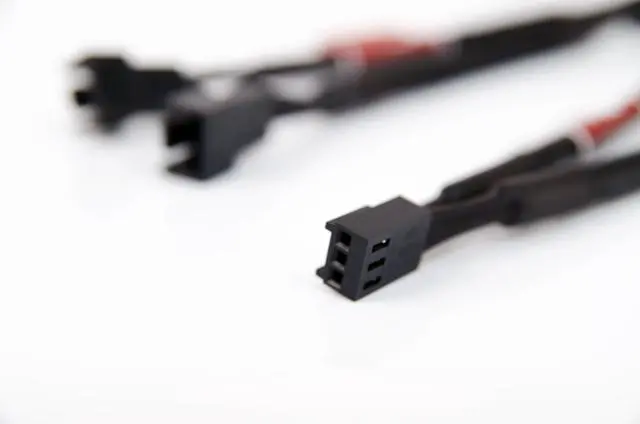
The NA-SYC2 is a fan accessory set consisting of two fully sleeved NA-YC2 Y-Cables for 3-pin fans. The NA-YC2 Y-Cables make it possible to run two 3-pin fans on a single fan header.


image for this item
Specifications:
  • Connector: 3-pin
  • Length: 115mm
  • Colour: Black
image for this item
Product Info:
  • Y-type splitter cables for running two fans on one fan header.
  • RPM signal of one fan is transmitted to the motherboard for speed monitoring
image for this item
Warning:
Common mainboard fan headers support up to 9.6 or 12W (check your mainboard manual for detailed information). Please thus make sure that the combined power draw of the fans connected to one fan header using NA-YC2 adaptors does not exceed this value!  
image for this item
Scope of Delivery:
  • 2x NA-YC2 Y-Cables
Products
Compare with other Y cables from our selection: 4-Pin Y Cables, black 3-Pin Y Cables, black
The NA-SYC2 is a fan accessory set consisting of two fully sleeved NA-YC2 y-cables for 3-pin fans. The NA-YC2 y-cables make it possible to run two 3-pin fans on a single fan header.


Attention! Common mainboard fan headers support up to 9.6 or 12W (check your mainboard manual for detailed information). Please thus make sure that the combined power draw of the fans connected to one fan header using NA-YC2 adaptors does not exceed this value!

Warranty & Returns

Warranty, Returns, And Additional Information

Return Policies*

  • Return for refund within: 30 days
  • Return for replacement within: non-replaceable
  • This item is covered by Noctua Cooling Solutions Return Policy
  • *Subject to applicable law
  • Warranty Notice:

    This product does not include manufacturer warranty when purchased or used outside of its designated sales region. By purchasing internationally, you acknowledge that warranty support from the manufacturer will not be available.

Manufacturer Contact Info

LOADING...

The Noctua NA-SYC2 is a 10 cm, black 3-pin Y-splitter cable set for users who want to connect two 3-pin PC fans to one motherboard fan header while monitoring the RPM signal from one fan.

Recommended For

  • PC builders with two 3-pin case fans and one available motherboard fan header who want both fans connected to the same header.
  • Builders who want a motherboard fan header to control two connected 3-pin fans together; the motherboard receives an RPM signal from one fan.
  • PC builders adding a second 3-pin fan to a case or cooling setup who want a short, black-sleeved cable for a neater-looking installation.
  • Builders wiring two separate pairs of 3-pin fans who can use the set’s two Y-cables to connect each pair to its own fan header.

Real-World Use Scenarios

  • When a PC build has two 3-pin case fans but only one available motherboard fan header, connect both through the splitter to run them from that header; check the motherboard’s power limit against the fans’ combined draw.
  • For two 3-pin fans serving the same case area, such as paired intake fans, the splitter lets them share one header’s control rather than requiring separate headers; they are not independently controlled through this cable.
  • When adding a second 3-pin fan to a compatible CPU cooler or case-fan setup, use one header for both fans and monitor the RPM reported from the fan connected to the splitter’s tach-signal lead.
  • In a compact build where the motherboard has few fan headers, use a splitter to add a second 3-pin fan without routing both fans to separate headers; the short sleeved cable helps keep the connection near the header.
  • When connecting two fans to one header, use the motherboard’s fan-control settings for the shared header and remember that the motherboard receives an RPM reading from only one fan, not separate readings for both.