• $15.99
  • Free 30-day Returns
  • Ships from China.
    Price alert
    Shop it at NeweggBusiness.

    Vszerda UEX108 600mm M.2 to PCIe X4 Riser Cable (PCIe 3.0 X1 Speed),for PCIe WiFi Card, M.2 PCIe Card, USB PCIe Card, Sound Card, etc

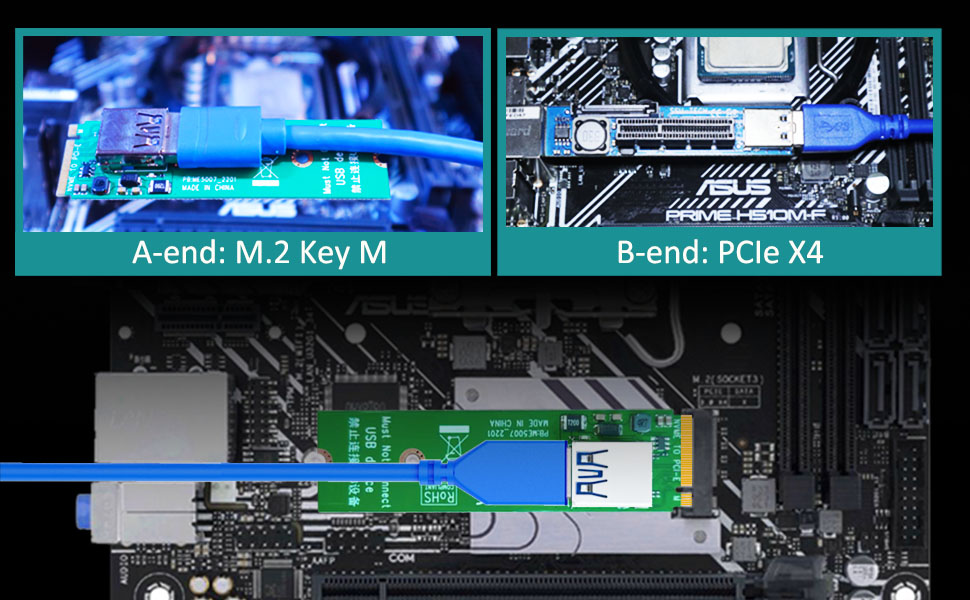
    • This 600mm length M.2 riser cable converts the onboard M.2 Key-M slot into a PCIe X4 slot. But the maximum speed is only PCIe 3.0 X1 (~1GB/s).
    • Work with PCIe X1/X4 cards, such as PCIe Wifi Card, M.2 PCIe Card, Firewire Card, USB PCIe Card, Sound Card, etc.
    • Another advantage: the 600mm round wire can be twisted at any angle, so the position of the female side is virtually unlimited. In addition, the bottom surface is insulating foam, which can be labeled with self-adhesive tape (Not included) so that the female side can be mounted at any angle.
    • Plug and Play, and compatible with Windows/Mac OS/Linux/NAS. If the PC crashes or has blue screens after installation. Please re-insert the Mini PCIe riser cable and make sure all devices are properly secured.
    • Operating Voltage: 12 Voltage; Output Power: 10W at max.
    +
    +
    Overview
    Specs
    Reviews

    Any questions? Ask CelesteSM will help you find out quickly.

    Model: UEX108

    A-end M.2 Key M
    B-end PCI-Express X4 (Female)
    Speed Bandwidth PCIe 3.0 X1
    Power Supply 10W/12V
    Length 23.6inch/600mm
    m.2 extension cable

    Why M.2 to PCIe X4 Extension Cable?

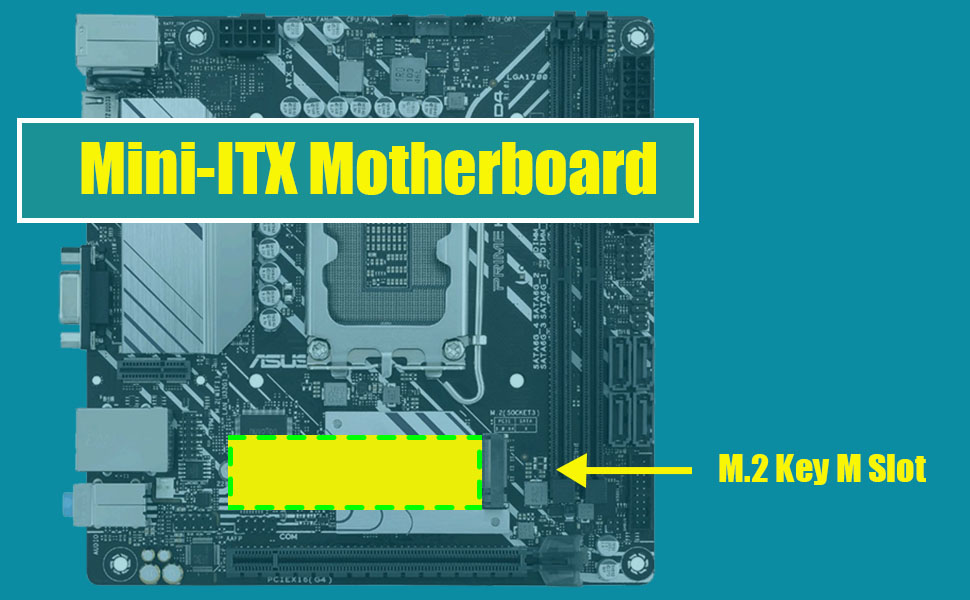
    • Usually on a Mini-ITX motherboard, there is only one PCIe X16 slot for the graphics card. To get an extra PCIe slot, you can convert the M.2 slot on the motherboard into PCIe slot
    • You want to move PCIe X1/X4 devices outside the motherboard because the motherboard space is too crowded, or the cooling on the motherboard is too poor
    • How to use the M.2 Key M slot on the motherboard?

    m.2 extension cable

    Advantages

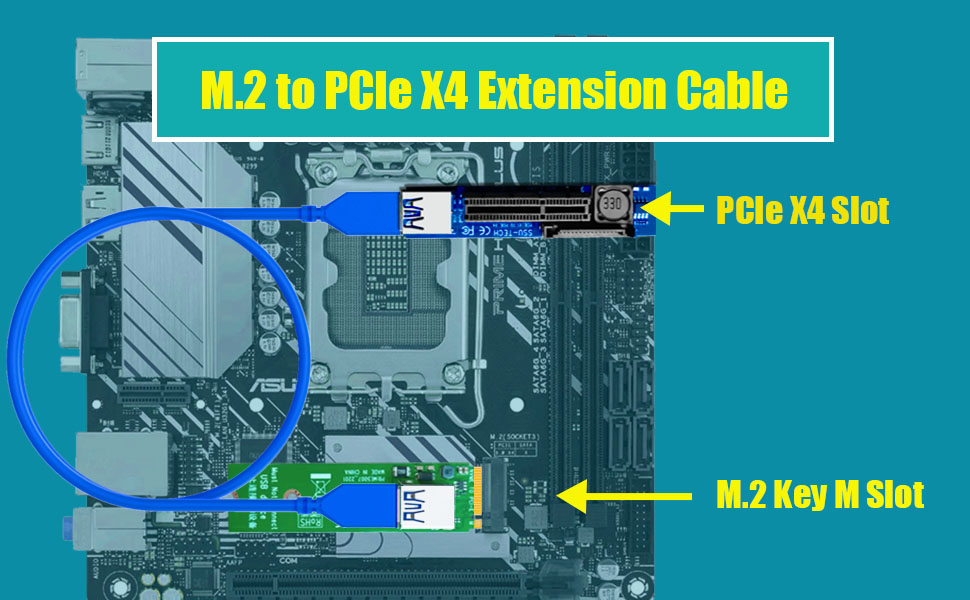
    This M.2 to X4 extension cable can convert to PCIe X4 interface, and extends to 23.6 Inch/60cm far away

    It features with the following advantages:

    • M.2 Key M slot converts to PCIe X4 slot, so you can install PCIe X1/X4 device to motherboard
    • 10W power supply from PCIe X4 slot. If it is insufficient, 15PIN SATA interface is available for extra 54W power supply
    • The length of 23.6 Inch/60cm can extend the PCIe X4 slot to any position of the PC case, even outside the PC case
    • M.2 Key M converts to PCIe X4, but still PCIe X1 speed bandwidth. You can install PCIe X1 or X4 deivces on this extension cable

    Overall, this M.2 Key M to PCIe X4 extension cable is a reliable and practical solution that can perfectly solve your problems
    m.2 extension cable

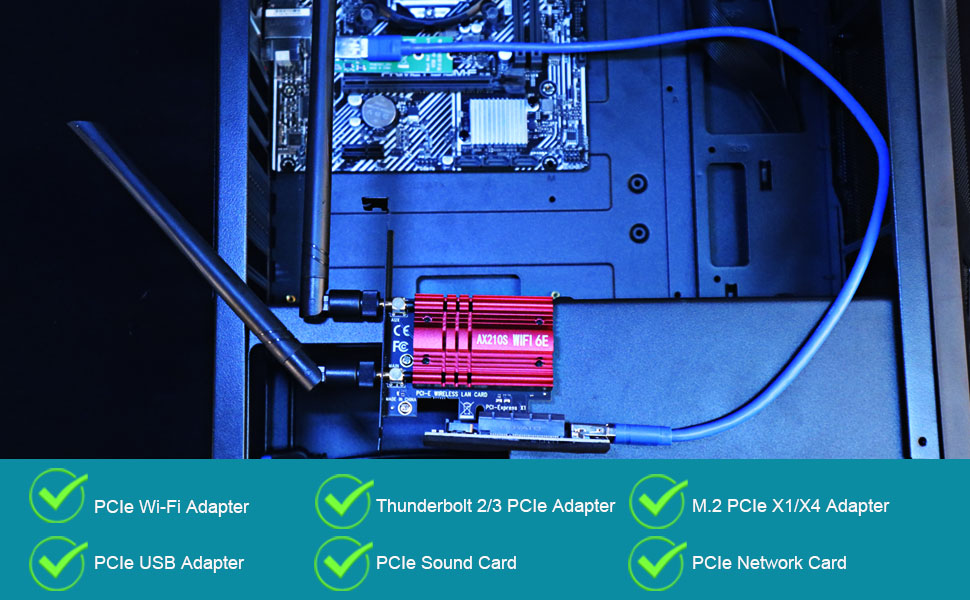
    What devices can use this M.2 to X4 extension cable?

    • PCIe Wi-Fi adapter
    • PCIe USB adapter
    • M.2 PCIe adapter
    • PCIe Network Card
    • PCIe Sound Card
    • PCIe Thunderbolt 2/3 Adapter
    • Other PCIe X1 or X4 devices

    Noted: although converting to PCIe X4 slot, speed bandwidth is PCIe 3.0 X1 at max
    pcie x1 speed

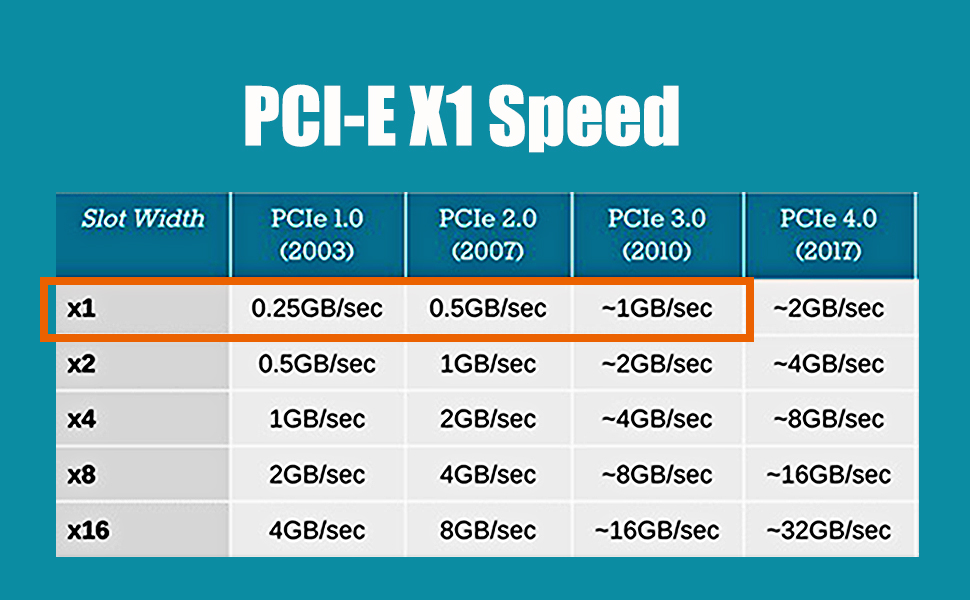
    PCI-Express 3.0 X1 speed at max

    With PCI-E 4.0 hardware condition (PCI-E devices and motherboard and CPU all supports PCI-E 4.0):

    • The speed will downgrade to PCI-E 3.0 X1 situation

    With PCI-E 3.0 hardware condition (PCI-E devices and motherboard and CPU all supports PCI-E 3.0):

    • ~ 1GB/s for PCI-E 3.0 X1

    With PCI-E 2.0 hardware condition (PCI-E devices and motherboard and CPU all supports PCI-E 2.0):
    • ~ 0.5 GB/s for PCI-E 2.0 X1

    m.2 extension cable

    Plug and Play, Easy to Installation

    • No driver required
    • Transparent to OS

    Noted:

    1. A-end can install into M.2 Key M slot
    2. B-end can be installed with PCIe X1/X4 devices
    3. All operations must be performed with the motherboard powered off

    Model: UEX108

    A-end M.2 Key M
    B-end PCI-Express X4 (Female)
    Speed Bandwidth PCIe 3.0 X1
    Power Supply 10W/12V
    Length 23.6inch/600mm
    m.2 extension cable

    Why M.2 to PCIe X4 Extension Cable?

    • Usually on a Mini-ITX motherboard, there is only one PCIe X16 slot for the graphics card. To get an extra PCIe slot, you can convert the M.2 slot on the motherboard into PCIe slot
    • You want to move PCIe X1/X4 devices outside the motherboard because the motherboard space is too crowded, or the cooling on the motherboard is too poor
    • How to use the M.2 Key M slot on the motherboard?

    m.2 extension cable

    Advantages

    This M.2 to X4 extension cable can convert to PCIe X4 interface, and extends to 23.6 Inch/60cm far away

    It features with the following advantages:

    • M.2 Key M slot converts to PCIe X4 slot, so you can install PCIe X1/X4 device to motherboard
    • 10W power supply from PCIe X4 slot. If it is insufficient, 15PIN SATA interface is available for extra 54W power supply
    • The length of 23.6 Inch/60cm can extend the PCIe X4 slot to any position of the PC case, even outside the PC case
    • M.2 Key M converts to PCIe X4, but still PCIe X1 speed bandwidth. You can install PCIe X1 or X4 deivces on this extension cable

    Overall, this M.2 Key M to PCIe X4 extension cable is a reliable and practical solution that can perfectly solve your problems

    m.2 extension cable

    What devices can use this M.2 to X4 extension cable?

    • PCIe Wi-Fi adapter
    • PCIe USB adapter
    • M.2 PCIe adapter
    • PCIe Network Card
    • PCIe Sound Card
    • PCIe Thunderbolt 2/3 Adapter
    • Other PCIe X1 or X4 devices

    Noted: although converting to PCIe X4 slot, speed bandwidth is PCIe 3.0 X1 at max

    pcie x1 speed

    PCI-Express 3.0 X1 speed at max

    With PCI-E 4.0 hardware condition (PCI-E devices and motherboard and CPU all supports PCI-E 4.0):

    • The speed will downgrade to PCI-E 3.0 X1 situation

    With PCI-E 3.0 hardware condition (PCI-E devices and motherboard and CPU all supports PCI-E 3.0):

    • ~ 1GB/s for PCI-E 3.0 X1

    With PCI-E 2.0 hardware condition (PCI-E devices and motherboard and CPU all supports PCI-E 2.0):

    • ~ 0.5 GB/s for PCI-E 2.0 X1

    m.2 extension cable

    Plug and Play, Easy to Installation

    • No driver required
    • Transparent to OS

    Noted:

    1. A-end can install into M.2 Key M slot
    2. B-end can be installed with PCIe X1/X4 devices
    3. All operations must be performed with the motherboard powered off

    GLOTRENDS UEX108 600mm M.2 to PCIe X4 Riser Cable (PCIe 3.0 X1 Speed),for PCIe WiFi Card, M.2 PCIe Card, USB PCIe Card, Sound Card, etc


    Product information

    Brand GLOTRENDS
    Hardware Interface PCI Express x4
    Style 600mm M.2 to PCIe X4 Riser Cable
    Item Weight 0.09 kg
    Compatible Devices Firewire Card, M.2 PCIe Adapter, PCIe WiFi Card, Sound Card, USB PCIe Card
    Model Number UEX108
    Number of Items 1
    Number of Packs 1
    Manufacturer glotrends
    Unit Count 1 Count
    Built-In Media PCIe Riser Cable
    Mfr Part Number UEX108
    Operating System Windows/Mac OS/Linux/NAS
    Style Name 600mm M.2 to PCIe X4 Riser Cable

    Warranty & Returns

    Warranty, Returns, And Additional Information

    Warranty

    • Please contact the Seller directly for warranty information. Warranty information may also be found on the Manufacturer's website.
    • CONTACT

    Return Policies

    Manufacturer Contact Info

    LOADING...