




 here!
here!
I’m your shopping assistant for PC builds, upgrades, and everything tech.
Got questions? Ask away!
Start a conversation
here!
I’m your shopping assistant for PC builds, upgrades, and everything tech.
Got questions? Ask away!
Start a conversation Top Rated Top Rated




Any questions? Ask CelesteSM will help you find out quickly.
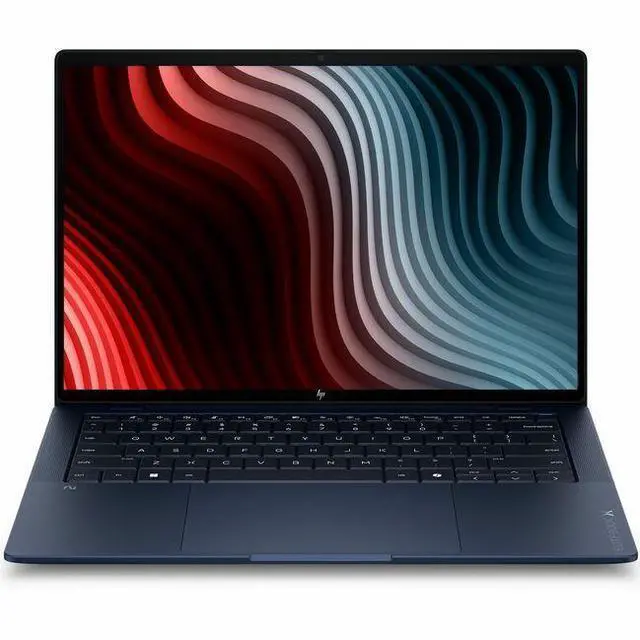
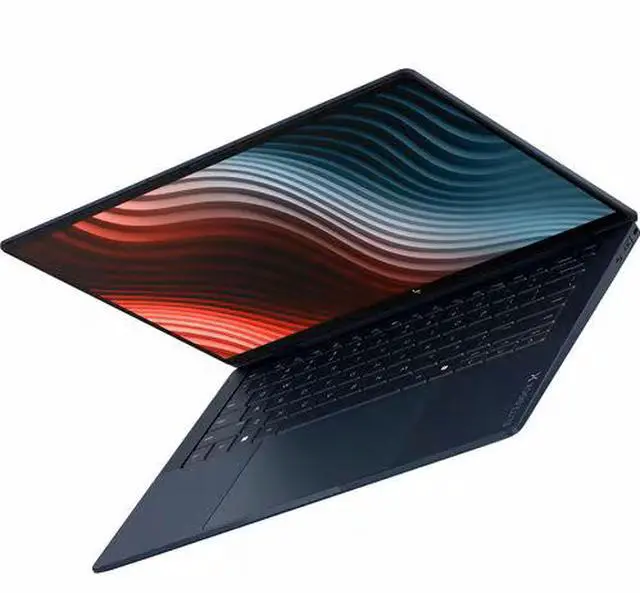
The HP EliteBook X G2a is a 14-inch Copilot+ business laptop with a 3K 120Hz touchscreen, Ryzen AI 9 HX PRO 470, 64GB RAM, and 1TB SSD, making it a strong fit for professionals who want premium portability, fast multitasking, and built-in AI features for office, collaboration, and creative productivity.
| Attribute | Value |
|---|---|
| Best For | 14-inch touchscreen AI-capable business and student users who need a portable Windows 11 Pro notebook with a Ryzen AI 9 HX processor, large 64 GB memory and 1 TB NVMe storage for productivity, AI-assisted workflows, and everyday multitasking |
| Processor And Core Count | AMD Ryzen AI 9 HX PRO 470 (Ryzen AI series) with up to 5.2 GHz turbo, 12 logical processor count and 24 MB L3 cache |
| GPU And VRAM | Integrated AMD Radeon 890M graphics with shared (system) memory |
| Display Spec | 14.0" 2880 x 1800 IPS touchscreen, 120 Hz refresh rate, up to 700 nit peak brightness with Low Blue Light / Eye Ease |
| Memory Configuration | 64 GB LPDDR5X system memory (64 GB installed, 64 GB maximum listed) |
| Storage And Expansion | 1 TB solid-state drive (M.2 NVMe form factor/interface) |
| High Speed I O | Two Thunderbolt 4 (USB-C) ports (supporting USB Power Delivery and DisplayPort 2.1), total USB ports listed as 2, and one HDMI output |
| Battery And Power | Internal lithium‑polymer battery (installed) with 4000 mAh capacity, 3 cells, battery weight ~0.52 lb; batteries included |
| Wired And Wireless Networking | Wi‑Fi 7 (802.11be) wireless LAN and Bluetooth support |
| Webcam And Privacy | Front-facing 5.0 MP webcam for video conferencing |
| Keyboard And Control | Touchscreen primary human-interface input (touch control supported) |
| Portability | Thin 0.56" x 12.3" x 8.5" chassis and approximately 2.45 lb light weight for a 14" business notebook |
| External Display And Docking Fit | Supports external displays via HDMI and DisplayPort 2.1 over Thunderbolt 4 (USB-C) ports |
| Software And Security | Ships with Windows 11 Pro and includes Wolf Pro Security Edition in the package content |
| Model Identifiers | HP EliteBook X G2a (Model/Part D72PQUT#ABA), Manufacturer Hewlett Packard, 2026 model/edition listed |
Q: Should I choose the HP EliteBook X G2a or the HP EliteBook X G1a?
A: Choose the EliteBook X G2a if you want the newer AMD Ryzen AI 9 HX PRO 470 platform, Wi-Fi 7, and a 64 GB / 1 TB configuration paired with a 3K 120 Hz touch display. Choose the EliteBook X G1a if you want a very similar premium 14-inch EliteBook concept and can accept the older Ryzen AI 9 HX PRO 375 platform. External benchmark coverage suggests the jump from HX 370-class chips to HX 470-class chips is modest in many CPU tests, so the G2a is more of a platform refresh than a dramatic step up. The practical reason to prefer the G2a is buying the latest business platform and connectivity rather than expecting a large day-to-day speed change.
Q: Is the HP EliteBook X G2a worth it over a lower-tier HP EliteBook 8 G1a?
A: Choose the EliteBook X G2a if you want a thinner, more premium 14-inch design with a higher-resolution 3K 120 Hz touch display and stronger integrated graphics from Radeon 890M. Choose the EliteBook 8 G1a if your priority is mainstream business value, simpler serviceability, or upgrade flexibility. HP's published specifications show the EliteBook 8 G1a uses socketed DDR5 memory in SODIMM slots on supported models, while the EliteBook X line is positioned as the more premium compact option. In short, the X G2a fits buyers prioritizing display quality and top-end integrated performance; the 8 G1a fits buyers prioritizing practicality and lower-cost business deployment.
Q: HP EliteBook X G2a vs Lenovo ThinkPad T14s Gen 6 AMD: which is better for business buyers?
A: Choose the EliteBook X G2a if you want a sharper 3K 120 Hz touch display and a higher-end Ryzen AI 9 PRO configuration with 64 GB memory already configured. Choose the ThinkPad T14s Gen 6 AMD if you prefer a lighter-spec productivity-focused business laptop where keyboard feel, conservative display options, and fleet standardization may matter more than display resolution. Official Lenovo materials position the T14s Gen 6 AMD around Ryzen AI 5 and 7 PRO processors, while HP positions the EliteBook X G2a as a flagship-style 14-inch EliteBook with higher display emphasis. The trade-off is straightforward: HP leans premium multimedia and stronger integrated graphics headroom, while Lenovo leans mainstream executive mobility.
Q: Should I get the HP EliteBook X G2a for portability or buy a workstation-style 14-inch laptop instead?
A: Choose the EliteBook X G2a if you want one machine for premium office work, AI-enabled productivity, light creative tasks, and some GPU-assisted workloads without moving to a thicker workstation. Its 2.45 lb weight, integrated Radeon 890M graphics, and Copilot+ positioning make it a portability-first premium business laptop. Choose a workstation-style 14-inch model such as Lenovo's ThinkPad P14s Gen 6 AMD if your software stack benefits more from workstation positioning, ISV-oriented product targeting, or broader enterprise workstation deployment. The EliteBook X G2a is the better fit when mobility and display quality come first; a workstation model is the better fit when certification-oriented workflow support matters more.
Q: Is this a good buy for travel-heavy office work and frequent meetings?
A: Yes for premium business travel, especially if you want a 14-inch touch laptop with high-end specs. This EliteBook X G2a combines a 14-inch 3K 120 Hz IPS touchscreen, Windows 11 Pro, Wi-Fi 7, a 5 MP webcam, 64 GB RAM, and a 1 TB SSD in a thin 2.45 lb chassis. That makes it well suited for multitasking, video calls, browser-heavy work, and carrying between meetings. The main trade-off is price: its hardware is far above what most basic office users need.
Q: Is it good for note-taking, meetings, and everyday business apps?
A: Yes. For note-taking, meetings, Microsoft 365 work, web apps, and multitasking, this model is more than capable. The touchscreen helps with annotation and navigation, and the 64 GB memory leaves a large performance cushion for many apps and browser tabs. One practical caveat: comparable retail Q&A pages frequently ask whether a pen is included, and HP touch models often do not include one by default, so pen-based note-taking may require buying a compatible stylus separately.
Q: Who is this laptop really suitable for?
A: It is best for business users who want a premium Windows laptop with very high memory, strong integrated graphics, modern wireless, and enterprise-oriented software. Good fits include executives, consultants, developers, analysts, and users who keep many apps open or work with large spreadsheets, presentations, and AI-assisted workflows. It is less suitable for buyers who only need email, documents, and streaming, because those users can spend much less and still get a solid experience.
Q: What are the main trade-offs versus a cheaper 14-inch Copilot+ laptop?
A: The EliteBook X G2a gives you much more memory, a sharper 3K 120 Hz display, business-focused Windows 11 Pro, and a stronger premium-workstation profile than mainstream 14-inch Copilot+ laptops. The trade-off is value: cheaper alternatives usually cover the same core tasks such as Office, web work, video calls, and light creative use at a much lower price. In short, this HP makes more sense if you specifically need premium business hardware and overhead for heavier multitasking, not if you just need a capable everyday laptop.
Q: Is this better than a similar consumer 2-in-1 if I do not need tablet mode?
A: Usually yes, if your priority is business performance and premium specs rather than flexibility. This EliteBook is a traditional clamshell business notebook with touch, not a convert-to-tablet design. Compared with many consumer 2-in-1 models, it is a better fit for users who care more about memory capacity, professional OS features, and long-term work use. A consumer 2-in-1 can be the better buy if you specifically want tent or tablet mode, or if you want to spend much less.
Q: Who is the HP EliteBook X G2a best suited for?
A: It is best suited for users who want a premium 14-inch business laptop for office work, video calls, multitasking, and travel, and who specifically value high memory, a high-resolution touchscreen, and modern connectivity. With a Ryzen AI 9 HX PRO 470, 64GB RAM, 1TB SSD, Wi-Fi 7, and a 5MP webcam, it fits professional workloads better than budget or student-buying scenarios.
Q: Is the HP EliteBook X G2a worth buying if you mainly want a work laptop?
A: Yes, if your priority is a high-end work laptop and you will use its premium specs. The 64GB RAM, 1TB SSD, Ryzen AI 9 HX PRO 470, 3K 120Hz touch display, and business-oriented features make it stronger than most mainstream office laptops. It is less compelling if your needs are basic email, web, and documents, because the configuration is likely more than many users need.
Q: Is the HP EliteBook X G2a a good choice for travel and everyday portability?
A: Yes. At about 2.45 lb with a 14-inch chassis, it is well suited for frequent travel, commuting, and hybrid work. Its trade-off is that the high-resolution 120Hz touchscreen and powerful processor favor a premium experience over maximum simplicity or lowest cost.
Q: What are the main trade-offs of choosing the HP EliteBook X G2a?
A: The main trade-offs are cost and potential overbuying. This configuration emphasizes premium business hardware: 64GB memory, a 3K 120Hz touchscreen, integrated Radeon 890M graphics, and modern ports including Thunderbolt 4. That makes it attractive for demanding productivity, but unnecessary for buyers who only need a basic laptop or who are comparing primarily on value.
Q: Can the HP EliteBook X G2a replace a typical mainstream laptop for work and note-taking?
A: Yes. It can easily replace a typical mainstream work laptop for note-taking, meetings, browser-heavy work, documents, spreadsheets, and multitasking. Its touchscreen and light weight help for portable day-to-day use, while the 64GB RAM and Ryzen AI processor provide far more headroom than a standard office notebook.


