
Your Browsing History






Any questions? Our AI beta will help you find out quickly.
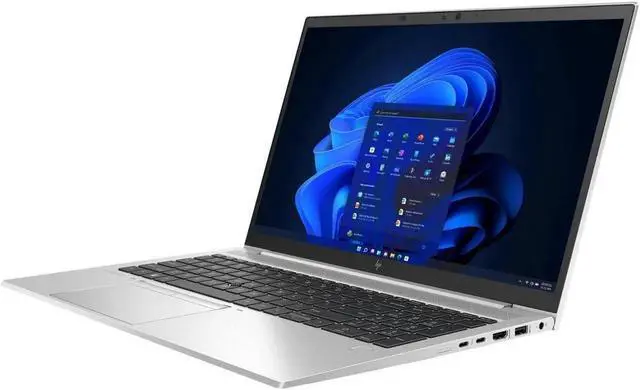
Meet the demands of your multi-task, multi-place, enterprise-business workday with the 15.6" EliteBook 850 G8 Multi-Touch Laptop from HP is a powerful, secure, and durable system that allows teams to work from many locations. This system is powered by an 11th Gen 2.6 GHz Intel Core i5-1145G7 Quad-Core processor that allows you to run multiple applications simultaneously. If you need more power, the system can be overclocked to 4.4 GHz using Intel Turbo Boost 2.0 technology. The 16GB of 3200 MHz DDR4 RAM, which comes in a 2 x 8GB configuration, helps to ensure smooth multitasking and allows the computer to quickly access frequently used files and programs. If you need more RAM, this system accepts up to 64GB, using one 32GB module in each of the 260-pin SO-DIMM slots.
The 15.6" UWVA anti-glare IPS display features a Full HD 1920 x 1080 native resolution that is equipped with LED backlighting, a 16:9 aspect ratio, 250 cd/m2 brightness, a 600:1 contrast ratio, a refresh rate of 60 Hz, coverage for 45% of the NTSC color gamut, and viewing angles of 85/85/85/85°. Integrated Intel Iris Xe graphics delivers a sharp, clear picture, and you'll be able to output video to an external display at resolutions up to 4K @ 60 Hz using the HDMI 2.0b output. The display also features multi-touch functionality, allowing you to utilize the touch gestures and functions in Windows 10 Pro to further improve accessibility and productivity.
For storage of your files, a 512GB PCIe M.2 NVMe PCIe SSD offers quick access to your data. If you want to add external storage drives or other peripherals, the EliteBook 850 G8 features two 40 Gb/s Thunderbolt 4 ports that support DisplayPort 1.4 and Power Delivery, plus two 5 Gb/s USB 3.2 Gen 1 Type-A ports, one of which doubles as a charging port. Wi-Fi 6 (802.11ax) is also built-in for wireless networking and Bluetooth 5.0 technology will allow you to connect additional compatible peripherals. Other features include an integrated 32GB recovery drive, a 720p IR webcam for facial authentication with Windows Hello, two user-facing mics and one world-facing mic, and stereo speakers with Bang & Olufsen HD audio.
The EliteBook 850 G8 Laptop includes an AC adapter and an HP Long Life 3-cell / 56Wh lithium-ion battery that supports fast charging up to 50% in 30 minutes and lasts for up to 14.75 hours before recharging is required. Windows 10 Pro (64-bit) is the installed operating system and protection is provided by a limited 3-year parts & labor warranty.
General Features
Designed for You
The HP EliteBook 850 is built for how you work with an AI-based audio experience. This easy to carry, light, and thin business laptop comes with an 85% screen-to-body ratio and a quiet and comfortable keyboard to work on.
Work with Peace of Mind
Security features from HP work together to create an always-on, always-acting, resilient defense. From the BIOS to the browser, above and below the OS, these constantly evolving solutions help protect your PC from threats.
Pursue Success
Do your best work on the HP EliteBook 850 with Wi-Fi 6 (802.11ax) , a battery life of up to 14.75 hours, and a powerful 11th Gen 2.6 GHz Intel Core i5-1145G7 Quad-Core processor.
Sanitization and Sustainability
Address issues around sanitization and sustainability. The speaker enclosure contains ocean-bound plastics and the system can be sanitized with select household disinfecting and cleaning wipes.
HP Sound Calibration
Tune your headphone audio for an immersive sound experience with HP Sound Calibration.
HP Dynamic Audio
HP Dynamic Audio, a new AI-based audio experience, tunes output to speech, music, and movies all while suppressing background noise.
Tile
Find your missing laptop, even when it's turned off, using the Tile feature and app.
Intel Evo
Select configurations of the HP EliteBook 850 meet standards for the Intel Evo platform, delivering high performance, responsiveness, long battery life, and immersive visuals.
Tamper Lock Intrusion Detection System
Know if someone has tried to open the cover of your system, thanks to a tamper lock intrusion detection system that can require an administrator password to restart the system.
Windows 10 Pro
Start Menu
After its hiatus in Windows 8, the Start Menu has returned. Utilizing a combination of the traditional menu system and Windows 8's Live Tiles, the improved Start Menu gives you more information at a glance, showing notification information alongside your applications and other pinned items.
Cortana
Microsoft's digital personal assistant, Cortana can answer your questions with information gleaned from both your device and the internet at large. You can type or even talk with her, if your system has a microphone. Using her Laptop, Cortana keeps track of your needs and wants, and she learns over time to improve her information gathering skills.
Microsoft Edge
After nearly 20 years, Microsoft has finally replaced its Internet Explorer web browser. With Microsoft Edge, users can write directly on web pages and share notes with friends and colleagues. It also improves the online reading experience by adding a distraction-free mode and read-it-later functionality. Edge also has built-in Cortana integration; you can have her help you find a restaurant, make a reservation, and pull up directions without leaving your browser.
Windows Store
For Windows 10, Microsoft has unified the Windows Store. Now, apps for PCs, tablets, and phones will all be accessible from one place. And with support for Universal Apps, one version of an app can work across all your compatible devices automatically.
Windows Continuum
Windows 10 was designed for a variety of screen sizes and input styles, and with its Continuum feature, it automatically adapts to fit your needs. A Windows 10 tablet on its own requires a touch-centric approach, but attaching a mouse and keyboard will shift everything to a more traditional interface. You can even attach an external monitor to your Windows 10 phone for a near-desktop experience. But it's not just the operating system; Windows Universal Apps take advantage of Continuum as well.
Xbox on Windows 10
Gaming is a big focus of Windows 10. Xbox integration allows for PC players to match up against Xbox One players on supported games, and if you have an Xbox One, you can even stream compatible titles to your PC. Native support for recording with the new Game DVR feature makes it easy to capture and share your gameplay. The new DirectX12 takes better advantage of multi-core processors, giving games a performance boost, even on older hardware. Windows 10 also features native support for virtual reality headsets, such as the Oculus Rift.
Additional Windows 10 Pro Features
The Pro version of Windows 10 includes all the features of Windows 10 Home plus many designed specifically for business users, including Hyper-V virtualization, BitLocker disk encryption, and remote desktop access. Devices will also be able to join domains and the Azure Active Directory, and they can even access a specialized version of the Windows Store featuring custom, company-specific applications.
Items IncludedNo additional resources available
Featured