here!
I’m your shopping assistant for PC builds, upgrades, and everything tech.
Got questions? Ask away!
Start a conversation
here!
I’m your shopping assistant for PC builds, upgrades, and everything tech.
Got questions? Ask away!
Start a conversation






Any questions? Ask CelesteSM will help you find out quickly.

Provide a noticeable all round
speed and Performance boost
without stuttering or lag

Bring you closer to the people
and things you love while
giving you a place to think,
express and create

Offer the great value for running video and professional applications that keep you productive

Backlit Keyboard

DDR4 RAM cuts back voltage by 40% and boosts performance and bandwidth by 50% as compared to DDR3, which gives you less overall power consumption

M.2 drive with a PCIe interface has increased performance and takes advantage of non-volatile memory express (NVMe) protocol which increases the performance and has a reduced latency
| Brand | HP |
|---|---|
| Color | Silver |
| Features | Wifi 6,Bluetooth 5.3 |
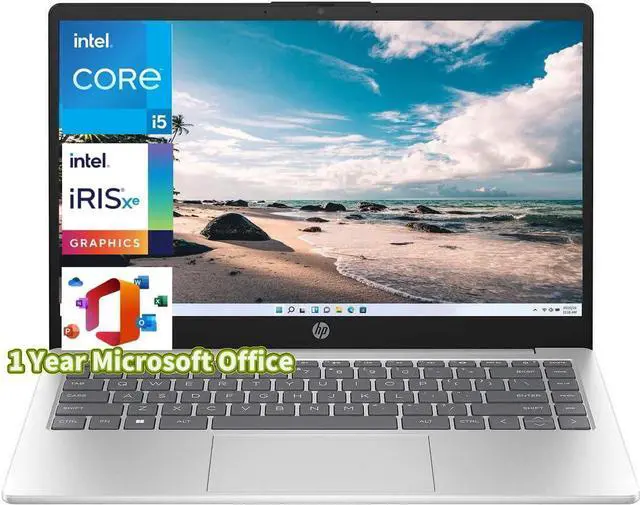
| CPU | 13th Gen Intel Core i5-1335U (10-Core) Processor |
| Graphic | Intel Iris Xe Graphics |
| Memory (RAM) | Up to 64 GB |
| Operating System | Windows 11 Home/Pro |
| Processor | Intel Core i5 |
| Screen Resolution | FHD(1920 x 1080) |
| Screen Size | 17.3 in. |
| SSD | Up to 2 TB |
| Touchscreen | NO |
| Dimensions | 15.78" x 10.15" x 0.78" |
| Weight | 4.6 lbs |
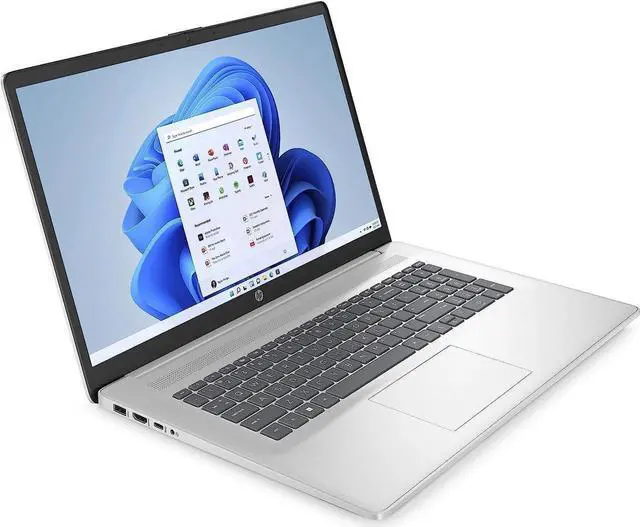
CPU:13th Gen Intel Core i5-1335U (10-Core) Processor
Memory: Up to 64 GB DDR4 RAM
Hard Drive: Up to 2TB PCIe NVMe M. 2 Solid State Drive
Operating System: Windows 11 Home/Pro
Display:17.3" IPS Anti-Glare FHD (1920 x 1080) Display
Graphics:Intel Iris Xe Graphics
Ports:
1x USB Type-C
2x USB Type-A
1 AC smart pin
1x HDMI 1.4 b
1x Combination Headphone/Microphone Jack
Wireless Connectivity: Wi-Fi 6 and Bluetooth 5.3
Keyboard:HP Backlit Keyboard with Numeric Keypad
Battery:3-cell, 41 Wh Lithium-ion prismatic Battery
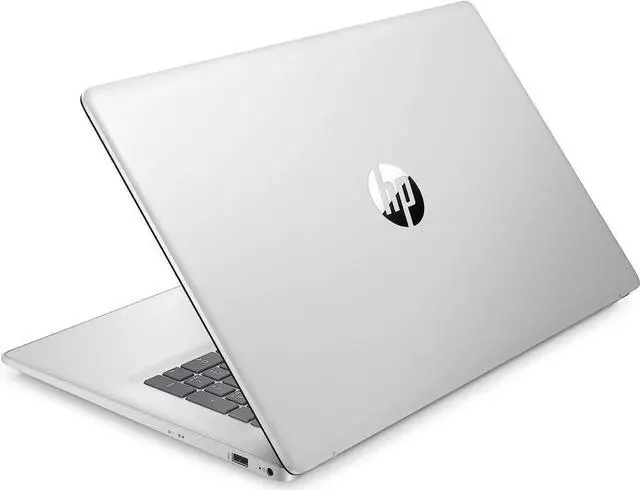
Dimensions:15.78" x 10.15" x 0.78";4.6 lbs
Color:Silver
The HP 17 is a Windows 11 Pro laptop with a 17.3-inch Full HD anti-glare IPS display, Core i5-1335U processor, 8 GB RAM, and 512 GB SSD, suited to office work, study, and everyday multitasking on a large screen.
| Attribute | Value |
|---|---|
| Best For | Work and business use with a 17.3-inch Full HD display |
| Processor | 13th Gen Intel Core i5 |
| Display | 17.3-inch Full HD (1920 x 1080) |
| Memory Configuration | 8GB DDR4-3200 |
| Storage | 512GB PCIe SSD |
| Wireless Connectivity | Wi-Fi 6 and Bluetooth 5.3 |
| Keyboard | Backlit keyboard |
| Operating System | Windows 11 Pro |
| Color | Silver |
Q: HP 17 with Core i5-1335U or Core i3-N305: which configuration should I choose?
A: Choose this HP 17 configuration if you want the Core i5-1335U processor, 8 GB RAM, and 512 GB SSD alongside its 17.3-inch FHD display. HP lists the i5-1335U with 10 cores and 12 threads, compared with 8 cores and 8 threads for the i3-N305 option in the HP 17-c3000 series.
Q: How does this HP 17 compare with the HP 17-c3000 with Core i7-1355U?
A: This HP 17 pairs the 17.3-inch FHD display with a Core i5-1335U, 8 GB RAM, and a 512 GB SSD. Choose it for the i5 configuration; the HP 17-c3000 with Core i7-1355U is the series’ higher processor option, with a listed maximum turbo frequency of 5.0 GHz versus 4.6 GHz for the i5-1335U.
Q: Should I choose this HP 17 or the previous-generation HP 17 with Core i5-1235U?
A: Choose this configuration if you prefer the HP 17 with the newer Core i5-1335U processor. HP lists both processors with 10 cores, while the i5-1335U has a maximum turbo frequency of 4.6 GHz compared with 4.4 GHz for the i5-1235U in the HP 17-c2000 series. The previous-generation model is also an HP 17 with a 17.3-inch display, with screen and memory details varying by configuration.
Q: Is this laptop suitable for office work, note-taking, and video meetings?
A: Yes. Its Core i5 processor, 8 GB of RAM, 512 GB SSD, Windows 11 Pro, and 17.3-inch Full HD display suit common office tasks, web browsing, and note-taking. It has a 720p webcam for video meetings. The 8 GB of RAM may limit heavier multitasking, and the product information does not specify battery life.
Q: Is this 17.3-inch laptop practical to travel with?
A: It can be carried, but at 4.6 pounds and with a 17.3-inch screen, it is better suited to desk-to-desk use or occasional travel than frequent lightweight commuting. Battery life is not provided, so it should not be chosen on the assumption that it will last a full workday away from an outlet.
Q: Who is this laptop best suited for?
A: It is a reasonable fit for people who want a large Full HD screen for everyday work, browsing, streaming, and document editing, and who expect to use the laptop mostly at a desk. Its 8 GB of RAM is a modest starting configuration; users who regularly run many demanding applications at once may want more memory.
Q: Is it a good choice for gaming?
A: It is configured for general productivity rather than demanding gaming: it uses integrated Intel Iris Xe graphics, not a dedicated graphics card. It may suit some lighter games, but check each game’s system requirements; the supplied specifications do not establish performance for specific titles.
Q: Is this HP 17 suitable as a desktop replacement?
A: It may suit a mostly stationary setup for everyday work, browsing, and multitasking: it pairs a 17.3-inch FHD display with a Core i5-1335U and 512GB SSD. Its 4.6-pound weight and large chassis make it less convenient to carry than a smaller laptop. The Reddit discussion considering a similar HP 17 explicitly describes a home desktop-replacement use case.
Q: What are the main trade-offs of this HP 17?
A: The large 17.3-inch FHD screen gives you more viewing area, but the 4.6-pound size is a portability trade-off. A Reddit discussion of a similar HP 17 also raised concerns about display quality, battery capacity, and port selection; check the exact listing for details on those features, since configurations can differ.
Q: Is 8GB of RAM enough, or should I check whether it can be upgraded?
A: The listed 8GB may be limiting if you regularly keep many apps or browser tabs open. A Reddit discussion about an HP 17 with the i5-1335U specifically asks about upgrading its memory, but that does not establish whether this exact configuration is upgradeable. Confirm the RAM layout and upgrade options for the specific unit before buying.