Out of stock
This item is currently out of stock and it may or may not be restocked.
Sold by Newegg

Shipped by Newegg

Shop it at NeweggBusiness.

HP ZBook Fury G1i 18" Mobile Workstation - WQXGA - Intel Core Ultra 7 255HX - 32 GB - 1 TB SSD - Windows 11 Pro - NVIDIA RTX Pro 4000 Blackwell 16 GB - Webcam - Wi-Fi 7 - C94C6UT#ABA

  • Intel Core Ultra 7 255HX
  • 32GB DDR5 Memory / 1TB SSD
  • NVIDIA RTX Pro 4000 Blackwell
  • Non-Touch Screen
  • 2560 x 1600
  • Windows 11 Pro
Overview
Specs
Reviews
See all Q & A
avatar

Any questions? Our AI mode will help you find out quickly.

SMART BUY ZBOOK G1I 18 U7 255HX 18 32GB/1T PC

Warranty & Returns

Warranty, Returns, And Additional Information

Warranty

  • Limited Warranty period (parts): 1 year
  • Limited Warranty period (labor): 1 year
  • Read full details

Return Policies

Manufacturer Contact Info

LOADING...

Learn about this product

The HP ZBook Fury G1i is an 18-inch mobile workstation built for engineers, 3D creators, and technical professionals who need desktop-class performance, a color-accurate WQXGA 165Hz display, and pro GPU power for demanding design, visualization, and AI-assisted workflows.

Recommended For

  • Engineers, CAD users, and simulation-heavy professionals who need workstation-class graphics, ISV-focused positioning, and room to scale memory/storage over time while still carrying the system between office, lab, and field locations.
  • 3D artists, video editors, and VFX users who work with large local project files, GPU rendering, or multi-app timelines and want an 18-inch mobile workstation rather than relying on a desktop plus remote access.
  • AI developers and technical users who want to run local GPU-assisted workflows, model experiments, or data-heavy projects on a portable system with Ethernet, high-speed Thunderbolt, and more expansion headroom than thin creator laptops.
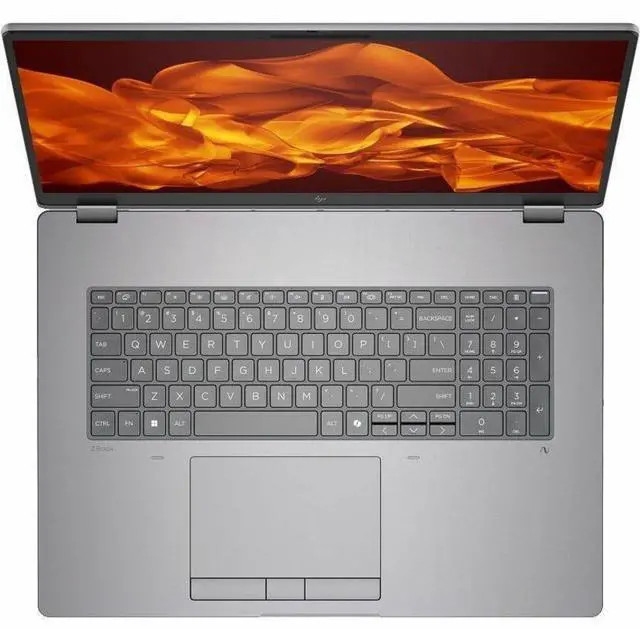
  • Users replacing a fixed desktop with one machine for desk work and occasional travel, especially if they value the large 18-inch display, numeric keypad, wired networking, and upgrade-friendly design more than low carry weight.

Real-World Use Scenarios

  • Running CAD, BIM, or 3D design software on-site or between offices: users can work on large assemblies and complex viewports locally instead of remoting into a desktop, with workstation-class graphics and ISV-focused positioning aimed at engineering and design workflows.
  • Editing high-resolution video, motion graphics, or color-sensitive creative work on location: users get a large, high-gamut display and enough GPU/CPU headroom for timeline work, effects, and exports without needing an external monitor for every session.
  • Doing AI development, local inference, or GPU-accelerated data science away from the lab: users can prototype and test models on the laptop itself, which fits workflows where local GPU access matters more than thin-and-light portability.
  • Using it as a desktop replacement for simulation, rendering, or other sustained heavy workloads: users should expect strong throughput in a portable chassis, but also a large footprint, noticeable fan activity under load, and a setup that makes the most sense when plugged in.
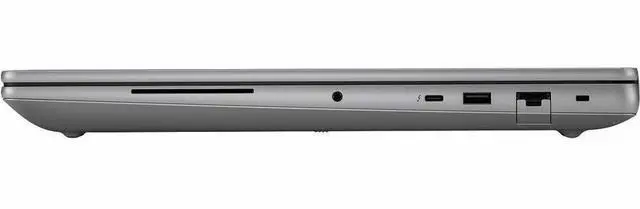
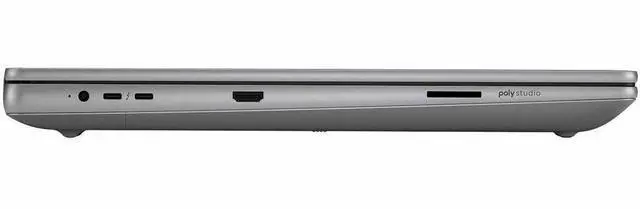
  • Connecting multiple peripherals, fast storage, wired networks, and external displays in a studio or engineering workspace: users can treat it like a mobile workstation hub, reducing reliance on dongles and making it easier to move between desk-based and field-based work.

Reference Q&A

Q: Is the HP ZBook Fury G1i 18 a better fit than a 16-inch mobile workstation like the Lenovo ThinkPad P16 Gen 2?

A: Choose the HP ZBook Fury G1i 18 when your priority is maximum on-device workstation performance, a larger 18-inch workspace, and newer platform features such as Intel Core Ultra HX, Wi-Fi 7, and Thunderbolt 5. Choose a 16-inch class system like the ThinkPad P16 Gen 2 when easier travel and a smaller footprint matter more than screen size and peak GPU headroom. In short: the ZBook Fury G1i 18 is the stronger performance-first choice, while a 16-inch workstation is the more mobility-friendly choice.

Q: Should I buy this RTX Pro 4000 configuration or move up to a higher ZBook Fury G1i configuration with RTX Pro 5000?

A: Buy this RTX Pro 4000 configuration if your work centers on CAD, BIM, pro visualization, Adobe workflows, and GPU-accelerated creation where strong certified graphics performance is important but the very top mobile GPU tier is not required. Move up to RTX Pro 5000 if your workloads are more dependent on sustained GPU compute, heavier rendering, larger AI models, or more demanding simulation jobs. The trade-off is straightforward: this RTX Pro 4000 version is the more balanced configuration, while RTX Pro 5000 is the better fit for users who regularly push GPU limits.

Q: Is this ZBook Fury G1i 18 worth choosing over a lower-tier mobile workstation GPU configuration like RTX Pro 2000 or RTX Pro 3000?

A: Yes, this configuration makes more sense if you expect to keep the laptop for several years and run heavier 3D, rendering, visualization, or AI-assisted professional workflows. Lower-tier RTX Pro 2000 or 3000 models are better suited to lighter CAD, office, and mixed business use where lower cost and lower power needs matter more than GPU headroom. The main reason to choose this RTX Pro 4000 model is to get a more capable long-term workstation without stepping all the way up to the highest-priced GPU tier.

Q: How does the HP ZBook Fury G1i 18 compare with the previous ZBook Fury generation?

A: Choose the ZBook Fury G1i 18 if you want HP's newer workstation platform with Intel Core Ultra HX processors, Blackwell-generation RTX Pro graphics options, Wi-Fi 7, and Thunderbolt 5. A previous-generation ZBook Fury remains a sensible option when budget matters more than having the latest connectivity and GPU architecture. The upgrade case is strongest for buyers replacing an older workstation for newer GPU-accelerated workflows or broader I/O flexibility rather than for basic office or light CAD use.

Q: Should I pick the HP ZBook Fury G1i 18 for travel-heavy work, or is it mainly for desk-based use?

A: Pick the ZBook Fury G1i 18 when your work needs a desktop-replacement mobile workstation and you will benefit from the larger display, Ethernet, and high-end expandable platform more than from low carry weight. If you travel frequently, work in tight spaces, or value easier daily transport, a lighter 16-inch workstation is usually the more practical choice. This model is best matched to performance-first users who still need mobility, not to buyers optimizing primarily for portability.

Q: Is the HP ZBook Fury G1i 18 a good choice for travel or daily commuting?

A: Only if performance matters more than portability. This model is large and heavy for regular travel at 7.76 lb with an 18-inch chassis, so it is better suited to users who move between offices or job sites occasionally rather than people who want a light daily-carry laptop. Retail Q&A patterns on comparable 18-inch laptops frequently focus on fan noise, heat, and general portability, which signals that buyers see this size class as a desk-first machine.

Q: Is it good for meetings, office work, and general productivity?

A: Yes, but it is more machine than most office users need. For meetings, multitasking, spreadsheets, browser-heavy work, and video calls, the 32GB RAM, 1TB SSD, 5MP webcam, Wi-Fi 7, Ethernet, and 18-inch 2560 x 1600 display are all strong. The trade-off is size, weight, and likely higher noise and power draw than a mainstream business laptop, so it fits best if office work is combined with heavier technical or creative workloads.

Q: Who is this laptop actually suitable for?

A: It is best for users who need workstation-class GPU and CPU performance in a mobile form: CAD, 3D content creation, simulation, AI-assisted workflows, large datasets, and advanced multitasking. It is less suitable for buyers whose main needs are web, email, notes, and light office apps, because those users can usually get a lighter and less expensive laptop without giving up everyday responsiveness.

Q: Should I choose this over a thinner workstation like the HP ZBook Firefly?

A: Choose the ZBook Fury G1i if you need much higher sustained graphics and compute performance, more screen space, and stronger desktop-replacement behavior. Choose a thinner model like the ZBook Firefly if portability, lighter travel weight, and simpler office use matter more. In short: Fury is the better performance-first choice, while Firefly is the better mobility-first choice.

Q: Is this better than a gaming laptop for professional work?

A: Usually yes for professional workstation use, but not always for value. The ZBook Fury G1i is the better fit if you prioritize professional GPU-class hardware, business features, Windows 11 Pro, Ethernet, and workstation positioning. A gaming laptop may offer strong raw performance for less money, but it is typically a better choice for gaming-first buyers than for users who want a business-oriented mobile workstation.

Q: Who is the HP ZBook Fury G1i 18 best suited for?

A: The ZBook Fury G1i 18 is best suited for users who need a desktop-replacement mobile workstation for heavy professional workloads such as 3D, CAD, GPU-accelerated creation, or engineering software. Reddit discussion around the Fury G1i repeatedly frames it as the top-end ZBook option for buyers who prioritize performance over portability. With an 18-inch 2560x1600 165 Hz display, RTX Pro 4000 GPU, Ethernet, and a large chassis, it fits workstation use better than travel-first or casual laptop use.

Q: Is the HP ZBook Fury G1i 18 a good travel laptop?

A: No, not if portability is the priority. At 7.76 lb with an 18-inch chassis, this model is much closer to a transportable workstation than a carry-everywhere laptop. It makes more sense for users who move between desks, offices, or job sites and want workstation-class hardware in one system. Buyers focused on commuting, note-taking, or frequent air travel will likely find the size and weight to be the main trade-off.

Q: Is the ZBook Fury G1i 18 worth buying over a thinner laptop?

A: It is worth buying if your decision is driven by workstation performance, expandability, and ports rather than thinness or convenience. The trade-off discussed around the Fury line is straightforward: you accept more bulk in exchange for higher-end CPU and GPU options, wired networking, and a larger cooling-focused chassis. If your work does not need RTX Pro graphics or this level of hardware, a thinner laptop is usually the more practical choice.

Q: What are the main trade-offs of buying the HP ZBook Fury G1i 18?

A: The main trade-offs are size, weight, and the fact that workstation buyers may encounter configuration or support details that matter in daily use more than on spec sheets. Reddit discussions mention practical issues such as charger compatibility, firmware-related troubleshooting, and isolated hardware quirks. That does not make the model a bad choice, but it means this is a better fit for buyers comfortable with workstation-class setup and support expectations than for someone who wants a simple mainstream laptop.