


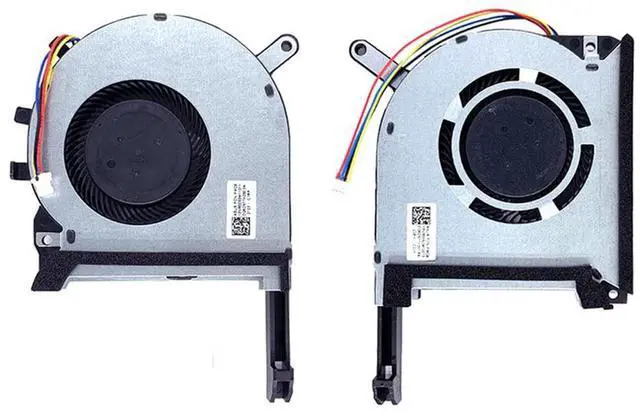



- Location diagram of laptop cooling fan.
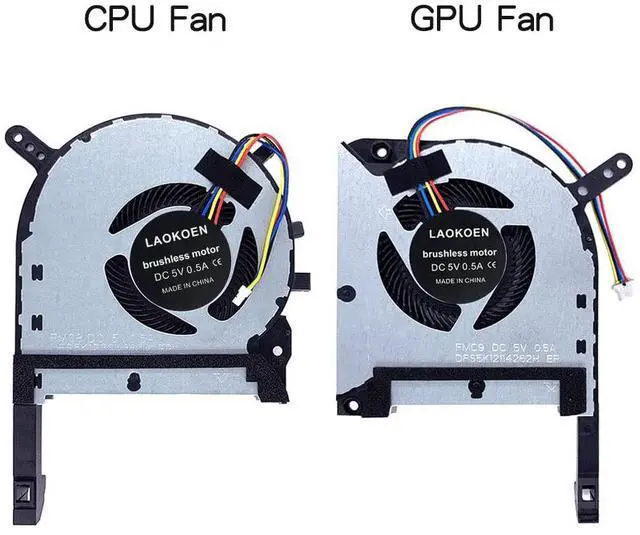
- When using a laptop normally, the one on the left is the CPU cooling fan, and the one on the right is the GPU cooling fan.
- Compatible laptop models:
- Important Note :only suitable for ASUS TUF Gaming A15 F15 A17 F17 GTX1050 GTX1050Ti? GTX1060 GTX1060ti GTX1650 GTX1650Ti GTX1660 GTX1660Ti RTX2060 graphics card series laptop.
- Important Note :Not suitable for RTX3050 , RTX3050Ti , RTX3060 , RTX 3070 graphics card series laptops.
- for ASUS TUF Gaming A15 TUF506IU TUF506IV TUF506II FA506 FA506IV FA506IU FA506IH TUF506IV-AS76 TUF506IV-xxxx TUF506IU-IS75 TUF506IU-xxxxGTX1050 GTX1050Ti? GTX1060 GTX1060ti GTX1650 GTX1650Ti GTX1660 GTX1660Ti RTX2060 graphics card series laptop,
- for ASUS TUF Gaming F15 FX505D FX505DT FX505DY FX505DU FX505DD FX505GE FX505DV FX505GT FX505GT-AH73 FX506 FX506LU FX506LH GTX1050 GTX1050Ti? GTX1060GTX1060ti GTX1650 GTX1650Ti GTX1660 GTX1660Ti RTX2060 graphics card series laptops,
- for ASUS TUF Gaming FX705 FX705GM FX705DU FX705DD FX705DT FX95DU FX95G FX95GT9750 FX505 FX705G FX506LI10750 GTX1050 GTX1050Ti? GTX1060ti GTX1650 GTX1650Ti GTX1660 GTX1660Ti RTX2060 graphics card series laptop,
- for ASUS TUF Gaming A17 GTX1650 GTX1650Ti GTX1660 GTX1660Ti RTX2060GTX1050GTX1050Ti? GTX1060 GTX1060ti graphics cardSeries laptop FA706IUFA706IU-H7120FA706IH FA706IH-xxxx TUF706IV TUF706IU-AS76 series laptops Fan, Not suitable for RTX3060 RTX3060Ti RTX3070 RTX3070Ti RTX3050 RTX3050Ti graphics card series laptop.
- for ASUS TUF Gaming F17 GTX1650 GTX1650Ti GTX1660 GTX1660Ti RTX2060GTX1050GTX1050Ti? GTX1060 GTX1060ti graphics cardSeries laptop FX706L FX706LI FX706LI-HX177 series laptops Fan, Not suitable for RTX3060 RTX3060Ti RTX3070 RTX3070Ti RTX3050 RTX3050Ti graphics card series ,
- for ASUS TUF Gaming FX86 ZX86 FX86FE FX86SM FZ86F GTX1050GTX1050Ti? GTX1060 GTX1060ti GTX1650 GTX1650Ti GTX1660 GTX1660Ti graphics card Series Laptop .
How to find a laptop model ?

Please check the detailed model and graphics card configuration of your laptop !
- How to determine a compatible cooling fan for your laptop ?
- Flip your laptop 360 degrees, and on the back of the bottom of the laptop,you can see the detailed model number, as shown in the picture,Find the words ' model: TUF506 TUF506IV FA506IV FA506IH FX505D FX506LU FX506LI FX506LH TUF706IU FX706L FX706LI FA706IU FX86F FX705D...' which is the detailed model number of your laptop.
- Check your computer graphics card version information, only applicable to GTX1050 GTX1050Ti? , GTX1650 GTX1650Ti , GTX1060 GTX1060ti , GTX1660Ti RTX2060 graphics card series laptops, Not suitable for RTX3050, RTX3050Ti , RTX3060 , RTX3060Ti , RTX3070 , RTX3070Ti graphics card series laptops.
- After opening your laptop, check if the color of the fan casing inside your computer is silver. If your fan matches the color in the picture described in our product description, it is compatible. If your fan casing is black, then our product is not compatible with your laptop, and the fan interface is different, so it cannot be used.

- A good fan will have a fan part number identification and the fan's workmanship is particularly meticulous,
- The connection points of the fan interface and the order of the fan wires should be kept consistent with the original fan wires, which is the only way to make a good cooling fan.
- How to check the part number of the laptop cooling fan in order to find a better quality cooling fan:
- Open the laptop shell and you can see your cooling fan, as shown in the picture: this position is your fan part number. If you cannot see the part number of your laptop cooling fan here, then remove the fan and on the back of the fan, as shown in the picture below: you can also see your fan part number:
- Coding of cooling fan:
- CPU cooling fan : FM1U FMC8 13NR00S0M11011 DFS5K12304363H .
- GPU cooling fan : FM1V FMC9 13NR00S0M12011 DFS5K12114262H .
- By looking at the model diagram on the bottom back of the computer and comparing it with our product description and pictures, you can find a cooling fan that is compatible with your laptop

- The benefits of choosing a high-quality cooling fan:
- The cooling fan has low operating noise, high air volume, and durability.
- Using a computer is quiet, comfortable, and no longer troubled by noise.
- Solve the error, abnormal noise, and high temperature of your laptop fan, so that your laptop fan can operate normally again!
- Replacing the cooling fan with a new one can solve the problem:
- Using a computer is quiet, comfortable, and no longer troubled by noise.
- The temperature of the laptop is no longer too high, and it runs faster and more comfortably at low temperatures.
- When the computer is turned on, it no longer prompts "fan error", making office use smoother.

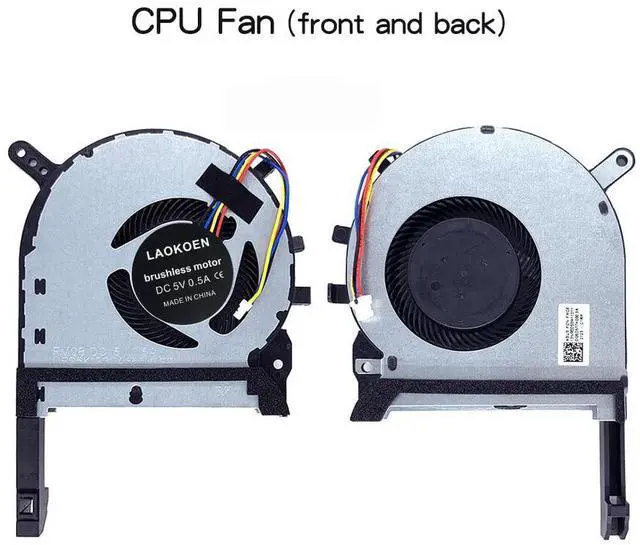
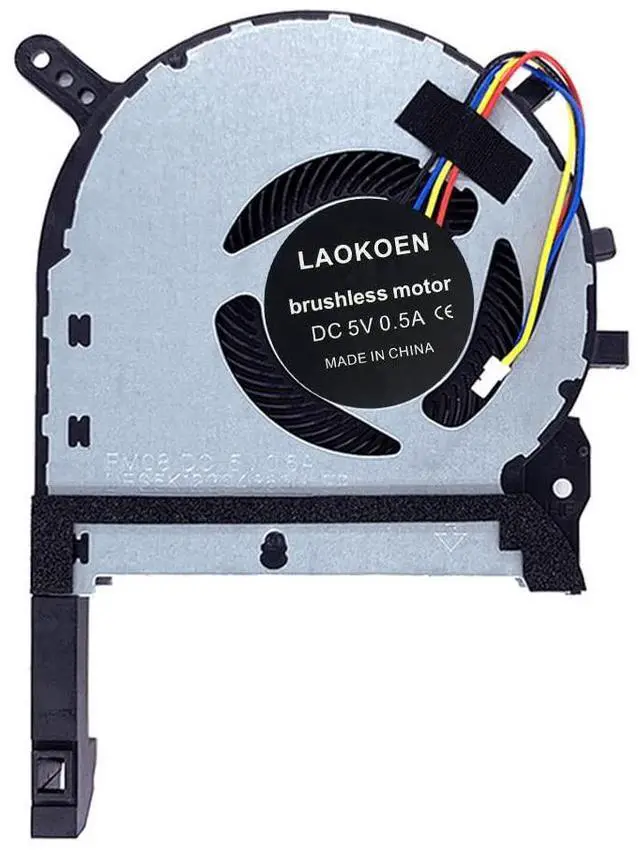
This is the front of the CPU fan. The voltage of the cooling fan is DC5V 0.5A. When using a computer normally, the cooling fan is installed on the left side of the keyboard, which is the cooling fan below the F1 button.
Fan p/n: FM1U FMC8 13NR00S0M11011 DFS5K12304363H.

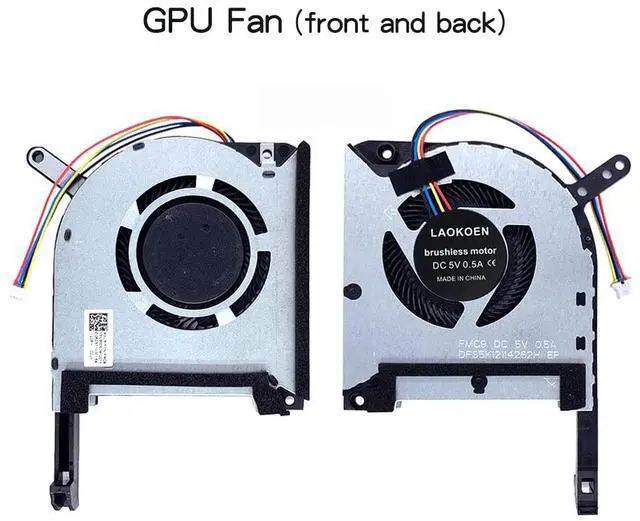
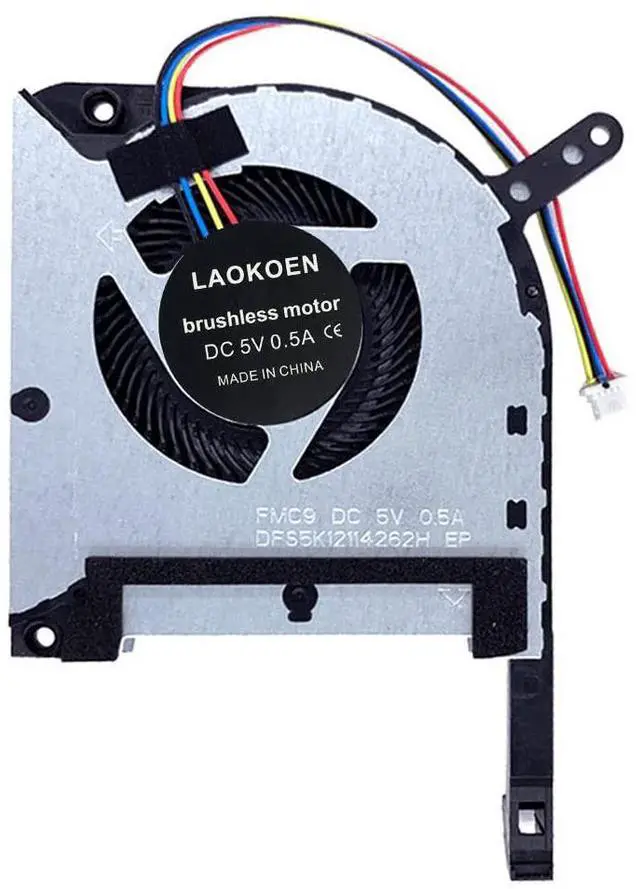
This is the front of the GPU fan, and the voltage of the cooling fan is DC5V 0.5A. When using a computer normally, the cooling fan is installed on the right-hand side of the keyboard, which is the cooling fan below the F12 button.
Fan p/n: FM1V FMC9 13NR00S0M12011 DFS5K12114262H

- If you open the bottom shell of the computer and see that the cooling fan inside the machine is black, it is not compatible with the cooling fan we linked because the fan interface is different.
- Please refer to our product description on how to find a compatible laptop cooling fan.
- Location diagram of laptop cooling fan.
- When using a laptop normally, the one on the left is the CPU cooling fan, and the one on the right is the GPU cooling fan.
- Compatible laptop models:
- Important Note :only suitable for ASUS TUF Gaming A15 F15 A17 F17 GTX1050 GTX1050Ti? GTX1060 GTX1060ti GTX1650 GTX1650Ti GTX1660 GTX1660Ti RTX2060 graphics card series laptop.
- Important Note :Not suitable for RTX3050 , RTX3050Ti , RTX3060 , RTX 3070 graphics card series laptops.
- for ASUS TUF Gaming A15 TUF506IU TUF506IV TUF506II FA506 FA506IV FA506IU FA506IH TUF506IV-AS76 TUF506IV-xxxx TUF506IU-IS75 TUF506IU-xxxxGTX1050 GTX1050Ti? GTX1060 GTX1060ti GTX1650 GTX1650Ti GTX1660 GTX1660Ti RTX2060 graphics card series laptop,
- for ASUS TUF Gaming F15 FX505D FX505DT FX505DY FX505DU FX505DD FX505GE FX505DV FX505GT FX505GT-AH73 FX506 FX506LU FX506LH GTX1050 GTX1050Ti? GTX1060GTX1060ti GTX1650 GTX1650Ti GTX1660 GTX1660Ti RTX2060 graphics card series laptops,
- for ASUS TUF Gaming FX705 FX705GM FX705DU FX705DD FX705DT FX95DU FX95G FX95GT9750 FX505 FX705G FX506LI10750 GTX1050 GTX1050Ti? GTX1060ti GTX1650 GTX1650Ti GTX1660 GTX1660Ti RTX2060 graphics card series laptop,
- for ASUS TUF Gaming A17 GTX1650 GTX1650Ti GTX1660 GTX1660Ti RTX2060GTX1050GTX1050Ti? GTX1060 GTX1060ti graphics cardSeries laptop FA706IUFA706IU-H7120FA706IH FA706IH-xxxx TUF706IV TUF706IU-AS76 series laptops Fan, Not suitable for RTX3060 RTX3060Ti RTX3070 RTX3070Ti RTX3050 RTX3050Ti graphics card series laptop.
- for ASUS TUF Gaming F17 GTX1650 GTX1650Ti GTX1660 GTX1660Ti RTX2060GTX1050GTX1050Ti? GTX1060 GTX1060ti graphics cardSeries laptop FX706L FX706LI FX706LI-HX177 series laptops Fan, Not suitable for RTX3060 RTX3060Ti RTX3070 RTX3070Ti RTX3050 RTX3050Ti graphics card series ,
- for ASUS TUF Gaming FX86 ZX86 FX86FE FX86SM FZ86F GTX1050GTX1050Ti? GTX1060 GTX1060ti GTX1650 GTX1650Ti GTX1660 GTX1660Ti graphics card Series Laptop .
How to find a laptop model ?
Please check the detailed model and graphics card configuration of your laptop !
- How to determine a compatible cooling fan for your laptop ?
- Flip your laptop 360 degrees, and on the back of the bottom of the laptop,you can see the detailed model number, as shown in the picture,Find the words ' model: TUF506 TUF506IV FA506IV FA506IH FX505D FX506LU FX506LI FX506LH TUF706IU FX706L FX706LI FA706IU FX86F FX705D...' which is the detailed model number of your laptop.
- Check your computer graphics card version information, only applicable to GTX1050 GTX1050Ti? , GTX1650 GTX1650Ti , GTX1060 GTX1060ti , GTX1660Ti RTX2060 graphics card series laptops, Not suitable for RTX3050, RTX3050Ti , RTX3060 , RTX3060Ti , RTX3070 , RTX3070Ti graphics card series laptops.
- After opening your laptop, check if the color of the fan casing inside your computer is silver. If your fan matches the color in the picture described in our product description, it is compatible. If your fan casing is black, then our product is not compatible with your laptop, and the fan interface is different, so it cannot be used.
- A good fan will have a fan part number identification and the fan's workmanship is particularly meticulous,
- The connection points of the fan interface and the order of the fan wires should be kept consistent with the original fan wires, which is the only way to make a good cooling fan.
- How to check the part number of the laptop cooling fan in order to find a better quality cooling fan:
- Open the laptop shell and you can see your cooling fan, as shown in the picture: this position is your fan part number. If you cannot see the part number of your laptop cooling fan here, then remove the fan and on the back of the fan, as shown in the picture below: you can also see your fan part number:
- Coding of cooling fan:
- CPU cooling fan : FM1U FMC8 13NR00S0M11011 DFS5K12304363H .
- GPU cooling fan : FM1V FMC9 13NR00S0M12011 DFS5K12114262H .
- By looking at the model diagram on the bottom back of the computer and comparing it with our product description and pictures, you can find a cooling fan that is compatible with your laptop
- The benefits of choosing a high-quality cooling fan:
- The cooling fan has low operating noise, high air volume, and durability.
- Using a computer is quiet, comfortable, and no longer troubled by noise.
- Solve the error, abnormal noise, and high temperature of your laptop fan, so that your laptop fan can operate normally again!
- Replacing the cooling fan with a new one can solve the problem:
- Using a computer is quiet, comfortable, and no longer troubled by noise.
- The temperature of the laptop is no longer too high, and it runs faster and more comfortably at low temperatures.
- When the computer is turned on, it no longer prompts "fan error", making office use smoother.
This is the front of the CPU fan. The voltage of the cooling fan is DC5V 0.5A. When using a computer normally, the cooling fan is installed on the left side of the keyboard, which is the cooling fan below the F1 button.
Fan p/n: FM1U FMC8 13NR00S0M11011 DFS5K12304363H.
This is the front of the GPU fan, and the voltage of the cooling fan is DC5V 0.5A. When using a computer normally, the cooling fan is installed on the right-hand side of the keyboard, which is the cooling fan below the F12 button.
Fan p/n: FM1V FMC9 13NR00S0M12011 DFS5K12114262H
- If you open the bottom shell of the computer and see that the cooling fan inside the machine is black, it is not compatible with the cooling fan we linked because the fan interface is different.
- Please refer to our product description on how to find a compatible laptop cooling fan.