Are you an E-Blast Insider?

Shop without retyping payment details. Secure shopping made faster.
Check out with PayPal.


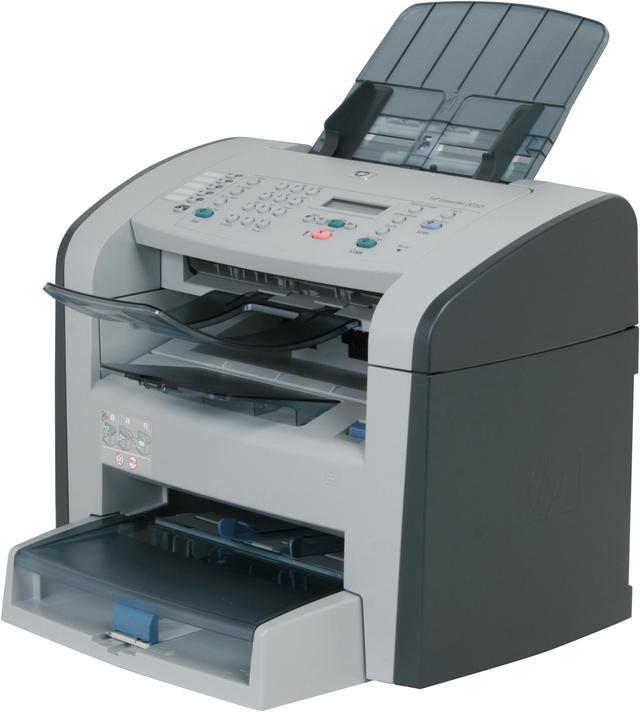
HP LaserJet 3050 MFC / All-In-One Up to 19 ppm Monochrome Laser Printer
- Up to 19 ppm
- 1200 x 1200 dpi Black Print Quality
- Up to 7,000 pages monthly
- 64 MB Memory, std.
Learn more about the HP 3050
| Cartridges Compatible | HP LaserJet Black Print Cartridge with Ultraprecise Toner. Average cartridge yield 2,000 standard pages Q2612A |
|---|
| Brand | HP |
|---|---|
| Series | LaserJet |
| Model | 3050 |
| Part Number | Q6504A |
| Recommended Use | MFC / All-In-One |
| Output Type | Monochrome |
|---|---|
| Laser Technology | Laser |
| Black Print Speed | Up to 19 ppm |
| Black Print Quality | 1200 x 1200 dpi |
| Time To First Page (seconds) | 8 sec. |
| Print Languages, std. | HP PCL 6, HP PCL 5e, HP PostScript Level 3 emulation |
| Duplex printing | Manual |
| Max. Duty Cycle | Up to 7,000 pages monthly |
| Copy Quality, Black | 600 x 600 dpi |
|---|---|
| Max. Number of Copies | 99 |
| Scan Color Depth | 24bit |
|---|---|
| Scan Resolution, Optical | 600 x 600 dpi |
| Scan Resolution, Enhanced | Up to 19200 dpi |
| Color Fax | No |
|---|---|
| Fax Transmission Speed | 3 sec./page |
| Paper Trays, std. | 1 |
|---|---|
| Paper Trays, max. | 1 |
| Input Capacity, std. | 260 sheets |
| Input Capacity, max. | 260 sheets |
| Output Capacity, std. | 100 sheets |
| Output Capacity, max. | 100 sheets |
| Media Type | Paper (plain, preprinted, prepunched, bond, color, glossy, letterhead, light, heavy, recycled, rough), envelopes, transparencies, labels, cardstock |
| Media sizes supported | Media input tray and priority slot: letter, legal, envelopes (No 5 1/2 Baronial through No 11), index cards, postcards; automatic document feeder (ADF): letter, legal Priority slot and input tray: 3 x 5 to 8.5 x 14 in; automatic document feeder (ADF): 4.13 x 5.83 to 8.5 x 15 in |
| USB Ports | Yes |
|---|---|
| Other Ports | RJ-11 fax port, RJ-11 line-out telephone port |
| Processor(MHz) | 264 |
|---|---|
| Memory, std. | 64 MB |
| Power Requirements | Input voltage: 110 to 127 VAC (+/- 10%), 50/60 Hz (+/- 2 Hz), 4.5 amp 220 to 240 VAC (+/- 10%), 50/60 Hz (+/- 2 Hz), 2.3 amp |
| Power Consumption | Active 290 watts Active copy 225 watts Ready 5 watts PowerSave 5 watts Off 0.03 watts |
| Windows Compatible | Windows 2000; Windows XP Home; Windows XP Professional; Windows Server 2003; Windows Vista(TM) Ready |
|---|---|
| Macintosh Compatible | Mac OS X v 10.3 and higher |
| Dimensions | 16.9" x 17.3" x 18.1" |
|---|---|
| Weight | 22 lbs. |
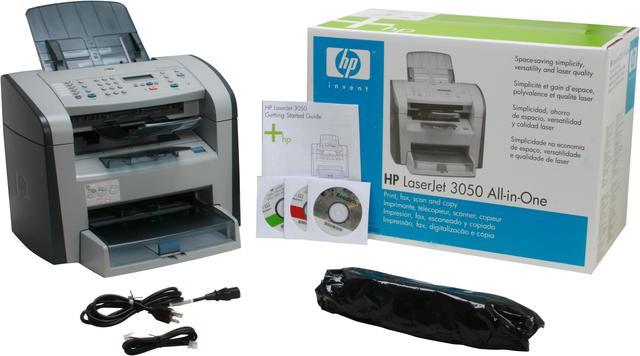
| Package Contents | HP LaserJet 3050 All-in-One Printer User Manual Support Disk Power Cable Telephone cable |
|---|
| Date First Available | June 16, 2006 |
|---|
Pros: Small footprint, low cost AIO with above average build quality, speed and aesthetics/ergonomics. Menu screens are logical and standalone. Printer works well and 19 ppm seems pretty accurate. Hardware FAX component is very well implemented and is fault tolerant enough to work well with my Vonage VOIP faxline. Scanner is limited to sheet feed; however, it works very well scanning documents to Adobe Acrobat and easily imports a 10 page document in a couple of minutes with very high quality imaging and minimal user intervention. I wouldn't stick photographs or precious documents in there, though.
Cons: The fax printdriver works great from the host machine; when shared (yes, you can share the fax) to another computer, a dialogue box pops up on the host machine asking for the fax number, rather than on the client's desktop. This is weird on networks and would be pretty annoying in any work environment other than a home or single room office: "Hey Bob, can you enter this telephone number into your screen so that I can send a fax?" Doesn't eliminate the need for a flatbed scanner--large documents, photos or 3D objects. No built-in networking. JetDirect USB a weak substitute.
Overall Review: Even though not a perfect product, it costs as much as two toner cartridges for my old printer and is substantially better at everything. I would strongly recommend and am thinking about getting this for people as a Christmas gift.
Pros: Beautiful prints (fast and crisp) Great copies Low cost per page (2000 pages from toner cartriage)
Cons: When receiving fax, it will drops call (due to answer machine on the line) Will not communicate in WinXP Pro as a scanner (firmware update ran and latest drivers installed) HP Tech support- useless, spent 3 hrs the first time, no resolution,NewEgg replaced unit, spent 3.5 hrs the second time (with HP), they said to send device back to retailer. Not happy with HP right now.
Overall Review: If you are looking for a work horse dedicated fax, copier, printer, this is the machine you want. Need a fax with v-mail or answer machine connected to the line?-STAY AWAY. Scanner, if it would work, the quality would be good.
Pros: Easy set up. Vista drivers were available. Large capacity paper tray. Quiet, little warm-up time.
Cons: NOTE - there is no built in hand-set, you have to provide your own phone for using voice. - but fine based on price and rebate.
Overall Review: For less than $200 after rebates, this printer gave no problems.
Pros: I actually really like the hardware, it's the support and software that really turn me off.
Cons: Software including HPToolbox will not install in Vista Ultimate. It will under Vista Home Premium, or so they say. Wish I had known that before I purchased. Thats my bad. I can print, there's a hokey work around for scanning, but there is no fax functionality. This is the very first item I've purchased from New Egg that I've considered returning. I should have done more homework. After looking around I see HP updates are surprisingly slow. I wish I had bought something else.
Pros: Quiet, fax, FAST, copy, color scan, distinctive ring. Good printer over all, HP reputation.
Cons: Came with 2 cd's. One was for Mac, one was Readirispro. The Mac CD would not work on WinXP, and the readiris pro is BLANK! 350MB download from HP.com
Overall Review: NewEgg ad it too me next day(w/o weekend in the way) on Ground Shipping. Thank's NewEgg!
Pros: The price is ok, but only if the thing would work. The footprint is also nice.
Cons: I'm currently on my second one of these and I need to figure out how to get it replaced as well. On both units, the fax does not work properly. It sends garbled faxes that you can't read. Really very annoying, and a huge pain when I need a working fax for my business...
Pros: Great Print Quality Very fast "Click to Print" Easy Set-Up Fax is easy to use. Inexpensive Toner Small Foot-Print
Cons: It turns itself off after 60 seconds of non use, making a noise similar to the fuser charging up to print. Its a little distracting.
Overall Review: Great all arround printer and a must have for a small office. The All-in-one does not take up a lot of desk space, provides excellent print quality and is very cost effective.
Warranty & Returns
Warranty, Returns, And Additional Information
Warranty
- Limited Warranty period (parts): 1 year
- Limited Warranty period (labor): 1 year
- Read full details
Return Policies
- Return for refund within: 30 days
- Return for replacement within: 30 days
- This item is covered by Newegg.com's Standard Return Policy
Manufacturer Contact Info
- Manufacturer Product Page
- Manufacturer Website
- Support Phone: 800-474-6836
- Support Website
- View other products from HP


Pros: Awesome all in one machine! Laser black printing speed. prints pages at laser fast speed, great quality. I use it for FedEx, USPS, and UPS Labels print out great.Great design. large paper tray 250 sheets. Fax.speed very impressive.
Cons: I cannot think of any...
Overall Review: NEWEGG ROCKS! FREE SHIPPING AND GREAT PRICE.