This means the product was tested and repaired as required to meet the standards of the refurbisher, which may or may not be the original manufacturer. Any exceptions to the condition of the item outside the manufacturer’s information should be provided in the listing, up to and including warranty details.
Any questions? Our AI beta will help you find out quickly.
Try me now
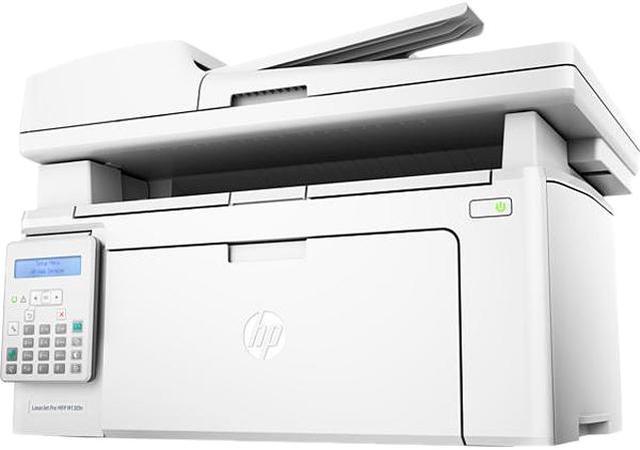
Learn more about the HP M130fn
Compatible Cartridges
Cartridges Compatible
HP 17A Original Black LaserJet Toner Cartridge CF217A (~1600) HP 19A Original LaserJet Imaging Drum CF219A (~12000)
Model
Brand
HP
Series
LaserJet Pro MFP
Model
M130fn
Part Number
SNO-G3Q59AR#BGJ
Recommended Use
MFP
Functions
4-in-1: Print, Copy, Scan & Fax
Display
2-line LCD
Print
Output Type
Monochrome
Laser Technology
Laser
Black Print Speed
Up to 23 ppm
Black Print Quality
Up to 600 x 600 dpi, HP FastRes 1200 (1200 dpi quality)
Time To First Page (seconds)
As fast as 7.3 sec black
Print Languages, std.
PCLmS, URF, PWG
Duplex printing
Manual
Max. Duty Cycle
Duty Cycle (Monthly, letter): Up to 10,000 pages Recommended Monthly Page Volume: 150 to 1,500 pages
Copy
Copy Speed, Black
Up to 23 cpm
Copy Quality, Black
600 x 400 dpi; 600 x 400 dp (text and graphics)
Max. Document Enlargement
400%
Max. Document Reduction
25%
Max. Number of Copies
99
Copy Features
Copier Settings: Number of Copies; Lighter/Darker; Optimize; Paper; Multi-Page Copy; Draft Mode
Scan
Scan Element
CIS
Scan Resolution, Optical
Up to 300 dpi (color and mono, ADF) Up to 600 dpi (color, flatbed) Up to 1200 dpi (mono, flatbed)
Scan Maximum Document Size
8.50" x 11.70" (ADF, Flatbed)
Scan Features
Scan Speed: Up to 12 ppm Scan Type: ADF, Flatbed Scan File Format: JPEG, PDF, PNG Scan Input Modes: Scanning via HP LaserJet Scan (Windows); HP Director (Macintosh) or TWAIN-compliant or WIA-compliant software Recommended monthly scan volume: 150 to 1,500
Fax
Fax Transmission Speed
3 sec./page
Fax Memory
Up to 1000 pages
Fax Resolutions
Up to 300 x 300 dpi (halftone enabled)
Fax Features
Maximum Speed Dialing Numbers: Up to 120 numbers (119 group dials)
Media Handling
Input Capacity, std.
150-sheet input tray
Output Capacity, std.
100-sheet output tray
Output Capacity, max.
Up to 100 sheets
Media Type
Paper (laser, plain, photo, rough, vellum), envelopes, labels, cardstock, postcards
Media sizes supported
Letter; legal; executive; 8.50" x 13.00"; envelopes
Windows 10, 8.1, 8, 7: 32-bit or 64-bit, Windows Vista (32-bit only), Windows XP SP3 or higher (32-bit only)
Macintosh Compatible
OS X EI Capitan (v10.11), OS X Yosemite (v10.10), OS X Mavericks (v10.9), OS X Mountain Lion (v10.8)
Other
Linux
Features
Features
Designed for efficiency Print, scan, copy, and fax with HP's smallest LaserJet MFP - designed to fit into tight workspaces. Wait less. Print up to 23 pages per minute, with first pages ready in as fast as 7.3 seconds. Help save energy with HP Auto-On/Auto-Off Technology. Quickly capture two-sided documents in fewer steps.
Mobile printing made simple Print from iPhone and iPad with AirPrint 1.5, which automatically scales jobs to the correct paper size. Print with the ease of sending an email, right from a smartphone, tablet, or notebook, using HP ePrint. Send jobs from your smartphone, tablet, or PC to any company printer, using Google Cloud Print 2.0.
HP quality - print after print Produce sharp text, bold blacks, and crisp graphics with precision black toner. Don't be fooled by alternatives that mimic Original HP. Help ensure you're getting the quality you paid for. Track toner levels with print gauge technology. Produce the most prints possible and get what you paid for. No delays or mess - quickly replace your cartridges, using auto seal removal and easy-open packaging.
Dimensions & Weight
Dimensions
11.00" x 16.34" x 11.34" (Minimum) 16.68" x 16.34" x 20.13" (Maximum)
Weight
16.76 lbs.
Additional Information
First Listed on Newegg
January 08, 2024
Customer Reviews of the HP M130fn
There are no reviews yet.
Do you own this product?
Warranty & Returns
Warranty, Returns, And Additional Information
Warranty
Please contact the Seller directly for warranty information. Warranty information may also be found on the Manufacturer's website.