• $19.99
  • Free 30-day Returns
  • Top Rated
    4.7 (567 seller ratings)

    Shipped by Newegg

    Price alert
    Shop it at NeweggBusiness.

    Meet Your Seller

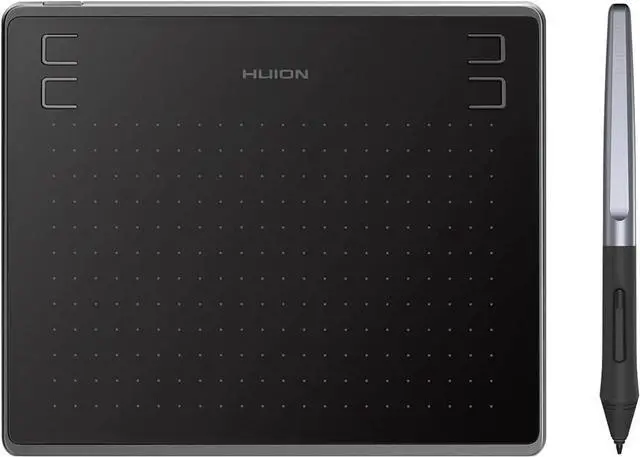
    Huion HS64 Digital Graphics Tablets OSU! Drawing Tablet with 8192 Battery-Free Stylus and 4 Express Keys, Ideal Use for Distance Education and Wed Conference

    Limited time offer, ends 04/30 By HUION Official

    REFURBISHED Product Type
    • The perfect replacement for a traditional mouse!
    • Huion HS64 graphic tablet is 258g weight and 8mm thick, support Android mobile phone connection, as well as macOS 10.12 or later and Windows 7 or later operating system.
    • Compatible with Microsoft Office programs like Word, PowerPoint, OneNote and more.
    • Easily connect your device to HS64 tablet, play the OSU! Game or start your work, sketch, paint or edit photos, sign documents digitally, create mind-maps, draw diagrams or take notes.
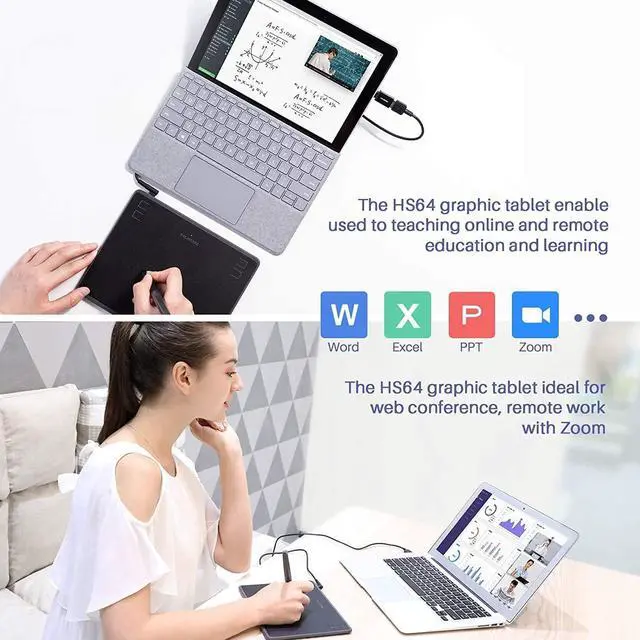
    • Nice choice for Distance Education and Web Conference, online meeting or teaching.
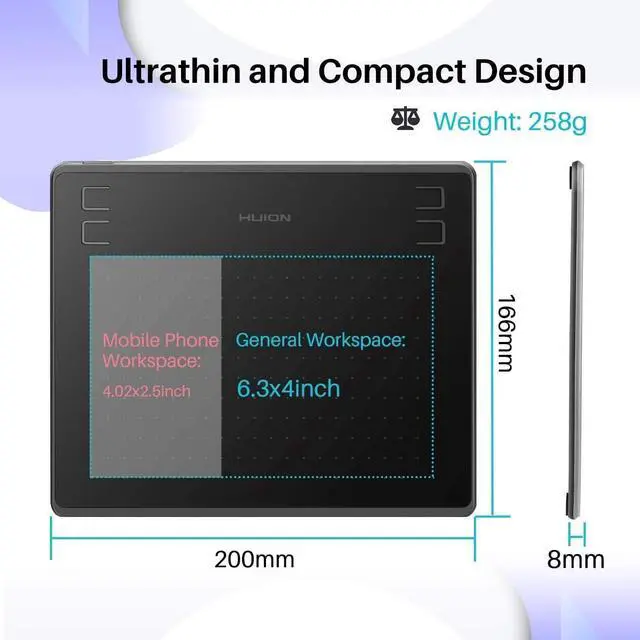
    • Large Working Area: The pen tablet features PC/ laptop work area is 160 x 102mm and mobile phone/tablet work area is 102 x 63.8mm.
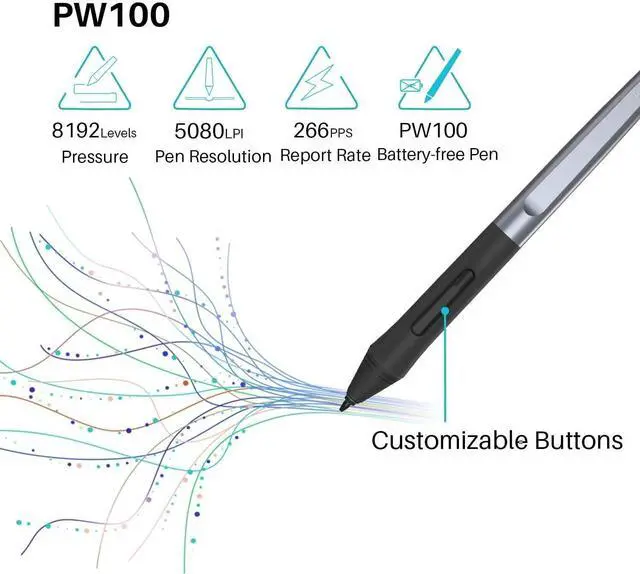
    • 5080 LPI pen resolution and 266PPS Report rate provides smooth drawing for your artwork creation.
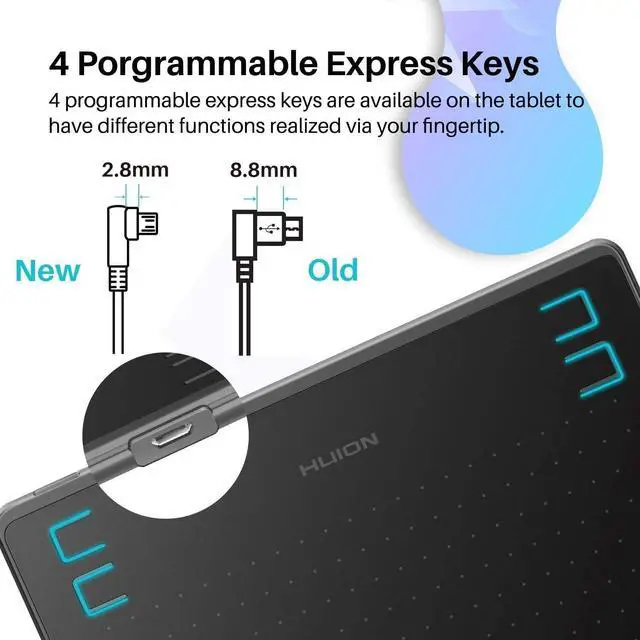
    • Battery-Free Pen for Energy Saving: New pen stylus technology supports 8192 levels of pressure sensitivity, tilt-response and virtually lag-free tracking.4 User-defined Express Keys.
    +
    +
    Overview
    Specs
    Reviews
    avatar

    Any questions? Our AI beta will help you find out quickly.

    image for this item

    1. Game Playing

    • No need to install Huion driver, you can play OSU! or other similar game directly on HS64 OSU tablet with sensitive stylus. It is great for entertainment and change the way you game.


    2. Online Teaching


    • Meet all your needs for every subject. You can use it with some online teaching software such as Power Point, Word, OneNote, PDF... for online tutoring, writing drawing and calculating.


    3. Online Working


    • Work more efficiently with Huion tablet. You can use it for online conference purpose,Web Conferencing, Webinars and Screen Sharing.


    4. Drawing/Sketching


    • The pressure-sensitive pen delivers excellent control and accuracy for your drawing. It is an ideal digital drawing pad for beginners.
    image for this item
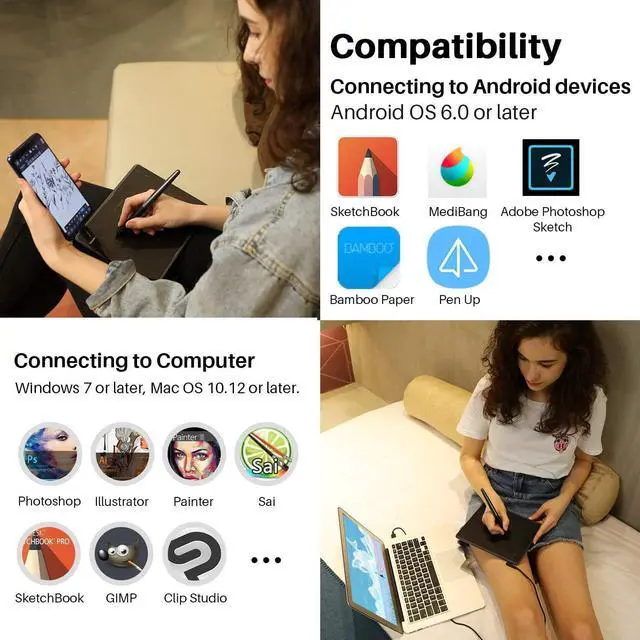
    • Compatible with Linux(Ubuntu)/ Windows 7 or above/ Mac OS 10.12 or above/ Android 6.0 or above( iPhone and iPad are NOT at the moment ).
    • NOTE: The cursor will not show up in SAMSUNG at present, except SAMSUNG Note Series.
    image for this item
    Battery-free Stylus
    • 8192 Pen Pressure


    With 5080LPI Resolution, makes every stroke more fluent; Its pressure sensitivity is four times higher than most of the homogeneous products recently in the market.


    • Battery-free Stylus


    Outfitted with Huion's latest battery-free stylus PW100, say goodbye to charging cables; Don't need to worry about the potential battery leakage and run-out.

    image for this item
    Sufficient Space for Creation
    • Compact Working Area


    6.3×4 inches general provides the user with the most comfortable size to work and no delay; Create lines and projects as you can imagine, which brings users higher efficiency.


    • Phone Working Area


    4×2.5 inches mobile phone working area, compatible with Android 6.0 or above. You can create your drawing easier when a idea comes out.

    image for this item
    Battery-free Stylus 8192 Pen Pressure With 5080LPI Resolution, makes every stroke more fluent; Its pressure sensitivity is four times higher than most of the homogeneous products recently in the marke
    • Keep favorite short-cut in handy


    They are available on the tablet to have different functions realized via your fingertip, which will bring users higher efficiency as they draw. The shortcuts CAN'T be used under Mobile Mode.


    • Wide Digital Art Software


    Adobe Photoshop, Illustrator, Corel Painter, Manga Studio, Clip Studio, Zbrush, Krita, Gimp and more.

    image for this item
    Micro USB
    • The Micro USB detachable cable of HS64 overcomes the setbacks of traditional non-detachable USB cable. Therefore, the drawing pad is easy to use as well as easy to carry around.
    image for this item
    Ultrathin & Portable
    • Portable Design - Only 8mm thick and weigh 258g, easy to carry the art tablet around.
    • Package content - 1xHuion HS64 Tablet, Battery-free Pen PW100, Micro USB Cable, Extra Pen Nibs x 18, OTG Adapter (Micro-USB), OTG Adapter (USB-C), 1xDrawing Glove, Quick Start Guide, 1xPen Clip
    image for this item
    Anti-Slip Design
    • Anti-Slip Design on the back can prevent the tablet from dropping easily down when you focus on drawing.
    image for this item
    Compatibility
    • Compatible with Linux( Ubuntu )Windows 7 or above Mac OS 10.12 or aboveAndroid 6.0 or above iPhone and iPad are NOT at the moment 
    • NOTE: The cursor will not show up in SAMSUNG at present,except SAMSUNG Note Series. If you are not sure whether the product is compatible with your Phone or if you meet any problems , please message us.
    Excellent Performance with Wide Compatibility

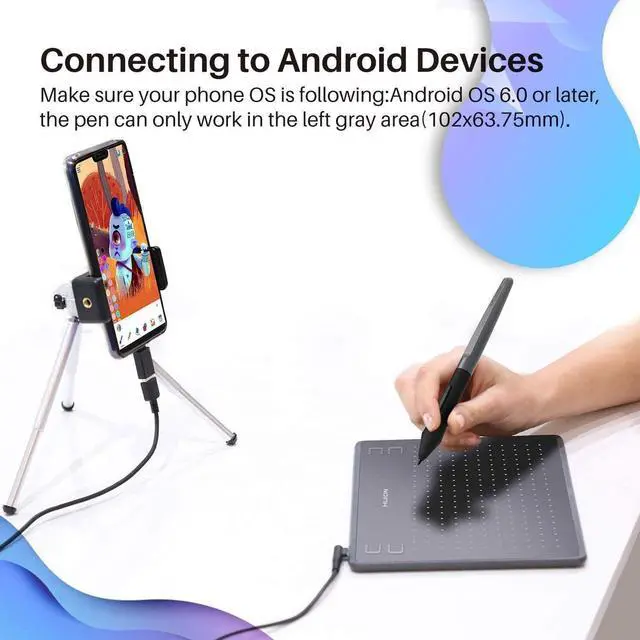
    1. HS64 drawing tablet supports Android phone /tablet connection, it means that you can use a graphic tablet to draw even if you do not have a PC/laptop because you can connect the graphic tablet to an Android phone/tablet.


    2. Compatible with most of drawing softwares such as Photoshop, Illustrator, Corel painter, Comic studio, Manga Studio, Clip Studio etc.


    3. Regarding connection with the mobile phone (wthout driver installed), there will be two possible situations as followed:
    A. Connection with the phone mode automatically activated. In this case, workspace of the pen tablet will be ajusted, with the proportion between x-axis and y-axis becoming 10: 16, as is showed below;
    B. Connection without the phone mode automatically activated. Long press express keys (1) and? for 3 seconds to activate the phone mode.
    C. No of adjustment when it comes to connection with a computer.

    On-The-Go with OS Android
    Comes with OTG connectors (USB to Type C ), you can easily connect to the Android phone and enjoy On-The-Go technology anytime and anywhere.
    Compatible with Windows 7 or above /Mac OS 10.12 or above/ Android 6.0 or above( NOT suitable for IPhone/IPad).
    NOTE: The cursor does not show up in SAMSUNG device at present (except SAMSUNG Note Series), such
    as:
    Google Nexus
    SAMSUNG Galaxy S6/S7/S7

    4 User-defined Express Keys
    Comes with 4 user-defined express keys, it is easy for you to keep the most commonly used express keys.
    Updated Micro USB Cable will save the space and protect the interface better.

    Ultra-thin & Portable
    PC mode: working area is 160 x 102mm.
    Phone mode: working area is102 x 63.8 mm.
    With 258g weight and 8mm thickness, HS64 is very lightweight and easy-carrying.

    What's in the box?
    HS64 Drawing Tablet*1
    Battery-free Pen*1
    Micro USB Cable*1
    Pen Nibs x 8*1
    Pen Nib Clip*1
    OTG Adapter (USB-C)*1
    Quick Start Guide*1

    Huion provide lifetime technical support on all Huion drawing pen tablets/monitors.
    If you have any questions on using the Huion drawing monitor tablet, please check the Quick Guide on package, email us by cs_us@huion. cn or search Huion online to find us for more assistance, we are always here to help you!
    Here to download Driver or User Manual:
    https: //www. huion. com/download/
    Here to Find all the product FAQ:
    https: //support. huion. com/support/home

    Painting/Sketching
    For the professional artist, new designer and amateur hobbyist, Huion drawing tablets Compatible with Windows 7 or above /Mac OS 10.12 or above/ Android 6.0 or above, as well support most of the drawing software such as PS, SAI, CorelPainter, Illustrator, SketchBook Pro, Manga Studio, Krita and more. The advanced pen technology offer better and precise control of drawing lines in digital drawing and photo-editing.

    E-leaning /Teaching
    For the teacher and students, its really perfect replacement for traditional mouse and paper! Teachers may want to broadcast your courses in real-time to your streaming platforms such as YouTube, Facebook, Bloc, Twitch, Udemy, Khan Academy, Codecademy, and more. And Students can take fast note-taking, tutoring, writing and calculating when learning courses online.

    Online Meeting/Remote Work
    If you want to work from new location like home or outside, you can use Huion tablets to capture ideas, create mind-maps, draw diagrams & share them with colleagues and friends when web-conferencing, as it compatible with Microsoft Office programs like Word, PowerPoint, OneNote PDF and more. Visually present your handwritten notes and signatures precisely.

    Video Edit/More Fun
    Whats more, you can play OSU! Game, or even edit/personalize your photos & videos to help you stand out on your social media channels. Huion drawing tablets is ideal choice for gameplay, drawing, painting, sketching, E-signatures etc. Waiting for you to discover more fun!

    Warranty & Returns

    Warranty, Returns, And Additional Information

    Warranty

    • Please contact the Seller directly for warranty information. Warranty information may also be found on the Manufacturer's website.
    • CONTACT

    Return Policies

    Manufacturer Contact Info

    LOADING...