
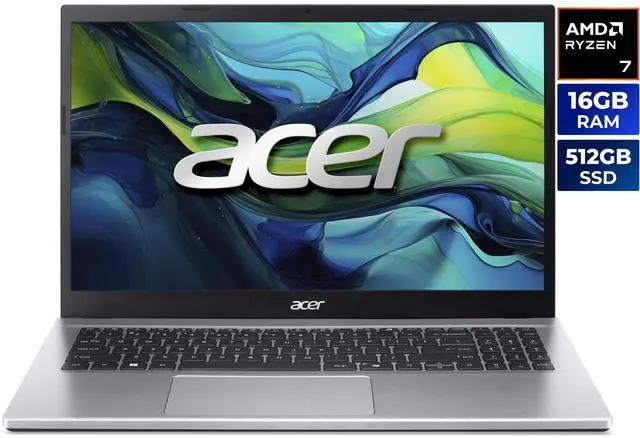
Random Access Memory (RAM) represents one of the most critical specifications affecting laptop performance, yet it’s often misunderstood by buyers navigating the overwhelming choices available in 2026. Too little RAM creates frustrating bottlenecks that no processor upgrade can solve, while excessive RAM wastes budget that could enhance other components. This comprehensive guide explains RAM’s role, how much you actually need for different uses, and how to make intelligent memory decisions when purchasing your next laptop.
Understanding RAM’s Role in Computing
RAM serves as your laptop’s short-term working memory, storing data and instructions that the processor needs immediate access to. Unlike storage drives (SSDs or hard drives) that hold files long-term, RAM provides the fast, temporary workspace where active applications and system processes operate.
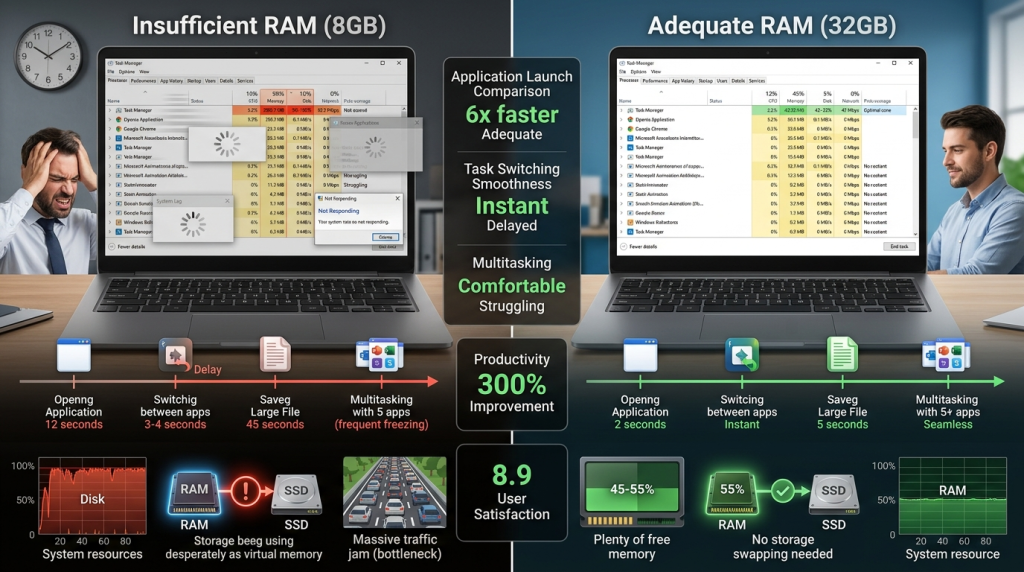
When you open an application, its code and data load from storage into RAM, where the processor can access it thousands of times faster. Multiple open applications compete for available RAM, and when you exceed capacity, the system resorts to using storage as virtual memory—a much slower process that creates the “lag” users experience when systems run out of memory.
RAM Requirements by User Type in 2026
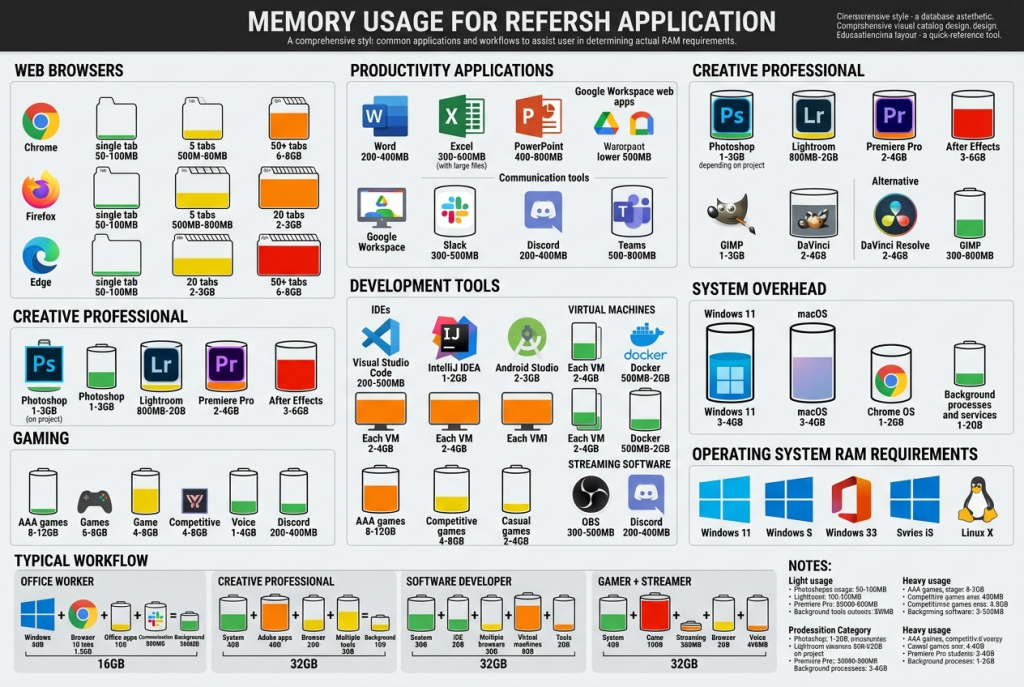
The question “how much RAM do I need?” lacks a universal answer, depending entirely on your computing patterns, application requirements, and multitasking habits.
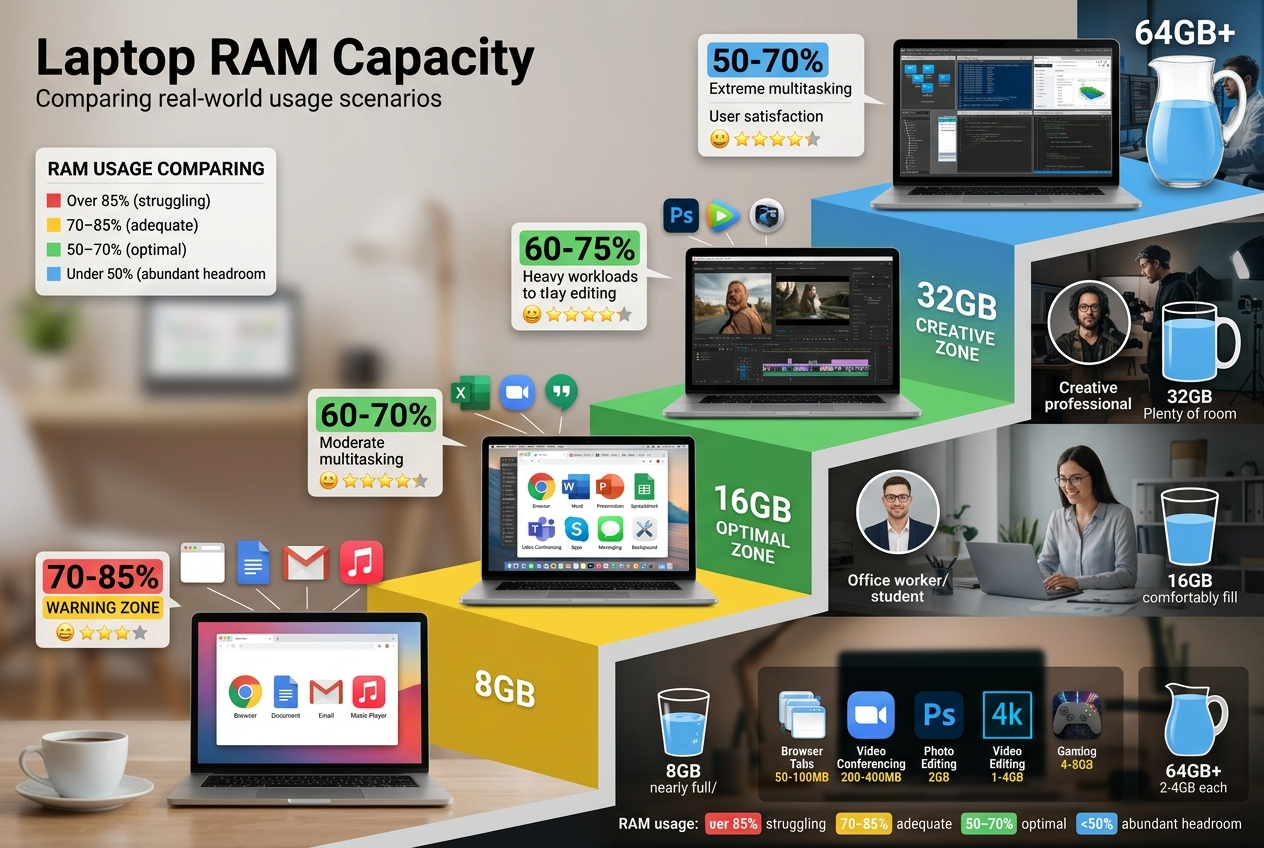
8GB: Entry-Level and Light Use
Eight gigabytes represents the absolute minimum for modern Windows laptops in 2026, suitable only for light, focused computing. Users who primarily browse websites with moderate tab counts, edit simple documents, check email, and stream video find 8GB adequate—barely.
However, even basic users increasingly encounter scenarios where 8GB feels constraining. Modern websites consume surprising amounts of memory, video conferencing applications demand substantial resources, and Windows 11 itself requires considerable memory for smooth operation. For any serious multitasking or future-proofing, 8GB represents a compromise rather than a comfortable solution.
Budget-conscious buyers or those purchasing Chromebooks for straightforward cloud-based computing may find 8GB acceptable due to Chrome OS’s lighter memory footprint. However, even in this scenario, 16GB provides noticeably smoother experiences.
16GB: The Sweet Spot for Most Users
Sixteen gigabytes has emerged as the practical minimum for comfortable computing in 2026, recommended for the vast majority of laptop buyers. This capacity handles typical multitasking scenarios—multiple browser tabs, office applications, video conferencing, music streaming, and several background utilities—without performance degradation.
Business laptops targeting professionals typically ship with 16GB as standard, recognizing this as the baseline for productive work environments. When using the Laptop Finder, filtering for 16GB minimum ensures systems won’t become memory-constrained during typical use.
The rise of Copilot+ PCs with integrated AI features makes 16GB even more important, as AI models and real-time processing demand substantial memory even when running locally on specialized NPUs.
32GB: Power Users and Creative Professionals
Thirty-two gigabytes serves users whose workflows involve memory-intensive applications or aggressive multitasking across demanding programs. Photo editors working with RAW files in Adobe Lightroom or Photoshop, video editors handling 4K footage, 3D modelers, software developers running multiple virtual machines, and data analysts working with large datasets all benefit significantly from 32GB.
Premium laptop configurations targeting creative professionals often include 32GB standard, recognizing these users’ higher memory demands. The difference between 16GB and 32GB becomes immediately apparent when working with large projects—fewer interruptions, smoother scrubbing through timelines, and the ability to keep resource-intensive applications open simultaneously.
64GB and Beyond: Specialized Professional Workflows
Sixty-four gigabytes or more addresses truly specialized scenarios: professional video editors working with 8K footage, 3D animators rendering complex scenes, software developers compiling large codebases, scientists running simulations, and virtualization power users running multiple full operating systems simultaneously.
For the overwhelming majority of users—even enthusiasts and hobbyists—64GB represents massive overkill that doesn’t improve everyday computing experience. However, for professionals whose work genuinely demands it, inadequate RAM creates productivity bottlenecks that no amount of processor or graphics power can overcome.
RAM Requirements Comparison Matrix
| User Type | Minimum RAM | Recommended RAM | Optimal RAM | Typical Use Cases |
|---|---|---|---|---|
| Light/Casual | 8GB | 16GB | 16GB | Browsing, email, streaming, documents |
| Standard Productivity | 16GB | 16GB | 32GB | Office work, video calls, multitasking |
| Creative Professional | 16GB | 32GB | 64GB | Photo/video editing, design, content creation |
| Developer/Technical | 16GB | 32GB | 64GB | Programming, VMs, databases, compiling |
| Gaming | 16GB | 16-32GB | 32GB | Modern games, streaming, recording |
| Specialized Professional | 32GB | 64GB | 64GB+ | 8K video, 3D rendering, simulations |
Gaming and RAM Requirements
Gaming laptops present interesting memory considerations. Game requirements have steadily increased, with 2026’s AAA titles often listing 16GB as minimum and 32GB as recommended specifications.
However, gaming memory requirements differ from creative professional needs. Games consume substantial RAM while running but don’t typically benefit from memory beyond their requirements. A game requiring 16GB won’t run better with 32GB unless you’re simultaneously streaming, recording, or running other memory-intensive background tasks.
Both Intel gaming laptops and AMD gaming configurations typically offer 16GB as baseline with 32GB configurations available. For gaming-focused use, 16GB remains adequate in 2026, while content creators who game should opt for 32GB.
The latest NVIDIA GeForce RTX 50 Series gaming laptops with their powerful GPUs benefit from adequate system RAM, though the GPU’s dedicated VRAM (video RAM) handles graphics processing independently from system memory.
RAM Speed and Type Considerations
RAM capacity represents only part of the equation—speed and type also impact performance, though less dramatically than capacity for most users.
DDR4 vs DDR5
In 2026, the transition from DDR4 to DDR5 memory has largely completed in new laptops, with DDR5 offering higher speeds and better power efficiency. However, real-world performance differences for typical tasks remain modest—you’ll notice inadequate RAM capacity far before you notice slightly slower RAM speeds.
When choosing between laptops, prioritize capacity over speed. A laptop with 32GB of DDR4 RAM outperforms one with 16GB of faster DDR5 RAM for memory-intensive work, despite the newer memory technology.
Dual-Channel Configuration
RAM performs best in dual-channel configuration, using two matched memory modules rather than a single module. Most modern laptops utilize dual-channel configurations automatically, but this matters for understanding why a laptop with two 8GB modules (16GB dual-channel) performs slightly better than one with a single 16GB module.
Upgradability: A Critical Consideration
Laptop RAM upgradability varies dramatically by model and design. Traditional laptops often feature accessible RAM slots allowing user upgrades, while ultra-thin designs increasingly use soldered memory that cannot be upgraded after purchase.
This upgradability factor significantly impacts buying decisions. If purchasing a laptop with upgradable RAM, you might opt for 16GB initially with plans to upgrade later if needs increase. However, if RAM is soldered, you must purchase the capacity you’ll need throughout the laptop’s lifespan upfront.
When researching specific models, verify upgrade possibilities before assuming you can add memory later. Many 2-in-1 convertible laptops prioritize thin designs over upgradability, using soldered memory exclusively.
RAM and Battery Life Relationship
RAM impacts battery life in two ways: capacity and usage. Higher capacity RAM consumes slightly more power at idle—the difference between 16GB and 32GB might reduce battery life by 3-5% even when memory isn’t fully utilized.
However, insufficient RAM severely impacts battery life by forcing the system to constantly swap data between RAM and storage, keeping the processor and storage actively working rather than entering efficient idle states. A laptop struggling with 8GB RAM performing constant memory paging often exhibits worse battery life than one comfortably operating with 16GB.
Modern RAM technologies have improved power efficiency substantially, making capacity-related power consumption minimal compared to other components like displays and processors.
Operating System and RAM Efficiency
Different operating systems manage RAM differently, affecting how much you need. Windows 11 actively uses available RAM for caching and system features, making 16GB the practical minimum for smooth operation. Windows laptops benefit significantly from adequate memory.
macOS similarly benefits from generous RAM, though Apple’s unified memory architecture in their Apple Silicon systems utilizes memory differently than traditional laptop designs. When considering Mac alternatives, RAM remains a critical specification.
Chromebooks require less RAM due to Chrome OS’s lightweight architecture, with 4-8GB often sufficient for typical Chrome OS workflows. However, Chromebooks running Android apps or Linux containers benefit from 16GB, particularly for multitasking.
Virtual Memory and RAM Interaction
When RAM fills completely, operating systems use storage as “virtual memory” or “page file”—treating SSD space as extremely slow RAM. While this prevents crashes, the performance impact is severe.
Modern fast SSDs make virtual memory less painful than when systems used hard drives, but even the fastest SSD is hundreds of times slower than RAM. System responsiveness deteriorates dramatically when relying on virtual memory, creating the “slow laptop” experience users dread.
Adequate RAM prevents virtual memory reliance, maintaining consistently responsive performance even when multitasking aggressively.
Future-Proofing Considerations
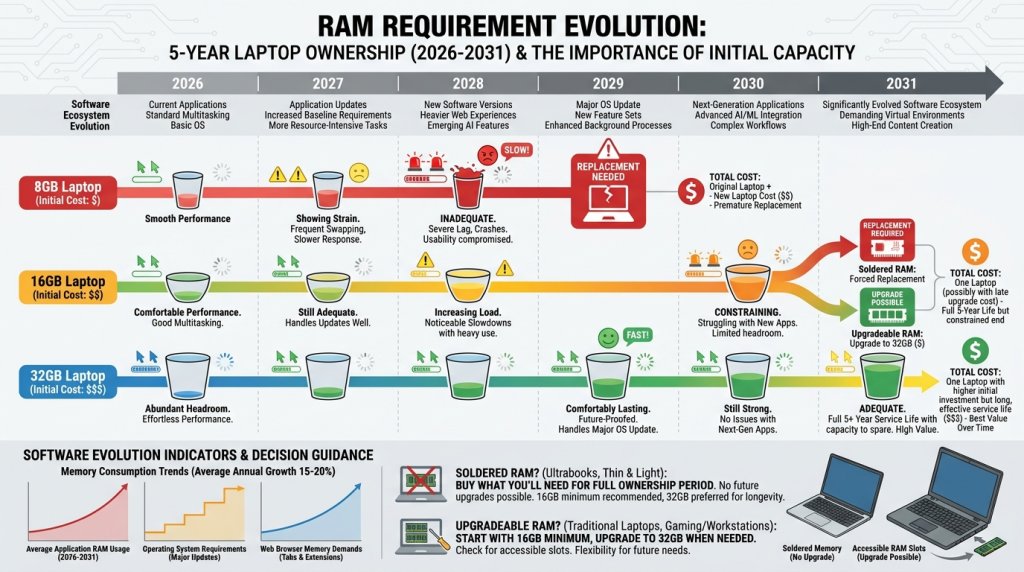
Laptops typically serve users for 3-5 years, during which software memory requirements inevitably increase. Applications grow more feature-rich, websites become more complex, and operating systems add capabilities—all consuming more memory.
Purchasing RAM capacity that feels slightly excessive today provides headroom for tomorrow’s increased requirements. A laptop with 16GB that feels adequate at purchase may feel constraining three years later, while one with 32GB remains comfortable throughout its service life.
This future-proofing consideration particularly matters for laptops with soldered memory where upgrades are impossible. Spending incrementally more for additional RAM at purchase time proves far more cost-effective than replacing an otherwise functional laptop solely because it lacks adequate memory.
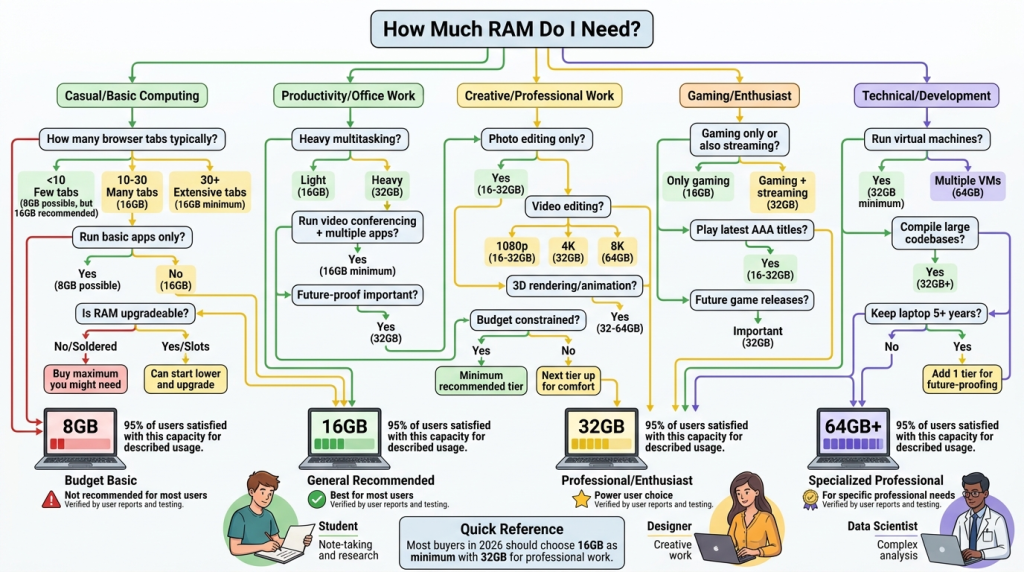
Making Your RAM Decision
When determining appropriate RAM capacity for your next laptop, consider these factors:
Choose 8GB only if:
- Budget is extremely constrained
- You’re purchasing a Chromebook for basic use
- You understand the limitations and accept slower performance
- You perform truly minimal computing tasks
Choose 16GB (recommended for most buyers) if:
- You perform typical productivity work
- You multitask with several applications
- You want comfortable, responsive computing
- You engage in light content creation or casual gaming
- You value good performance without excessive cost
Choose 32GB if:
- You work professionally with photos, video, or design
- You’re a software developer or technical professional
- You run virtual machines or development environments
- You heavily multitask with demanding applications
- You game while streaming or recording
- Your laptop uses soldered memory and you want future-proofing
Choose 64GB+ only if:
- You professionally work with 8K video or massive files
- You run multiple virtual machines simultaneously
- You perform scientific computing or complex simulations
- You’ve experienced RAM limitations with 32GB
- Your workflow genuinely requires it (honestly assess this)
The Laptop Finder helps filter systems by RAM capacity, allowing you to focus on laptops meeting your memory requirements alongside other critical specifications.
For most users in 2026, 16GB represents the sweet spot—adequate for current needs while providing reasonable headroom for software evolution. Creative professionals and power users should strongly consider 32GB, while specialized professionals know from experience when they require 64GB or more.
Remember that RAM is just one component of system performance. A well-balanced laptop with 16GB RAM, a modern processor, fast SSD storage, and appropriate graphics capabilities delivers better overall experience than one with 32GB RAM but compromised other components. Use RAM as one factor in holistic system evaluation rather than the sole purchasing criterion.
Related Posts
- Gaming Laptop vs. Business Laptop: What’s the Real Difference — and Which One Do You Actually Need?
- The Perfect Balance: Best Laptops for Hybrid Work and Learning in 2026
- Power Through Your Day: The Ultimate Guide to Long-Battery Laptops in 2026
- The Complete 2026 Laptop Buying Guide: Making the Right Choice
- Ultimate Guide to Laptops 2022