
Buying a laptop for school is one of those decisions that feels harder than it should be, mostly because the advice you find online is written for everyone at once. A film student and a nursing student have almost nothing in common in terms of what they need from a machine, and yet they will read the same “best laptop” list. So instead of ranking laptops from best to worst, this guide sorts them by the situation you are actually in. Find the scenario that matches your semester, and the recommendation follows from there. Every price below was checked on Newegg on July 28, 2026, and every pick is sold by Newegg.

Scenario 1: You Mostly Need a Browser, and Money Is Tight
If your coursework lives in Google Docs, your school’s learning portal, and a browser-based textbook reader, you do not need a Windows machine at all. A Chromebook boots in seconds, updates itself quietly, gets excellent battery life, and is far harder to clutter up with junk software. The ASUS Chromebook C423NA at $298.98 has a 14-inch display and a 180-degree hinge, which is genuinely useful when you want to lay it flat to share notes across a library table.
The honest limitation is software. If a professor requires a desktop application, a specific statistics package, or a proprietary lab tool, a Chromebook will block you. Check your program’s software requirements page before you commit. If the list is clean, this is the least stressful $300 you can spend on a semester.
Scenario 2: General Studies, and You Want One Machine for Four Years
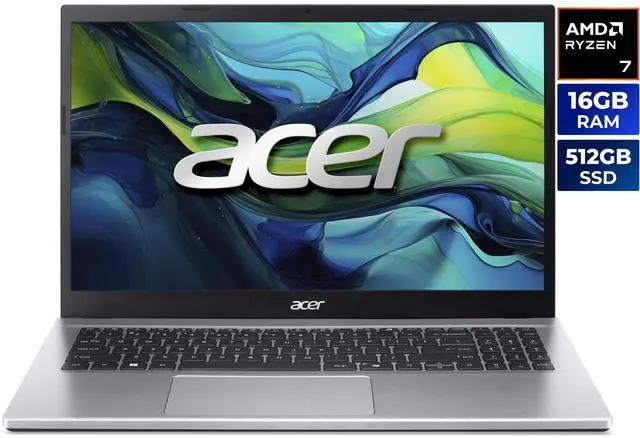
This is where most students land, and the sweet spot is clear: 16GB of memory, a 512GB solid state drive, and a modern eight-core processor. The Acer Aspire Go 15 at $599.99 hits all three, pairing a Ryzen 7 5825U with 16GB of DDR4 and a 512GB SSD on Windows 11 Home. It is not exotic hardware, and that is the point. It opens thirty browser tabs, a PDF reader, a spreadsheet and a video call at the same time without stuttering, which describes roughly ninety percent of college computing.
If you know you are a tab hoarder or you plan to run virtual machines for a computer science course, the same chassis is available with 32GB of memory as the Acer Aspire Go 15 with 32GB at $674.99. Memory is the one component you cannot usually add later on a thin laptop, so paying $75 now to double it is a reasonable hedge.
Scenario 3: You Annotate, Sketch, or Read Constantly
Pre-med students marking up diagrams, architecture students sketching thumbnails, and anyone who reads hundreds of pages a week all benefit from a touchscreen more than they expect. Scrolling a long PDF with a finger, pinching to zoom a dense figure, and tapping through slides are small conveniences that add up over a semester. The ASUS Vivobook 15.6-inch touchscreen at $719.99 combines a Core i5-1334U with 16GB of memory and a 512GB SSD, which keeps the rest of the spec sheet in the same practical territory as the picks above.
Scenario 4: Heavier Software, Real Multitasking, Faster Everything
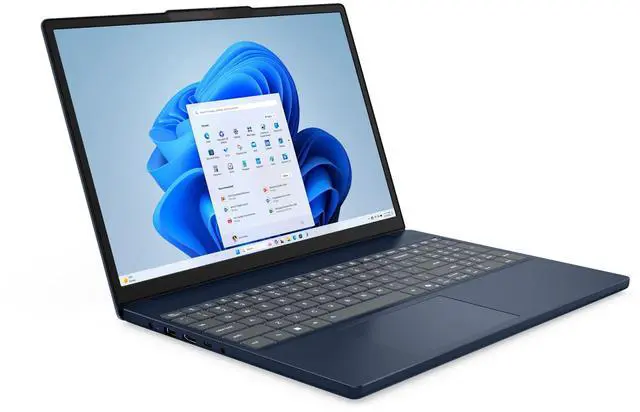
Engineering, data science, GIS, and design programs ask more of a laptop, and the difference shows up in how long you wait for a render, a build, or a large dataset to load. The Lenovo IdeaPad Slim 3 15.3-inch at $899.99 uses a Ryzen 7 8840HS, a substantially newer eight-core mobile processor than the entry-level picks, with 16GB of memory and a 512GB SSD.
If your program leans toward business or IT and you want manageability features, the Dell Pro 16 at $929.99 offers a 16-inch Full HD Plus display and a Core 5 120U with vPro. The larger screen is a real quality-of-life upgrade if you spend hours in spreadsheets or split-screen documents, and 16-inch laptops still fit most backpacks comfortably.
Scenario 5: You Also Game, and You Only Get One Laptop
Plenty of students need a machine that handles coursework by day and games at night, and a dedicated GPU is the only way to get there. The MSI Cyborg A15 at $967.77 pairs a Ryzen 7 260 with an RTX 5050 laptop GPU and a 15.6-inch 144Hz display, which is a sensible combination: the 144Hz panel makes fast games feel smooth, and the discrete GPU also accelerates video editing and anything that leans on CUDA.
Two trade-offs to accept honestly. Gaming laptops are heavier and warmer than the thin picks above, and battery life under load is measured in a couple of hours rather than a workday. If you can leave it on a desk most of the time and carry it to class occasionally, that is a fine deal. If you walk five miles a day between buildings, buy the lighter machine and game on a desktop.
Three Things Worth Paying For, and One That Is Not

Worth paying for, in order: 16GB of memory, because it is the upgrade you cannot do later and the one that most affects how a laptop feels in year three; a 512GB SSD, because 256GB fills up faster than anyone expects once you add course files, media and a game or two; and a display you can stand looking at, since a Full HD IPS panel is the practical minimum for reading text all day.
What is usually not worth paying for is the top processor in a lineup. Moving from a mid-tier chip to the flagship often costs a few hundred dollars and delivers a difference you will only notice in benchmarks, not in lecture notes. Put that money into memory, storage, or a monitor for your desk instead. You can compare the current range on Newegg’s 15.6-inch laptop listings to see how configurations stack up at each price.
The Quick Answer
Browser-only coursework and a tight budget: the ASUS Chromebook at $298.98. General studies and you want it to last: the Acer Aspire Go 15 at $599.99, or the 32GB version at $674.99 if you multitask heavily. Lots of reading and annotation: the ASUS Vivobook touchscreen at $719.99. Engineering or design: the Lenovo IdeaPad Slim 3 at $899.99, or the Dell Pro 16 at $929.99 for a bigger screen. Coursework plus gaming: the MSI Cyborg A15 at $967.77. Pick the scenario, not the spec sheet, and you will spend less and be happier with it in April.
Read More
- Tom’s Hardware: Best College Laptops — Independent testing and rankings for student laptops.
- PCWorld: Best Laptops — Hands-on reviews across budget, premium and 2-in-1 laptops.
- Google: What You Can Do With a Chromebook — Official rundown of Chromebook capabilities and limits before you commit.
- Newegg: Back to School with Intel — Current back-to-school promotions on Intel-powered systems.
- Newegg: 15.6-Inch Laptops — Browse and filter by processor, memory and storage.
Related Posts
- Ryzen 7 7700X3D Motherboard and BIOS Guide: Official Support, Step by Step
- Celebrity Gaming Setups: The PCs That Keep the Spotlight Running
- Best Home and Small-Office NAS in 2026: Pick by Scenario
- Best DDR5 RAM Kits in 2026 (and Why Prices Are Up)
- How to Make Headphones Feel Better for Long Listening Sessions
Frequently Asked Questions
Answers to the most common questions about choosing a back-to-school laptop.