
New semester, new setup. Whether you are heading to a dorm, a shared apartment, or logging in from your childhood bedroom, the right gear makes the difference between a smooth term and a string of last-minute panics. A modern laptop is a great start, but it rarely comes with everything a student actually needs day to day. This checklist walks through six practical upgrades, one category at a time, so you can build out a reliable, budget-friendly setup without overspending. Grab what you need, skip what you do not, and start the year ready for anything.
Why a tech checklist beats impulse buying
It is easy to arrive on campus, realize your new laptop only has a couple of USB-C ports, and panic-buy the first accessory you spot. A checklist flips that script. By thinking through how you actually study, submit assignments, and attend class before you shop, you buy fewer things and use them more. The goal here is not the flashiest desk setup on social media. It is a dependable kit that protects your work, keeps you comfortable during long study sessions, and makes you look and sound professional in online classes and group calls. Every pick below is available at Newegg, with prices checked on August 6, 2026.
Back up your work (portable storage)
Nothing ruins a semester faster than a lost final paper. Cloud storage helps, but a physical backup you control is the safety net every student should have. A portable SSD copies gigabytes of notes, photos, and project files in seconds and slips into any bag. Our pick is the Samsung T7 Portable SSD 1TB, $229.00 at the time of writing. It is compact, shock-resistant with no moving parts, and fast enough to edit video or run a portable app library straight off the drive. Set a weekly reminder to drag your coursework folder onto it, and a spilled coffee or a dead laptop becomes an inconvenience instead of a catastrophe.
Expand your ports (USB-C hubs)
Thin-and-light laptops look great until you need to plug in a monitor, a flash drive, and a charger at the same time. A USB-C hub turns a single port into many, adding HDMI, USB-A, card readers, and pass-through charging. If you are on a tight budget, the Rosewill 8-in-1 USB-C Hub (4K HDMI) delivers 4K HDMI output and a stack of extra ports for just $29.99 at the time of writing, which is hard to beat for dorm-room duty. If you want something built to last through four years and beyond, the Belkin 7-Port USB-C Hub, $62.99 at the time of writing, offers a sturdier build and reliable performance for a permanent desk setup. Not sure which fits your laptop? Browse the full range of USB-C hubs to compare ports and price.
Comfortable typing (keyboard + mouse)
Typing every assignment on a cramped laptop keyboard is fine for a while, and then your wrists start to complain. A full-size wireless keyboard and mouse transform any dorm desk into a comfortable workstation, and they free up screen space by letting you prop your laptop on a stand. The Logitech MK270 Wireless Keyboard + Mouse Combo, $29.99 at the time of writing, is an affordable, no-fuss choice: it uses a single tiny USB receiver, runs for months on its included batteries, and includes handy shortcut keys. It is the kind of upgrade you stop noticing precisely because it just works.
Show up on camera (webcam)
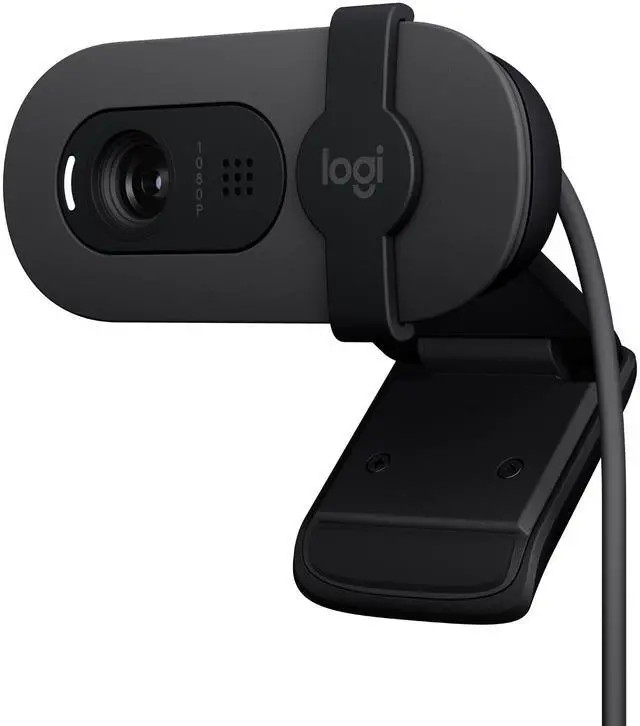
Online lectures, virtual office hours, and remote group projects are part of student life now, and most built-in laptop cameras are grainy and unflattering. A dedicated webcam is the single easiest way to look more professional on a call. The Logitech Brio 100 1080p Webcam, $29.99 at the time of writing, delivers a crisp Full HD image, better low-light handling than most laptop cameras, and a built-in privacy shutter so you control exactly when you are seen. Clip it to your monitor and you will present clearly whether you are defending a thesis or just checking in with a study group.
Sound good on calls (headset)
Good audio is half of every video call, and it is the half people notice most. A proper headset cuts out roommate noise, keeps your microphone close to your mouth, and lets you focus during long study blocks. The Razer BlackShark V2 X Headset, $54.99 at the time of writing, is a lightweight, comfortable over-ear option with a clear microphone and cushioned earcups you can wear for hours. It is just as happy carrying you through a late-night gaming session as it is keeping a group presentation crisp and intelligible.
Keep your laptop cool
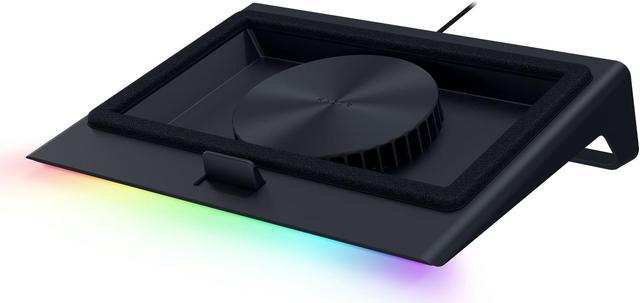
Heavy multitasking, video calls, and marathon research sessions push laptops hard, and heat is the enemy of both performance and battery lifespan. When a laptop runs hot, it slows itself down to protect its components, which means slower everything right when you need speed. A cooling pad lifts the chassis for better airflow and adds fans to pull heat away. The Razer Laptop Cooling Pad (14″-18″), $129.99 at the time of writing, fits most modern laptops, raises the screen to a more ergonomic angle, and helps your machine stay quick and quiet under load. It is a worthwhile investment if you run demanding software or simply want your laptop to last through graduation.
Your quick-reference checklist
Build your kit one line at a time, and do not feel you need everything at once. Start with a backup drive to protect your work, add a hub so you can plug in whatever campus throws at you, then layer in comfort and communication gear as your budget allows. Here is the full checklist at a glance:
| Category | Recommended pick | Price (at time of writing) |
|---|---|---|
| Portable storage | Samsung T7 Portable SSD 1TB | $229.00 |
| USB-C hub (budget) | Rosewill 8-in-1 USB-C Hub | $29.99 |
| USB-C hub (premium) | Belkin 7-Port USB-C Hub | $62.99 |
| Keyboard + mouse | Logitech MK270 Combo | $29.99 |
| Webcam | Logitech Brio 100 1080p | $29.99 |
| Headset | Razer BlackShark V2 X | $54.99 |
| Cooling pad | Razer Laptop Cooling Pad | $129.99 |
Tick these boxes and you will spend less time troubleshooting and more time learning. A dependable setup pays for itself in saved stress across a full academic year.
Read More
- RTINGS webcam reviews — Independent, lab-tested comparisons to help you judge webcam image quality.
- Tom’s Hardware — In-depth reviews and buying advice on SSDs, laptops, and accessories.
- PCMag — Expert product roundups, including guides tailored to students and back-to-school shoppers.
- Logitech official site — Product details and support resources for the MK270 combo and Brio webcams.
- Newegg Laptops category — Browse laptops and student-ready systems to anchor the rest of your kit.