Grand Theft Auto VI arrives on PlayStation 5 and Xbox Series X|S on November 19, 2026, and the screen you play on will shape the experience as much as the console itself. Choosing the best TV for GTA 6 comes down to a short list of features: a 4K panel, a 120 Hz refresh rate, HDMI 2.1 with VRR and ALLM, and HDR that can actually get bright. Rockstar has not confirmed the game's resolution or frame-rate modes yet. For that reason, this guide treats a new display as future-proofing rather than a promise of a specific frame rate. Next, you will learn what each spec does, how OLED, Mini-LED and QLED panels compare, when a gaming monitor makes more sense, and which console settings to switch on before the November 12 preload begins.
What the Best TV for GTA 6 Needs: Quick Checklist
The best TV for GTA 6 has a native 4K panel, a 120 Hz refresh rate, at least one full-bandwidth HDMI 2.1 port, VRR, ALLM and bright HDR. Anything beyond that is a bonus, not a requirement.
Use this list when you compare models in a store or online:
Resolution: native 4K (3840 x 2160)
Refresh rate: 120 Hz native, not "motion rate" 120 or 240
Ports: HDMI 2.1 at 40-48 Gbps on the input you will use
Gaming features: VRR (HDMI Forum VRR) and ALLM
HDR: HDR10 support for PS5, Dolby Vision for Xbox, 600 nits or more of peak brightness
Input lag: under 20 ms in game mode, ideally under 10 ms at 120 Hz
Filtering a search for 4K 120 Hz TVs removes most budget sets that cannot run high refresh rates. However, read the fine print on each listing. Many TVs advertise "Motion Rate 240" while the panel itself only refreshes at 60 Hz, and that number does nothing for console gaming.
Size matters too. For example, at a typical couch distance of 7 to 9 feet, a 55-inch to 65-inch screen fills your view without forcing you to turn your head during chases.
Why 4K and 120 Hz Matter Before Frame Rates Are Confirmed
A 4K 120 Hz display keeps your options open, because it can show every mode Rockstar ships, whether the game targets sharp visuals, higher frame rates, or something in between. A 60 Hz TV caps you at 60 frames per second, no matter what a future patch or performance mode offers.
Rockstar has not announced resolution or frame-rate targets for GTA 6. Still, both consoles support a 4K signal at 120 Hz, and many recent console games offer a quality mode and a performance mode. In practice, a 120 Hz panel gives you headroom for any performance option that appears at launch or later. The PlayStation Store also lists the game as PS5 Pro Enhanced, though Sony and Rockstar have not detailed those features.
A high refresh rate helps even when a game runs below 120 fps. For example, a 120 Hz panel refreshes every 8.3 milliseconds instead of every 16.7 milliseconds. That shorter interval lowers motion blur on sample-and-hold screens and makes VRR more effective, since the TV has a wider window to match the console's output.
4K resolution matters for a different reason. Open-world cities are full of distant signs, power lines and foliage, and fine detail holds up better on a 4K panel at 55 inches and above. On the other hand, a smaller 1440p screen can look just as crisp up close, which is why 1440p gaming monitors stay popular.
HDMI 2.1, VRR and ALLM Explained
HDMI 2.1 is the connection standard that carries 4K at 120 Hz, VRR and ALLM between your console and display. Without it, you are limited to 4K at 60 Hz or 1080p at 120 Hz. For a deeper look at the standard, see what HDMI 2.1 is and whether you need it.
Here is what each feature does:
VRR (variable refresh rate) lets the TV change its refresh rate on the fly to match the console. When frame rates dip in a busy chase, VRR prevents tearing and reduces stutter.
ALLM (auto low latency mode) tells the TV to switch into game mode as soon as the console starts sending a game signal. As a result, you get low input lag without menu digging.
4K 120 Hz needs roughly 40 Gbps or more of bandwidth, which only full HDMI 2.1 ports provide.
VRR is the feature most likely to matter on day one. Because GTA 6's performance targets are unconfirmed, nobody knows how steady the frame rate will be in dense areas. However, VRR smooths those dips instead of letting them turn into judder. Both consoles use HDMI Forum VRR, which most HDMI 2.1 TVs support.
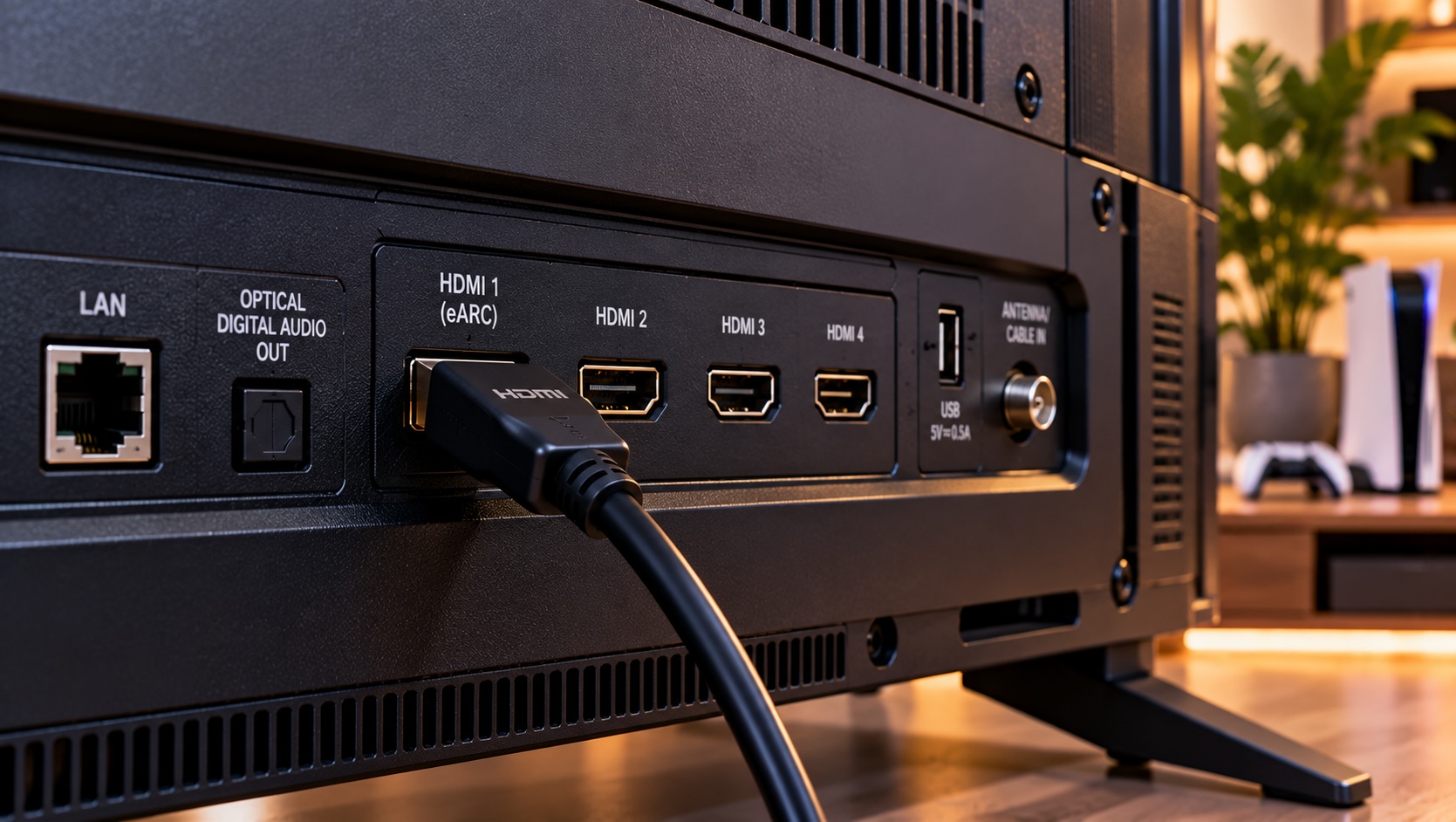
Next, count the HDMI 2.1 ports. Some sets offer four full-bandwidth inputs, while others offer two, and one may double as the soundbar's eARC port. For a second console, an HDMI 2.1 switch can help, but enough native ports is simpler.
HDR for GTA 6: HDR10, Dolby Vision and Peak Brightness
When you shop for the best TV for GTA 6, HDR (high dynamic range) matters. It adds brighter highlights and deeper color, and it matters most in open-world games full of sunsets, neon signs and bright streets. The format your TV needs depends on your console, and peak brightness matters more than the logo on the box.
PS5 outputs games in HDR10, while Xbox Series X|S also supports Dolby Vision gaming. Dolby Vision sends scene-by-scene metadata so the TV can tone-map each frame more precisely. However, a bright HDR10 set will still beat a dim Dolby Vision set. If you play on Xbox, pick a TV that supports Dolby Vision gaming at 120 Hz, since some models only handle it at 60 Hz.
Next, check brightness, which TV makers measure in nits. As a rough guide:
400-500 nits: HDR is technically supported, but highlights look flat
600-1,000 nits: noticeable punch in headlights, sun glare and neon
1,000-2,000+ nits: strong HDR with sparkling highlights, common on Mini-LED sets
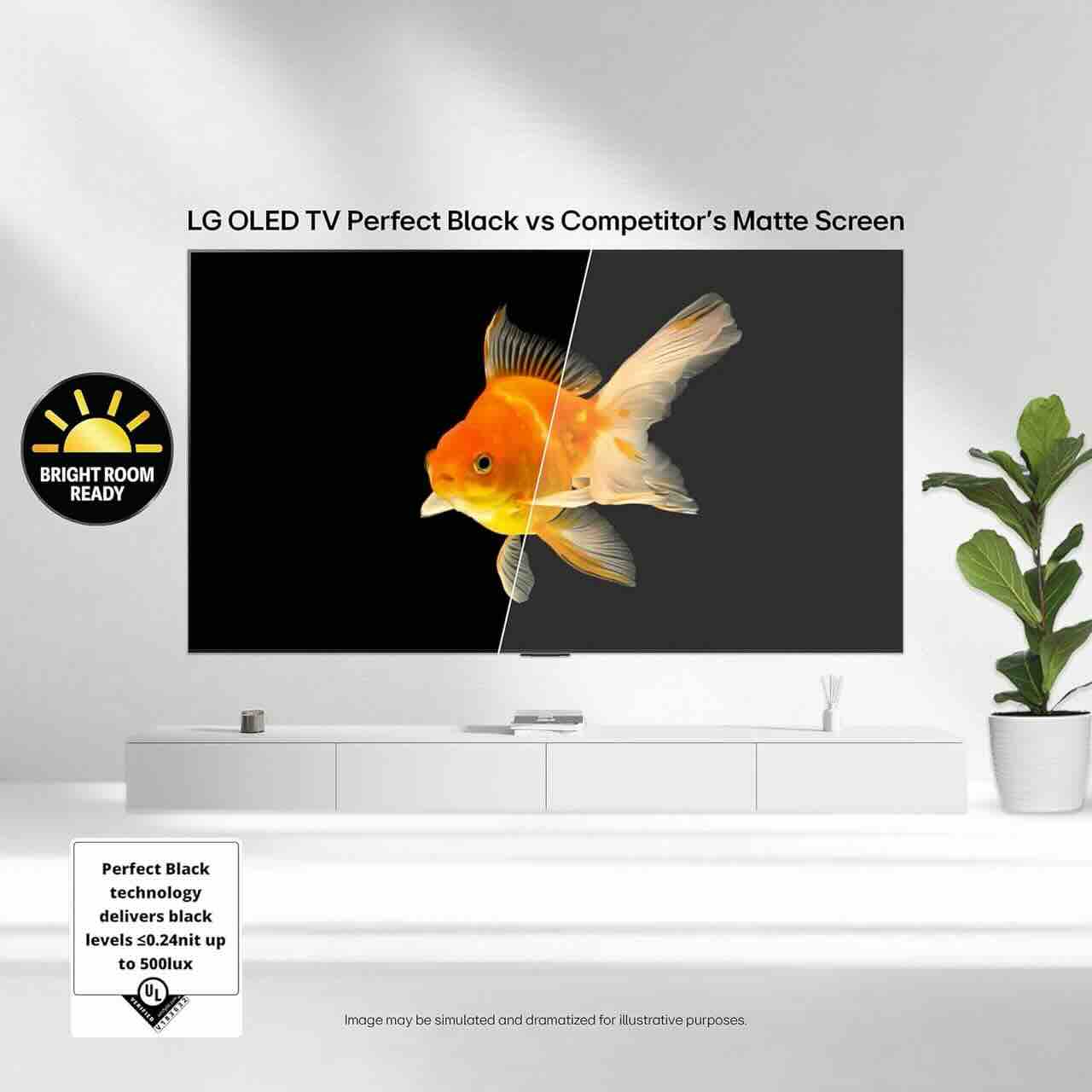
Contrast matters just as much as brightness. A TV with deep blacks makes night driving look dramatic, while a TV with weak blacks turns shadows gray. For this reason, look for local dimming on LCD TVs or choose OLED.
Finally, run each console's built-in HDR calibration after setup. Calibration tells the game how bright your specific TV can get, so the image does not clip highlights or crush detail in dark alleys.
OLED vs Mini-LED vs QLED: Choosing the Best TV for GTA 6
The best TV for GTA 6 depends on your room: OLED wins on contrast and motion in darker rooms, Mini-LED wins on brightness in sunny rooms, and QLED offers the best value. All three panel types are available with 4K, 120 Hz and HDMI 2.1.
Panel typeStrengthsTrade-offsBest forOLEDPerfect blacks, near-instant pixel response, wide viewing anglesLower full-screen brightness, small burn-in risk with static HUDsDim rooms, evening sessionsMini-LEDVery high peak brightness, strong HDR, no burn-inSome blooming around bright objectsBright living roomsQLED (standard LED)Lower prices, bright and colorfulWeaker blacks without many dimming zonesBudget 4K 120 Hz setups
An OLED TV delivers the most cinematic night scenes, because each pixel turns off completely. Its sub-millisecond pixel response also keeps fast motion clean. On the other hand, a static minimap can raise burn-in concerns, though pixel shifting reduces that risk.
A Mini-LED TV groups thousands of tiny LEDs into hundreds of dimming zones. That design pushes highlights past 1,000 nits, which suits bright daytime scenes and sun glare.
Meanwhile, a mid-range QLED TV with 120 Hz and HDMI 2.1 covers the essentials for less money.
TV or Gaming Monitor for GTA 6?
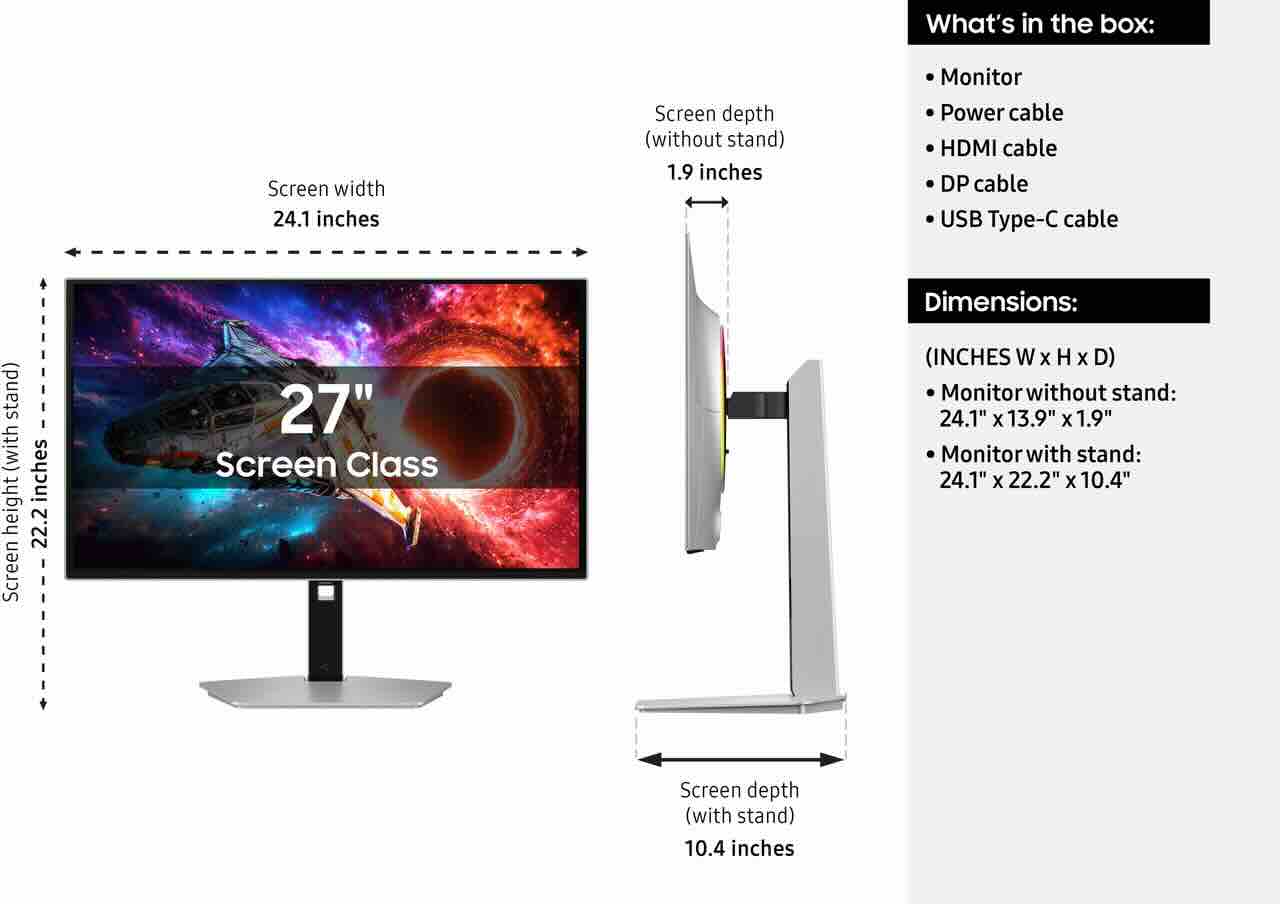
The best TV for GTA 6 suits a couch at 7 feet or more, but a 27-inch to 32-inch gaming monitor makes more sense on a desk 2 to 3 feet away. Both can deliver 120 Hz and VRR.
Monitors bring real advantages, as our roundup of the best gaming monitors of 2026 shows. For example, many 4K gaming monitors offer 144 Hz or higher refresh rates and very low input lag. However, confirm the monitor has a full HDMI 2.1 port. Many models reserve their top refresh rate for DisplayPort and cap HDMI at 4K 60 Hz.
Resolution choice depends on screen size:
27-inch 1440p: sharp at desk distance, and both PS5 and Xbox Series X output 1440p
27-inch to 32-inch 4K: the sharpest option, and it also suits a future PC upgrade
32-inch 1440p: works, but pixels become more visible up close
A 1440p gaming monitor is the value pick for a bedroom or dorm desk. In addition, a high-refresh monitor carries over to a future gaming PC, though no PC version of GTA 6 has been announced.
Audio is the main drawback. Monitor speakers are thin or missing, so pair one with a gaming headset or plug headphones into the controller.
Input Lag, HDMI Ports and Ultra High Speed Cables
Input lag is the delay between a button press and the result on screen, and the best TV for GTA 6 keeps it under 10 ms at 120 Hz in game mode. Your HDMI cable and port choice decide whether you get that performance at all.
Game mode turns off most image processing, which can cut input lag from 50-100 ms down to roughly 10-20 ms. Because ALLM triggers game mode automatically, you rarely need to set it by hand. Still, check that motion smoothing and noise reduction are off after the switch.
In addition, the cable matters more than many buyers realize. Full 4K 120 Hz with HDR needs an Ultra High Speed HDMI cable certified for 48 Gbps. The PS5 and Xbox Series X ship with a suitable cable. If you need a longer run for a wall-mounted TV, buy a certified Ultra High Speed HDMI cable rather than an older "High Speed" cable from a drawer. Older cables often cause flickering, blank screens or a fallback to 60 Hz.
Finally, port selection is the last piece. Plug the console into a port labeled HDMI 2.1, 4K@120 or "Game," and avoid sharing it with a soundbar if the TV only has two fast ports. If you add a soundbar, connect it to the eARC port so the console's video signal stays direct.
Console Settings to Turn On Before November 19
The best TV for GTA 6 only delivers if the console and TV settings match, so set them up before the November 12 preload. The full process takes about 10 minutes.
On the TV:
Enable the enhanced HDMI mode for the console's port (often called Input Signal Plus, HDMI Ultra HD Deep Color or 4K 120 Hz mode).
Turn on Game Mode or confirm that ALLM is enabled.
Enable VRR in the TV's game settings.
Turn off motion smoothing and extra sharpening.
On PS5, open Settings, then Screen and Video, then Video Output. Set VRR to Automatic and 120 Hz Output to Automatic. Next, set HDR to On When Supported and run Adjust HDR. Under Saved Data and Game/App Settings, you can also set Game Presets to prefer Performance Mode, so supported games choose their higher-frame-rate option.
On Xbox Series X|S, open Settings, then General, then TV and Display Options. Choose 120 Hz as the refresh rate. Then, under Video Modes, enable Allow Variable Refresh Rate, Allow Auto Low-Latency Mode and Allow Dolby Vision for Gaming. Finally, run the Xbox HDR Game Calibration app.
Final Pre-Launch Display Checklist
Before November 19, 2026, confirm that your console and the best TV for GTA 6 you picked agree on 4K at 120 Hz, VRR and calibrated HDR. A quick check now saves troubleshooting on launch night.
The console's video info screen shows 4K, 120 Hz and HDR
VRR appears as active in the TV's game menu or info overlay
The cable is Ultra High Speed certified
Motion smoothing is off
HDR calibration matches your room's lighting
Also, consider where the TV sits. A sturdy TV wall mount can cut glare from windows and place the screen at eye level for long sessions. Because the boxed version contains a download code rather than a disc, every player downloads GTA 6, so free up drive space before the preload. A larger internal NVMe SSD handles that on PS5.
Frequently Asked Questions
What is the best TV for GTA 6 on PS5?
The best TV for GTA 6 on PS5 is a 4K 120 Hz model with HDMI 2.1, VRR, ALLM and bright HDR10. Dolby Vision gaming is not needed, because PS5 uses HDR10.
Does GTA 6 run at 120 fps?
Rockstar has not confirmed resolution or frame-rate modes. A 120 Hz display is future-proofing, and VRR smooths any frame-rate dips.
Do I need HDMI 2.1 for GTA 6?
No, the game will play on HDMI 2.0. However, HDMI 2.1 unlocks 4K at 120 Hz and VRR, the features most likely to improve smoothness.
Is OLED burn-in a risk with GTA 6?
Risk is low with modern OLED TVs, which use pixel shifting and logo dimming. Varying your content helps, and Mini-LED avoids the issue entirely.
Is a gaming monitor better than a TV for GTA 6?
At a desk, a 27-inch to 32-inch monitor with HDMI 2.1 is excellent. From a couch, a 55-inch or larger TV is the better fit.
More from the GTA 6 Ready series: "Best Console for GTA 6: PS5, PS5 Pro, Series X or Series S, Plus Which Edition to Buy"; "GTA 6 Storage Guide: How to Upgrade Your PS5 or Xbox Before Launch"; "GTA 6 Gaming Setup: Chairs, Controllers and Headsets for Long Sessions".
Conclusion
The best TV for GTA 6 combines 4K resolution, a native 120 Hz panel, full HDMI 2.1 with VRR and ALLM, and HDR bright enough to make sunsets and neon signs glow. Rockstar has not confirmed frame-rate modes yet. Even so, those features cover anything the game offers on November 19, 2026, and VRR smooths the rough patches along the way.
Choose OLED for dark rooms, Mini-LED for bright ones, and QLED to save money. If you play at a desk, pick a monitor instead. To compare options side by side, browse the full range of 4K TVs or the lineup of HDR gaming monitors on Newegg.