

Shopping for a desktop PC in 2026 requires more than just comparing specifications—understanding market cycles, identifying genuine value propositions, and timing your purchase strategically can save hundreds or even thousands of dollars while ensuring you get the performance you need. This comprehensive guide explores how to evaluate desktop PC value, recognize when to buy, and navigate the complex landscape of pricing and performance tiers to make informed purchasing decisions.
Understanding Price-to-Performance Ratios
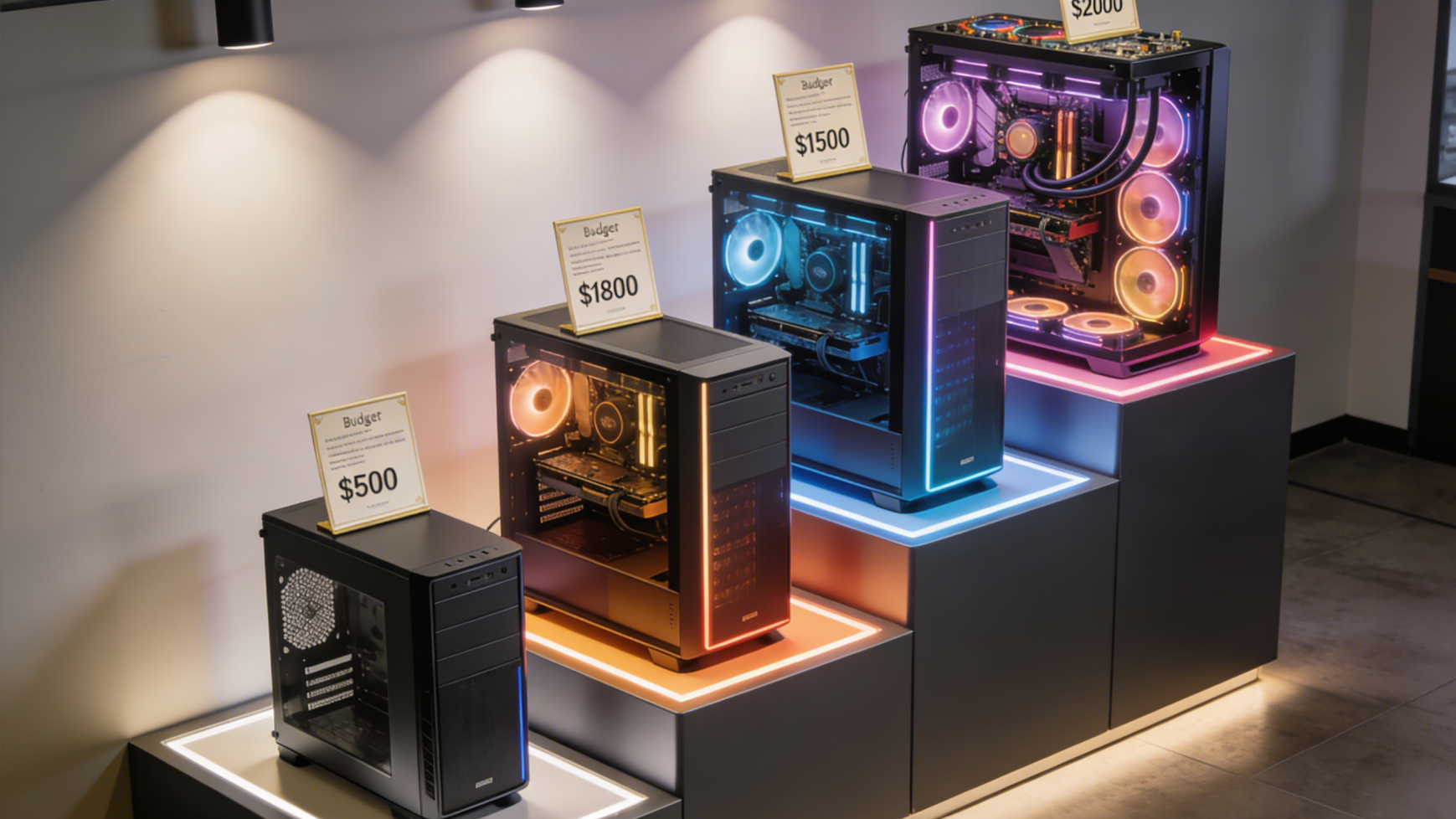
The relationship between cost and capability varies dramatically across different price points. Entry-level systems under $500 provide basic computing for everyday tasks but struggle with demanding applications. Mid-range systems between $800-1500 offer the best overall value, handling most tasks competently without unnecessary premium features. High-end systems above $2000 deliver cutting-edge performance but with diminishing returns—each additional dollar buys incrementally smaller performance gains.
The Best Sellers in Desktop Computer category provides valuable insight into which systems buyers trust most. These popular models typically represent sweet spots in their respective price categories, offering proven reliability and capability. Studying best-sellers helps identify which features and specifications matter most to real-world users.
Seasonal Buying Patterns and Sales Events
Desktop PC pricing follows predictable seasonal patterns. Major sales events throughout the year provide opportunities for significant savings. Black Friday and Cyber Monday remain the premier shopping periods, with retailers offering their deepest discounts. Back-to-school sales in July and August target students and educators with competitive pricing on complete systems and components.
January post-holiday sales clear inventory as manufacturers prepare for new product launches. This timing often yields excellent deals on previous-generation hardware that remains highly capable. Late spring and early summer see relatively stable pricing with fewer major promotions, making these less ideal times for bargain hunters unless you need a system immediately.
The Lowest Price in Desktop Computer section tracks recent price reductions, helping you identify systems currently discounted from their typical selling prices. Monitoring this category regularly reveals patterns in pricing and highlights exceptional temporary deals.
 New Product Launch Cycles
Understanding hardware release schedules helps time purchases strategically. Graphics card launches typically occur annually, with new GPU generations superseding previous models. Buying GPUs shortly after new generation launches often provides poor value—initial pricing runs high with limited availability. However, purchasing previous-generation cards immediately after new launches yields substantial savings as retailers clear inventory.
CPU releases follow similar patterns, though Intel and AMD stagger their launches, creating multiple buying opportunities throughout the year. The CPU Processor category shows both current and previous generation processors, with older generations often offering compelling value for users who don’t need absolute cutting-edge performance.
Evaluating Pre-Built vs. Custom Build Value
Pre-built systems from major manufacturers offer convenience and support at the cost of some customization and potential savings. However, promotional pricing on pre-built systems sometimes beats component costs for equivalent custom builds. The Gaming Desktop PC category includes pre-configured systems with verified component compatibility and professional assembly.
Building custom systems provides maximum control over component selection and often delivers better value, particularly in mid-range and high-end configurations. Use Newegg’s Custom PC Builder tool to price equivalent custom builds and compare against pre-built options. The tool shows real-time component availability and pricing, helping you identify the best value approach for your requirements.
For gaming specifically, the Gaming PC Finder matches systems to your favorite games and budget, eliminating guesswork about which pre-built configuration meets your needs. This tool accounts for both current and upcoming game requirements, helping ensure your purchase remains relevant.
Component-Level Value Analysis
Different components contribute unevenly to overall system cost and capability. Graphics cards represent the single largest expense in gaming builds, often consuming 30-40% of total system cost. The GPU category spans from budget cards under $200 to flagship models exceeding $1500. Understanding your performance needs prevents overspending on unnecessary GPU capability.
Memory pricing fluctuates based on global supply and demand, sometimes varying by 50% or more over several months. When RAM prices are elevated, buying systems with minimum memory and upgrading later can save money. Conversely, when memory is cheap, maximizing RAM in your initial purchase provides better long-term value.
Storage represents another area where patience yields savings. SSD prices continue declining over time, making storage one component where waiting often makes sense. The Hard Drives section shows how prices for equivalent capacity drives decrease quarter over quarter, with newer technologies becoming more affordable.
 Budget Category Strategies
Entry-Level Systems ($400-$700)
Entry systems prioritize essential functionality over performance. These configurations handle web browsing, office applications, video streaming, and casual gaming at lower settings. Value comes from reliable components rather than cutting-edge specifications. Integrated graphics from modern CPUs eliminate discrete GPU costs while providing adequate performance for basic tasks.
For users with basic computing needs, all-in-one computers in this price range provide excellent value by including display, webcam, and speakers in one package. The simplicity and space efficiency of AIOs justify their modest price premium over equivalent tower configurations.
Mid-Range Systems ($800-$1500)
Mid-range builds deliver the best performance per dollar, handling modern games at high settings, supporting creative applications, and providing headroom for future needs. This category benefits most from careful component selection—choosing previous-generation flagship components often outperforms current-generation mid-range parts at similar prices.
Systems in this range should include discrete graphics cards, sufficient RAM (16-32GB), and fast SSD storage. These specifications ensure smooth performance across virtually all common use cases without excessive spending on premium features that provide minimal practical benefit.
High-End Systems ($1500-$3000+)
Premium systems target enthusiasts and professionals requiring maximum performance. Diminishing returns become apparent here—a $3000 system might perform only 30-40% faster than a $1500 system in many real-world scenarios. However, for professional workflows where time equals money, this performance premium justifies the investment.
High-end builds should emphasize balanced configurations rather than single extreme components. A system with a flagship GPU but inadequate CPU or RAM wastes potential. Browse high-end options at NVIDIA and AMD brand stores to understand premium component options.
Monitor and Peripheral Value Considerations
Your display significantly impacts overall computing experience and represents a long-term investment lasting through multiple PC upgrades. The 24-26 inch category offers excellent value for most users, providing crisp imagery at reasonable prices. These monitors typically last 5-7 years, making them worth prioritizing in your budget.
For gaming and immersive experiences, curved displays and ultrawide formats provide enhanced immersion at price premiums that have decreased substantially in 2026. These displays transform gaming and productivity experiences more dramatically than incremental GPU upgrades.
Advanced display technologies like HDR and OLED/QLED panels represent premium features that significantly enhance visual quality. These technologies previously commanded severe price premiums but have become more accessible in 2026, making them worthwhile considerations for users prioritizing image quality.
Adaptive sync technologies prevent screen tearing and improve gaming smoothness. Both G-Sync and FreeSync monitors are widely available, with compatibility expanding across both NVIDIA and AMD graphics cards. This technology costs little extra but dramatically improves perceived smoothness.
 Resolution and Performance Balancing
Display resolution directly impacts required GPU performance and system cost. 1080p Full HD systems provide excellent gaming experiences with modest hardware requirements, making them ideal for budget-conscious builds. Modern mid-range GPUs easily drive 1080p displays at high refresh rates with maximum settings.
4K gaming demands substantially more GPU horsepower, effectively doubling or tripling required graphics card investment. For many users, high refresh rate 1440p displays provide better overall value than 4K—the performance requirements remain manageable while image quality significantly exceeds 1080p.
5K displays target professionals requiring maximum screen real estate for creative work. These ultra-high-resolution displays demand powerful GPUs but primarily for desktop rendering rather than gaming, making them excellent for content creators who game occasionally rather than primarily.
Warranty and Support Value
Extended warranties and support services add to system costs but provide peace of mind. Pre-built systems typically include manufacturer warranties covering parts and labor, valuable for users uncomfortable with component-level troubleshooting. Custom builds require managing warranties for individual components, which demands more effort but often provides longer coverage periods.
Premium brands sometimes charge higher prices but include superior support experiences—faster response times, better customer service, and more comprehensive coverage. For business users or those who depend on their systems for income, this premium can justify itself through reduced downtime when issues arise.
Future-Proofing vs. Immediate Needs
Attempting to “future-proof” systems by over-specifying components often wastes money. Technology advances rapidly enough that mid-range systems purchased now and upgraded in 3-4 years typically outperform premium systems used for 6-7 years without upgrades, while costing less overall.
Instead of maximizing every specification, build systems that comfortably exceed current needs by 25-30%, providing headroom for software demands to increase without requiring immediate upgrades. This approach balances longevity with cost-effectiveness, avoiding both premature obsolescence and wasteful overspecification.
 Using Shopping Tools Effectively
Motherboard selection impacts future upgrade potential significantly. Investing slightly more in a quality motherboard with additional M.2 slots, RAM slots, and PCIe lanes provides upgrade flexibility that extends system useful life. This represents one area where modest additional investment yields substantial long-term value.
Planning your purchase using the Custom PC Builder helps optimize budget allocation across components. The tool shows how rebalancing spending between components affects overall capabilities, helping you identify optimal configurations for your budget and needs.
Virtual Reality and Emerging Technologies
VR gaming requires substantial system capability but has become more accessible in 2026. Entry-level VR demands GPU performance equivalent to high-end 1080p gaming, while premium VR experiences require hardware comparable to 4K gaming systems.
For users interested in VR, building systems that exceed minimum VR requirements provides better experiences with improved visual fidelity and frame rates that enhance immersion while reducing motion sickness. The Gaming and Virtual Reality section helps identify VR-ready systems and components.
Making the Purchase Decision
After researching options and identifying target specifications, timing the actual purchase strategically maximizes value. Set price alerts for specific components or systems you’ve identified, allowing you to act quickly when prices drop. Combining component sales—GPU discount one week, CPU discount the next—can yield significant total savings when building custom systems.
Don’t let perfect be the enemy of good. Waiting indefinitely for optimal pricing or next-generation launches means missing out on using and enjoying your system. If current prices fall within your budget and meet your needs, purchasing now provides immediate utility that often outweighs potential future savings.
 Conclusion: Smart Shopping for Long-Term Value
Maximizing desktop PC value requires balancing multiple factors—component selection, purchase timing, market awareness, and realistic needs assessment. By understanding price-performance relationships, recognizing seasonal patterns, and using available shopping tools effectively, you can acquire systems that deliver excellent capability at fair prices. Remember that the best value system isn’t necessarily the cheapest or most expensive—it’s the one that meets your specific needs at a price point you’re comfortable with, providing reliable service for years to come. Smart shopping means being informed, patient when possible, and decisive when the right opportunity presents itself.