A few years ago you had to pick: a 4K monitor for sharp single-player games, or a fast 1080p or 1440p panel for competitive shooters. Dual-mode monitors try to give you both on one screen. Flip a setting and a 4K 240Hz display becomes a 1080p 480Hz one. I think they're one of the more genuinely useful monitor ideas of the last couple of years, with a few caveats.
Why it matters
Most people who play competitive shooters also play story-driven games. If you want 480Hz for one and 4K detail for the other, a dual-mode panel saves you from buying two monitors or compromising on one. It's also a hedge as GPUs get faster: a current card might run your shooter at 400-plus frames at 1080p, and a future card might run your favorite open-world game near 240 at 4K.
How dual mode works
In the lower-resolution mode, the monitor combines groups of four pixels into one, so 3840x2160 becomes 1920x1080 and the refresh rate roughly doubles. The image fills the screen, so a 1080p picture on a 32-inch panel looks noticeably softer than native 4K. Some models let you shrink the 1080p image to a smaller area to keep it sharper, which competitive players often prefer.
What to look for
Panel type. OLED gives near-instant response and perfect blacks; Mini LED and IPS go brighter in some cases and don't carry burn-in risk. Ports. 4K at 240Hz needs DisplayPort 1.4 or HDMI 2.1 with DSC, or DisplayPort 2.1 at UHBR20 speeds, so check that your GPU and the monitor's inputs line up. Size. At 27 inches, the 1080p mode looks sharper than at 32 inches because the pixels are smaller.
Comparison
| Monitor | Panel | Size | High-res mode | High-refresh mode |
|---|---|---|---|---|
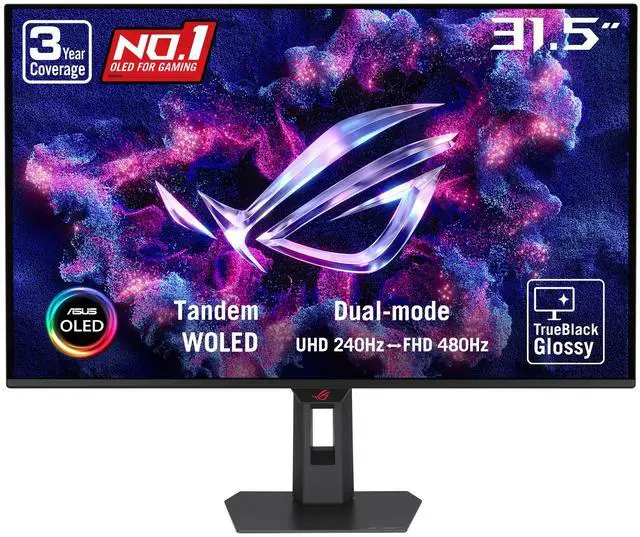
| ASUS ROG Strix 32 (XG32UQWMS) | OLED | 31.5" | 4K 240Hz | 1080p 480Hz |
| ASUS ROG 27 Dual Mode | OLED | 26.5" | 4K 240Hz | 1080p 480Hz |
| ASRock Phantom Gaming 32 | OLED | 32" | 4K 240Hz | 1080p 480Hz |
| Samsung Odyssey G7 32 | OLED | 32" | 4K 165Hz | 1080p 330Hz |
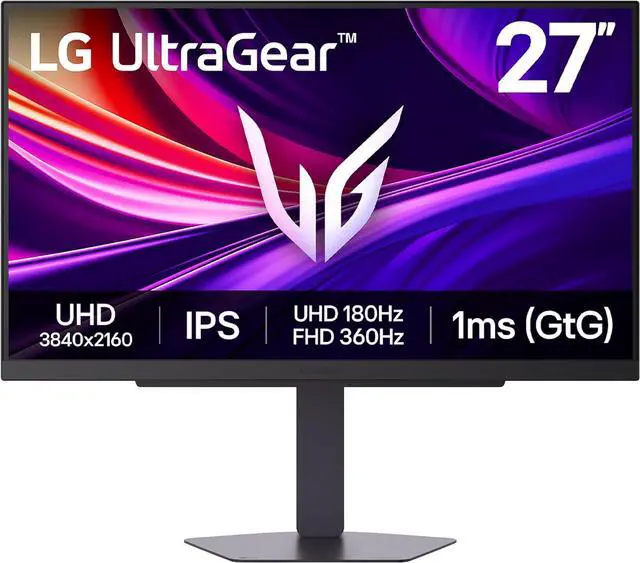
| LG UltraGear 27 | IPS | 27" | 4K 180Hz | 1080p 360Hz |
| HKC 27 Mini LED | Mini LED | 27" | 4K 160Hz | 1080p 320Hz |
My picks
Best overall: the ASUS ROG Strix 32 OLED does 4K at 240Hz and 1080p at 480Hz on a 31.5-inch Tandem WOLED panel, with two HDMI 2.1 ports and DisplayPort 1.4 with DSC.
Best 27-inch OLED: the ASUS ROG 27 Dual Mode packs the same 4K 240Hz and 1080p 480Hz modes into 26.5 inches, which keeps the 1080p mode sharper, and adds DisplayPort 2.1 plus USB-C.
Best for console plus PC: the ASRock Phantom Gaming 32 OLED has two HDMI 2.1 ports, two DisplayPort 1.4 ports, USB-C and built-in speakers, which is handy if a PS5 and a PC share the screen.

A more modest OLED: the Samsung Odyssey G7 32 runs 4K at 165Hz or 1080p at 330Hz and supports HDR10+, which makes it easier for midrange GPUs to keep up.
Best non-OLED: the LG UltraGear 27 dual-mode IPS runs 4K at 180Hz or 1080p at 360Hz with no burn-in concern, a good fit if you leave static desktop windows open for hours. The HKC 27 Mini LED is the brightness pick, with a 4K 160Hz / 1080p 320Hz split and a DisplayHDR 1400-rated Mini LED panel.
Related variations worth knowing
Not every dual-mode monitor starts at 4K. The ASUS ROG Swift 27 OLED switches between 1440p at 540Hz and 720p at 720Hz, aimed squarely at esports players. The ASUS ROG Strix 27 IPS goes the other way, offering 5K at 180Hz or 1440p at 330Hz for people who want extra sharpness for work.
Setting one up properly
Most dual-mode monitors switch modes from the on-screen menu or a hotkey, and some may switch automatically when the PC sends a 1080p signal. After switching, set the matching refresh rate in Windows under Display, then Advanced display, or in your GPU control panel, because Windows doesn't always pick the highest one on its own.
Cable choice matters more than usual. 4K at 240Hz pushes a lot of data, so use the DisplayPort or HDMI 2.1 cable that came with the monitor rather than an old one from a drawer. If you see flickering or a black screen at 240Hz, the cable is the first thing I'd swap.
For consoles, the high-refresh 1080p mode doesn't apply in the same way. A PS5 can output up to 4K at 120Hz over HDMI 2.1, so connect it to an HDMI 2.1 port and leave the monitor in its 4K mode. On the PC side, hitting 240fps at 4K in demanding games needs a high-end GPU or upscaling, while lighter competitive games are where the 480Hz mode really shines.
Final verdict
If you play both competitive and cinematic games and have a GPU that can drive 4K, a dual-mode monitor is a smart way to avoid choosing. If you only play shooters, a dedicated 1440p high-refresh panel is often the better value. And if you mostly play slower single-player games, a regular 4K monitor will do the job without paying for a mode you won't use.
Frequently Asked Questions
What is a dual-mode monitor? It's a monitor that can switch between a high-resolution mode, such as 4K at 240Hz, and a lower-resolution mode, such as 1080p at 480Hz, to trade sharpness for speed.
Does 1080p look blurry on a 4K dual-mode monitor? It looks softer than native 4K because four pixels are combined into one, especially on a 32-inch screen. It's clearer on a 27-inch model.
What GPU do I need for 4K at 240Hz? You need a GPU and monitor connection that supports it: DisplayPort 1.4 or HDMI 2.1 with DSC, or DisplayPort 2.1 at UHBR20. Actually reaching 240fps at 4K requires a high-end card or upscaling in most modern games.
Are dual-mode OLED monitors at risk of burn-in? OLED panels can retain images over time with static content. Manufacturers use pixel-refresh features to reduce risk, but IPS or Mini LED models avoid it entirely.
Is a dual-mode monitor good for PS5? Yes, models with HDMI 2.1 can run 4K at up to 120Hz from a PS5, while the high-refresh mode is mainly useful for PC.
Read More
- RTINGS: LG 27G850A-B review - A detailed test of a 4K 240Hz IPS dual-mode monitor.
- RTINGS: The best gaming monitors - Lab-tested picks across sizes and budgets.
- ASRock: Phantom Gaming PGO32UFS - Official specs for ASRock's 32-inch dual-mode OLED.
- Newegg Insider: RGB Stripe OLED Monitors Explained - How newer OLED subpixel layouts affect text clarity.
- Newegg: Dual-Mode Monitors - Browse dual-mode gaming monitors on Newegg.