




 here!
I’m your shopping assistant for PC builds, upgrades, and everything tech.
Got questions? Ask away!
Start a conversation
here!
I’m your shopping assistant for PC builds, upgrades, and everything tech.
Got questions? Ask away!
Start a conversation







Any questions? Ask CelesteSM will help you find out quickly.
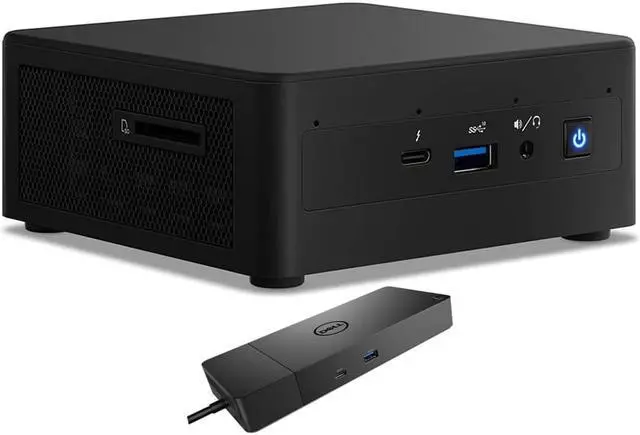
The Intel NUC11PAHi5 is a compact mini desktop with an 11th Gen Core i5-1135G7, 16GB RAM, a 2TB NVMe SSD, a 2TB hard drive, and Windows 10 Pro. It suits home and business users who want a space-saving PC with substantial storage for everyday productivity.
| Attribute | Value |
|---|---|
| Best For | Home and business mini-PC use with local SSD and HDD storage, plus wired and wireless networking |
| Processor And Cache | 11th Gen Intel Core i5 quad-core processor with 8MB L3 cache |
| Graphics And Display | Integrated graphics; no screen or monitor included |
| Memory | 16GB DDR4 memory |
| Storage And Expansion | 2TB SSD and 2TB HDD, with a card reader; no optical drive |
| Networking And Wireless | Wi-Fi 6 AX201, Bluetooth 4.2, and RJ-45 networking |
| Operating System | Windows 10 Pro |
| Physical Design And Power | Black mini PC with a 120W power supply; keyboard not included |
| Model Identifiers | Intel NUC11PAHi5 |
Q: Intel NUC11PAHi5 vs NUC11PAHi7: which should I choose?
A: Choose the NUC11PAHi5 listing for its Core i5-1135G7, 16GB RAM, 2TB NVMe SSD, 2TB HDD, and included dock. Choose the NUC11PAHi7 if you prefer the higher CPU tier: its i7-1165G7 has a maximum turbo frequency of 4.7GHz versus 4.2GHz for the i5, while both processors have four cores and eight threads.
Q: Should I get this NUC11PAHi5 or the NUC11PAHi3?
A: Choose this NUC11PAHi5 when you want the four-core, eight-thread i5-1135G7 and Iris Xe graphics, along with the listing’s 16GB RAM and 4TB combined storage. The NUC11PAHi3 uses a two-core, four-thread i3-1115G4 and Intel UHD Graphics, making it the lower processor tier in the same NUC 11 Performance family.
Q: Intel NUC11PAHi5 vs NUC 12 Pro i7: which is a better fit for heavier multitasking?
A: Choose the NUC 12 Pro i7-1260P when newer-generation processor performance for CPU-intensive, multithreaded work is the priority. In Notebookcheck’s Geekbench 5 multi-core results, its tested NUC 12 Pro scored 9,935; a tested NUC11TNKi5 with the same i5-1135G7 processor as this listing scored 4,593. Choose this NUC11PAHi5 listing when its included 16GB RAM, 2TB SSD, 2TB HDD, and WD19S dock better match your setup. The reviewed systems had different configurations, so the benchmark is an indicative comparison.
Q: NUC11PAHi5 vs NUC11PAKi5: which fits a lower-profile desk setup?
A: Both are NUC 11 Performance models with the Core i5-1135G7 and Iris Xe graphics. The NUC11PAKi5’s slim chassis is 38mm tall; this NUC11PAHi5’s tall chassis is 51mm and is the version represented here with a 2TB 2.5-inch HDD. Choose the PAKi5 for the lower-profile chassis, or this PAHi5 listing when its bundled storage configuration is the priority.
Q: Is this mini desktop suitable for everyday office and home work?
A: Yes. Its 11th Gen Core i5 processor, 16GB of RAM, and SSD are suited to typical office tasks such as web browsing, email, document work, and multitasking. It is a desktop rather than an all-in-one: you’ll need a separate monitor, keyboard, and mouse. It has no built-in webcam, so add one if you need video meetings.
Q: Can I connect this PC to a monitor, or use it with multiple displays?
A: A monitor is not included. The listed PC has HDMI, mini DisplayPort, and Thunderbolt 3 ports, and the included WD19S dock adds DisplayPort and HDMI outputs. The exact number of displays supported at once depends on the connected monitors, cables, and configuration, so check those requirements before buying for a specific multi-monitor setup.
Q: Is this a good computer to take on work trips?
A: It may suit a trip where you have access to a monitor and peripherals, but it is not a laptop replacement: it has no screen or battery listed and needs a power supply. For a portable work setup, plan to carry or obtain a display, keyboard, and mouse as well.
Q: Is this mini PC suitable for gaming?
A: It is better suited to everyday computing than demanding games. The listing specifies integrated graphics, not a dedicated graphics card, so gaming performance will depend on the game and its settings; check the game’s requirements if gaming is important to you.
Q: Is the NUC11PAHi5 suitable as a work desktop?
A: It has a Core i5-1135G7, 16GB of RAM, and 2TB SSD plus 2TB HDD storage, which fits a general office-work setup on paper. One Reddit user reported sluggishness after the system had been locked for a while, so that report is worth considering, but it does not establish that all units have the issue.
Q: Does the NUC11PAHi5 work with Ubuntu or other Linux systems?
A: A Reddit user reported that Ubuntu 20.04 mostly worked on a NUC11PAHi5, but described problems with audio through the headphone jack and HDMI. If Linux audio is important, check current driver and user reports for your intended distribution before buying.
Q: Is the NUC11PAHi5 a good choice for gaming?
A: The listing specifies integrated graphics, not a dedicated graphics card, so this configuration is better treated as a general-purpose mini PC than a gaming-focused desktop. A Reddit discussion about this model asks about improving retro-game performance and notes that the small chassis limits heat dissipation under higher power settings.
Q: What should I consider about heat and noise under sustained workloads?
A: A Reddit discussion of the NUC11PAHi5 describes its compact cooling system as a limit on how much heat it can dissipate during heavier workloads; lowering power settings was discussed as a way to reduce the load. Expect sustained performance to depend on workload and configuration rather than assuming the processor can run at peak speeds indefinitely.


