




 here!
I’m your shopping assistant for PC builds, upgrades, and everything tech.
Got questions? Ask away!
Start a conversation
here!
I’m your shopping assistant for PC builds, upgrades, and everything tech.
Got questions? Ask away!
Start a conversation







Any questions? Ask CelesteSM will help you find out quickly.
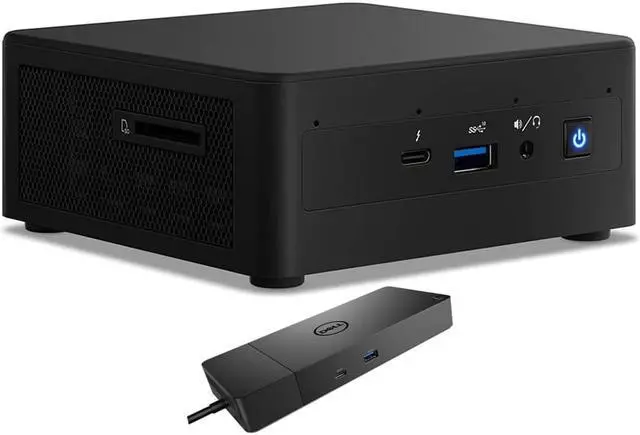
The Intel NUC11PAHi5 is a compact mini desktop with an 11th Gen Core i5-1135G7, 16GB RAM, a 512GB NVMe SSD, and Windows 10 Home, bundled with a Dell WD19S dock; it suits home-office and business users who want a small PC for everyday productivity and a dock for desk connectivity.
| Attribute | Value |
|---|---|
| Best For | A compact home or business desktop for everyday computing, with a quad-core Intel Core i5 processor, 16GB of memory, and 512GB of SSD storage |
| Processor And Graphics | 11th Gen Intel Core i5 with four cores, 8MB L3 cache, and integrated graphics |
| Memory | 16GB DDR4 memory |
| Storage And Expansion | 512GB SSD; no HDD or optical drive |
| Wired And Wireless Networking | Wi-Fi 6 AX201, Bluetooth 4.2, and RJ45 Ethernet |
| Display And Peripherals | No screen or monitor included; no keyboard |
| Power | 120W power supply |
| Operating System | Windows 10 Home |
| Form Factor And Color | Black Mini PC |
| Model Identifiers | Intel NUC11PAHi5 |
Q: Should I choose the NUC11PAHi5 or the NUC11PAHi3 for multitasking?
A: Choose the NUC11PAHi5 for multitasking: its Core i5-1135G7 has 4 cores and 8 threads, compared with 2 cores and 4 threads in the NUC11PAHi3’s Core i3-1115G4. This listing also includes 16GB of RAM and a 512GB SSD.
Q: How does the NUC11PAHi5 compare with the NUC11PAHi7?
A: Choose the NUC11PAHi5 for the listed 16GB RAM and 512GB SSD configuration with a Core i5 processor. Choose the NUC11PAHi7 if you prefer the higher-tier Core i7-1165G7, which has a maximum turbo frequency of 4.7 GHz and 12MB cache; the i5-1135G7 reaches 4.2 GHz and has 8MB cache. Both processors have 4 cores and 8 threads.
Q: Is the NUC11PAHi5 a good upgrade from the NUC10i5FNH?
A: Choose the NUC11PAHi5 if you want the newer 11th Gen Core i5 platform with Intel Iris Xe integrated graphics. The NUC10i5FNH uses a 10th Gen Core i5 with Intel UHD Graphics. Both processors have 4 cores and 8 threads, so the generation and graphics are useful points of comparison.
Q: Is this mini desktop suitable for office work and video meetings?
A: It is suited to everyday office tasks such as documents, email, web browsing, and multitasking, with a quad-core Core i5, 16GB RAM, and a 512GB SSD. It has no built-in webcam, so video meetings require an external webcam; a monitor, keyboard, and mouse are also not listed as included.
Q: Can it run two monitors?
A: The included dock lists HDMI and DisplayPort outputs, and the mini PC lists HDMI, mini DisplayPort, and Thunderbolt 3 ports. These provide display connection options, but the supplied specifications do not confirm the maximum number of displays supported simultaneously; verify the intended monitor setup before buying.
Q: Does it come with a monitor?
A: No. The product is a mini desktop with no display, so you will need to provide a monitor. The listing also does not specify that a keyboard or mouse is included.
Q: Is it a practical computer to take on work trips?
A: The mini PC is compact, but it is not a self-contained travel computer: it has no screen or battery. It is most practical when you can bring or access a monitor, keyboard, mouse, and power outlet at your destination.
Q: Is the NUC11PAHi5 suitable as a work computer?
A: Its 4-core i5 processor, 16GB RAM, and 512GB SSD are suited to typical office work and multitasking. One NUC11PAHi5 owner reported sluggish graphics after the PC had been locked for a while, so the discussion does not establish that every unit will be trouble-free. The included WD19S dock adds connection options, but the listing does not include a monitor, keyboard, or mouse.
Q: Can the NUC11PAHi5 handle gaming?
A: It has integrated graphics and no dedicated GPU, so it is a better fit for older or less demanding games than for graphics-intensive modern games. A Reddit owner discussed using this model for retro gaming and seeking more frame rate, but the discussion does not provide a reliable performance benchmark.
Q: What should I consider about heat and fan noise?
A: The compact chassis has limited cooling capacity, which can constrain sustained performance under heavy loads. NUC11PAHi5 owners have also discussed fan noise, including a report of the fan staying on during suspend; these reports identify potential trade-offs, not guaranteed behavior for every unit.
Q: Is the NUC11PAHi5 a straightforward choice for Linux?
A: It may run Linux, but owner discussions report issues involving suspend behavior, fan operation, and hardware or driver support. If Linux is essential, check compatibility for your intended distribution and peripherals before buying; the listed Windows 10 Home installation does not establish Linux support.


