




 here!
I’m your shopping assistant for PC builds, upgrades, and everything tech.
Got questions? Ask away!
Start a conversation
here!
I’m your shopping assistant for PC builds, upgrades, and everything tech.
Got questions? Ask away!
Start a conversation




Any questions? Ask CelesteSM will help you find out quickly.
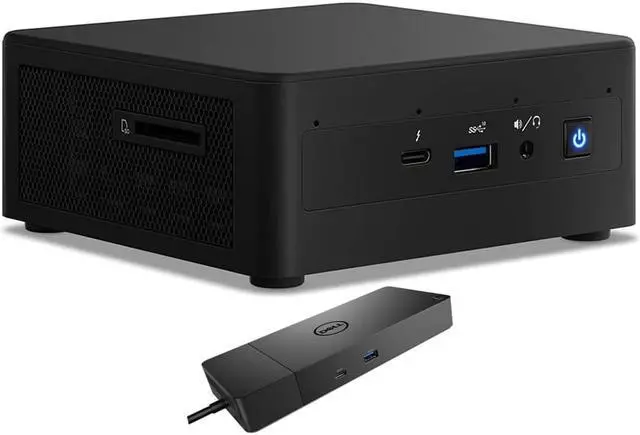
The Intel NUC11PAHi5 is a compact Windows 10 mini desktop with an 11th Gen Core i5 processor, 256GB SSD, 2TB HDD, and Dell WD19S dock, suited to home or office users who want a small PC with ample file storage and dock connectivity.
| Attribute | Value |
|---|---|
| Best For | Home and business desktop use where a compact mini PC with integrated graphics and wireless networking fits |
| Processor And Core Count | 11th Gen Intel Core i5 with a quad-core processor and 8MB L3 cache |
| Graphics | Integrated graphics with integrated video |
| Memory | 4GB DDR4 memory |
| Storage | 256GB SSD and 2TB HDD |
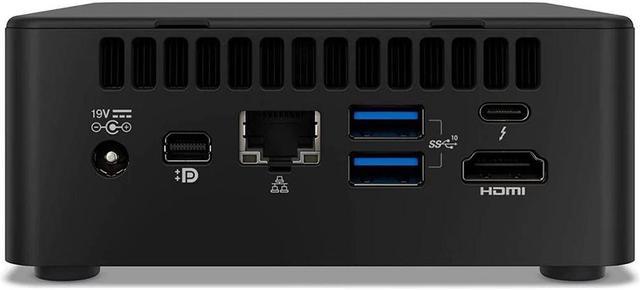
| Networking And Connectivity | Wi-Fi 6 AX201, Bluetooth 4.2, and RJ45 networking |
| Display And Peripherals | Monitor not included; no optical drive or keyboard |
| Power And Color | 120W power supply in black |
| Operating System | Windows 10 Home |
| Model Identifiers | Intel NUC11PAHi5 |
Q: Should I choose the Intel NUC11PAHi5 or the NUC11PAHi7?
A: Choose this NUC11PAHi5 configuration for an 11th Gen Core i5 quad-core processor, integrated Iris Xe graphics, and the listed 256GB SSD plus 2TB HDD. The NUC11PAHi7 uses an 11th Gen Core i7 quad-core processor with higher listed turbo frequency and more cache, making it the higher-tier choice when you want more processor headroom. ([intel.com](https://www.intel.com/content/dam/support/us/en/documents/intel-nuc/NUC11PA_TechProdSpec.pdf))
Q: How does the NUC11PAHi5 compare with the NUC11PAHi3?
A: Choose the NUC11PAHi5 when you want a quad-core, eight-thread processor and Iris Xe graphics. The NUC11PAHi3 is the lower-tier option in the same NUC 11 Performance family, with a dual-core, four-thread processor and Intel UHD Graphics. ([intel.com](https://www.intel.com/content/dam/support/us/en/documents/intel-nuc/NUC11PA_TechProdSpec.pdf))
Q: Is this NUC11PAHi5 a good step up from the Intel NUC10i5FNH?
A: Choose this NUC11PAHi5 if you want the newer 11th Gen Core i5-1135G7 platform. The NUC10i5FNH is a previous-generation option with a 10th Gen Core i5-10210U. This listing also includes a 256GB NVMe SSD, 2TB HDD, and a docking station, so compare the full bundle as well as the processors. ([intel.com](https://www.intel.com/content/dam/support/us/en/documents/intel-nuc/NUC11PA_TechProdSpec.pdf))
Q: Is this mini PC suitable for everyday office work and video meetings?
A: It can suit basic office tasks such as documents, email, and web browsing. The listed 4GB of RAM may limit heavier multitasking, and the system has no built-in webcam or display, so video meetings require an external webcam and monitor. Check with the seller whether the RAM can be upgraded in this configuration.
Q: Does it work well as a travel computer?
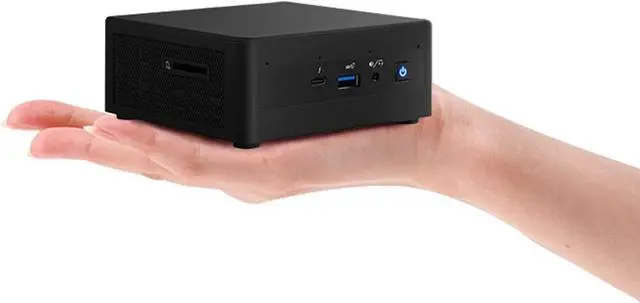
A: The compact mini PC is easier to transport than a conventional desktop, but it is not a complete travel workstation: it has no screen, keyboard, or webcam. Plan to bring or access a monitor and input devices, and use the listed Wi-Fi or Ethernet connection as needed.
Q: Can I connect two monitors?
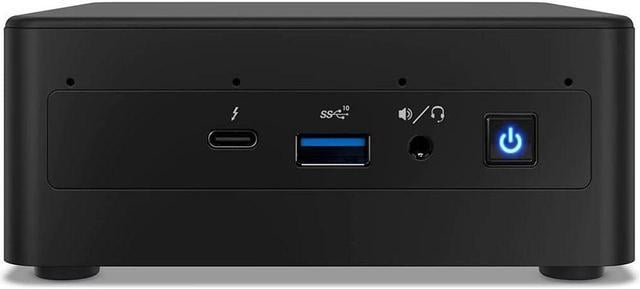
A: The listing includes HDMI, mini DisplayPort, and Thunderbolt 3 ports, while the included dock adds HDMI and DisplayPort outputs. However, the listing does not specify the maximum number of simultaneous displays or supported resolutions, so confirm compatibility for your monitors and intended dock setup before buying.
Q: Is the storage enough for everyday use?
A: It includes a 256GB PCIe NVMe SSD plus a 2TB 2.5-inch hard drive. That provides a smaller, faster SSD alongside more space for files, but the listing does not specify how storage is configured for individual apps or whether additional drives can be installed.
Q: Is the NUC11PAHi5 suitable as a primary work PC?
A: It may suit everyday desktop work, but this listing includes only 4GB of RAM. A Reddit user described using the same NUC model as a work PC after installing 16GB, so consider a RAM upgrade for multitasking; the listing’s integrated graphics are not a dedicated GPU.
Q: Should I upgrade the 4GB of RAM?
A: For multitasking or more demanding workloads, plan to upgrade: 4GB is a constraint in this configuration. Owners discussing this model described using larger memory configurations, and a review video lists support for up to 64GB; verify compatible memory before buying.
Q: Is the NUC11PAHi5 quiet enough for a desk?
A: Reports are mixed. Reddit users described it as generally quiet while running, but noted fan noise in some situations, including while suspended. Noise may vary with workload and settings, so the discussion does not guarantee how this specific configuration will sound.
Q: Can I expect Windows 10 to work reliably on it?
A: The listing specifies Windows 10 Home, but reports from users are not uniform: one Reddit discussion describes initial Windows 10 freezes that stopped after BIOS and driver troubleshooting. Treat that as an example of a reported issue, not evidence that every unit will have the same problem.


