




 here!
I’m your shopping assistant for PC builds, upgrades, and everything tech.
Got questions? Ask away!
Start a conversation
here!
I’m your shopping assistant for PC builds, upgrades, and everything tech.
Got questions? Ask away!
Start a conversation




Any questions? Ask CelesteSM will help you find out quickly.
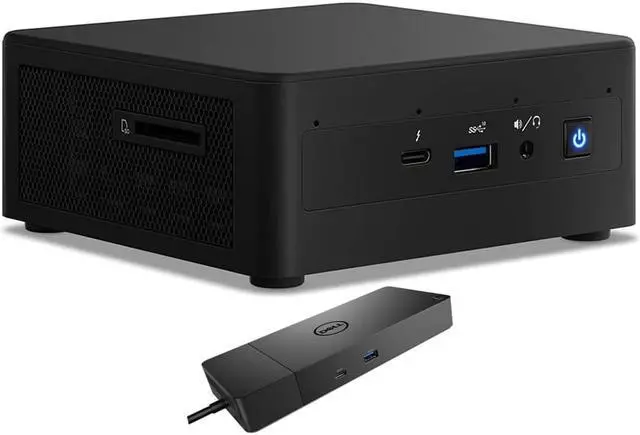
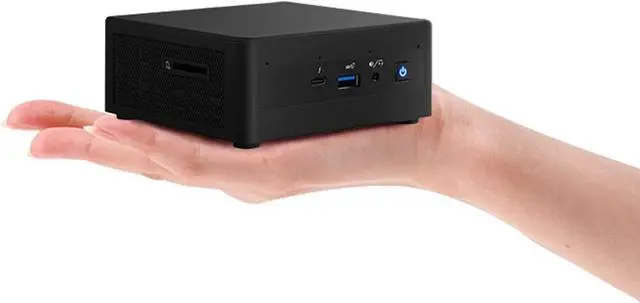
The Intel NUC11PAHi5 is a compact Windows 11 Home mini desktop with an 11th Gen Core i5-1135G7, 8GB DDR4, a 1TB SSD and 1TB HDD, plus a Dell WD19S dock. It suits home-office and business users who want a small PC for everyday work, with wired and wireless connectivity and extra dock ports.
| Attribute | Value |
|---|---|
| Best For | Home or business computing in a compact desktop, with both SSD and HDD storage |
| Processor And Core Count | 11th Gen Intel Core i5 with four cores and 8MB L3 cache |
| Memory And Storage | 8GB DDR4 memory, 1TB SSD, and 1TB HDD |
| Graphics | Integrated graphics |
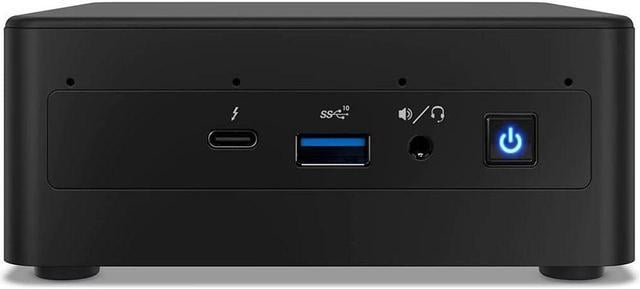
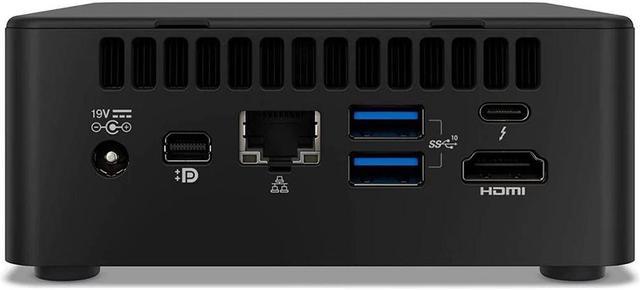
| Connectivity And Expansion | Wi-Fi 6 AX201, Bluetooth 4.2, RJ45 Ethernet, and a card reader |
| System And Included Equipment | Windows 11 Home; monitor and keyboard not included; no optical drive |
| Power And Design | Black mini PC with a 120W power supply |
| Model Identifiers | Intel NUC11PAHi5 |
Q: Intel NUC 11 i5 vs i3: which is better for multitasking?
A: The NUC11PAHi5 is the stronger fit for running several applications at once: its Core i5-1135G7 has 4 cores and 8 threads, compared with the NUC 11 i3’s 2 cores and 4 threads. The i5 model also uses Intel Iris Xe Graphics, while the i3 model uses Intel UHD Graphics. This Newegg configuration adds 8GB RAM, a 1TB SSD, a 1TB hard drive, and a WD19S dock.
Q: Intel NUC 11 i5 vs i7: which configuration should I choose for everyday work?
A: Choose the NUC11PAHi5 for everyday home or office work when its 4-core, 8-thread processor and included storage-and-dock bundle match your needs. The NUC 11 i7 keeps the same core and thread count but has a higher maximum turbo frequency and more cache, making it the higher processor tier within the lineup.
Q: Intel NUC 11 i5 vs NUC 12 Pro i5: which is the better upgrade?
A: The NUC 12 Pro with Core i5-1240P is the newer-generation choice for workloads that benefit from more CPU cores: it has 12 cores and 16 threads, compared with the NUC11PAHi5’s 4 cores and 8 threads. Choose this NUC 11 package when its preconfigured 8GB RAM, combined 2TB storage, Windows 11 Home, and included WD19S dock are a better fit for your setup.
Q: Is this mini PC suitable for everyday office work?
A: Yes. Its four-core Intel Core i5 processor, 8GB of RAM, NVMe SSD, and Windows 11 Home suit routine tasks such as email, web browsing, documents, and spreadsheets. The 8GB memory may feel limiting with many demanding apps open at once. A monitor, keyboard, and mouse are not included.
Q: Can I use it for video meetings?
A: Yes, with separate meeting equipment: this listing specifies no built-in webcam, and no monitor is included. Add a webcam and display; the PC also has a headphone/microphone combo jack and Bluetooth for compatible audio devices.
Q: Can it run two monitors?
A: The PC has HDMI, mini DisplayPort, and Thunderbolt 3 ports, and the included WD19S dock has HDMI and DisplayPort outputs. The listing does not specify the maximum number of simultaneous displays or confirm every dock-and-monitor configuration, so check your displays’ connections and the desired setup before relying on the dock.
Q: Is it good for gaming?
A: It is better suited to everyday computing than demanding games. It uses integrated graphics rather than a dedicated graphics card, so game performance will depend on the title and settings; consider another class of PC if high-end gaming is a priority.
Q: Is the NUC11PAHi5 suitable for everyday work and multitasking?
A: It has a quad-core i5-1135G7 and is discussed by owners for work and everyday multitasking. This configuration includes 8GB of RAM, so consider whether that capacity fits your workload before buying.
Q: Can you upgrade the RAM in the NUC11PAHi5?
A: Reddit owners report using this model with 32GB and 64GB of RAM, so upgrades beyond the included 8GB are discussed. Check the exact memory type and configuration before purchasing an upgrade.
Q: Is the NUC11PAHi5 a good choice for gaming?
A: It uses integrated graphics rather than a dedicated GPU, and Reddit owners discuss tuning it for retro gaming and better frame rates. It is a better fit to consider for lighter gaming than for demanding graphics workloads.
Q: What should I consider if I plan to run it under sustained heavy load?
A: Reddit owners discuss the small chassis as a limit on cooling and note that power settings affect performance and noise. If your workload runs heavily for long periods, thermals are a trade-off to consider.


